
Make Viral Motu Patlu Videos with ChatGPT!
44sHigh curiosity and step-by-step tutorial appeal to users wanting to create viral content easily.
▶ Play Clip"The title promises a viral video creation method, and the video delivers a basic tutorial, but it's padded with filler and lacks depth."
This video demonstrates a simple method to create viral Motu Patlu-style AI videos using ChatGPT and a free online tool. The process involves generating a themed image with ChatGPT, then animating it into a short video clip using a web-based platform.
The video promises to show how to make viral Motu Patlu videos for free and unlimited using a simple process.
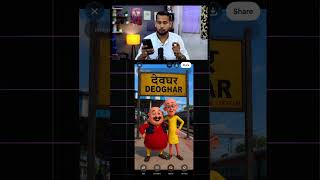
Open ChatGPT on your phone and give a command specifying the desired background for the Motu Patlu image, e.g., 'make me a photo of Motu Patlu where he is at the railway station of Deoghar and there is a board of Deoghar behind him.'
ChatGPT generates the image. The creator mentions a prompt link is pinned in the comments for viewers to use.
Click the link to get a pre-written prompt. Modify the text to match your own state or market, e.g., change 'Deoghar' to your location.
Open Chrome browser and visit the website shown (likely a free AI video generator). Tap on it to proceed.
Upload the Motu Patlu image you created with ChatGPT to the website.
Enter the prompt, select video options, set the ratio to 9:6, enable 'omni flash', and set duration to 10 seconds.
Click send, wait 15-20 seconds for the video to be generated, then download it. The video includes a voiceover saying 'Hello friends, I am Motu.'
The video provides a straightforward, free method to create personalized Motu Patlu videos using ChatGPT and an online tool, with easy customization for different locations.
What AI tool is used to generate the Motu Patlu image?
ChatGPT
00:13
What settings are recommended for the video generation?
Ratio 9:6, 'omni flash' enabled, duration 10 seconds.
01:24
How long do you need to wait for the video to be generated?
15 to 20 seconds.
01:38
What is the purpose of the prompt link pinned in the comments?
To provide a pre-written prompt template for users to customize.
00:40
ChatGPT for Image Generation
Shows a practical use of ChatGPT for creating personalized images.
00:13Free Video Creation Settings
Provides specific settings (ratio, duration) for a free tool, making the process reproducible.
01:24Quick Turnaround Time
The 15-20 second generation time makes the workflow efficient.
01:38[00:01] Friends, the viral video of Motu Patlu that you are seeing below, in just one click, that too unlimited and absolutely free. Let me tell you the process of making it. First of all you have to open the chat GPT of your phone. Now
[00:13] you have to give the command as to what type of background of Motu Patlu you want. For example, suppose I am from Deoghar. So here I say, make me a photo of Motu Patlu where he is at the railway station of Deoghar and there is a board of Deoghar behind him.
[00:26] So I have said it like this and sent it. Now you can see here that a photo has appeared in front of me like this. There is also a board for brother-in-law. Now just click on it. you will need a form. So I have pinned the link to the propt in the comment.
[00:40] you click on the link, a print will appear in front of you. Okay, right? Now you just have to make a little change in the text that you see in the prompt. Like here I have written about Deoghar. Whichever state you belong to,
[00:54] whichever market you belong to, you can get it written as per your wish. Ok? Now After making the change, you have to open Chrome in a simple way. Now after coming to Chrome browser, flow. Then this website will appear in front of you. Now tap on it. Now
[01:09] which is very easy. After that, below you will get the Now after that friends, you have to upload your photo from here. The photo you made of Motu Buttle. Ok ? After uploading, see here,
[01:24] friends, here below we will put our print in a simple way. After entering the print, and select the video etc. from here. Here you have to select the ratio of 96 and here you have to set the omni flash and make it 10 seconds.
[01:38] After doing this, you have to click on send here. As soon as you send, you have to wait for 15 to 20 seconds. Then it will convert the photo into video and give it to you. Hello friends, I am Motu. So just click on it and you can easily download it from here.
[01:51] And to see more videos like this, do follow.

⚡ Saved you 0h 01m reading this? Transcribe any YouTube video for free — no signup needed.