

Earning Money with AI Videos: Viral Trend
45sThe promise of making money from viral AI videos immediately grabs attention and taps into a high-demand niche.
▶ Play Clip"Delivers on the promise of a free AI video tutorial, but padded with subscription requests and repetitive instructions."
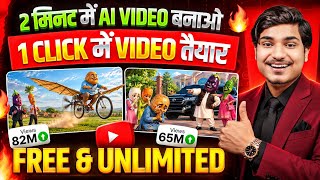
This video is a step-by-step tutorial on creating AI-generated cartoon videos for free, using tools like ChatGPT and Google Flow (likely referring to Google's AI video generation tool). The creator demonstrates how to generate viral video ideas, craft prompts, and produce videos with AI, including a method to get Google's Pro subscription for free through Jio recharge plans.
The video promises to teach viewers how to create trending AI videos step by step, absolutely free.
The creator asks viewers to subscribe to the channel for more trending AI video tutorials.
Instructions to open ChatGPT (likely via Play Store), log in with Gmail, and use a provided prompt to generate 10 viral video ideas.
The prompt generates ideas like a kid asking about Wi-Fi in a bag, leading to funny dialogues. If not satisfied, users can ask for 10 more ideas.
Choose the most interesting idea, copy it, and paste it into a notes app for editing.
Open a new chat in ChatGPT and paste a video prompt template (link provided in description) that can be customized with location and dialogue.
Replace the placeholder location with your own (e.g., 'back store') and paste your dialogue into the prompt.
Send the prompt to ChatGPT, which generates a complete video script with dialogues.
Copy the generated script and open Chrome browser to search for 'Google Flow' (likely Google's AI video tool).
Log in with Gmail and note that a Google Pro subscription is required, but the video explains how to get it free.
Google Pro subscription provides 1000 credits monthly, and the video will show how to get it free via Jio recharge.
Paste the copied script into the Google Flow interface and adjust settings: select image, choose video ratio (9:16 for shorts), and set output count.
Click send and wait a few seconds for the AI to generate the video. The example shows a kid asking about Wi-Fi in a bag.
Click the download button and select 1080p to save the video to your gallery.
Open the MyJio app, find monthly recharge plans with 5G unlimited, and claim the Google Gemini Pro subscription under 'What's New'.
The creator encourages making dialogues funnier for engagement and invites comments for doubts.
The video provides a complete, free method to create AI cartoon videos using ChatGPT for scripting and Google Flow for video generation, with a bonus tip on obtaining Google Pro for free via Jio recharge.
What is the first step to generate viral video ideas?
Open ChatGPT, log in with Gmail, and paste a prompt from the description to get 10 ideas.
00:41
How can you get more video ideas if you don't like the first 10?
Reply to ChatGPT asking for 10 more ideas.
01:32
What is the purpose of the video prompt template?
It helps generate a complete video script with dialogues by customizing location and dialogue.
02:15
What ratio should you select for making short videos in Google Flow?
9:16
04:36
How many credits do you get monthly with Google Pro subscription?
1000 credits
04:08
How can you get Google Pro subscription for free?
Through Jio recharge plans that include Google Gemini Pro subscription, claimable via MyJio app.
05:41
What is the recommended resolution for downloading the AI-generated video?
1080p
05:28
Free AI Video Creation Method
Provides a complete free workflow using ChatGPT and Google Flow, making AI video creation accessible.
00:41Google Pro Free via Jio
Reveals a practical way to get a paid subscription for free, adding significant value.
04:08Example Video Generation
Demonstrates the actual output, proving the method works.
05:02[00:04] husband that I should earn for you? This is earning. Papa's angel, this is not earned, this is a Papa's angel, this is not earned, this is a tomato.
[00:16] trending a lot. People by posting that video. As you And today I am going to teach you step by step. Absolutely free. step. Absolutely free.
[00:29] But friend, if you are new to the channel then trending AI videos come, I teach you guys to make them first. So please subscribe brother. Let's start the video. Now friends, first of all you have to open the
[00:41] Friends, you can get this in Play Store. Like you will install it and open it. It will ask you to log in through Gmail. You guys please do that. You guys will get such an interface. Now here on Ask Chat GPT you have to
[00:53] No need to write, guys. I am giving you the link in the description box. You Friends, there you will get a print with 10 different ideas. Friends, I have pasted the same prompt here. So you guys copy and
[01:06] paste it here. What will happen with this is that as soon as you send this prompt, the guys will As you can see, the bag store where the kid says uncle, Wi-Fi is available in this bag. Then the shopkeeper
[01:19] says no son. Then Kid says then why so expensive? So in this way guys will give you 10 viral ideas, childish and comedy type, so that friends, your if you do not like any of these 10 ideas then what you have to do is
[01:32] What will you have to do for that? If you click on reply to chat Jupiter, you will write 10 more. send it, you will see it here and I am giving you 10 more ideas. pillow with remote control and a charging toy. So I have given you all a lot of funny ideas. Now
[01:47] you find most interesting, you have to work on that. Now let's So what will we do? We will completely copy our idea one. If you tap and hold it, then drag it completely, you will have a copy. After copying,
[02:01] a notes application on your mobile phone, you have to open it. Then guys, you have to go to the new chat and paste your entire idea here. I did it. Then what do you have to do? You have to cut it completely again and then you have to
[02:15] open your chat GPT application again. Done, you will get the option of two lines. Then guys a new chat will open for you guys. Now guys, if you click on the link that I have given you in the description box and
[02:29] guys simply have to copy that video prop and n't need to change anything in this. I have written everything here. You just have to make Whatever your idea is, you have to make changes accordingly. Like we will
[02:43] open our Notes application again here. Now our location is our back store. copy it. Let's guys select our location and copy it here Now guys, in this print of ours, there will be a section of a location here.
[02:57] location is written here. What should we do with the location that is written by us? you have to write your location here. As you can see, I Open your Notes application again. Now guys, we will copy our dialogue completely here.
[03:12] open our Chat GPT application again. Now guys, we have a dialogue So in this way we will come down completely. Then you will see So select the entire dialogue and paste your dialogue. Now
[03:27] ? You have to click on the send button. Now as you send it, Prop will make the complete video and give it to you. You don't need to do anything. way. Look, the dialogue is also written below. Your entire video
[03:40] We will select the whole thing here. Let's keep the guys tapped. You can And after copying, you all cut it completely and then you all have to open any of your opened the Chrome browser. Now you have to click on the search button and search
[03:54] Google Flow. Then you will get Google Lapse. You guys please tap on it. Now the So you all have to log in here through any Gmail. And you must have Google's Pro subscription in the Gmail with which you are logging in. Now
[04:08] We will tell you this absolutely free of cost in this video. So you guys should watch the entire video. If you have Google Pro subscription then Every month you get 1000 credits. Basically,
[04:21] we will tell you how to get it absolutely free. click on that. Now you will get such an interface here. You have to friends, you have to paste the entire video that you had copied here.
[04:36] click on the settings button. Your image will be selected. You guys please make a video of it. Now Friends, if you are selecting 9:6 in ratio. That means you guys are making shorts videos. means that friends, you are making a long video. So we're making a short.
[04:49] We select 9:16. Friends, if you keep the output one then your keep two outputs, then it makes two videos for you, in which you have to and friends, click on the send button here. As you
[05:02] So you guys have to wait for a few seconds. He makes it and gives it to you people. this has been made and given to us here. Now guys let's play it here once and see how it is made. Uncle, this bag comes with Wi-Fi.
[05:16] Then why so expensive? Will you do your homework yourself in this ? So brother, as you saw, how amazing our video has become, friends. Everything got in the video. Just download it guys. There
[05:28] is a download button, click on it. You can download it by clicking on 1080p. It will be downloaded and added to your gallery. Now let me take the Pro subscription of Google Ji. So first of all guys you have to open MyJio application on your mobile phone.
[05:41] Now friends, you must be getting monthly recharge done. which you get to see 5G unlimited. As you can see, in all the True 5G plans, you can see the Pro subscription of Google Gemini
[05:53] you guys get the recharge done then just come down in this manner. What's New Please click on this. As you can see, you are being given a click on No More. After that friends, you can claim on whichever Gmail you want to claim.
[06:07] I have already made a claim here. Now friends, I have taught you everything. doubts then please comment. I will reply to you. Rest of the guys I The more funny things the child says, the more engaging your video will become. Rest of the
[06:21] engaging your video will become. Rest of the friends, see you on such new videos.



⚡ Saved you 0h 06m reading this? Transcribe any YouTube video for free — no signup needed.