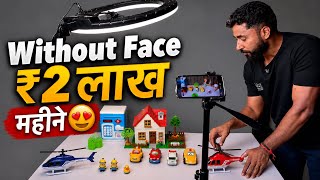
Lakhs per video with no face!
44sHigh earning potential and faceless creation hook viewers seeking passive income.
▶ Play ClipThis video provides a step-by-step guide on creating a faceless children's toy channel on YouTube, demonstrating how to produce engaging videos using stop-motion photography and basic editing tools. The creator emphasizes the potential for high viewership and monetization without showing one's face.
The creator shows a trending children's channel earning lakhs of rupees, with millions of views per video, highlighting the profitability of faceless toy channels.
Necessary items include a ring light (with color-changing options), a mobile phone, a tripod or mobile stand, and toys (e.g., helicopter, car, horse). Links are tagged in the video.
Instead of recording video, the creator takes a series of photos with slight movements of the toys to create a stop-motion effect. The camera aspect ratio should be set to 16:9.
Videos should be 2-3 minutes long to target children, who tend to watch the entire video, improving engagement and virality.
The creator demonstrates moving toys incrementally and taking photos after each movement to simulate action, such as a horse moving towards another horse or a helicopter arriving.
All photos are imported into the Inshort app. The duration is set to 0.3 seconds per photo and applied to all, creating a smooth video. Background music and sound effects (e.g., helicopter sounds) are added.
The resulting video shows seamless movement of toys, such as horses interacting and a helicopter landing, demonstrating the effectiveness of the stop-motion technique.
The video concludes by encouraging viewers to try the method, subscribe to the channel, and comment with any issues for further clarification.
"Title accurately describes the content: a guide to making faceless children's videos and earning money on YouTube."
What aspect ratio should be used for the photos?
16:9
02:18
What is the recommended video length for children's toy videos?
2-3 minutes
02:45
Which app is used to compile the photos into a video?
Inshort
07:21
What duration per photo is recommended in Inshort?
0.3 seconds
09:52
Why should the video be targeted at children?
Children tend to watch the entire video, improving engagement and virality.
02:45
What is the main technique used to create the video?
Stop-motion photography: taking photos after each small movement of toys.
04:10
How can you add sound effects for specific toys like a helicopter?
In Inshort, go to Effects, search for 'helicopter', and add the sound.
11:12
Profitability of Faceless Channels
Demonstrates that children's toy channels can earn lakhs of rupees without showing face.
00:02Stop-Motion Over Video
Uses photos instead of continuous video to create smooth animation, a clever low-effort technique.
01:50Targeting Children for Engagement
Explains why 2-3 minute videos are optimal for children's attention span and algorithm favorability.
02:45Editing with Inshort
Provides a free, accessible tool for compiling stop-motion photos into a video with adjustable duration.
07:21Adding Sound Effects
Shows how to enhance videos with relevant sound effects to increase engagement.
10:07[00:02] Here you can see that this channel is trending. People are earning lakhs of rupees by making such videos. This is a children's channel. There gets a lot of views in millions. If you search Kids Toy Channel on YouTube, you will see that there are
[00:18] you will see that every video gets millions of views. can earn a lot of money here from each video. People are earning lakhs of rupees here. By making such videos. So this is a simple way to make a video. You can make this video in two ways.
[00:32] But if you don't understand then you won't be able to make this video. As easy as it looks, it is a bit tricky. If you do not understand this properly then you will not be able to make such a video. You friends, see here I have
[00:44] first showing you what all items you will need in it. A ring light will be required, which you can get very cheaply. I am tagged in this video. You is very good. Many colors also change here. I am going to
[00:58] show you the color first. So look here, this is the color right now. After this I closed it. See, it has reduced. It became a different colour. It became yellow in colour and after that it became more light. You will get it at a very low price. After this, you will definitely have this mobile here. In
[01:12] tell you how to set the camera. After this you have to take a tripod like this. I have to buy a mobile stand. I will also tag you with the link of this video. You buy it. After this,
[01:25] toys like this are needed. I will also tag you with the toy here. You will get ₹1 for ₹150. You can get it online. Ok? What do you have to do after this? You can see how I have set up here. Similarly, you have to
[01:37] keep the setup ready here and place your camera like this and here let me tell you that you can see that I have the camera turned on here. You do not have to record video here. Friends, you have to keep the light in such a way that there is no shadow.
[01:50] So watch for 1 minute. So here you can see that I have done only the photo one. So you have to make a video from the photo itself. I will also show you how to make it there. Now look, what do you have to do simply? In this way the toy has to be taken
[02:03] first. After purchasing the toy, way you have to set the entire toy in this frame. So what do you need to do to set the frame first? Look here, first of all you have to go to the photo section.
[02:18] After reaching the photo section, look carefully. After going to the photo section, first of all if you have an Android then there will be a settings option here and settings option here and you have to make the aspect ratio 16:9.
[02:31] Look here, you have to make it 16:9 ratio. What do you have to do now after this? Now look and understand carefully one by one. Now like I you have to make a video of this. Now friends, let me tell you the first thing here. You don't have to make long videos here.
[02:45] What you have to do here is simply that you have to make a video of more than 2 minutes i.e. 3 minutes. You have to target children because when children watch videos, they watch the entire 3-minute video and just one of your videos will go viral. The
[03:00] Why would she go away? Because look, I'm telling you. Now suppose the children are activities are happening here. Suppose the helicopter is moving. Children will see something in this, now I will tell you how the video is made.
[03:13] Now when children watch this video, they will not even know when they will watch your 3 minute video. So in this way the engagement of your video becomes very good. And when the engagement of the video becomes very good then your video becomes 100%
[03:27] viral. You understand, right? So the views go into millions this way this is a toy, sorry it is a little broken. My daughter was playing so you have to buy a toy like this. Do you know how much it costs? You will get this for ₹40-50.
[03:40] in such a market, you will get it at a higher price. You will get it cheaper online. Now look, this is like a helicopter. I got this for ₹80. It's very nice. Ok ? Similarly, look at this car and look at this car like this also. Look at this. Look at this.
[03:53] Ok? So just assume this and see. Look at this. So how do we make a video now Look at this, this car is great. So you can buy this type of toy. Now let me teach I had made a previous video. So in that people had said that
[04:10] Rahul Sir, how have you made the video? I didn't understand So let me show it to you again here. So now, let's say this is a helicopter. So what will we do with this first? We will zoom in on this a little bit. Now
[04:23] suppose the helicopter is coming here on its own, then how do we do it, if suppose this one of yours has a key, that is, it is going to move, then it is a good thing, but if you want to make it run like this then also it is a good thing, otherwise suppose
[04:38] this one is there now, I will show you this, suppose there is no key or you have to do simply is to keep it here like this, see, now suppose this horse wants to come near this horse and talk to it, then how will it happen,
[04:52] let me show you. So just look at it simply, what are we going to do with this horse first bit ? We will run it like this. After this
[05:05] ? We will run it like this. After this we will take a photo here again. Ok? Again, we'll run this over here. Will take the photo again. Again, we'll run this over here. Will take the photo again. Again, we'll run this over here. Will take the photo again. Again
[05:19] we will run it here. Will take the photo again. We'll run it here again. Will take the photo again. Again, we'll run this over here. Will take the photo again. Look here, move. I am just telling you right now. I am making it in the video. Now
[05:33] let's run it a little bit again. We will take a photo of it again. Ok? Now Ok? We have to create this story. watching carefully. Let us zoom in on this a little bit.
[05:46] Now look, this horse has come here again like this. Sorry again, it keeps shaking. take photos here again. You keep watching. Now the horse it happened like this. Ok? If this happens,
[05:58] we will take photos again. Keep watching here. Again, we did it this way. not appearing in the image. Again, we did it like this here. Took photos again. Now what will both the horses do here? Will
[06:10] stick to each other. So what will we do? Place this horse like this. Took photos here again. Now both these horses will run away. So let us take this forward a little more. horses will run away. So let us take this forward a little more. Ok? Then we take it forward.
[06:23] Then take a photo. Then we take it forward. Then we take a photo of it. Then we take it forward. Then take a photo. Then we take it forward. Then take a photo. Then let's take it a little further. We take the photo again. Again, let
[06:37] us extend this a little further. Let's take the photo again. We will move this forward again. Let's take the photo again. After this it went here. Now take the photo again. What will happen now? The helicopter will come. Ok? So what will happen here
[06:53] ? Like look, the helicopter came. I came walking again. Ok? I came walking again. After this he came walking again. I came walking again.
[07:07] Look here like this, you took it, right? Now here we have to make a video. This is the first how to make a video from all the photos we have taken. And the second thing is that you have to make videos by moving like this. You can make both types of videos.
[07:21] So let me show you how to make this video now. So now see how to make a video. How to convert all the images we have taken into video. So from simple we will come to inshorts. Now see, no AI is being used here.
[07:34] video and channel will be monetized. There come to Inshorts. What will we do here after coming to Inshort Pay ? In this way your page will open
[07:46] and here you have to click on the video section. you have to click on New Project. After clicking, now You have to click on this and
[08:02] select all the photos you have taken here. One by one. So 1 2 3 4 serial wise 5 6 7 8 9 10 11 12 13 14 15 16 17 18 19 20 21 22 23 24 So 1 2 3 4 serial wise 5 6 7 8 9 10 11 12 13 14 15 16 17 18 19 20 21 22 23 24
[08:15] We will click on the tick here and now our photo is being added here. Now look carefully, here you have to do two to three things. After this, your video, your original video, your own content and your video will be
[08:29] Now here you can see what is there, just look at this here, you can zoom it a little because while I was explaining it to you here, the camera was visible. So for now we are just telling you here. But when you
[08:44] do it, you should not see only yours here. Ok? Only the thing you are making the video of should be visible. So what do you have to do with Simple? Here you have got all the images. Now here you will get an option
[08:57] select at the point. Meaning, after clicking on this duration button, Meaning, after clicking on this duration button, you have to click on 0.12 or 1.2 seconds here and then you have to click on the double tick option here. See,
[09:11] you will click on the double tick option. Apply to all means it will be yours on all the images. Why am I saying this, I am showing you this just now. Like look, right now I am doing this one. So now if I show you how to run it, you will see that no
[09:24] video is playing in it. It looks like an image here. Now look, it looks like the image. But now after doing this setting, your video will be made in the format and will look very good. So see here,
[09:37] I did it in 1.2 seconds and after this I did Apply All and after applying all you will see now. Now watch me run it once. So you will see that whatever is there now is click on duration and here we will make it
[09:52] 0.3 seconds. Ok? Look, after clicking on 0.3 seconds, we clicked on Apply to All. video once. So look at this horse which has come near the horse. After coming, now look these horses have gone away. After leaving, now look the
[10:07] helicopter came here. Look, a video is ready, isn't it? This is how you have to make the video. There is no tension in this, meaning there is no hard work involved. hard work involved. Look at it once, look at it this way. Ok?
[10:19] Look at it this way. And what will you do here after this ? You will provide background music. For example, I have to add background music here, then I came to the audio section here. If you look here, you will find many effects here. Favorite Recent Popular Games
[10:32] Instrument Dramatic Horror Transitions Camera Flight Social Daily Food Bells Vehicle Airplane Vocals Laughter Children Applause Heart Beat Footsteps Ambience Animals Look
[10:46] after clicking on animals, if you look here you will see cow, donkey, frog, goat, monkey, so here you will get to see many sound effects. Now if
[10:59] you can download it separately. And let me show you one more thing here. You will click on this effect. After clicking, if you click on these three lines, then see how much music, sound effects and many other
[11:12] things will be available here. Now what simple thing do you have to do ? Here you have to apply sound effects. this video will be ready for you. For example, suppose there is a helicopter. Then So look here I went into the effects. After going to the effect, I have
[11:26] written helicopter here. Ok? HEL Helicopters. Look, I wrote helicopter. Look, I have added this. Now look, you are seeing it, right? So this is how I have just shown it to you. Now you watch the entire video
[11:41] this video will become very long. The video would already be 10-15 minutes long. So I have just given you an idea. You have to work on this idea. And if there is any problem then please comment me. I will make a very cool and good
[11:55] video and explain it to you. Ok ? If you like the video then please n't subscribed to the channel, please subscribe and press the bell icon. That's all for today's video friends. See you in a new video with a new topic.
⚡ Saved you 0h 12m reading this? Transcribe any YouTube video for free — no signup needed.