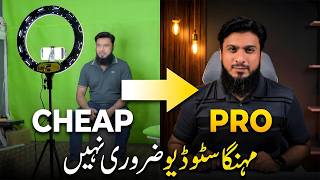

Budget Studio Setup Reveal
45sThe dramatic transformation from a normal room to a professional studio setup creates curiosity and showcases the potential of budget equipment.
▶ Play Clip"The title promises a surprising transformation, but the video is mostly a product pitch with minimal actual tutorial content."
This video demonstrates how to build a professional YouTube studio setup on a tight budget using three affordable items: a green screen backdrop, an 18-inch soft panel light with tripod and remote, and a dual-transmitter wireless microphone. The creator shows how these components, combined with basic CapCut editing, can transform a normal room into a studio-grade recording environment.
The video starts with only room lights on, then introduces a soft panel light with three color modes (mid, white, golden). The setup includes a green screen and a wireless mic, all controlled via remote.
After editing in CapCut—removing the green screen, enhancing the voice, and applying color grading—the normal setup achieves studio-grade quality, creating a total vibe change.
The wireless mic with dual transmitter costs 2650 rupees, the green backdrop (10x5 feet) costs 1100 rupees, and the soft panel with tripod, 3 color modes, and wireless remote costs 5500 rupees.
The green backdrop allows users to change the studio environment as desired—swap backgrounds, play videos, add text, and replace any studio background with a single click.
The entire package is available on cm shop.pk for 9500 rupees, with a minor advance required. Full payment gets free delivery and a discount. Setup takes only 10-15 minutes.
The creator provides a link in the bio to a complete CapCut tutorial for those who need help with editing, ensuring viewers can achieve similar results.
Viewers can order individual items if they prefer, or take the full deal. The creator encourages comments and feedback.
What are the three color modes of the soft panel light?
Mid color, white color, and golden color.
00:13
What is the price of the wireless mic with dual transmitter?
2650 rupees.
00:52
What is the price of the green backdrop (10x5 feet)?
1100 rupees.
00:52
What is the price of the soft panel with tripod and remote?
5500 rupees.
01:04
What is the total price of the complete package on cm shop.pk?
9500 rupees.
02:00
How long does it take to set up the entire studio setup?
10-15 minutes.
02:00
Studio-grade transformation
Demonstrates that a normal setup can achieve professional quality with simple editing, making it accessible to beginners.
00:26Affordable equipment prices
Provides concrete price points that prove a professional setup is within reach for most content creators.
00:52Green screen versatility
Highlights the creative freedom of changing backgrounds and adding elements with a single click, a key advantage for content variety.
01:17[00:00] तो इस वक़त आप जो सेटअप देख रहे हैं, ये कैसा बनने वाला है, अभी आप देखकर हैरान रह जाएंगे तो इस वक़त सिर्फ रूम की लाइट्स ओन है, अब मैं आउन करता हूँ अपना ये सौफ्ट पैनल तो इस soft panel के अंदर तीन color modes हैं
[00:13] जिसमें ये mid color, white color और ये golden color है वापस करते हैं white color पर अब ये room की lights on है और ये हमारा soft panel on है जिसे मैं इस remote से control कर रहा हूँ तो मेरे background पे green screen और ये एक छोटा सा wireless mic
[00:26] तो इन तीनों चीज़ों को मिला कर अब जो चीज आप देखने वाले हैं वो आपको हैरान कर देगी ये देखें editing करके green screen को remove कर दिया vice को थोड़ा से enhance कर दिया और थोड़ी सी color grading कर दिया और ये सारा काम आप easily cap cut के अंदर कर सकते हैं
[00:39] तो आप इस normal से setup को studio grade quality में लाकर total vibe change कर सकते हैं और आप ये सुनकर हैरान रह जाएंगे कि ये तीनों चीजें आप में से हर बंदे के बजट में आती हैं मतलब कोई भी content creation start करना चाहे तो easily कर सकता है
[00:52] सिर्फ ये एक wireless mic जो के dual transmitter के साथ है CM shop पे आपको मिलता है सिर्फ 2650 रुपे में यह ग्रीन बैकड्रोप यानि 10 by 5 feet आपको मिलता है 1100 पे का और यह कमाल का soft panel जिसके साथ tripod भी है
[01:04] 3 color modes हैं और साथ wireless remote जिससे आप recording के दुरान ही control कर सकते हैं यह आपको मिलता है सिर्फ 5500 पे का और अगर इसके size की बात की जाए तो यह पूरे 18 inch की light है यानि एक ही light काफी है हाँ अगर कमरे की lights पर आप on कर लें
[01:17] तो सोने पर सोहागा और इस green backdrop के साथ आप अपने studio की environment को जैसा चाहें बना लें जैसा चाहें background change कर लें वीडियोस चला लें text चला लें किसी भी तरह के studio background को आप easily replace कर लें एक click के साथ
[01:29] इत मिन्स के आप सिर्फ इन तीन चीजों के साथ एक मुकम्मल YouTube स्टूडियो सेटअप बना सकते हैं green backdrop light stand quality wireless mic setup ready mobile mobile result
[01:48] क्योंकि light 18 inch की है जिसकी light intensity कमाल है तो अगर आप अपनी journey start करने जा रहे हैं और आप चाहते हैं कि आपके tight budget के अंदर आपको best budget में तमाम चीज़े मिल जाएं तो cm shop.pk पर ये package आपको मिल रहा है
[02:00] सिर्फ 9,500 रुपे के साथ minor सा advance must है बट अगर आप फुली पेमिट अडवांस करते हैं तो आपको डिलिवरी भी फ्री मिलेगी और डिसकाउंट भी दिया जाएगा और ये ऐसा सेटप है जिसे आप 10-15 मिनट में इजीली रेडी कर लेंगे
[02:12] उसके बाद आपको थोड़ी सी कैप कट की एडिटिंग आनी चाहिए अगर नहीं आती तो कोई मसला नहीं ये बायो में लिंक दे रहा हूँ कैप कट का मुकमल टुटोरियल मैंने बनाया हुआ है इसको देखकर आप अपने इस तरह के सेटअप का ऐसा रल्ट ले सकते हैं
[02:52] आपके पास आडर डी है तो कोई मसला नहीं, आप सिंगल सिंगल चीज को भी ओडर कर सकते हैं, और अगर पूरी डील लेना चाहें, तो यू आर मॉस्ट वेलकम, तो कैसा लगा आपके इस शौर्ट सा टिटोरियल, कमेंट्स में लाजमी बिताईएगा, अपना धेर सा रख्य
[03:22] करते हैं




⚡ Saved you 0h 03m reading this? Transcribe any YouTube video for free — no signup needed.