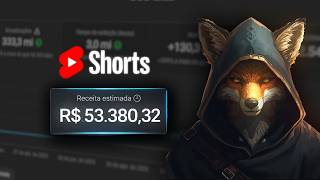

R$53K de um canal de shorts do zero
45sShows a huge revenue number upfront, creating curiosity and desire to learn the method.
▶ Play Clip"Title promises revenue method and delivers a detailed tutorial, though exact R$50k claim is stated but not proven."
This video reveals a method to generate over R$50,000 in revenue in under 8 months by creating podcast clip channels. The creator demonstrates how to find viral-worthy moments, edit clips in CapCut to avoid YouTube's reused content policy, and monetize quickly—achieving monetization in 21 days.
Podcast clips generated over R$50,000 in less than 8 months.
Channel is monetized on YouTube, Facebook, and TikTok using the same process.
Started channel on Jan 27, monetized by Feb 16 (21 days).
Large podcasts like Flow and Inteligência Ltda don't claim copyright on clips.
Raw clips without editing get flagged as reused content; own editing is essential.
Check video timeline for most-viewed segments to find viral clip potential.
Channel with ~6 million views could generate over R$6,000; replicating could yield R$5,000+.
Record screen of most-watched segment, transfer to CapCut for editing.
Use S and Q keys in CapCut to remove silences, stutters, and off-topic moments.
Change aspect ratio to 9:16 for YouTube Shorts; scale clips to 316.
Static camera works; manual keyframing or CapCut auto-reframe can add movement.
Apply filter, then circle mask to create unique visual; mirror image to avoid reuse detection.
Generate captions, position near face (-300), add background music at low volume.
Add relevant images or videos as new layers to differentiate content.
Music, filters, framing, and camera movement make video unique to avoid reused content flag.
YouTube is more lenient; TikTok stricter; techniques shown work for YouTube monetization.
By selecting popular podcast moments, editing with CapCut (filters, masks, captions, music), and adding unique elements, you can create original clips that avoid reused content flags and monetize quickly across platforms.
How much revenue did the creator claim from podcast clips in under 8 months?
Over R$50,000.
00:02
Which podcasts are mentioned as not claiming copyright on clips?
Flow podcast and Inteligência Ltda.
00:57
How many days did it take to monetize the example channel?
21 days.
00:43
What aspect ratio should be used for YouTube Shorts?
9:16.
05:10
What keys in CapCut are used to remove silences?
S and Q.
04:41
What scale value is applied to clips after changing aspect ratio?
316.
05:24
What position value is suggested for captions to place them near the face?
-300.
07:25
What is the purpose of adding a filter and circle mask?
To make the video unique and avoid being flagged as reused content.
06:45
Which platform is described as more lenient regarding reused content?
YouTube.
09:27
What is one technique to add camera movement in CapCut?
Using keyframes to zoom or pan manually.
08:59
Revenue Milestone
Claims over R$50,000 in 8 months from podcast clips, demonstrating high earning potential.
00:0221-Day Monetization
Achieved YouTube monetization in just 21 days, a key selling point for the method.
00:43Editing to Avoid Reused Content
Emphasizes that raw clips get flagged; own editing is crucial for algorithm approval.
01:10Using Most-Viewed Moments
Leveraging YouTube's timeline data to identify viral clip potential is a smart, data-driven approach.
02:16Algorithm Differentiation Strategy
Explains how music, filters, and camera movement make content unique to avoid reuse detection.
08:33[00:02] podcast clips that generated over R$ 50,000 in revenue in less than 8 months. In this video, I'm going to show you one of the ways I find podcast cosplays and how I edit my videos to avoid problems with the
[00:16] YouTube algorithm. This channel is also monetized on Facebook and TikTok. I monetized this other channel in the exact same way as the channel I've
[00:30] had for longer, following the same process. As you can see in the other video, I've already shown that I monetized this channel in 21 days. I started this channel in January, on January 27th, that was the
[00:43] first post I made on this channel. And now in February, on the 16th, I got my first recipe through this channel. Basically, what do I do? I come here to YouTube and I search for the niche I want or the person
[00:57] I want to make a video about. Then you can make several podcasts. None of can make several podcasts. None of these large podcasts claim copyright. Flow podcast, Inteligência Ltda can be paired with, and many
[01:10] Basically, they don't claim copyright, so you won't have any problem posting this clip on your channel. What own editing of this cut. You can't
[01:23] just take that clip and post it to your channel without doing any editing. You might be having trouble with the YouTube algorithm. He might understand that his content is reused content, because several people are
[01:35] producing that same content en masse. So what can we do to avoid having this problem? We're going to do our own edition. So how do I do it? For example, on this channel I showed you here, Forge de Cortes, I'm
[01:47] doing cuts of Daniel Zuerman, who was from Pânico. You don't have to do the same thing. You can do it, research some niche that has an audience, some niche that is of interest to you. Science, there's Serjão, there's
[02:01] Lito, there's Finance, which has Flávio Augusto, there's police, and several others. After you've chosen your niche, you 'll research people within that niche, and podcasts within that niche. So, let's go. I'm doing it by Daniel
[02:16] Zuerman. I'm going to write his name here . I'll grab an episode here. on the video timeline, you can see which moments from the episode were the most viewed. Based on these most-viewed moments, you already have
[02:30] an idea of what people are looking to watch. So, this people wanted to see it, they were interested, and sometimes they even opened the this is content that has the potential
[02:43] to be a clip that could go viral. This is one of the ways I find haircuts that go viral, as you can see here on this channel, which I started a short time ago. The first post on this channel was on January 27, 2026. So
[02:57] you can see here, look, 1 million, 4 million, 1 million, 1,400, 6 million, anyway, it's a trend that keeps repeating itself. I managed to make almost this channel go viral. Not every video you post will go viral, but
[03:11] if you follow a few principles, you can create many viral videos and earn a high income with your video editing channel. The revenue shown on this channel is low because most of these views weren't
[03:25] monetized. The channel was monetized on the 16th, and you can see that from the 16th onwards my views dropped a lot, also because there were some days when I didn't post. I just grabbed whatever clips I could find, posting only to avoid not
[03:37] manage this channel properly. I have other channels, I have other obligations, and so I didn't dedicate as much time to it. The views ended up dropping , but with this total number of views, this channel would have
[03:50] already generated more than R$ 6,000 for sure. By replicating what I did here, this channel could easily generate over R$ 5,000. So basically, that's one of the ways I do it. I'm here at the most-
[04:02] watched segment of the podcast. I record the screen here in this section, it can be with my cell phone, it can be with my computer, and then I transfer this recording to Capcut and do my editing there in Capcut. Now that I've recorded the screen and separated the cut
[04:15] I wanted to make, with CapCut open here, I go to Create Project. I'm going to import the cut I want to make into Capcut here timeline. I'm going to increase the height of the track here, increase the
[04:29] size of the audio waveform, and I'm going to find the point where the cut I want to make begins. During the final matches of the World Cup, I went onto the pitch, man. When I was leaving the airport, it was just me and the cross-eyed guy.
[04:41] I've found the perfect moment here when I want the cutting to begin. I'm going to cut here to start cutting here. Now I'm going to remove all these silences that are in the cut. I come here, press S and Q, and remove all these silences
[04:55] here. And every time the person stops to breathe, those moments of silence here, when they stutter, when they stray from the topic, I'll remove them from the cut. And after I finished editing our cut, you know, I
[05:10] all the moments where the interviewee stutters or changes the subject. Now I'm going to change the format of our cut to a shorts format, which our cut to a shorts format, which will have a 9:16 aspect ratio. Here it's 16:
[05:24] 9. I click here on aspect ratio and I click here on 9:16. Now I'm going to select all the cuts here in the video. Here on the scale I click on 316. And
[05:36] then all our clips will be on that scale. So what do I do now? This is one way to do it. There are other options here. There are some features here in Capcut that can help you keep the person speaking
[05:50] centered. Here in the image there's movement, there's automatic reframing, there's camera tracking, but I'm not going to use those functions, I'm going to do it the simplest way here, but this also
[06:04] works. There was a video I posted here where I did this. I did this in this cut here. I didn't move the camera, I just left it static here and did the editing of the cut. I've included some images here. This is one
[06:19] way to do it. Okay, I'm just going to check here to see if there are any moments where the interviewee moves too far out of the frame, and I can adjust it manually. But he won't be going out much here, so I'm going to keep the
[06:32] cut like this. Now what am I going to do? I'm going to select all the clips. I'm going to click here to create a composite clip. I'm going to put in a filter. I can click here on filter, choose some filter. There are several here. After I apply a
[06:45] filter, I go with the selected clip, I go to mask, add mask, I go to circle, and increase the size of this circle. And here, with this little arrow pointing upwards, I drag it upwards. I'm going to increase
[06:59] the size here a little. Beauty? Now I can add some elements here so our video doesn't end up being considered reused content. I can mirror the image reused content. I can mirror the image here. Then I come here to the subtitles section, and I
[07:11] generate a subtitle here. Here in the caption tab, I go to the template and I've chosen the model I want, I click on generate captions. With our generated caption, I only change the position of the caption here. When the caption is
[07:25] generated, it comes down here. I click here on position. I'll put a value here that will bring the caption closer to the person's face. If I'm going to set it to -300, that's great. Now I'm going to put some music on the track. I'm going to
[07:38] turn the music volume down here. When I was leaving the airport, this guy comes up looks at the little computer like this and looks at my face like this, and freezes. even joked, "Hey, you're going to get arrested here." The airport security guy. And
[07:52] to enhance the cut here, what can you do? You can download some images, find some videos about what the person is talking about, and then post them here on the timeline and drag them out. A new layer will be generated here in
[08:05] Capcut. And then you can frame the image the way you want, crop it. Here you can upload the image or video you want, for as long as you like. And these elements that you're adding here on the
[08:19] timeline, in addition to what I've already done , I added a different filter, I added music. With the music and editing we've done, your video will already be different from other videos. The algorithm analyzes both the
[08:33] visuals and audio of your video to identify whether the content is being reused or not. So, if you added music and applied those will already be different because the filter will be different, the camera framing
[08:46] you did will be different, especially if you use those Capcut functions that move the camera to follow the face. Or if you do it manually by clicking here on the keyframe, you can advance here on the
[08:59] timeline and zoom in here, see. And then this camera movement will be done . In short, there are several elements you can apply to different, and to avoid problems with reused content. Basically, this
[09:12] is already enough for your video to be original content. You can add a few more elements here to make the image a little more distorted, but this is enough for YouTube. TikTok is a little more annoying, but on
[09:27] YouTube you can post videos like that and avoid problems with reused content, and you can monetize it like I did with this channel I showed you. And that's how I managed to monetize this channel in 21
[09:39] days. If you want to know more, if you want to learn more things here, I also teach other ways to find cuts and other techniques that I used for cuts and other techniques that I used for retention, techniques on how to avoid having
[09:51] problems with reused content across all social media platforms. I left the link to my training in the pinned comments. If this lesson has helped you in any way, please consider leaving a like and subscribing to the channel. It cost.
⚡ Saved you 0h 10m reading this? Transcribe any YouTube video for free — no signup needed.