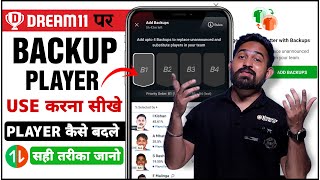

Why Backup Players Are a MUST in Dream11
45sHigh stakes: viewers fear losing points due to last-minute lineup changes, making this tip immediately actionable.
▶ Play Clip"Delivers exactly what the title promises — a clear, practical guide to using backup players in Dream11."
This video is a tutorial on how to use the backup player feature in Dream11, a fantasy sports platform. It explains why backup players are important, how to add them, and how they automatically replace non-playing players after the toss.
After the toss, the playing XI is announced. If you have players in your team who are not playing and you forget to edit, your points and rank suffer.
Use backup players when you might be busy after the toss (e.g., boarding a flight) and cannot edit your team.
In the team edit screen, click 'Add for Backup Player' and select up to four backup players from the available pool.
You can add up to four backup players. Fantasy points are only for the 11 players in the starting lineup; backup players' points are not counted unless they replace a non-playing player.
A backup player can only replace an announced (non-playing) or substitute player. The impact player rule does not apply.
If a backup player replaces a non-playing captain or vice-captain, the backup player inherits that role.
If two players are not playing, the backup with the highest credit value replaces the non-player with the same credit value. If credits are equal, the order is based on the backup list.
Without backup players, non-playing players score zero points, leaving you with a 10-player team, which drastically reduces your chances of a good rank.
Adding backup players in Dream11 is a simple yet crucial step to protect your fantasy team from last-minute lineup changes. By setting up to four backups, you ensure your team remains competitive even if you cannot edit it after the toss.
How many backup players can you add in Dream11?
Up to four backup players.
02:25
What happens if a backup player replaces a non-playing captain or vice-captain?
The backup player inherits the captain or vice-captain role.
03:50
What is the rule regarding impact players and backup players?
The impact player rule does not apply; backup players can only replace announced (non-playing) or substitute players.
02:52
Why is it important to add backup players?
Without them, non-playing players score zero points, leaving you with a 10-player team and a lower rank.
06:16
If two non-playing players have the same credit value, how is the backup chosen?
The backup with the highest credit value replaces the non-player with the same credit value; if equal, the order is based on the backup list.
05:23
Backup player limit
Clarifies the maximum number of backups allowed, a key rule for team building.
02:25Captain/vice-captain transfer
Explains a critical nuance that can affect your fantasy points significantly.
03:50Consequence of no backups
Highlights the practical risk of not using backups, motivating users to adopt the feature.
06:16[00:01] नमस्कार दोस्तों दोस्तों आज के वीडियो में मैं आपको सिखाऊंगा कि Dream 11 में जो Backup Player का Feature है उसे हम कैसे यूज़ करें? Backup Player हम अपनी टीम में कैसे एड कर सकते हैं? और Backup Player क्यों और कब
[00:14] एड करना होता है? और Backup Player एड करना क्यों ज़रूरी है? यह सभी question के answer आपको इस video में मिल जाएंगे तो दोस्तों जैसा कि आपको पता है कि हम dream 11 पे जब team बनाते हैं उसके बाद 7 बजे जब toss होता है उसके बाद होता है line up out
[00:30] यानि कि जो player खेल रहा है और जो player नहीं खेल रहा है वो दोनों announce होते है तो हमने अपनी team में उन player को अगर रखा है जो नहीं खेल रहे है और हम अपनी team को edit करना भूल जाते है
[00:43] तो हमारा बहुत बहार नुकसान होता है क्योंकि इसकी वज़े से हमारे point जो है वो कम यहाँ पे बनते है है और हमारा रेंग जो है वह कम आता है तो इसलिए हमें बैकअप प्लेयर जो है वह ऐड करना बहुत ही जरूरी है तो
[00:56] यह कैसे यूज करना है यह हम आगे जानते हैं तो दोस्तों यहां पर मैं जो है अपना ब्रिंग 11 ओपन कर रहा हूं यह dream11 का homepage है. ok उसके वाशब यहाँ my matches में जाएंगे my matches में जाएंगे. तो हमने जिस match के लिए team बनाई है. वो यहाँ पे
[01:12] आपको देखने को मिलेगा. okay ? तो हम यहाँ पे click करेंगे. तो यहाँ पे देखने को मिलेगा team यानि कि हमने जो team बनाई है. वो यहाँ पे आपको
[01:33] example 6 flight flight net of team edit option add for backup player add option click
[02:01] तो अगर हमें backup player add करना है तो हम यहाँ पे add वाले option पे click करेंगे तो यहाँ पे हमारे सामने कुछ इस तरीके से interface खुलके आ जाएगा यानि कि हमने जो जो player को select नहीं किया है
[02:13] हमने जो 11 player की team बनाई है और जो जो player हमने select नहीं किया है उनका list यहाँ पे आ जाएगा, उनमें से जो है आपको select करने है कोई भी 4 player, यहाँ पे आप देख सकते हैं, rule में आपको बता देता हूँ, add up to 4 backup player,
[02:26] यानि कि आप जो है 4 backup player को add कर सकते हैं, यहाँ आप देख सकते हैं fantasy point for only 11 player, यानि कि जब team जो है यहाँ पे हम बना लेते हैं match start हो जाता है उसके बाद हर player को जो है यहाँ पे 4-4 point मिलते है
[02:40] अगर आप backup player लेते हैं तो उनके कोई point आपको यहाँ पे देखने को नहीं मिलेंगे कोई भी उनके जो extra point है वो यहाँ पे add नहीं होंगे यह आप देख सकते हैं backup player can only replace unannounced and substitute player
[02:52] impact player का जो है यहाँ पे rule लागू नहीं परता है सिर्फ unannounced player और यह आप देख सकते हैं substitute player का ही यहाँ पे rule देखने को मिलता है कि इनको जो है यह replace करेंगे ओके तो यहाँ पे मैंने जो है रोही शर्मा को backman में से लिया है
[03:06] विकेट कीपर में से जो है इसान कीशन को लिया है as a backup player all rounder में से Mitchell Santner को और बॉलर में से जो है जीसान अंसारी को यहाँ पर लिया है चार backup player हो गए ओके और यहाँ पर आप देख सकते हैं नीचे लिखके आगे है रोहिष चर्मा इसान कीशन Mitchell Santner और जीसान अंसारी तो
[03:22] तो यहाँ पर होगा क्या कि 7 बजे के बाद जब मैं able नहीं होंगा यानि कि मैं इस team को edit करने के लिए मतलब मैं busy हो जाऊंगा Henry Clasin team Henry Clasin unannounced player playing 11 Ishan Kishan wicket keeper automatically Ishan Kishan reflect
[04:03] आजाएंगे अगर सूर्य कुमार यादव नहीं खेल रहे होंगे तो और vice captain का जो यहाँ पर होद्धा है वो चला जाएगा रोहित शर्मा को यानी कि मैंने यहाँ पर बना गिया है vice captain सूर्य कुमार यादव को वो नहीं खेल रहे हैं, रोहित शर्मा यहाँ पर
[04:15] रिक्लेक्ट हो जाएंगे, तो वाइस केप्टन बन जाएंगे रोहित शर्मा, यहाँ पर मैं आपको जो है, दूसरा एग्जंबल दे देता हूँ, यह आप देख सकते हैं, एक टीम है, साथ बजे के बाद अगर कोई प्लेयर नहीं खेलेगा तो उनके सामने यहाँ पर इस तरीके से
[04:27] रेम डॉट आ जाता है यहाँ आप देख सकते हैं संजू सैमसन, डैविड वर्नर, विराट कॉली स्टेवस मिट, रोहित समाईए एक टीम है पूरी यहाँ पर आप देख सकते हैं दो प्लेयर नहीं खिल रहे है यहाँ पर आप देख सकते हैं इक टीम में से दो प्लेयर नहीं खिल रहे है
[04:39] संजू सैमसन और स्टेव स्मित और स्टेव स्मित वाइड केप्टन है और substitute player यहाँ पे आप देख सकते हैं Rohit Sharma, David Warner और Yuzvendra Chahal और मैंने यहाँ पे backup में क्या लिया है यहाँ पे देख सकते है
[04:51] batters में से KL Rahul को जो कि 9.5 credit यहाँ पे आप देख सकते हैं Rahul Javidjah को all rounder में से 9 credit Aaron Prince को यहाँ पे आप देख सकते हैं बैटस्पेंड में से और विकेट कीपर में से इसान कीसन को लिया है
[05:03] यहाँ पे आप देख सकते हैं तो अब मैं आपको बताने जा रहा हूँ कि होगा क्या तो यह आप देख सकते हैं अन एनाउस्ट प्लेयर कौन-कौन से है संजू सेम्सन और स्टिव स्मिस 9 credit credit replace Steve Smith better K Rahul better credit save 9 Rahul Steve Smith Steve Smith
[05:36] नहीं खेल रहे हैं मैंने उनको vice captain बनाया है तो K.R. Rahul बन जाएंगे vice captain उसके बाद यहाँ पे आप देख सकते है Aaron Finch तो Aaron Finch यहाँ पे आप देख सकते है batsman battle है तो वो चले जाएंगे David Warner की तेकाप है
[05:48] और David Warner को मैंने बनाया था captain तो यहाँ पर क्या हो जाएगा, Aaron Fiend जो है, बन जाएंगे, Captain, यह आप देख सकते हैं, Isan Kishan, तो भाई, Isan Kishan, Wicket Keeper है, तो यहाँ पर Wicket Keeper जो है, Sanju Samson नहीं खेल रहे है, तो भाई, यहाँ पर Isan Kishan, जो है, Replace कर जाएंगे, Sanju Samson को, तो इस तरह के से यह rule वर्क कर रहा है
[06:20] टीम को edit करना भूल जाते है उसके बाद जो है अगर यह आप देख सकते है संजु संजु के सामने wave dot है यानि कि यह नहीं खेल रहे है तो अगर यह playing 11 का हिस्सा नहीं है तो जब match start होगा तो इनके सामने जो point होंगे वो भी zero होंगे और सभी के अगर कोई कुछ भी नहीं करेगा तो सबको जो है 4-4 point मिलते हैं लेकिन अगर कोई playing 11 का हिस्सा नहीं है तो यहाँ पे 4 point नहीं मिलेंगे यानि कि zero होगा तो वो हमारा loss उपर से जो है यहाँ पे उनके point ऐर नहीं होंगे
[07:01] जरूरी है और ये कैसे add किया जाता है तो अम्मीद करता हूँ आपको वीडियो पसंद आया होगा और अगर आपको वीडियो पसंद आया है तो वीडियो को like कर दीजिएगा वीडियो के नीचे comment कर दीजिएगा और bye के ज़िना को subscribe करना बिलकुल भी मत बुलेगा दिलते हैं next video में सब तक के लिए take care
[07:13] बाई जय हिंद जय भारत



⚡ Saved you 0h 07m reading this? Transcribe any YouTube video for free — no signup needed.