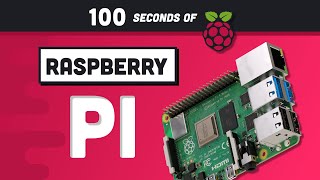

Raspberry Pi: $5 Computer That Changed the World
45sThe shockingly low price and the story of its fruit-inspired name and Python connection create an instant curiosity hook.
▶ Play ClipThe Raspberry Pi is a tiny, affordable computer that has become one of the best-selling computers worldwide since its 2012 launch. It features a quad-core processor, up to 8GB RAM, and various connectors for GPIO, USB, Ethernet, camera, and microSD. It can be used as a desktop or for IoT projects, robotics, and more.
Idea born in 2006, launched in 2012. Named 'Raspberry' after fruit-naming trend in computer companies, 'Pi' for Python programming language.
Quad-core processor, up to 8GB RAM. Includes Wi-Fi/Bluetooth module, GPIO header, Ethernet, USB ports, audio jack, CSI camera connector, micro HDMI ports, and USB power port.
MicroSD slot acts as hard drive. First-time setup uses NOOBS installer to install Raspberry Pi OS (Linux).
Can control LEDs via GPIO with Python, build home security systems with camera and Wi-Fi, and many other projects limited only by imagination.
The Raspberry Pi is a versatile, low-cost computer ideal for learning programming and building creative hardware projects, with endless possibilities for makers and hobbyists.
[00:00] Raspberry Pi, a computer that fits in the palm of your hand with a price tag as low as $5. The idea was born in 2006 and the first commercial unit was launched in 2012,
[00:13] and since then it's evolved into one of the best-selling computers in the world. It's named Raspberry because computer companies like to name themselves after fruit, and Pi for the Python programming language. Not only is the computer tiny, but it can also be
[00:25] quite powerful, with a quad-core processor and up to 8GB of RAM. They're great for building your own IoT prototypes, robots, security cameras, web servers, and many other fun projects. When you unbox your Raspberry Pi 4, you'll notice a bunch of little chips and connectors.
[00:40] In the center, we have our CPU and RAM. That is the brain of the operation. Nearby is the Wi-Fi Bluetooth module that can wirelessly connect to the outside world. At the top, we have a general purpose input-output connector for connecting other electrical devices. To the
[00:55] right we have an Ethernet connection along with four USB ports On the bottom we have an audio jack to connect speakers or headphones a CSI camera connector for building your own custom camera micro HDMI ports for connecting multiple monitors and finally a USB port to provide power to the computer
[01:13] But most importantly, flip the Raspberry Pi over to find the microSD slot. Think of it as a hard drive that contains the operating system required to interface with the hardware. You can use the Raspberry Pi like a normal desktop computer by connecting a keyboard, mouse, and monitor.
[01:28] When you power it up the first time, you can install any operating system you'd like, but most beginners will take advantage of the Noobs installer, which installs a flavor of Linux called Raspberry Pi OS. Now that you're in, you can program it to take over the world.
[01:41] You might connect some LEDs to the GPIO header, then control them with a Python script. Or you might add a camera, then connect to Wi-Fi to build your own home security system from scratch. The possibilities are limited only by your imagination.
[01:54] This has been Raspberry Pi in 100 seconds. If you enjoy these short videos, please make sure to hit the like button and subscribe. It really helps out. And if you want to see more Raspberry Pi content, let me know in the comments. Thanks for watching, and I will see you in the next one.



⚡ Saved you 0h 02m reading this? Transcribe any YouTube video for free — no signup needed.