Edit Videos with Words - Gemini Omni
45sDemonstrates a revolutionary AI feature that lets users edit video by simply describing changes, which is highly shareable and visually impressive.
▶ Play Clip
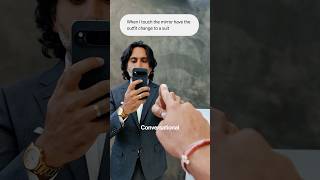
What was the craziest announcement from Google I/O, you think? >> Uh Omni, for sure. Conversational video editing. >> So, Gemini invited us to I/O to see all the announcements, and Omni really blew me away. >> Yeah. So, three things that stood out to me. Number one, you can just edit with words. You can shoot a video, upload it to Gemini, and ask for what you want. >> We used it when you touched this mirror, and we
could make it ripple, we could change your outfit. There's just so many things you could do, and I stayed consistent. >> Yes. >> Which is crazy. >> Now, why I think this matters is because it's really interesting ways to get visual hooks. So, we were thinking about it in terms of how do you open a reel and catch someone's attention? You can do that pretty quickly here. >> Okay, another thing, I've never seen this before, you
can draw out your vision. So, I today just drew a car, and then added some arrows and instructions, and you can upload it to Gemini, and it will follow those instructions. >> That one they taught us there, I think that one's crazy. >> For me, too, one of the benefits is maintaining my own style, my own sketch style. So, I sometimes sketch out concepts that we're talking about, but now I can make them move and just
be more interesting. Number three, I was in an edit, and I wanted to test this shot where a map moved from one location to another. And I prompted the shot first. I just asked for what I wanted, and then I could see if it actually worked in the story before I committed to going and filming it. >> And then we actually got a map and a magnifying glass, which was a really cool shot, and made the
real shot based on the reference shot. >> just nice to be able to test it. >> Like just to see if it works in the edit. >> Yeah, exactly.
⚡ Saved you time reading this? Transcribe any YouTube video for free — no signup needed.