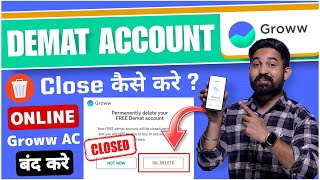

Before Closing Groww Account, Do THIS!
44sHigh educational value with crucial steps to avoid losses, prompting viewers to pause and take notes.
▶ Play Clip"The title promises a guide on closing a Groww account, and the video delivers exactly that with clear steps, though it could be more concise."
This video provides a step-by-step guide on how to close a demat account online through the Groww application. It covers the prerequisites, the process of raising a ticket, and the final steps involving Aadhaar eSign, concluding with a timeline for account closure.
Before closing a demat account, ensure you have no open holdings, positions, mutual funds, or SIPs. Your account balance should not be negative.
Open the Groww app, tap the profile icon, and select 'Customer Support 24/7'.
In the support search bar, type 'Demat Account Close' and press enter. Then, choose 'Contact Us' and click 'Raise a Ticket'.
In the ticket form, type 'I want to close my demat account' in the description field. You can optionally attach a screenshot, but it's not required. Click 'Raise a Ticket'.
After raising the ticket, you'll receive a ticket ID and a confirmation email on your registered email ID.
Within 24 hours, you'll receive another email with a link (grow.in/close-demat-account) to proceed with the closure.
Click the link, log in via OTP, and confirm the permanent deletion of your demat account by clicking 'OK Delete'.
Click 'eSign to Finish', proceed, and sign the form. Enter your Aadhaar number, send OTP, and verify. The document will be signed successfully.
After completing the eSign process, your demat account will be closed within 7 days.
Closing a Groww demat account is a straightforward online process that requires clearing all holdings and completing an Aadhaar eSign. The account is typically closed within a week after the final verification.
What must you do before closing a demat account?
Clear all holdings, positions, mutual funds, SIPs, and ensure balance is not negative.
00:16
What is the first step to close a demat account in the Groww app?
Open the app, tap profile icon, and select 'Customer Support 24/7'.
01:02
What should you type in the support search bar?
'Demat Account Close'
01:31
What is the required description for the ticket?
'I want to close my demat account'
02:15
How long does it take to receive the closure link after raising the ticket?
Within 24 hours.
03:14
What is the link provided in the email?
grow.in/close-demat-account
03:14
What is the final step to close the account?
Complete Aadhaar eSign by entering Aadhaar number and verifying OTP.
04:40
How many days does it take for the account to close after eSign?
Within 7 days.
05:47
Clear holdings first
Essential prerequisite to avoid complications during closure.
00:16Ticket ID confirmation
Provides a reference for tracking the closure request.
02:44Permanent deletion confirmation
Emphasizes the irreversible nature of the action.
03:57Aadhaar eSign required
Legal verification step that finalizes the closure.
04:40[00:00] नमस्कार दोस्तों दोस्तों अगर आप भी ग्रो एप्लीकेशन में अपना डीमेट अकाउंट ऑनलाइन ग्रोस करवाना चाहते हैं तो आप बिल्कुल सही वीडियो आपके आज के वीडियो में मैं आपको step by step पूरा process समझाऊंगा कि grow application में
[00:13] demand account कैसे close करते हैं तो दोस्तो हम process समझे उसके पहले आपको कुछ चीजे जो है jam में रखना बहुत जरूरी है demand account close करने से पहले तो वो क्या है तो दोस्तो अगर आपने
[00:26] application में कोई share खरीद के रखा है यानि कि आपने जो है holding की हुई है या फिर आपकी कोई position open है या फिर आपने mutual fund या SIP में invest करके रखा है तो ये आपको निकाल लेना है
[00:38] यानि कि ये जो है आपको clear कर देना है और इस application में आपका जो balance है वो भी minus में नहीं होना चाहिए ओके, तो ये चीजे वो है जो आपको जो है ध्यान रखनी है DMAT Account क्लोस करने से पहले
[00:51] अब हम समझकर है कि DMAT Account Online क्लोस कैसे करते है ग्रोएप्लीकेशन में, तो आपको सबसे पहले अपना ग्रो अप्लीकेशन ओपन कर देना है तो ये है ग्रो अप्लीकेशन का होम्पेज और यहाँ पे उपर आपको जाए अपना प्रोपाईल आइकन दिख रहा
[01:04] है तो आपको जाए यहाँ पे प्रोफाईल आइकन पे क्लिक कर देना है अब होगा जैसे ही कॉपा लाइक चांवल क्लिक करिंगे के्सा पोस्ट 247 आपको जो है यहां पर क्लिक कर देना या जैसे ही
[01:20] account close Okay Demand account close enter Demand Account Close Demand Account Close
[01:41] तो आपके सामने कुछ इस तरीके से इंटरफेस खुल के आ जाएगा ओके तो यहाँ पे नीचे जो है दो ऑप्शन देखने को मिलेंगे contact support और contact us तो आपको जो है contact us वाले ऑप्शन पे क्लिक करना है
[01:53] आप जैसे ही contact us वाले ऑप्शन पे क्लिक करेंगे यहाँ पर आपको जो है नींचे Razer Ticket वाला option दिखेगा तो आपको जो है simply Razer Ticket वाले option पर क्लिक कर देना है आप जैसे ही Razer Ticket पर क्लिक करेंगे
[02:06] तो आपके सामने कुछ इस तरीके से interface खुल के आ जाएगा जो topic आपने search किया वहाँ पर वहाँ पर लिख जाएगा यानि कि वह हो गया है इश्यू और यहाँ पर आपको कोई जिस तरीके से इंटरफेस दिखेगा एड फाइल यानि कि अगर आप जो है स्क्रीन सोट एटेज करना चाहो तो कर सकते हो लेकिन
[02:21] लिखा है आपको यहां पर कुछ भी नहीं करना है नीचे लिखा है describe your issue in detail तो आपको यहां पर type करना है I want to close my demand account आपको फिर इतना लिखना है और नीचे जो है raise the ticket का
[02:33] option दिया गया है तो आपको यहां पर जो है raise the ticket पर click कर देना है आप जैसे ही raise the ticket click grow support ticket ID confirmation mail grow application register mail ID mail ID mail confirmation mail ticket ID receive 24 mail
[03:34] इसकी तरीके होने के बाद, तो आपको आपको जो है यहाँ पे दो in link देखने को मिलेंगे तो ये जो लंबा वाला link है उस पे आपको click करना है ये वाला जो link है जो मैंने आपको पहले जो है बताया, grow.in close-bmeld account, यह वाले link पे आपको click करना है, अब जैसे जो
[03:49] वाले link पे click करेंगे तो आपके सामने कुछ इस तरीके से interface खुलेगा okay तो यहाँ पे जो है आपको अपना grow application जो है यहाँ पे login कर लेना है OTP जो अगर okay उसके बाद जो है आपके सामने कुछ इस तरीके से interface दिखेगा यह आप देख सकते है यहाँ पे लिखा है
[04:03] परमनंटली डिलीट यॉर फ्री डीमेट एकाउंट ओके दो आपको दिख रहे हैं यहाँ पर मैंने थोड़ा जूम करके दिखा है दो आपको नाओ और ओके डिलीट तो आपको यहाँ पर ओके डिलीट वाले आपको लिख करना है
[04:16] अगर आप sure है कि हाँ मुझे अपना limit account close करना है अगर नहीं करना चाहते है अपना मन जो है आपने बना लिया है कि बई मुझे नहीं करना है तो not now कर सकते है लेकिन यहाँ तक आया है इसका मतलब है कि आपको जो है close करना है
[04:28] तो ok delete वाले option पे click करना है उसके बाद जो है यहाँ पे आपके register mobile number पे जो है एक OTP आएगा OTP interface finish with other e e to finish
[04:51] से आधे खरीदा और यहां पर जो है मूटिपल याद आपको कर दिना है और प्रोसीट पर क्लिक करना है अब जैसे ही इसना प्रोसेस करेंगे प्रोशेक्ट पर क्लिक करेंगे तो यहां पर आपके सामने जो है वह पहला वाला फॉर्म जब आपने जो है ग्रोएप्लीकेशन में डीमेट एकओर बनाया था वो उस तरीके से जो है यहाँ पर पूरा आपको देखने को मिलेगा
[05:08] आपका यहाँ पर Sign भी दिख जायेगा, E-Sign ओके, तो यहाँ पर आपको जो है Sign Now वाले ओप्शन पे क्लिक कर देना है आप जैसे ही Sign Now वाले ओप्शन पे क्लिक करेंगे तो आपके सामने फिर से कुछ इस तरह के से Interface खुल जाएगा
[05:20] यहां पर आपको टिक कर देना है और यहां पर आपको जो है अपना आधार का number डालना है उसके बाद send OTP करना है तो आपका जो आधार जिस mobile number के साथ link है वहाँ पे OTP आएगा वो OTP यहां
[05:33] यहां पर डाल देना है उसके बाद यहां पर वेरिफिकेशन कर देना है आप जैसे ही इतना प्रोसेस करते हैं तो यहां पर इस लिखते आ जाएगा document signed successfully do not close the window you will be redirected
[05:45] okay तो इतना process करेंगे तो आपका जो demand account है वो 7 दिन के अंदर अंदर जो है close हो जाएगा तो दोस्तो ये था पूरा process के grow application में किस तरीके से demand account close करना है वो भी
[05:58] online, उम्मीज है के आपको पता चल गया होगा, मैंने जो है step by step जो है बड़े ही आराम के आपको समझाया, तो उम्मीज कर सा हूँ, आपको विडियो भी पसंद आया होगा अगर विडियो पसंद आया हो, तो विडियो को like कर दीजिएगा वीडियो के नीचे पॉमेंट कर दीजिएगा और भाई के चैनल को सब्सक्राइब करना
[06:11] बिल्कुल भी मत भूलेगा मिलता है नेश वीडियो में तब तक लिए टेक केर भाई जैहिंद जैहिंद भारत




⚡ Saved you 0h 06m reading this? Transcribe any YouTube video for free — no signup needed.