AI Summary
This video reveals a complete, step-by-step system for creating a successful self-improvement YouTube channel using AI tools, from idea generation to final upload. The creator demonstrates the process by building a channel in just 10 minutes, emphasizing the importance of consistent execution over talent.
Chapters
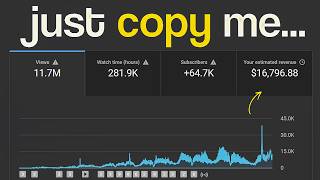
A channel with only 55 videos has nearly 91,000 subscribers and earns thousands per month, all without showing a face or personality, relying on deep self-improvement content.
The creator will show how to build such a channel from scratch, and as proof, made one in just 10 minutes.
Use ChatGPT with a specific system prompt (not a weak one like 'Give me a YouTube idea') to generate 10 highly specific video ideas, including scroll-stopping titles, emotional hooks, and core messages.
Feed the chosen idea back into ChatGPT with a scriptwriter prompt, requesting an emotional, raw, narrator-style script with short, punchy paragraphs (no bullet points).
Use a third prompt to break the script down sentence by sentence and generate detailed visual directions for each scene, specifying a sketch animation style and tight aesthetic.
Use Flow AI to build the channel's visual identity. Paste in the first image prompt, generate it, and review the result. Note what works and carry that language through every other prompt.
Review each image for consistency (e.g., black and white, sage green accent). Fix any off-style images immediately, as one bad image can break the entire mood.
Use Flow AI's video generation tool. Upload each image as a reference, paste the matching scene prompt, and generate. Motion should be subtle (shadows shifting, lines pulsing).
Use Eleven Labs to generate voiceover from the script. In CapCut, drop the audio on the timeline first, then add clips and cut them to match the voiceover pacing. Add auto-captions with a bold font, white or yellow text, black background box, and pop-in animation.
99% of creators are too lazy to execute this multi-step process, which is the viewer's advantage. The creator offers exact prompts and community access via a link.
The video provides a complete, actionable pipeline for creating a faceless self-improvement channel using AI, emphasizing that the key differentiator is not knowledge but consistent execution of the process.
Mentioned in this Video
Tutorial Checklist
Study Flashcards (8)
How many videos did the example channel have, and how many subscribers?
easy
Click to reveal answer
How many videos did the example channel have, and how many subscribers?
55 videos and nearly 91,000 subscribers.
What is the first step in the AI-driven YouTube channel creation process?
easy
Click to reveal answer
What is the first step in the AI-driven YouTube channel creation process?
Use ChatGPT with a specific system prompt to generate 10 highly specific video ideas.
00:44
What style of script does the creator recommend for the scriptwriter prompt?
medium
Click to reveal answer
What style of script does the creator recommend for the scriptwriter prompt?
Emotional, raw, narrator-style, with short, punchy paragraphs and no bullet points.
01:10
What tool is used for creating the visual identity and generating images?
easy
Click to reveal answer
What tool is used for creating the visual identity and generating images?
Flow AI.
01:39
What is the recommended motion style for the animated clips?
medium
Click to reveal answer
What is the recommended motion style for the animated clips?
Subtle motion, like shadows shifting slowly and lines pulsing gently.
02:34
Which tool is used for voiceover generation?
easy
Click to reveal answer
Which tool is used for voiceover generation?
Eleven Labs.
02:58
What caption style is recommended in CapCut?
medium
Click to reveal answer
What caption style is recommended in CapCut?
Bold, aggressive font, white or yellow text, solid black background box, dead center on screen, with a pop-in animation.
03:12
What is the creator's final advice regarding execution?
easy
Click to reveal answer
What is the creator's final advice regarding execution?
99% of creators are too lazy to execute this multi-step process, so consistent execution is your advantage.
03:29
💡 Key Takeaways
Proof of Concept
Establishes credibility by showing a real channel with impressive stats, making the guide feel achievable.
Specific Prompting
Highlights the importance of detailed prompts over generic ones, a key technique for getting quality AI output.
00:44Visual Consistency
Emphasizes that maintaining a consistent visual style is critical for the channel's mood and brand.
01:39Execution Advantage
Reframes the barrier to success as laziness, not knowledge, which is a motivating and actionable insight.
03:29Full Transcript
[00:00] Think about this channel. Only 55 videos, yet nearly 91,000 subscribers, pulling in thousands of dollars every single month. No face, no personality, just self-improvement content that hits the viewer deep, giving them that feeling of actually achieving something.
[00:19] In this video, I'll show you how to build all of this from scratch. And as proof, I made one myself in just 10 minutes. It's late, the kind of late where the world feels paused.
[00:32] Your room is quiet, but your mind isn't. The glow from your screen lights up your face just enough to remind you that you're still here. Chapter 1. Idea Generation
[00:44] Open chat GPT, but don't make the mistake of typing something weak like, Give me a YouTube idea. Give it a proper system prompt. I'll drop the exact prompt for free in the comment section.
[00:56] Paste it in and it spits out 10 highly specific video ideas. Scroll-stopping titles, emotional hooks, core messages, all of it. Pick one idea, any one, and move to the next step.
[01:10] Chapter 2. Scripting with ChatGPT Feed that idea back into ChatGPT, this time with a script writer prompt. Tell it emotional, raw, narrator-style, no bullet points, short, punchy paragraphs.
[01:25] Once the script is ready, run one more prompt, the image prompt generator. It breaks the script down sentence by sentence and generates detailed visual directions for each scene. Sketch animation style, tight aesthetic.
[01:39] Now you have a complete production pipeline. Chapter 3. Creating visuals. Head over to Flow AI. This is where your channel's entire visual identity gets built, so don't rush it.
[01:51] Paste in your first image prompt Generate it and actually sit with the result Does the mood land Is the aesthetic holding Whatever working in that prompt note it down and carry that same language
[02:03] through every other prompt. Paste them in one by one. Review each image as it comes out. Is the black and white consistent? Is the sage green accent showing up where it should? If one comes back off, wrong style, weird composition, fix it on the spot. One bad image in the middle of your
[02:21] timeline will break the entire mood. Chapter 4 Animation Once every image is approved, open Flow.ai's video generation tool. The process is the same for every clip.
[02:34] Upload the image as a reference, paste in the matching scene prompt, hit generate and watch the playback. The motion should feel subtle, shadows shifting slowly, lines pulsing gently.
[02:46] Then move to the next image. Reference, prompt, generate, review. Same loop every time. By the time you're done, every clip will look like it was pulled from the same hand-animated film.
[02:58] Chapter five, voice and editing. Open Eleven Labs, paste in the script, select your voice model, and generate. Download the audio. Open CapCut, drop the audio onto the timeline first,
[03:12] then drag all your clips onto the track above and cut them to match the exact pacing of the voiceover. Go to the Text tab, generate auto-captions, bold, aggressive font, white or yellow text, solid black background box, dead center on screen.
[03:29] Add a pop-in animation to every word. It works as a micro-hook. Export in 4K and upload. Chapter 6. Final Word 99% of creators are too lazy to execute this multi-step process.
[03:43] That's your advantage. Want the exact prompts and access to a community already scaling this? Link is below. Follow for more niche breakdowns and keep watching.