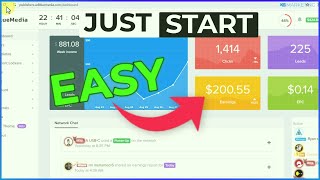

Make $200 a Day FREE
48sThe promise of making $200 a day for free is a high-engagement hook that immediately grabs viewers' attention.
▶ Play Clip""
[00:04] spending money on ads. Crazy, right? As you can see on your screen, it's entirely possible with the right strategy. And as a matter of fact, I previously shared a method of the channel on how to earn $100 a day with
[00:19] CPA marketing. So, feel free to check out that video right here. However, in today's video, I'll be showing you how to make $200 a day for free with CPA marketing. So, for those who don't know what I'm implying here, CPA marketing is
[00:34] a simple business model that pays you to generate leads for businesses. And these leads can be in various forms such as getting people to install an app, entering their email to an offer, or
[00:48] getting people to sign up for freebies or giveaway. It's that simple. Also, most CPA networks where you find the CPA offers will usually provide you with various tools to help you earn the most from your traffic. And these tools
[01:03] from your traffic. And these tools include content lockers, smart links, offer walls, etc. There are a lot of them depending on the CPA network you choose to work with, and I'll talk more on this shortly. However, for this
[01:17] video, I'll be showing you how to work with the smart link tool to earn money with CPA marketing. So, for those who don't know, this is a unique monetization tool that is designed in such a way that whenever a visitor
[01:32] clicks on your smart link, they will be sent to an offer that is most suitable for them. of course depending on several parameters which means there's a high likelihood of that visitor completing that offer which in turn leads to high
[01:48] conversion rates and high revenue for you. So how do you get a smart link? There are so many CPA networks out there where you can find smart links. An adblowmedia.com. However, if you come over to the
[02:04] adgobia.com website and if you click on the register button, as you can see, they currently not accepting registration at this time. But do not despair as there are other CPA networks you can join such as
[02:19] ogs.com. You can even come over to CPA.com. You can use CPAP.com. This is really up to you. However, if you want to find even more CPA networks, you can come over to.com
[02:35] and here you can find many CPA networks and you can check out their review. You can join anyone of your choice. This is really up to you. So, for this video, I'm going to be taking ojarts.com as an example, but you can use other CPA
[02:49] networks as well. All you just need to do is to click on the sign up button and you'll be able to create an account on OG ads or check out this video right here on how to create an account on OG ads. So once your account is created,
[03:02] all you simply need to do is to come over to tools and you want to then click on smart links. Okay. So once you click on smart links, it's going to bring you to this page and all you need to do here is to click on create a smart link. And
[03:16] to this page. And now you want to give your smart link a name. So now the next thing you want to then do here is going to ask you to enter a redirect URL. And this is where people will be taken to once they complete the offer in the
[03:30] smart link. All right. And to do that, we are going to find content that is going to entice people to want to complete this smart link in order to get access to that content. And to find such content is by going over toss.com.
[03:47] This is a website where you can find freebies, discount codes which people are constantly looking for online. So you can basically come over here, find these freebies and you can share them with people online. So once you come
[04:00] over to this website, you want to head over to the freebie section. So once you do that, it's going to bring you to this page. As you can see, there are endless freebies here you can basically give out to people. Okay? So if we scroll down
[04:13] here, you can see there are so many of them. people are constantly looking for online. You can see this one here has 37 comments on it. So you can basically scroll down and you can find as many of these freebies on this website which you
[04:27] can give out to people. Okay. So we are going to be taking this Amazon freebie as an example which is going to give people free Amazon music for 3 months. Okay. So you're going to click on this deal. So once you do that it's going to
[04:41] bring us to this page right here. And now if we click on this link. So as you can see this is the link where people can get access to this three months free Amazon music. So this is the link right here we want to simply copy. Then you
[04:57] want to come back to your OG ads account and you want to basically paste in the link in this box right here. It's that simple. This basically means once people complete the offer in this smart link they will be redirected to this Amazon
[05:11] offer. Okay. All you then need to do is to come over to the offer section and here you want to basically add offers from as many countries as you want. So all you then need to do from here is to click on the add offer button and here
[05:25] you can then add as many offers as you want. As you can see this offer right here is going to pay $46 for people just signing up to this offer. So you can just basically click on this and you can add as many offers
[05:41] as you want. So once you're done, all you just need to do is to click out of this and you want to then click on create smart link. And just like that, your smart link would be created. All you then need to do from here is to make
[05:55] sure to copy your smart link. And that takes us to the next step where you want to set up a simple landing page like this using a free landing page builder like googleites.com. As you can see, this is a very simple landing page. All
[06:10] I basically did was to take a screenshot of the offer page. And once you taking the screenshot, you'll be able to create a simple landing page like this. And you want to add a button right here. And this button, this is where you'll be
[06:23] adding your smart link. Okay? Okay. So, you want to go over to site.google.com to create a free Google site landing page. And once you come over here, all you just need to do is to click on the start a new site button. Okay? And once
[06:39] title like this. And here you want to then create a button. And in this button, you want to edit the button. And this is where you then want to paste in once you paste it in here, you want to click on okay. And once people click on
[06:55] this button, they have to complete the offer on their screen which is then going to redirect them to the Amazon offer page. I hope this makes sense. So this is how the smart link works. However, if you're on CPA.com, you can
[07:10] use the URL file locker instead to do this process. Okay. And if you even want to take it to the next level, you can connect this to a custom domain by coming over to this gear icon. And here you can see you can connect a custom
[07:26] domain to this landing page. This is really up to you. All right. So that takes us to the next step where you then want to create content showing people want to create content showing people how they can get this offer for free.
[07:39] Okay? And keep in mind you don't have to show your face. You can basically use any free screen recording software out there. Be it on your PC or on your mobile device. Okay, just like I'm doing right now. I'm not showing my face. You
[07:52] can also do the same thing by basically creating this content without showing your face using any of the free screen recording softwares out there. Okay. And also for the voice, if you don't want to use your voice, you can go over to
[08:07] use your voice, you can go over to 11labs.io io to create a free voice over for yourself. So, here's a quick example of what your video should look like. As you can see right here, just basically screen record the landing page which
[08:21] you'll be putting in the description of your video. And you also basically take people through the process of how they can get access to the Amazon offer. So, you need to let people know once they click on the click here button on the
[08:35] screen, it's going to take them to an offer. And if they complete the offer, you'll be redirected to the Amazon offer page like this. So it's a very simple process and the video should not be more than 2 minutes long. Okay. So once you
[08:49] create the video, that takes us to the next step where you then want to upload the video to YouTube. And the reason YouTube is one of the best traffic source for this strategy is because there are so many people who are
[09:01] there are so many people who are constantly looking for this offer on YouTube. So if I go over to YouTube as an example, so if I type in keyword like free Amazon music, as you can see, these are other variations of this keyword
[09:15] that people are constantly searching for on YouTube. So if I click on the first one right here, so as you can see, this keyword is getting a lot of traffic on YouTube. You can see a video uploaded about 12 hours ago getting 1,000 views
[09:31] every hour. And this is because this is a low competition keyword right here. And you can analyze this keyword by installing the Vid IQ plug-in on your browser. As you can see, it's going to give you a detailed analysis of this
[09:45] keyword. And as you can see, the competition level is close to the green section, which tells you this is a low competition keyword. And that tells you you can easily rank for this video and start getting views to your landing
[09:59] page. And to get this Vid IQ extension, all you just need to do is to type in Vid IQ Chrome extension on your browser and you'll be able to install it to your browser right away. So now once you upload the video, you want to type in a
[10:14] captivating title. And as you can see, because I use a highly optimized title which contains our keyword. As you can see, the rating of this title is 93 out
[10:26] of 100, which means this title is going to perform well in the search results. Okay? And also, you would then want to paste in the link to your landing page right here. And once you do that, all you just simply need to do is to upload
[10:40] the video to YouTube. It's that simple. And now all you simply need to do is to come back to the Alt UK deals website to find even more deals to share on
⚡ Saved you 0h 10m reading this? Transcribe any YouTube video for free — no signup needed.