
Why Data Pipelines Are Key for AI Trading
45sThis clip hooks viewers by explaining the critical role of fresh data in AI trading, a foundational insight that intrigues both beginners and experienced traders.
▶ Play Clip"Title promises a data pipeline walkthrough and delivers exactly that with a live trading example."
This video demonstrates how to build a data pipeline for AI-driven trading on prediction markets like Polymarket. The creator walks through five data sources—Kalshi, Reddit, Polymarket whales, X (Twitter), and Google News—and shows how to automate data collection using browser automation and APIs. The pipeline feeds a master file that an AI agent uses to identify high-value trades, with a live example of a Formula 1 bet that gained 60%.
AI models need fresh, real-world data to make accurate predictions. A robust data pipeline is essential for feeding the model with relevant information.
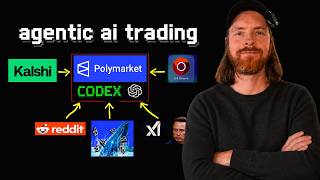
The pipeline uses Kalshi (competitor data), Reddit (sentiment via browser automation), Polymarket whales (large bettors' on-chain data), X/Twitter (news and trends), and Google News (general search).
All collected data is saved into a master unstructured text file, which the AI agent uses to calculate bets on Polymarket.
The pipeline identified a bet on Kimmi Antonelli winning at odds of 0.56. The creator bought $25 worth of shares, and within 15 minutes the position was up 28%, later reaching 60%.
The creator uses Codex (an AI agent) and OpenAI to execute the pipeline. A data.md file contains instructions for each source, and the agent runs browser automation to collect data.
The agent searches Google News, X, Reddit, Polymarket whales, and Kalshi for Bitcoin-related data. It collects news, sentiment, and whale activity, compiling everything into the master file.
After data collection, the agent analyzes the master file and Polymarket markets to find trades with positive expected value. It identified a bet on Bitcoin reaching $200k by year-end at 0.002 odds (97x potential return).
The creator placed a $10 bet on the Bitcoin $200k prediction. The Formula 1 bet was up 60%, showing the pipeline's potential. The video concludes with an invitation to join the Discord community.
A well-designed data pipeline is critical for AI trading success, as it provides the fresh, diverse data needed to identify high-value opportunities. The example pipeline demonstrated how to automate data collection from multiple sources and use an AI agent to execute trades on Polymarket.
What are the five data sources used in the pipeline?
Kalshi, Reddit, Polymarket whales, X/Twitter, and Google News.
01:00
How is data from different sources compiled?
All data is saved into a master unstructured text file (master_unstructured.txt).
02:30
What tool is used for browser automation in the pipeline?
Surf Agent.
01:30
What was the odds and potential return for the Bitcoin $200k bet?
Odds were 0.002, offering a 97x potential return.
10:00
How much did the Formula 1 bet on Kimmi Antonelli increase in value?
It increased by 60% (from $25 to $40).
03:30
Data is Key for AI Trading
Emphasizes that AI models need fresh data to succeed, not just the model itself.
Live Trade Success
Demonstrates the pipeline's effectiveness with a real trade that gained 60%.
03:30High-Risk High-Reward Bet
The agent identified a bet with 97x potential return, showcasing the pipeline's ability to find extreme value.
10:00[00:00] So, today I want to talk about something that is super important if you want to get into a genetic AI trading and that is your data pipeline, right? Because everything that is based on AI, we have to have some data to back up, to do some math, and to play on the strength of the models, right? Because they don't really know anything in the real world if they don't have fresh data, okay? So, that is really
[00:27] important in this kind of game. So, today I just thought I'd walk you through one of my data pipelines and I thought we could use Polymarket as an example today and Codex and OpenAI for kind of our agent. So, I'm not going to spend a huge time on this, but I'm going to go through every single step I have set up and talk a bit about how you can do kind of the same thing. So, these
[00:55] are the five sources I have set up now for our agent to get data to make more, yeah, calculated bets, you can say, on Polymarket with our agent Codex here on 55 with from OpenAI. So, on the left here we have Kalshi and here we can use the we can either use the Red Socket, right? It's free, or the API to look at the markets. So, this is a good way to just get some competition competitor
[01:22] data. All right, so we can check on the same markets. We can do some sentiment on Reddit, right? We can set up I have like a a browser automation Surf Agent. You can see how that works soon. So, this uses the browser so I can be logged in on Reddit to look through different subreddits for a news and top posts. If you go further on, we have the whales, right? Whale, I don't know how to whale,
[01:49] something like that. So, this is the Polymarket whales. These are the people that is placing large bets. So, we can and them actually on the blockchain so we can see what kind of data they have put up. It's not 100% real time, of course, but there could be some indicators there on a specific bet we want to make. So, I really like to leverage that. That is also kind of free through the API. That's what at
[02:16] least what I have set it up, okay? Uh same with Surf Agent browser automation, we can do x.com x.com uh Twitter, okay? Uh [snorts] kind of the same as Reddit, we just do some searches, as you will see soon. And Chrome, we can do some Google searches and stuff like that. This is also done with my browser setup, browser automation setup, Surf Agent. So, these are the five pipelines I have set up to kind of feed
[02:44] our agent with data uh on a specific keyword. So, this could be like Bitcoin. Uh I have placed I'm going to place a bet on like Formula 1 today. So, hopefully we'll see that's how that went during at the end of the video. So, what happens here now uh when we have run this pipeline, it kind of gets everything gets kind of saved into like a master file. So, this is uh my We collect all this
[03:11] information into like a master file. So, I guess kind of the master file is up here. So, all the information from these sources get kind of fed into this master file. It doesn't really work like we don't feed it one by one as it indicates here. So, we basically everything into this master file, we use this with a combination of the Polymarket to calculate the bet, right? So, I'm going to show you like a run-through of
[03:38] this on a specific keyword, how I set up my pipeline. So, I think we're just going to do that, and you kind of understand more how it works when I kind of run my setup on this. So, uh just wanted to show you kind of in my testing for this, uh I collected all the information, right, from uh sports and Formula 1 and it came to this that Kimmi Antonelli win today. Was pretty good priced at
[04:05] 0.56. So, we bought for $25, 44 yes shares. And let's take a look at how we've been doing so far. It's like 15 minutes ago. And you can see here we are kind of up um 28% already. So, that means that they had a good start, right? And we are looking kind of strong already. So, that's just an example of things you can do with this pipeline. But I'm not going to sell out of this. I'm
[04:33] just going to leave it till resolution. But just an example of how I use this pipeline to find um all the information. You can see the best bet from collected data by yes, but only at 0.58 or lower. This was all from all the information we gathered right? And we have some information here from the data we gathered. So, yeah, that's an example. So, now let me start a new one and show you kind of how
[05:00] this works now. So, the way I set this up now is I have this data.md file. This is basically just a compilation of all the different pipelines we have. So, we have my Cal Shi pipeline with a markdown file how we use that, okay? We have the surf agent. This gives instructions on how to do all the the research we want to do with this part of the pipeline, right? And we have the whale or whales,
[05:27] I guess. This also gives instruction on how we find those whale data from Polymarket. And yeah, that is the way I set it up. So, what I can do now is let's say I just go to here code X. Let's do the Yolo. I can just do something like read. And let's just do data.md. I'm going to do that first. Okay, so you can see we find the data pipeline index that is kind of pile up
[05:54] here. And here you can see we have the master unstructured.txt. This is the file I append all the information we find into this big unstructured data. And this is where we're going to look at when we are looking for a trade, let's say on for example Palm Market, Hyperliquid, or any other platform you want to do an AI agentic trade on. So, just to make it simple for the video, let's just do let's find some data
[06:22] for the keyword Bitcoin for a possible trade. Uh execute the uh full data pipeline. Something like that. Okay. So, now remember we're going to check the whales. We're going to check the Google Chrome or Google. We're going to check x.com. We're going to check Reddit. And we're going to check Calshi. That is the full pipeline. All of that information will get compiled into our text file. And from there we can look for any interesting trades we
[06:49] can make today. So, you can see the first thing it did now, it went to Google News, search for Bitcoin. And you can see it's scrolling through the data. It's very fast here. This is the browser automation part. Searches on news, scrolls down. Now it goes to X, searches for Bitcoin on the latest. Um maybe it's going to switch to top two, right? And all you can see here now is kind of recorded. And here we
[07:16] switch to Reddit. And all of this is automated, and that is very nice. So, we can just do it in like a slash goal if you wanted to. But for the video's sake, we're just going to do it like and I do some comment over here. You can see we're scrolling all through this data here, and it looks like we're just scrolling, but LLM is now collecting all this. And it could go into each post if
[07:43] you wanted to look more at something. This is a bit old. Maybe there are some improvements we can do here. Uh but this is more recent, right? And you can see the sentiment is kind of negative on cryptocurrency right now, so maybe a short trade could be interesting or something like that. But uh let's just let it continue and we're probably going to switch to the whale part and the Cal-Chi after this. Yeah, you can see
[08:11] we're still doing this. So, if we wait a while now, we're probably going to do the whale part and um the Cal-Chi part. So, you can see we have 60 observations with mixed sentiment including recent negative Bitcoin private context around the sub 60 and liquidation headlines. I'm running the Polymarket whale collector next with the category crypto. Yeah, that's what I want to see. Uh now it's going to of course check the Bitcoin up and down markets.
[08:38] And it's going to do the Cal-Chi collector market data for Bitcoin. So, you can see we're kind of compiling a bunch of different data from basically whatever source you want. This is just an example for the video, right? But this could be whatever sources you think are worthwhile setting up an automation pipeline for. So, you can see now the kind of the conclusion is high-level trade context. The collected news social data is mixed, but includes recent
[09:05] negative context around yeah. Polymarket whale data shows heavy activity in a short window up and down markets. Yeah, I expected that. But not a clean one-sided signal. Cal-Chi is mostly pricing upside threshold markets as no favored and stuff like that, right? So, basically you can see we kind of covered Cal-Chi, we covered the whale and the three surf agents data. And now we kind of compiled all of this into this unstructured file here. It is a
[09:33] bit bit structured, but basically you can see this is all the data we collected in that run. So, what I like to do now is I just go back here and I say something like I'm just going to keep it simple, so I'm going to do a slash goal here based [snorts] on the data the master unstructured file and the markets on Polymarket look for a good price with expected plus expected value do calculations and think
[10:00] hard. Just going to keep it simple. So, now we are kind of launching this goal and now the agent is just going to go through all the data we have and it's also going to pull markets from Polymarket API and it's just going to start looking for some good trades. Something like that. And then we can come in and evaluate if we actually want to pursue that. So, while we wait for that let's go back to
[10:27] our sports bet today sports placement on Polymarket to see how we are doing. So, we can see now the trade is 60% up. So, that's really good. We are looking strong here. 25 we are up to 40. We are also very close. I think this is looking very strong for this bet. Could you say it was kind of obvious, but you never know what happens in a startup and F1 race. But all the data indicated that
[10:54] this was semi good value because of maybe Monaco Grand Prix has a very good pole position winner rate or something like that. But basically we are looking very good here on the 60% up. So, yeah. Hopefully we double our money on this trade and we can move on to other trades. Okay, so after running the pipeline and we ended up with this one. Best trade still available on Polymarket. Will Bitcoin Bitcoin reach 200k by December 31st
[11:22] at the end of the year in other words yes. That was the trade it found. It was decent expected value because it's so low now. It's like .002. So, you could get like a 97x return if you actually did that. So, why not? I placed a $10 bet on that. And yeah, even though I don't think, but for the video's sake, I wanted to do that. So, based on all the data we collected and the markets
[11:49] at this moment in time on the Polymarket, our agent kind of came to this conclusion. So, why not just do it for fun? So, let me see. So far, it hasn't been the best. You can see we lost 17 cents. But I'm going to keep it here for a while. At least we see what happens. Since we're already going to make like $10 on the Kim Antonelli bet anyway, we can just keep this up anyway, I
[12:16] think. So, just for fun. So, maybe in another video I come back to that. But what I wanted to cover today was basically talking a bit about how you can set up like a pipeline. But this is just an example. I have other pipelines too I didn't cover today. But this is kind of a mix of data from like the whale API on Polymarket Kalshi and we have some sentiment analysis like on news and on X
[12:43] and Reddit. So, this is just one way you can do it. But there are tons of other ways. You can be hyper-focused on one specific data point. I'm probably going to cover that in the future anyway. So, if you're interested in this type of content, we do have a Discord. If you want to come hang by, hello. Dentoshi, nice to meet you. If you want to come hang by, talk about AI automation, AI agentic trading, and
[13:11] stuff like that. I think we are like almost 300, 400 people here now. So, drop by if you want to. It's free to join. So, yeah. That's what I wanted to cover today. Hope this gives you some inspirations of things you can set up because it's really important if you want to kind of get into this. The AI is kind of what Sorry, the data is kind of what leads you to success. Not uh not the
[13:38] model itself. You kind of need a good data pipeline or something like that to find uh the hidden gems inside the data. Or it could be relevant to look at sentiment and a kind of mix of everything. So, yeah. Thank you for tuning in. Have a great day and I'll see you again soon.


⚡ Saved you 0h 13m reading this? Transcribe any YouTube video for free — no signup needed.