
Stop Being a Novice: Lot Size Basics
45sDirectly calls out a common beginner mistake, creating a strong hook for traders seeking to improve.
▶ Play Clip"Delivers a clear, practical method for lot size calculation, though the 'novice' framing is a bit dramatic for the simple content."
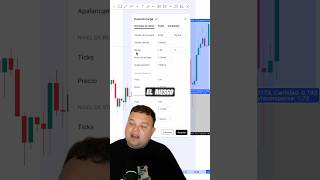
This video teaches novice traders how to calculate the correct lot size for their trading positions, emphasizing that asking about lot size reveals inexperience. The presenter demonstrates a practical method using a position sizing tool, showing how to input account balance, stop loss level, and risk percentage to determine the exact lot size needed to limit losses to a desired percentage of capital.
Asking what lot size to use in a trading account is a sign of being a novice. The video aims to teach proper lot size calculation to avoid appearing and being a beginner.
When entering a trade, use the position tool. Set the entry point, the stop loss level (where you will exit if the trade goes wrong), and the target objective. Double-click the tool to open the menu.
In the menu, enter your account balance. For example, if you have $2,000, input 2000. For EUR/USD, the lot size is 100,000 units; otherwise, you may need to look it up (e.g., using ChatGPT).
Enter the risk percentage of your capital you are willing to lose on this trade at the stop loss. For example, if you want to risk 1%, input 1%.
Set the quantity precision (decimal places) — recommended to leave at 3. Click accept, and the tool will show the exact lot size needed so that at the stop loss, you lose only the specified percentage (e.g., 1%) of your account.
The key takeaway is that lot size should be calculated based on your account balance, stop loss distance, and risk percentage, not guessed. Using the position tool automates this calculation, ensuring consistent risk management and preventing novice mistakes.
What does asking about lot size indicate about a trader?
It indicates they are a novice.
What is the lot size for EUR/USD?
100,000 units.
00:25
What three inputs are required in the position tool to calculate lot size?
Account balance, risk percentage, and stop loss level.
00:25
What is the recommended precision (decimal places) for quantity?
3 decimals.
00:52
How does the position tool determine the lot size?
It calculates the lot size so that at the stop loss, you lose exactly the specified risk percentage of your account.
00:52
Novice Indicator
Establishes the core premise: lot size questions reveal inexperience, setting the stage for the tutorial.
Account Balance Input
Shows the first concrete step in the calculation, grounding the method in real numbers.
00:25Risk Percentage Setting
Emphasizes risk management as the driver of lot size, a key principle for traders.
00:38Automated Calculation
Demonstrates the tool's output, making the process practical and repeatable.
00:52[00:00] Cuando alguien me pregunta qué lotaje debe utilizar en su cuenta de trading, me demuestra que es realmente un novato. Y es por eso que hoy te voy a enseñar a vos a calcular el lotaje así que dejas de parecer y ser un novato.
[00:12] Cuando vas a meter tu operación en trading vas a utilizar la herramienta de posición. Vas a decir quiero entrar acá, voy a perder acá abajo y voy a ir a buscar mi objetivo por allá arriba. Le vas a dar doble clic a esta herramienta y te va a aparecer este menú.
[00:25] En este menú deberás colocar el número, el balance de tu cuenta. Por ejemplo, tenés 2.000 dólares, pone 2.000 dólares. Si estás operando el euro dólar, el tamaño del lote es 100.000 y si no, te va a tocar buscarlo en ChatGPT.
[00:38] Luego vas a colocar el riesgo de tu capital que vas a estar arriesgando en este stop loss, en la zona que hemos dicho que donde llegamos vamos a perder. Por ejemplo, si vamos a perder en 1%, ponemos 1%. Y abajo de todo dice precisión de cantidad.
[00:52] Acá le vamos a poder poner los decimales. Yo recomiendo que lo dejemos en 3. Le damos a aceptar y acá te va a indicar en cantidad que lotaje debes utilizar en esa operación para que en ese stop loss pierdas el 1% de tu cuenta.
⚡ Saved you 0h 01m reading this? Transcribe any YouTube video for free — no signup needed.