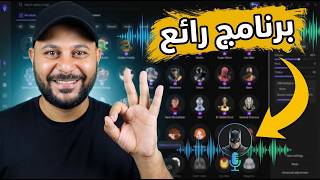

Imagine Changing Your Voice to Trump in Real Time
45sThe shocking reveal of real-time voice morphing to a celebrity creates immediate curiosity and shareability.
▶ Play Clip"Delivers a solid demo of the voice changer with clear instructions, though it's essentially a product showcase rather than a deep technical guide."
This video demonstrates the Esos VoiceWave program, a real-time AI voice changer that allows users to alter their voice in live conversations, games, and content creation. The presenter walks through the interface, showcases various voice options including famous personalities and characters, and explains how to integrate the tool with platforms like Discord and Roblox.
The video introduces the concept of real-time voice changing using AI, highlighting its use cases in gaming (e.g., Fortnite), meetings, and content creation.
Esos has been around since 2004, indicating reliability. The program is compatible with Windows 10 and 11. The download link is in the description.
The first step is selecting the input microphone and output device (e.g., headphones or AirPods) in the program's interface.
The main feature offers over 100 voices, including famous personalities, sports commentators, game characters, and cartoon characters. The presenter demonstrates changing to Trump's voice.
The program categorizes voices (e.g., Female, Anime). The presenter tries voices like Flora, Joker, and Batman, showing the variety.
The Soundboard is a library of audio files. The Community Library contains voices created by users.
Users can import an audio file and change the voice in it, not just in real-time. The presenter demonstrates this with a sample.
Users can clone any voice by uploading an audio recording (1-30 minutes). The presenter cloned his own voice and named it 'Ayman'.
The program provides tutorials for integrating with Discord, Roblox, Skype, WhatsApp, Zoom, etc. The key is selecting 'VoiceWave Microphone Esos' as the microphone in each platform's settings.
The program offers free trial voices, but full access requires payment. The presenter concludes the video.
Esos VoiceWave is a powerful, user-friendly tool for real-time voice changing with extensive voice options and cloning capabilities, suitable for gamers, streamers, and content creators. While it offers free trial voices, a paid subscription is required for full access.
What is the name of the AI voice changer program demonstrated in the video?
Esos VoiceWave
00:31
How many voices are available in the Real-Time Voice Changer?
More than 100 voices
01:18
What are the minimum and maximum durations for an audio recording to clone a voice?
Minimum 1 minute, maximum 30 minutes.
04:43
What microphone option should you select in Discord to use the voice changer?
VoiceWave Microphone Esos
05:58
What is the name of the cloned voice created by the presenter?
Ayman
04:59
Over 100 Voices Available
Highlights the extensive library of voices, making the tool versatile for various use cases.
01:18Voice Cloning Capability
Demonstrates a powerful feature that allows users to clone any voice, opening creative possibilities.
04:28Integration with Popular Platforms
Shows practical steps to use the voice changer in Discord and Roblox, increasing its utility.
05:30[00:02] Today's explanation of the program is truly fantastic. It allows you to change your voice in real time using artificial intelligence. Gamers use this in games like Gamers use this in games like Fortnite, or you can use it in
[00:16] meeting and chat programs. You can also use it if you're creating content and if you're creating content and stories and want characters with different voices. It's very interesting, so let's try it together. We'll be using the Esos VoiceWave program.
[00:31] using the Esos VoiceWave program. Esos has been around for about 21 years, since Esos has been around for about 21 years, since 2004, which indicates that their programs are very powerful. I'll leave the link in the description and in the pinned comment. This will open the
[00:45] download page, and it's compatible with Windows operating systems, whether Windows 10 or Windows 11. I've already downloaded the program, and this is the main interface, as you can see. The first step is to choose the microphone that the program will use to record the sound. So, we click
[01:03] on this arrow and select the microphone we'll be using. In this case, I'll be using my microphone. So, regarding the sound that will come out, I chose headphones or AirPods. Now let's go to the first option, Real-Time Voice Changer, which
[01:18] changes the voice in real time. It starts by showing you all the voices available in the program—more than 100 voices, guys! Whether they're famous personalities, sports chat personalities, they're famous personalities, sports chat personalities, game characters, cartoon characters, and so on.
[01:32] For example, I want my voice to change to Trump's voice right now, so I select it like this and turn on the microphone. You should now hear Donald Trump's voice: China, China, China, China, China. You'd think
[01:46] China had something on his mind. I want to hear my own voice at the same time, so I press here. want to hear my own voice at the same time, so I press here. I can still hear my voice as Trump's. I want to turn off the sound here. I want to cancel the voice change effect, so I press here. You should now
[02:02] change effect, so I press here. You should now hear my voice. I want to go back to the character's voice, so I hear my voice. I want to go back to the character's voice, so I press here. The other person should now hear press here. The other person should now hear that character's voice. For example, I'll choose the second character,
[02:14] that character's voice. For example, I'll choose the second character, Gear. You should now hear that girl's voice. Welcome to the Question Mark channel! Let's try Mickey Mouse. It's really fun, guys. I'm speaking in this character's voice right now. You can use this feature
[02:31] in live streaming programs, games, chats, and more. Now, let's go to the categories above. For example, "Female" will give you the female voice. Here are all the characters. For example, let's use
[02:44] Flora's voice. I don't know who Flora is, but you should be hearing her voice now. Let's scroll down a bit. We can Let's scroll down a bit. We can try this voice. I'm speaking in this
[02:58] character's voice, so you should be hearing it. You can do really cool things with these voices here, do really cool things with these voices here, for example, anime characters and others. These are for example, anime characters and others. These are all characters you can try yourself. Let's
[03:12] try the Joker's voice. This is the Joker's voice, guys, just like you hear. Now let's try Batman. This is supposed to be Batman's voice. I'm Batman, and I'm speaking to you
[03:25] This is supposed to be Batman's voice. I'm Batman, and I'm speaking to you from the Question Mark channel. If you like the voice, give it a Of course, guys, if we sit down... Let's try these voices. We'll never finish, so I'll move on to the second option, these voices. We'll never finish, so I'll move on to the second option, which is Soundboard. This is like a library of
[03:38] which is Soundboard. This is like a library of audio files. You can use these audio files; they're all just voice files, as you can see here. Now, here's the Community Library. These are the voices belonging to the program's users. The next option is if you want to change an existing voice. For
[03:54] if you want to change an existing voice. For example, if you have an audio file and want to change the voice, you're not speaking in real time. So, you click on Import and choose the voice. It starts uploading the audio. Here's the actual audio. For example, I want to change this voice to the voice of
[04:12] this character. Which character? The character is: " Peace be upon you and God's mercy and blessings. Welcome. How are you? May you always be well, healthy, happy, and safe." This is the same idea as changing the voice, but it's a recorded voice or one you have. Here's the Clone Voice option. If you
[04:28] Here's the Clone Voice option. If you want to clone anyone's voice or your own, you can do that. All you have to do is click on Clone Voice Now and start uploading an on Clone Voice Now and start uploading an audio recording of the voice you want to clone. You want to clone it or take
[04:43] its voice tone, but it shouldn't be less than a minute, meaning it shouldn't be less than a minute and shouldn't exceed 30 meaning it shouldn't be less than a minute and shouldn't exceed 30 minutes. After that, you press on Clown Now. By the way, I cloned my voice, so if we go here and go to Custom, I'll find the voice. I
[04:59] named it Ayman. Let's play it. My voice should have been changed to the voice of the character I cloned from, which is Ayman's voice. I don't know if there's a difference or not. I'm
[05:13] supposed to be speaking with my actual voice now. I've disabled this microphone. So now it's the cloned voice. I don't know if there's a difference or not. So if there is a difference, write to me in the comments. Okay, you're telling me that this program changes the voice in real time in programs, games, etc.
[05:30] How can I do this? You go here to this option, and it opens a tutorial showing you all the platforms. For example, here's Discord. If you click on it while you're in the platform, you select
[05:42] click on it while you're in the platform, you select Settings, then you choose Microphone or Settings, then you choose Microphone or Sound (Voice or Audio). Then you choose Microphone, and then you'll find something called VoiceWave Microphone Esos. You'll see this name as soon as
[05:58] you download the program; select it. That's how you enter Discord, and you'll be using the voice you change through the program. Here's an example for games, like Roblox. It's the same
[06:13] example for games, like Roblox. It's the same story. You can change it for Skype, WhatsApp, Zoom, and all the other apps. I've provided a tutorial for each one. The idea is that you go to Audio, change the microphone, and choose an Esos microphone so that any voice
[06:30] you select will be changed on the platform you chose. Of course, the program gives you some free trial voices, but to use all the voices, you have to pay. The
[06:42] use all the voices, you have to pay. The pricing of the program is finally here. I hope this video was helpful to you. Peace, mercy, and blessings of God be upon you. to you. Peace, mercy, and blessings of God be upon you.




⚡ Saved you 0h 06m reading this? Transcribe any YouTube video for free — no signup needed.