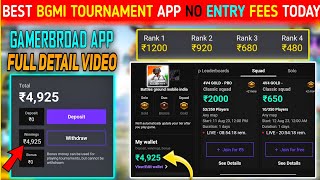
Earn ₹9 per match with Gamer Board!
45sHigh earning potential per match sparks curiosity and desire for quick money.
▶ Play ClipThis video provides a step-by-step guide on how to use the Gamer Board app to earn money by playing BGMI tournaments. The creator demonstrates the entire process from downloading and registering to joining tournaments, forming teams, and earning rewards.
The video begins with downloading the Gamer Board app from a provided link, installing it, and showing the download progress.
After installation, users must create an account by entering their name, phone number (for OTP), date of birth, and optionally a referral code. If already registered, they can sign in directly.
Users select a tier (e.g., G tier, Diamond Crown) and game mode (solo, duo, squad) to participate in tournaments.
For duo or squad modes, users must create a team by naming it and inviting teammates via a shareable code or link. Solo mode requires only registration.
The app displays match history, total points, and rank points. The best three games are counted for scoring.
To play, users must grant permissions (overlay, battery, etc.) and enable recording via the Gamer Board app. The recording indicator must turn green.
Players must link their BGMI ID in the app and play only ranked matches for the tournament to count.
A chicken dinner gives 30 points; 90 points from three best games can earn rewards. Top 30 in solo get prizes.
The creator shows a withdrawal of ₹180 and a balance of over ₹4900. Referral bonuses of ₹30 are available for both referrer and referee.
The Gamer Board app allows users to earn money by playing BGMI tournaments. By following the steps outlined, users can register, join tournaments, and earn rewards based on performance.
"The title promises earning money via the app, which the video delivers, but it's more of a tutorial than a get-rich-quick scheme."
What is the first step to use the Gamer Board app?
Download and install the app from the provided link.
00:02
What information is required to create an account?
Name, phone number (for OTP), date of birth, and optionally a referral code.
00:44
How do you join a duo or squad tournament?
Create a team by naming it and inviting teammates via a shareable code or link.
03:06
What permissions must be granted for the app to work?
Overlay, battery, and other permissions; recording must be enabled and indicator turned green.
07:17
What type of matches should be played for the tournament to count?
Only ranked matches; unranked matches do not count.
09:06
How many points does a chicken dinner give?
30 points.
10:59
How many of your best games are counted for scoring?
Three best games.
06:35
What is the referral bonus amount?
₹30 for both the referrer and the referee.
14:09
How can you withdraw earnings from the app?
The video shows a withdrawal of ₹180 and a balance of over ₹4900, but does not detail the withdrawal process.
13:00
Scoring System
Clearly explains that a chicken dinner gives 30 points and the best three games are counted, which is key to earning rewards.
10:59Permission Setup
Details the necessary permissions and recording setup, which is crucial for the app to function correctly.
07:17Referral Bonus
Highlights the referral bonus of ₹30 for both parties, offering an additional earning method.
14:09Withdrawal Proof
Shows actual withdrawal and balance, proving the app's legitimacy and earning potential.
13:00[00:02] brought the full detailed video of Gamer Board, so you can see, my charger is ₹9, the gamer has to read it inside the application, then what all people have to do to play inside the Gamer Board, I will detailed video of Gamer Board, okay, so as soon as you guys
[00:16] write in the description and in the comment box, then after clicking, some such type of interface is going to come, okay, what click on download up here, okay, simply click on download up, after that click on the download new which will come, after that you can go to the details and see
[00:31] how far the download has gone, okay, as I am seeing, you can see my download, my 90 B 100 B has been completed, the download is complete, now I will simply click on you and then I will install it, after initializing, okay,
[00:44] I will tell you guys further in the video how we will open the app like this, okay, after opening you, how to see the full details inside When you get it, then what do you have to do? You have to create an account, okay, put your name, okay, in the first place you have to put
[00:59] my greetings, you have to put your name below as well, put a number, an OTP will come on that number, okay, and after that select the date of birth, and if you download from my link, then there is no need to give a referral code, you
[01:14] just have to right click and after that click on continue, okay, so simply this is the entire process, how do you have to register, and if you have already registered, then you just have to enter the number here, on the number the OTP will
[01:27] come, after entering that OTP, everyone will be able to login simply, like I will do it here, I will click on sign in, after clicking on sign in, I had registered with my friend's number, okay, I will enter that number here, after entering this I will
[01:39] a coin will also come on that number, you people should first create a credit account, okay, after that if you people uninstall If you do it etc. then you guys can sign in like this, here I will copy my gamer vote which has come, I will
[01:52] copy it on the OTP, after that I will put it here, after putting it here I will click on verify, as you can see my account has been opened, so keep watching the video completely, you will get full information on
[02:07] how to start the glamour board, how to make us rebel etc., I will tell you everything in this video, so first of all you will have to select the tier here, corner here, solo dude squad, now if you want to
[02:22] inside your game, you guys have to select that arrow, yes, it means you are on the G tier, you guys Diamond Crown Glass are also in this, okay, that is related to the tier, okay, in all if you want to play solo, then do it on solo, this If you want to buy two then do it
[02:38] for two, if you want to play squad then do it for squad, it's a simple thing, then people just do it for all three, you guys are in the tier, go inside the game and see, we can after selecting it, if you want to join another tournament, then we
[02:52] can see the squad one here, solo 2, it is shown in three places above, then there is some problem in the you can register them, so simply here five rupees are coming for join, we have to click on it, so I am
[03:06] showing with my finger here, which is infanu, after clicking on it, click on create team, after that you have to name your team, what will you name your team, keep any name as per your wish, okay,
[03:21] name the team, okay, I will write a black name, after that I will click on submit, as soon as I click on submit, here I have an invite If there is no team option then I will simply click on invite team no. After that
[03:34] I will share it with my friends who are from my tubemate, I will I will send this link to their number and as soon as they download it and install it, if
[03:46] they have not downloaded the gamer application then join the team simply by entering this code there, I will also tell you later
[03:58] how you have to enter that, okay so this is the be on code, you will enter this code or if people download this gamer application in their mobile then as soon as they people download this gamer application in their mobile then as soon as they
[04:13] button, okay, then people can join directly and we join directly and we can also search for our team, okay, so I am not even searching that much, right now I will just show you a simple thing,
[04:25] how we can join the team You can join your guy, okay, how can you join your teammates in your team, and the thing from the SIM is solo, there is two squats, the joining thing, so in solo it means it is a very simple thing, if you register yourself then it will be done in a very simple way,
[04:40] ₹5 is going to join, just click on this and do it, your joining is done, now there is no hassle in solo, it is done easily in 16, okay, so you can see that I click on the play option also, then my game will open directly, so I will first
[04:54] after that I will register on two and show you how it is easy for us to register, click on five rupees, after that click on join five days, after that there is also the option of create team, you will have to call your teammate, in this also you will play in two, so
[05:09] so I will write the name of the black, after that I will click on submit and all That means the name of the team will be there, okay, after that you guys have to click on invite teammates, share it with your teammates in WhatsApp, it is a simple thing and
[05:24] people can share it in WhatsApp or this code, you can also share this code, WhatsApp and then I will create it and show it to you guys, click on create box, here I will enter the name of a team,
[05:39] click on submit, okay, after that if you click on invite team, this code is coming, this is a code from the bottom, with this code you can join the team of the team, you can join the team, okay, so simply
[05:54] copy it and tell your teammate, brother, this join option is coming, you can see it next to it, I will go back and show it to you guys directly, back and show it to you guys directly, click on this, after this enter here By
[06:07] clicking on the code, whatever code you gave here, put that code here, then you will be able to open it directly, okay,
[06:20] antivirus will be able to join below, okay, it is a simple thing, here in the squad he has nothing to do with the squad and by doing this you will have to join his teammates, okay, it is a very simple thing and then you click from here, this will
[06:35] show your entire maths history, how much did you do yesterday, how much is your total point, how much did you get, and what do they say, how many behind points do you need, that is, how many more points do you need, now people and reverse etc. everything will be visible here, so you
[06:48] etc. everything will be visible here, so you given rank points and there will be one point for each yesterday, okay and your best three games will be counted, whatever number of matches you play in your day, for this gamer you turn on the application, whatever number of
[07:02] matches you play, this will be played with audio and your three games will be counted, which will be the best three games, okay And here you can also see your reverse by coming to the rights option here, hashtag one is getting stick again, you are getting 920,
[07:17] gas, you guys can earn a lot here, gas and in solo, the top 30 people are given a price, okay, in solo, I will join you in a solo match and playing, I will show you how you will have to play max, okay,
[07:32] here the play option is coming, you guys click on it, okay, solo do it, guys click on it, okay, solo do it, in four, now people will have to play this and in two, teammates will have to play together, okay, then it will be counted now, otherwise it will
[07:44] not be counted, and in solo, if you do this, then permission to the gamer board, then look here, click on the application, after that, what is coming here, turn it green, okay, after turning it green, go back, okay,
[07:58] after backing, this first right click is done, so it is giving us permission on battery permission. click on the battery option and click on allow here, okay, after that the third one and this one has to be ticked as well, then by clicking on it too, the dog will be taken to here and settings,
[08:13] so what you have to do here is click on it and select always and after that simply back out, after backing out click on continue, these three permissions will come in the bus, after giving these three permissions click on
[08:25] from here it is start recording, so we are clicking on this and your recording will start automatically, okay and here this gas, here the GB option is there in red color on the light side,
[08:39] you just have to make it green, okay, to make it green, the game will open, okay, after that I will show you the process, how to make it green, only after making it green you have to play max, before that if I play it, it will
[08:53] remain red, then your maths will not count, you will play in vain, okay, so you guys can do this play in vain, okay, so you guys can do this after opening it, there will be a helmet option in the left corner,
[09:06] after cutting it, you can see here on the left corner, there is a helmet option, you can see this on the left side, there is a helmet option, click on the left side, then you go here, then your profile will be Facebook here or when
[09:20] you do this for the first time, then your ID will come, from here you will have to look and enter your ID side by side, so you can do this, okay, I have already done it, mine is also not there already, okay, so you people are just
[09:33] writing the ID there, okay and inside it you can play only ranked matches, you can play any mode inside the ranked or my mark sign of living etc. will have to be played inside the ranked only, if you play unranked then it will not be counted, so simply
[09:47] definitely some relief in the game as well, I will show you guys the rules, what happens after doing it and what do I have to do, I mean gas, in this video you guys will get to see everything, now how do people play tournaments in the gamer application,
[10:01] okay, so I will explain it to you guys how to play maths, how to do videos and what do you call your tyre etc. I have shown everything first and if there is anything left then you guys will not show it here at the end, okay, so
[10:14] you guys watch the entire video without skipping and if you like it then like etc., okay, so you can watch it here, I have started a match in solo, so guys, there is no hassle of passing out some ID here, it is a relief, you guys will do normal classic mass,
[10:27] your screen will be recorded in normal classic maths, screen recording will be on inside the gamer board application, so umar guys, in this video I will also give you some tips and tricks on
[10:42] how you can do well in the match Take out the special coin, how to raise the price of Blue Hashtag On, guys, watch without skipping, I will tell you in the end, okay, so
[10:59] if you do 15 tomorrows and take out a chicken dinner, then people get 30 points, so if you get 30 points like this, out of three, if you get 90 points, then people will get hashtag on, okay, that
[11:19] see further, gas, there is a whole squad, I have just rolled it and you can see what is inside them, I will
[11:37] kill this one too, come on, I have killed Ishq also, they were a little normal type of guys, after killing all four of them, I will get up with the bomb, after killing with the bomb, I will show you guys
[11:49] what you have to do, okay, so what will I do with the bomb, after that I will go inside this bomb, okay and gas, I am going to explain everything to you guys step by step, step by step,
[12:03] [Music] please wait, you guys, nothing like this etc. Okay, wait a little bit so that your screen can be captured, after that you have to
[12:16] click on this option, so after clicking on the first option, then click on it, then wait a little bit, so you guys don't have to get greedy right away, there is a little wait here, fencing your kill, then if people
[12:31] face here, then they should also know exactly how much yesterday happened, so after the fencing etc., you guys are done, all you have to do is this much, during the time of playing the match, you just have to take care of these things, then yours will be done, okay, and
[12:45] show you guys a series of videos, how to make videos etc., so if you guys see, then 4920 here on me and gas I will click inside this and it will show you how much I have done from this up, okay, just like I
[13:00] click on this, gas here you can see, it is read inside my bonus, whatever was inside the money wing, I had withdrawn, so I will want to go down, down to know After that, let me show people how many transactions I made, okay, you can see here,
[13:12] I made 180 rupees here, you can see here, and at your own time, I have more than 4900 rupees, so I have this bonus, I can play pet messages from that bonus, if there is more ending in it, then I will
[13:27] put the video of that too in the video, and you guys play till then, okay, I will also play, we will play together, after that a video will come on how to make a video, anyway, I have already made a video on Ujjwal, if you guys haven't seen it, you
[13:41] can go to my channel and watch it, I have already uploaded the video of the gamer board because right now it is in my wing, otherwise I cannot make a video right now, screenshot, that is, show you the history, so that you guys can be sure that this app is completely
[13:55] trusted and absolutely real, okay, and gas, we can click on invite friend here and gas, we can click on invite friend here and can earn a lot by playing tournaments like
[14:09] gas, you can see me inside, I have shared it with my teammates here and on WhatsApp, if I share it and they download it, then I will also get a download it, then I will also get a bonus of ₹30 and they will also get a bonus of ₹30, so by doing this
[14:21] bonus of ₹30 and they will also get a bonus of ₹30, so by doing this can earn a lot by sharing it and gas, if I have missed anything then you can tell me in the comments, what problem are you facing, I will reply to you guys
[14:35] and the rest, whoever gets this much in this video, in the next video, till then gets this much in this video, in the next video, till then bye gas
⚡ Saved you 0h 14m reading this? Transcribe any YouTube video for free — no signup needed.