
Why Your YouTube Views Are Stuck
42sTaps into the universal frustration of low views and reveals a hidden mistake, making viewers feel understood and eager for the solution.
▶ Play Clip"Delivers on the promise of more views with a clear, actionable scheduling strategy, though some fluff and a subscribe plug pad the runtime."
The video explains why YouTube videos often fail to gain views, attributing the problem not to content quality but to the upload method. The creator advocates scheduling videos instead of making them public immediately, allowing the algorithm time to analyze and target the right audience. The video provides a step-by-step guide on scheduling, including optimal timing and the use of third-party tools, and contrasts scheduling with premiering.
Creators often make videos public immediately, leading to poor performance because YouTube hasn't had time to analyze the video and target the right audience.
YouTube tests new videos by showing them to a small audience. If the audience is wrong, they ignore the video, causing YouTube to deem it useless and stop promoting it.
Title, description, tags, and thumbnail are signals that help YouTube understand the video. Immediate public uploads don't give YouTube time to process these signals.
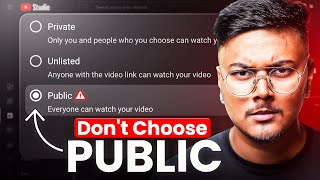
YouTube offers visibility options: private, unlisted, public, and scheduled. The creator recommends scheduling for most videos.
Scheduling gives YouTube time to read the title, description, tags, and test the thumbnail, so the video is pushed to the right audience when it goes live.
For mobile uploads, use tools like studyu.com to schedule, as they offer options to publish to subscription feed and notify subscribers, which the app may not do.
Schedule at least one day ahead to give YouTube processing time. Best times are 7-9 AM and 5-8 PM when audiences are most active.
Once scheduled, YouTube automatically publishes the video at the chosen time. You can schedule multiple videos in advance for consistency.
Premieres are suitable for special events like music launches or short films, but not for daily content. Scheduling is better for regular uploads as it gives the algorithm time to process.
Don't blame YouTube; use scheduling to give positive signals. After uploading, there are additional steps to boost growth, covered in a linked video.
The key to getting more views is not the content quality but the upload strategy. Scheduling videos gives YouTube time to understand and target the right audience, leading to better performance. Avoid premiering for regular content and use scheduling for consistency and algorithm optimization.
What is the main reason videos fail to get views according to the video?
Uploading videos as public immediately, not giving YouTube time to analyze and target the right audience.
00:02
What are the four visibility options YouTube provides?
Private, unlisted, public, and scheduled.
02:33
Why does scheduling help the YouTube algorithm?
It gives YouTube time to read the title, description, tags, and test the thumbnail, so it can push the video to the right audience.
03:00
What are the recommended times to schedule videos?
7-9 AM and 5-8 PM, when audiences are most active.
04:47
What is the difference between scheduling and premiering?
Scheduling gives the algorithm time to process the video, while premiering creates hype but doesn't allow processing, leading to lower CTR and watch time.
05:41
What tool does the creator recommend for scheduling from mobile?
studyu.com, because it offers options to publish to subscription feed and notify subscribers.
03:40
Algorithm Testing
Explains the core mechanism of YouTube's testing phase, which is crucial for understanding why videos fail.
00:29Scheduling Benefits
Highlights the key advantage of scheduling: giving the algorithm time to process signals.
03:00Optimal Scheduling Times
Provides specific, actionable times that can increase click-through rates.
04:47Premiere vs. Schedule
Clarifies when to use each feature, preventing common mistakes.
05:41[00:02] make is that as soon as they upload their video, they make it public and then wonder why they are not getting views? Why isn't YouTube's algorithm pushing and why aren't my subscribers increasing? You think the video is weak or
[00:16] blame the editing and sometimes you even doubt the thumbnail. But what is the real reason? Just a small setting. Look, YouTube is like a machine that tests videos. As soon as your video becomes public, he shows it to some people.
[00:29] Now, if at that time the YouTube algorithm does video goes to the wrong audience, wrong people and when those wrong people ignore that video, then YouTube thinks that your video is useless and
[00:44] all your hard work goes waste. I remember the first time I uploaded a video directly to the public, the views were so slow that I thought maybe YouTube was against me. But the truth is that YouTube was not against it. It was my mistake. And in this video I am going to show you the correct
[00:58] method by which you will be able to prepare your videos properly for YouTube. So that YouTube's algorithm doesn't have to send your videos to the wrong people. Rather, take it to exactly those people
[01:11] who want to watch your videos. And only then will you get more views, more subscribers and real growth. Now imagine you made a video, edited it , added a thumbnail and without thinking directly clicked on public. You think the
[01:25] views will come quickly. But in reality you have made a big mistake. I have caused my own loss. Why? Because YouTube did not get time to understand your video. , analyze your thumbnail , check your description and tags.
[01:39] All these things are signals to the YouTube algorithm. But when you suddenly make your video public, YouTube problem is that YouTube tests every new video. Meaning he shows it to some people first.
[01:53] If they don't click or just watch for a while and then leave, and there's no need to show it to people. And then we get the results, the video gets subscribers and then the video stops at one point. 100 views 200
[02:07] views, this happens often. And this is not just about one video. If you make the same mistake again and again, YouTube leaves your channel with the wrong audience. Meaning, the upcoming videos will also be shown to the wrong people. All the
[02:20] hard work will go waste. In simple words, you yourself have slowed down your channel. So now the question arises, if we do not make the video public directly then what is the right way? I tell you. So when you upload a video, YouTube
[02:33] gives you visibility options. You get options like private, unlisted, scheduled and premier. unlisted, scheduled and premier. want, you can send your video to someone through email. Second unlisted
[02:47] means only those who go through the link will be able to watch the video. If you have not given the link and have not be able to see the video. Third thing public. You know what this means, the video goes live instantly for everyone and this could also be your mistake. Last
[03:00] comes the schedule. This is the best option for YouTubers every time. Every big YouTuber never makes his videos public. I don't either. We schedule. Why? Because when you schedule a video, YouTube gets time to
[03:13] properly read the title description tags , test the thumbnails and then tailor the video for the right audience. This means that when your video finally goes live, YouTube is already prepared, ready to
[03:27] push it to the right audience. YouTube doesn't require much effort. here's a pro tip I want to share with you. If you are uploading from mobile then do If you are uploading from mobile then do
[03:40] Go to studyu.com. Schedule the upload from there. Because there you get the option to publish to subscription feed and notify subscribers. If you upload from the app, sometimes it happens that the
[03:54] already have a subscriber base, they do not get notifications. This happens quite often. Now suppose you have decided to schedule the video. Now the question arises when to schedule and how to do it so that our video
[04:07] gets maximum benefit. Let me explain all this in just three steps. But before that, one more important step remains. Subscribe to this channel. On this channel, I keep bringing such YouTube related videos.
[04:19] help you a lot in growing on YouTube. So if you want to grow on YouTube then go down and press the red subscribe button. Now the formula for scheduling videos is very simple. First of all, set the correct date. If you're
[04:33] uploading a video today, don't schedule it for today. Do you understand? Don't make it public. Don't send it in front of people. Please give me time one day ahead. Like tomorrow or the day after. This gives YouTube proper time to process your video and
[04:47] find the right audience for it. Second thing, select the right time. Now when it comes to time, the best time is when your audience is active. And generally people are more active on YouTube from 7 to 9 am in the morning and from 5:00 to 8:00 in the evening.
[05:01] During both these times the audience is more free and the chances of your video getting clicked increase significantly. And the third and last thing is relax. You don't need to be online anymore. Meaning once you
[05:13] schedule the video. YouTube will automatically make your video live and show it to the right audience at the right time that you selected. And the most important thing is that you can upload and schedule as many videos as you want, 5 to 10, 20 in a day.
[05:29] holiday. You uploaded 10 videos in one day and set one video for each day. Schedule a day or two and the videos will be uploaded automatically. It will be published. And by scheduling videos like this, you give time to the algorithm
[05:41] and also create consistency for yourself. Now there is another option while uploading in which many users get confused. Premiere it's Vaisant. It sounds very cool. The video will premiere. People will wait, the chat will be live.
[05:55] But the truth is, premiering isn't perfect for every video. means that YouTube shows the poster of your video even before it goes live.
[06:08] starts you can have a live chat with everyone. Now this thing seems right for those creators who launch music , launch short films. The trailer, comedy skits are doing something big which is generally not seen after a long time. Meaning,
[06:20] where people genuinely get excited. This video will be released on this date at this time. But if you are creating daily videos like tutorials, tips, daily vlogs then there is no point in premiering every video. Why? Because YouTube does
[06:34] not get time to process it. The video will go live in the hype but the algorithm will get will be the results? CTR down, watch time down and your motivation gone. Instead, if you use a schedule, YouTube gets proper time. To understand your video.
[06:47] Title, description, thumbnail, tags all get processed and when the video goes live it is ready for the right audience. Meaning you get a natural push. But yes, Premiere also has its advantages. Those are advantages in their own place. Double
[07:01] notifications, all these things but only for special videos and for normal growth and basic consistency, daily uploads, my schedule is best. And you go to the comment box below and tell me how you used to publish your videos till now. By going
[07:13] direct public, scheduling or premiering. Let's see which method most people use. Tell the truth. So now it is clear to you that the fault on YouTube was not of your video but only of your uploading habit. Let me
[07:28] confusing YouTube. Scheduling means YouTube is ready and your video is in front of the right audience. Premier means only for special locations. Don't consider YouTube your enemy. This machine is made for your growth. He just needs the right signal.
[07:43] correctly, you are giving positive signals to the algorithm and once your videos start reaching the right people, growth will start automatically. increase, watch time will boost and your motivation will double again. And now the
[07:58] next step is very simple. It is also very important to know what to do after uploading the video. Because 50% of the work is uploading videos. But the remaining 50% work starts after uploading the video. Then click on this video.
[08:12] In this, I have told you five things that you should do after uploading every YouTube video, due to which your growth will be 10 times faster and if you miss this then your competition will definitely overtake you.

⚡ Saved you 0h 08m reading this? Transcribe any YouTube video for free — no signup needed.