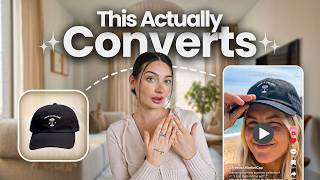

AI UGC Videos: No Product Needed
44sHigh curiosity gap about making product videos without physical inventory, appealing to e-commerce sellers.
▶ Play Clip"Delivers on the promise of showing how to make AI UGC videos, though the 'make money' aspect is implied rather than proven."
This video demonstrates how to create UGC-style marketing videos for print-on-demand products using AI, specifically through the Kittl design platform. The creator shows a step-by-step process of turning product mockups into realistic video content, highlighting the efficiency and cost-effectiveness for sellers who don't have physical products on hand.
The video introduces the concept of making UGC-style videos for print-on-demand or digital products using AI, which is a game-changer for sellers who don't have physical products to film.
Print-on-demand sellers don't have the product in hand to take videos, and making videos for many products is expensive and time-consuming.
Kittl is an online design platform, the creator's main choice for print-on-demand products, now offering video creation within the same workflow.
Under the templates or AI hub section, Kittl has released new UGC templates that can be customized with your own product images.
Kittl Flow guides you through creating a flow: start with a product picture, create a video, and generate the full scene.
The process involves uploading a product mockup (e.g., from Printify), removing the background, and placing it into the template.
After creating the product photo, you can generate a video, adjusting prompts for voice, shot, and ratio (e.g., 9:16 for short-form content).
Generating the video takes a few minutes and uses AI credits, but it's much faster than filming yourself.
The generated video looks realistic and can be downloaded, with the option to add your own audio or regenerate with different prompts.
The creator demonstrates with a hat, showing that the process works for different products, even if the template shows a different item.
Kittl offers many templates like outfit switch, unboxing, and scripted videos, providing numerous opportunities for marketing.
The creator shows examples with a T-shirt and a tote bag, emphasizing the realism and potential of AI-generated UGC videos.
AI-powered UGC video creation through Kittl offers a fast, cost-effective way for print-on-demand sellers to produce marketing content without physical samples, with realistic results and extensive customization options.
What is the main problem for print-on-demand sellers when creating marketing videos?
They don't have physical products on hand to film, and making videos for many products is expensive and time-consuming.
00:14
What is Kittl Flow?
A process in Kittl that guides you through creating a flow: start with a product picture, create a video, and generate the full scene.
02:09
What is the recommended aspect ratio for short-form content on Instagram, Pinterest, or TikTok?
9:16
03:56
How long does it take to generate a video in Kittl?
A few minutes, typically around 3 minutes, and it uses AI credits.
04:09
What can you customize in the video generation prompt?
You can change the way the person looks, the voice, the shot, and the ratio size.
03:30
What is the creator's opinion on the AI-generated audio?
They would not use the AI audio and prefer to add their own music or voiceover.
05:19
Game-changer for sellers
Highlights the core value proposition: AI UGC videos solve the problem of not having physical products.
00:14Kittl Flow simplifies creation
Introduces a structured workflow that makes the process accessible to beginners.
02:09Realistic AI video result
Demonstrates the quality of the output, showing that AI can produce convincing UGC content.
04:50Variety of templates
Shows the breadth of options (outfit switch, unboxing, etc.) that can be used for different marketing angles.
07:07Potential for growth
The creator notes the product is new and expects it to improve, indicating a forward-looking opportunity.
08:49[00:01] make UGC style videos for your print-on-demand or digital products using AI. And I have tried many different things before, and this is so exciting because it completely changes the game for us sellers that don't sell
[00:14] physical products that we have on hand. If you sell print-on-demand products, print-on-demand supplier that's shipping your products for you as they're sold, meaning that you don't actually have that product in hand to take a video of
[00:27] a sample. And when you're selling lots of different products, it can get expensive and time-consuming to make the videos yourself. And so, in today's video, I'm going to show you how we can make viral UGC videos using AI. So, for
[00:41] today's video, we're going to be using Kittl. Now, Kittl is a design platform online that if you follow me or know my channel at all, you've probably seen me talk about them because they are my main design platform of choice for my
[00:53] print-on-demand products. However, as I said, now it's a game-changer because within the same flow of creating my product photos, I can now make videos and even content in just a few clicks. And of course, Kittl is linked below for
[01:06] showing you for free. And I also have a discount code up for any pro plans if you choose to actually sign up for one of the paid plans like the one that I use so that I can get more downloads and do a lot more with the platform. So, on
[01:18] do a lot more with the platform. So, on here, I just went to the actual Kittl section. If you go under templates though or the AI hub, that's where you're able to find everything for this
[01:30] process. And they just released a bunch of new UGC templates. You can make UGC to click this here. I'm just going to search UGC, and it's going to show me all of the templates. So, a lot of movement going on here, but just to show
[01:44] you, all these products can be used and made into videos of our product instead of the product that they're showing. So, for example, if I was selling a hat, I could replace this for a hat. I I change the shirt on this girl however I want to
[01:57] do it. I'm going to select this one here. It shows you a little preview of what the video will be like before we switch it out with our product. Kittl walks you through this whole process through what they call Kittl Flow. So,
[02:09] Kittl Flow is essentially a way that you're going to be making a flow to start your art. So, you would start out with a picture of your product and then create a video of that and then further on to actually make the full generated
[02:22] scene. So, what we're going to do first is create our product in scene. You'll your product in [music] scene." So, I'm going to bring in this little crop top that I have. This picture is just a normal mock-up from Printify with a
[02:35] background and then I'm just going to remove the background of the product. And then I'm going to delete that, remove this background, and then bring my product in here. Okay. Now, before I hit regenerate, I'm going
[02:47] prompt and make sure that there's nothing that I want to change. Essentially, it looks okay, but if there is something here that says like, "Make you're going to want to delete it. And then I'm just going to hit regenerate.
[03:00] And this is already like built in the flow, right? We have this here, there's built in the flow. So, I'm creating the mock-up for this and then we literally we're finished with this to make the actual UGC video. Okay, cool. So, it
[03:15] made a photo of my product, right? Just in 1 second. Now, I'm going to go over video. I'm going to click down here to the prompt and here you can change out way the person looks, if I want to change the voice, if I want to change
[03:30] the shot, this can all be done or you absolutely can just leave it as it is. One thing I don't want though is the TikTok AI voiceover style. I want it to TikTok AI voiceover style. I want it to be voiced over soft feminine voiceover
[03:43] and see how that works. I might actually take the audio out, but just so you know, you can totally change anything you want here. It works as another AI of prompt. And then here too, if you're creating this for Instagram, if you're
[03:56] creating it for YouTube, you can change your ratio size. The 9 by 16's perfect for short form content on Instagram, Pinterest, or TikTok, or you can change And then I'm going to hit generate, and this does take a few minutes, and it
[04:09] does use AI credits to do. But after it generates, we will have a video version just replaced with our product. And as you saw, I had a starting point, right? It's only been a few minutes, and we already are generating a full video.
[04:21] started with like 3 minutes, so be prepared for that, but still, 3 minutes probably like 10 to 15 to really do this. But in just a few minutes, you can sample, taking all the clips yourself, and all of that can be very
[04:36] time-consuming. All right, so our video just finished, and I'm going to go ahead and zoom in here, and just play it for you.
[04:50] automatically something that we can download, put a TikTok audio over. This could be used on Pinterest. Just look how flawless this looks. And it did actually come with audio. Here, let me play it.
[05:04] with audio. Here, let me play it. >> Let's style this with me. >> Adjusting for the perfect fit. >> It is AI. I honestly, full transparency, would not use that audio, but I would just download this and use it as it is,
[05:19] and add my own music or my own voiceover. Or if I want to, anything that you want to change about this, you can just regenerate the video, can go down here, right? And just switch out anything about the prompt. So, if I say,
[05:32] feminine voiceover style," I'll just delete that and regenerate the clip. Now, I want to show you with another type of product as well. This one here is for a mug, but you could also do it and change it out for a completely
[05:44] different product. So, what I'm going to do is bring in a picture of maybe a hat that I have. Let's bring in this Nezu Martini hat. I'm just going to delete the current photo again. Remove the background, same way we did
[05:58] it before. Bring it in. Okay. Product in scene. Check our prompt. Perfect. but it's going to change the product selling, you know, sweatshirts or something that someone can do like a
[06:12] try-on for, you can still do these videos with a product like this. This is the current video that they have now where they're like showing the product. Okay. There's even a person in it, so we're going to see how it does when
[06:25] we're completely changing the product. Okay. Cool. Now, I'm going to go ahead. Just check this. It seems to be okay. We're going to generate and hope that it creates a product video as well, but with our hat
[06:38] instead of the mug. All right. So, after 3 minutes again, I'm going to zoom in here. We're all seeing this for the first time. Let's see how it goes.
[07:07] I just It's just so insane to me how how many believe I have more that I made, too, which I can show you, but there's so many on here. There's like the outfit switch. Um there's people talking about
[07:20] completely script as well if you want the person to talk about it, unbox the product like this one of unboxing. It's just so cool. There's so many opportunities with it as well, and I think Kittl's really changing the game
[07:33] by offering this to people because again, you're not starting completely something that, at least for me, when I started with AI, like I didn't really "Okay, like how can I come up with this idea to execute a video?" I don't know
[07:48] say. Here's an example of one that I made with a T-shirt from like literal start to finish. And here it is.
[08:10] course, everything can be changed. As I keep mentioning, you can change out the script, you can change what they say. I also made one, I think this is it, with also made one, I think this is it, with a tote bag that came out really well.
[08:22] >> Come with me. I just got this tote bag and I'm taking it out today. >> And we could make another scene and just
[08:35] versions of these as well, and then use them in our marketing. So, I really hope you found this helpful. I think that there is a lot of value in using this. I've tried a lot of UGC different generators, and this is my favorite. The
[08:49] AI characters look so real. I feel like there is so much potential with this, better because this is a newer product. So, I can't imagine where it's going to be in a bit of time. So, Kittl definitely has that down. Of course,
[09:01] like I said, leave any comments or questions that you have in the comment you'll be able to see the link to Kittl to try this out. I did a discount code if you join one of their paid plans, and you can try it out for free under a free
[09:14] that you already have. Thank you so so much for watching. Let me know if you're thoughts are on it, and I hope to see you in the next video.
⚡ Saved you 0h 09m reading this? Transcribe any YouTube video for free — no signup needed.