
Commentary Niche Never Dies
45sOpens with a bold claim that commentary content is evergreen, instantly grabbing attention from creators seeking reliable growth.
▶ Play Clip"Title accurately describes a step-by-step tutorial; the video delivers on its promise."
This video provides a comprehensive step-by-step tutorial on creating viral commentary videos for platforms like YouTube and TikTok. It covers niche selection, scriptwriting, AI voiceover generation, and editing in CapCut, with a focus on leveraging personal interests for authentic content.
Commentary videos with catchy captions and emojis are a durable niche that can lead to rapid growth on platforms like YouTube.
The video promises to show exactly how to make these videos, including finding a niche, crafting scripts, creating AI voiceovers, and editing in CapCut.
Most creators fail by copying random clips. Instead, choose a subniche based on your genuine interests (e.g., soccer, Marvel, pets) to ensure consistency and authenticity.
Ask yourself: 'What content would I enjoy making even if it didn't go viral?' Working from passion builds viral channels, not chasing trends.
This channel focuses solely on Marvel movies, covering mistakes, behind-the-scenes facts, and fan theories. Consistency in one theme leads to success.
This channel uses existing pet clips with engaging voiceovers, averaging over 11 million views per video without filming original content.
Train the algorithm by watching, liking, and commenting on videos in your niche. Also, watch long-form YouTube videos to find unique moments for shorts.
Write a raw description of the video clip, then paste it into ChatGPT to generate a commentary script with a strong hook, smooth flow, and satisfying payoff.
Use 11 Labs to generate realistic voiceovers. Choose a voice like 'Mark' and paste the script. The tool produces professional, human-like narration.
Import video and voiceover, blur text using effects and masks, generate captions, apply templates, add background music from Pixabay, and include red circle/arrow effects from the provided pack.
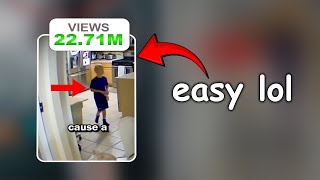
The example video reached 1,000 views in 15 hours. The creator emphasizes that with more creativity and effort, viewers can achieve even better results.
By following this step-by-step guide—choosing a passionate niche, using AI for scripts and voiceovers, and editing effectively—anyone can create viral commentary videos. The key is authenticity and consistency.
What is the key to choosing a successful subniche for commentary videos?
Choose a subniche based on your genuine interests and passions, not just trends.
01:45
What question should you ask yourself to ensure long-term motivation?
What content would I still enjoy making even if it didn't go viral right away?
02:13
How can you find unique content ideas that competitors miss?
Watch long-form YouTube videos in your niche to find viral moments or stories that no one has turned into shorts.
04:07
What is the recommended AI tool for generating realistic voiceovers?
11 Labs.
06:01
What should the first 3 seconds of a commentary script include?
A strong hook that is curious, funny, or emotional to stop people from scrolling.
05:34
How do you blur only specific text in CapCut?
Apply a blur effect, then use the mask option to adjust the blur area over the text.
07:22
What is the average view count per video for the 'Inface' pet channel?
Over 11 million views per video.
03:23
What is the first step in editing a commentary video in CapCut?
Import the video and voiceover to the timeline.
07:08
Where can you find free background music for your video?
Pixabay.com.
08:12
How many views did the example video get in 15 hours?
1,000 views.
08:55
Passion Over Trends
Emphasizes that genuine interest leads to better content and long-term motivation, a key principle for creators.
01:45Pet Channel Success
Demonstrates that repurposing existing content with creative voiceovers can achieve massive views, a replicable technique.
03:23Long-Form Content as Source
Reveals a unique strategy to find untapped short-form ideas by watching long videos, giving a competitive edge.
04:07Hook Importance
Stresses the critical role of the first 3 seconds in retaining viewers, a fundamental insight for short-form content.
05:34Example Video Results
Provides concrete proof of the method's effectiveness with real view counts, reinforcing the tutorial's credibility.
08:55[00:01] voiceover explaining what's happening filled with catchy captions, emojis, and That's called the commentary niche. And here's the best part. It never dies. learns how to do it right can grow fast and win big on platforms like YouTube
[00:15] wondering, how do people actually make these videos? Or maybe you've even tried copying another channel's video script or voiceover just to see if it works. starts somewhere. But after watching this video, you won't be the same
[00:27] I'm going to show you exactly how these kinds of videos are made step by step. your perfect niche. Yes, commentary has many powerful subniches you can actually get views. How to craft the
[00:40] watching till the end. How to create an AI generated realistic voiceover that your video in Cap Cut easily, even if you're a complete beginner. And guess give you my arrow effects, red circle overlays, and sound effects completely
[00:54] show you exactly where to get them. You can literally call this a full miniourse more thing. Our team includes several skilled short form editors and creators and more. So, if you ever need help with your channel, whether it's editing,
[01:07] content creation, or strategy, just send a message to this email. We'll help you take your channel to the next level. Let's dive into one of the most make your content blow up. Finding the right subniche. Most people approach
[01:20] start making content, they just open Tik Tok or YouTube shorts, scroll for hours, they download it, copy it, and try to recreate it. Now, there's nothing wrong with being inspired by viral content. But the problem is that most creators do
[01:33] They're just picking random clips and hoping one of them goes viral. That's hoping to hit the bullseye. Here's the truth. You don't need to go on a long hunt for your perfect subniche. It's already inside you. Every one of us has
[01:45] or passionate about. Maybe it's soccer, fashion, tech gadgets, funny pets, or as an example. If you're a soccer fan, you already have an advantage. You know leagues, the underrated teams, and even the behind-the-scenes stories. That's
[02:00] create better content in that area because you understand the culture, the you create content from your real interest, no one can beat you because something people can instantly feel through the screen. Before you start,
[02:13] content would I still enjoy making? Even if it didn't go viral right away. If you profitable or trending, you'll probably quit after your second or third video. beginners. They copy random clips they don't even understand, hoping to get
[02:26] doesn't work. But when you work within your true interest, you'll stay builds viral channels. Let's take a look at a few creators who mastered the art into massive success. The first example is a channel called I am Babpool. This
[02:41] one theme, Marvel movies. Every single video he makes is connected to that mistakes to behind the scenes facts and fan theories. He doesn't post random and builds depth within it. And if you look at his stats, it's paying off. He
[02:56] That's the power of focusing on what you creating from genuine passion. His obsession with Marvel turned into a money. You can do the same thing. If you're obsessed with Avatar, Stranger
[03:09] can build your own community around that. People love creators who share connection and loyalty. The second example is a channel called Inface the pet niche. Each video features adorable pet clips paired with engaging
[03:23] doesn't even film the animals. She just collects and narrate existing videos in results, an average of over 11 million views per video. That's insane. Think a creative voiceover to other people's content. Yet, the value they add makes
[03:38] success in subniches. You don't need to reinvent the wheel. You just need to your storytelling to it. So, whether your passion is in pets, sports, movies, or travel, pick your lane, study what works, and make it yours.
[03:52] it's time to find viral content videos within it. The simplest way is to train Shorts and start watching videos only from your chosen niche. like, comment, a few minutes or hours, the algorithm will start feeding you the best and most
[04:07] This step is important because you're building your personal inspiration feed. don't talk about. Instead of only taking ideas from short form videos, go watch full YouTube videos in your niche. Why? Because 99% of your competitors are only
[04:20] you watch long videos, you can find viral moments or stories that no one become your unique short form content that nobody's seen before. let's talk about how to write a powerful commentary script. If you're a natural
[04:36] yourself. But if you're not confident in your writing, don't worry. There's a you ask AI to write your script, you should first describe what's happening Google doc and write down what you see, not as a script, but as a simple
[04:50] >> All right, Brody. I just got new clippers, so screams. All right. All good. >> Yeah. All right, bro. All done.
[05:07] and the barber tells him to scream if it hurts. But the way he screams is so That's not a perfect script, and it doesn't need to be. It's just the raw written that, copy your text and paste it into Chat GPT or any AI writing tool
[05:21] commentary videos. Here's a simple explanation of what's happening in my narration script with a strong hook, smooth flow, and satisfying payoff. here. When you do this, AI will transform your rough idea into a
[05:34] like something you'd hear in a viral short. Remember the hook in the first 3 people stop scrolling. So, make sure your AI generated script starts with something curious, funny, or emotional. Something that instantly grabs
[05:47] Now that your script is ready, you need a voice over to bring it to life. If you voice, go ahead and record it yourself. It adds authenticity. But if you're not doesn't match the tone you want, AI voiceovers can help a lot. There are
[06:01] best and most realistic ones is 11 Labs. I've personally used it for years and it sounds professional. Link in the description. Here's how to use it. Go to script. Before generating, choose your favorite voice. You can experiment. They
[06:15] have voices that sound human, emotional, and natural. You can even clone your own you want. For this example, let's use one of the default voices, Mark. Once you'll have a clean, realistic voice over that's ready to use in your video.
[06:28] personal recommendation from my experience, and an affiliate. Now you a viral video idea, a professional script, a realistic AI voiceover. The final step is to edit them together in a way that keeps people watching.
[06:42] you the red circle arrow and sound effects pack that I promised earlier. To assets to my Discord server in the assets channel. So, join our free there. You can find the server link in my bio and I'll also put it in the
[06:56] free and you'll find tons of useful stuff there including job opportunities and many other resources. Now, let's start editing. Open Cap Cut PC, then packs you downloaded. First, let's make the interface optimized for vertical
[07:08] the top right corner. Then, select add to vertical. Once you do this, your your video and voice over to the timeline. The first thing you should do voice over so it flows smoothly. Next, as you can see, there's some text on the
[07:22] go to the effects tab and search for blur. Drag and drop the blur effect onto video will be blurred. But we only want to blur the text. To fix that, click the blur effect on the video. Then open the mask option. Click add mask. Move the
[07:35] blur area over the text. Adjust the size and blur only the text part. Now let's add captions. Go to the captions button on the top. Then click generate. Caputs for you. Once it's done, move the first caption to the center. When you move it,
[07:48] because that option is enabled. Now, adjust the captions manually if needed positioning mistakes. Next, we need to choose the best caption style since this is a short video. Click the first caption and go to templates. You'll find
[08:00] absolutely insane. Choose your favorite one that fits your video's vibe. For now, I'll pick this one because it looks fast and engaging. When I click it, it As you can see, it gave me perfect captions in just a minute. Now, let's
[08:12] beginning to hook viewers attention. Pick one you like from the pack you pixabay.com. Click on music and search for something that fits your video's funny track. Download it. Import it into Cap Cut and drag it to the bottom of the
[08:27] video looks like. >> So, this guy's getting a haircut, right? just scream. Sounds simple until you hear the scream." clippers, so scream if it hurts. All right. All right.
[08:41] All good. >> Yeah. All right, bro. All done. this video just to show you how these types of videos are created. When you
[08:55] editing style, and personal touch. If you're wondering how many views this video got, here's the result. I posted this video 15 hours ago, and it reached made this just to show you the process. There's no special trick here, but it
[09:08] Now, imagine if you put in more creativity and effort. How many views congratulations. You're a real creator, puts in the time. I'm 100% sure you enjoyed this tutorial, so please leave a
[09:20] if you're stuck in a view jail, click this next video. It has already helped this next video. It has already helped thousands of creators.
⚡ Saved you 0h 09m reading this? Transcribe any YouTube video for free — no signup needed.