
AI Summary
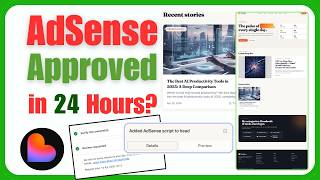
This video demonstrates how to create a fully automated blog using Logible, a platform that eliminates the need for keyword research, hosting, and manual content creation. By providing a single prompt, the tool automatically finds trending topics, writes SEO-optimized posts with images and internal links, and publishes them on a schedule. The tutorial also covers publishing the blog, verifying it with Google AdSense, and applying for monetization.
Chapters
The video introduces the concept of creating a fully automated blog using Logible, highlighting that no keyword research or hosting is required. The tool performs free keyword research, finds trending topics, and writes SEO-optimized posts automatically from a single prompt.
The creator goes to blog.dev and enters a prompt with the topic 'news and current affairs'. The prompt includes instructions for the blog to fetch trending topics from Google and post automatically. The prompt is copied from ChatGPT and is also provided in the video description.
After submitting the prompt, the platform asks questions about posting frequency (e.g., one post per day), whether to include RSS feed and newsletter signup, and whether to enable automated posting or manual daily prompts. The creator chooses manual daily prompts to save credits.
The creator sets a brand name and chooses to use stock images instead of AI-generated images to save costs. After submitting, the blog is created with sample posts that include titles, taglines, images, and detailed content with takeaways and corrections.
The creator explains how to generate new posts daily by entering a prompt that asks the tool to find trending topics from Google or other search engines. The tool then automatically explores and writes a new blog post, complete with internal links and images.
To publish, the user clicks 'Publish', chooses a subdomain (e.g., freeknews.lovableweb.com) or adds a custom domain, and confirms. The website becomes live after a few seconds.
The creator mentions a separate video on indexing the website in Google. For AdSense, users must wait a few months and have a certain number of posts. The process involves adding the site URL, copying the AdSense snippet, pasting it into the website's header, publishing, and verifying.
After adding the snippet, the user verifies the site in AdSense, which triggers a review process that can take 1 to 10 business days. Approval is not guaranteed, as some categories are not eligible for AdSense.
The video provides a complete, step-by-step guide to creating an automated blog with Logible, from initial setup to publishing and monetization. It emphasizes the ease of use and the potential for earning income through AdSense, though it notes that approval is not guaranteed and requires patience.
Mentioned in this Video
Tutorial Checklist
💡 Key Takeaways
No Hosting Required
This is a key selling point that differentiates Logible from traditional blogging platforms.
Automated Content Generation
The tool can fetch trending topics and write posts automatically, saving significant time.
01:58AdSense Monetization Path
Provides a clear process for earning income, but with caveats about approval.
06:45AdSense Approval Not Guaranteed
Important caveat that some categories are not eligible, setting realistic expectations.
08:38Full Transcript
[00:00] In this video I'm going to show you how you can create a fully auto blog using Logible. You don't need to do a keyword research, you don't need to have any hosting, you can create a fully automated blog without hosting. It will do a free
[00:13] keyword research for you, find the trending topics and write the blog process including images, internal links and fully SEO optimized process automatically by giving just one prompt. So this auto blog website tutorial is
[00:29] free of cost and full pack of information you need to write this video till end so let me get started as a very first step you need to go here www.blog.dev and give this prompt and here my topic is news and current affairs
[00:44] and all so you can get right here your own topic in this prompt so here I have given the news and current affairs as my topic and this website will be fully actions approval and it will write blog post automatically right after 12 hours
[01:00] you can see here in the prompt I have written and I have also written the prompt for the blog writing so I will just copy this prompt from my chat gpt this prompt is also provided into the description you can just copy the both of the prompts so
[01:15] here I write here SEO prompt for example here and here right after SEO prompt I will paste this prompt so this prompt will write a blog post and here you can see
[01:27] insert topic here you can see this is the topic so here insert in the in the insert topic you can say get daily and here I have read get the latest trending topic from google and etc so it will
[01:41] get the trending topic from the google automatically and post on the blog automatically so you will see here so this is the font i am going to give this font and it will generate an amazing blog for us as well as write the purchase so i just click here and let's see the results
[01:58] after few seconds and here you can see it's asking some questions as a track and air news and here i say uh level ai pickups use prosperity so i just lovable usage so here i say posting
[02:14] schedule come from two post a day so yes two a day one post per day or three posts per week so it's a one post per day for example here and here you can see essence ready asex do you want to add so I just say yes also Jason also our assist feed newsletter sign up so also newsletter sign up i don need and here i say uh yes and here you can see you can review and
[02:42] just click on submit and it will create a fully automated website for you so here it's asking some questions approve enabling global could trigger it and keep a credit funded for example
[02:57] 0.01 credit or you know dollars for purpose depending upon course length and 0.05 purpose or depending upon for stats so this is uh is asking for you that do you want to make it you
[03:13] know automated or you want to write manually by day by day so here you can also say yes if you have credits in your cloud and here if you can say yes i will write daily by myself so this is very
[03:28] okay so i say here i say i will give daily from to generate the articles because i don't want to waste my credits from my you know um cloud ai so if you can you know give these as skinny amount
[03:41] to this stock daily it will write amazing blog automatically so here i just say i will you know give daily prompt to generate articles so so i have given this prompt and it will right after
[03:55] that it will generate an amazing blog for us so here it's asking for brand name so i just give you brand name a generated per so here i just say a generated images it will be 0.01 toast and if
[04:10] you want to use stock images so i will use stock images here and click on submit allow all i say allow all here you can see it has been created an amazing blog for us if you can see here it has
[04:24] been written some posters if you click on this post you can see this is amazingly added the title the tagline and the image as well as the details here everything is written you can see takeaways
[04:37] corrections and answers and amazingly done this so if you go here and want to write a daily post here you can see here for example I have created this board you know blog and
[04:50] this is my next day on the next day I just write here on the next day you can write here such a new trending topic from Google and any search engine or your own a platform and add and tunneling and write a blog for us so just need to write this prompt and a new blog post will be ready so i just click here and it will write an
[05:13] amazing another blog post for us you can see it's exploring the trending topics i mean it will automatically explore and search the trending topics for us and write the blog for us now
[05:26] another port has been added if you can see this is a new port you may see flash is here so if you open this port you can see this is the feature image go here and these are the internal links as I mentioned that we need to have the
[05:41] internal links here so here you can see this is the link okay so this is amazingly done you can see this is the table and so on and everything is amazingly done and also in inside this they have amazingly used the images okay so this is how you
[06:00] can create an amazing ai based automatic blog for you so now we are going to publish this so you just need to click on publish to publish this dog so here as you can see this is the in front so i
[06:13] say freeknews for example dot loveweb.com and just click on here and click on continue if you want to add custom domain you can also add custom domain keep in mind so i just click on continue here
[06:28] and here it will be public you can just click on continue and just click on continue and click on publish after publishing this will be amazingly done the website has been published now your
[06:45] website has been published. Another question is how you can index this? For indexing process, I have created a complete video. You can watch this video by clicking the link provided into
[06:57] the description. This video is already published on my channel that how you can index your website into Google and other search engines. As well as if you want to apply for AdSense. Keep in mind,
[07:09] instantly after creating your website, you cannot apply for the AdSense. You just need to wait for a few months after adding few postage as expected postage you should have on your blog for applying
[07:21] the adsense so how you can apply for adsense this is very easy you can just go here adsense.google.com and here you can just click on simply add a new site so if you click on add new site you simply need to provide the url of your website for example this is our url of our website you just need to copy this url go here and paste here so here you will be at the uh you know you
[07:42] have a website and click on sale it will go into the review process you can see this is the direct viewer comments so i sent snippet you just need to copy this snippet so this is the uh you know
[07:55] access snippets so you just need to copy this snippet and add this into your website and you just need to verify for example i just copy this snippet here go back and paste here and
[08:09] write this font and click on enter so it will place into your website so this snippet has been added into the header you just need to click on publish and click on update because before updating if you want update the website so this has been
[08:26] it's updating it within few seconds now this has been updated I go back into the actions and click on verify I check on this checkbox and click on verify now
[08:38] your site has been verified just click on next and review request it will review your website this can take one business days to ten business days keep in mind you just need to wait for the review so i just click on to that review and it will review our
[08:55] website for questions approval and then it will approve for us so don't worry you will get your website approval within few days or within a few seconds or sorry a few hours so keep in mind this
[09:09] is not 100 sure that your website will be you know 100% get approval because some categories does not upload into your in the google adsense so this is the complete process how you can create an amazing
[09:24] ai blog and how you can create an amazing you know automatic lovable blog that you can you know apply for the adsense approval and on money or an ambassador income i hope you love this video and
[09:39] if you like this video please subscribe and hit the like button and comment below any next video unique thank you so much and also comment your cdn that i will ensure that you have watched
[09:51] the complete video thank you so much