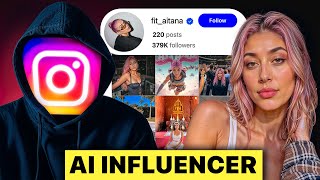

She's Not Real: The AI Influencer Truth
42sShocking reveal that a hyper-realistic influencer is AI, combined with the creator's claim of making millions, hooks viewers immediately.
▶ Play Clip"Delivers exactly what the title promises with detailed steps, but contains some fluff and self-promotion."
Clay reveals the secrets behind creating AI influencers like Aitana Lopez, detailing three distinct types: fitness models, course sellers, and self-clones. He demonstrates step-by-step methods using tools like OpenArt, Picasso, and HeyGen, while emphasizing character consistency and monetization strategies. The video aims to capitalize on the AI gold rush in social media marketing.
Clay introduces an AI influencer as not real, and notes that many creators struggle with character consistency.
Clay has made over a million dollars with his own AI influencer on YouTube and believes AI influencers are the future of internet marketing.
The video will cover creating a fitness influencer like Itana Lopez, a course seller like Maddie Cobb, and an AI clone of yourself.
Character consistency is the number one issue; 99% of people give up before starting because they can't maintain consistent features.
After testing many AI tools, Clay found the secret method that creators of Itana Lopez use, involving specific steps in OpenArt.
To get good results, prompts must be extremely detailed, describing exact features like skin tone, hair color, and facial structure.
Set prompt adherence to 2 to avoid a plasticky AI look; this keeps the output focused on the face.
Upscale images using OpenArt's built-in upscaler with 2X plus face to remove grain and make it more realistic.
Generate at least 10-30 images from different angles, poses, and clothing to provide a diverse set of reference images for the AI.
Use OpenArt's consistent character feature to train an AI model using all reference images, ensuring the character stays identical in future generations.
Upload images to Picasso, crop the face, and use the video generator with negative prompts to create realistic AI influencer videos.
Itana Lopez monetizes through brand deals and Fan View, earning over $100,000 from premium content at $15 per month.
Maddie Cobb made over $100,000 in 45 days through a school community with 2,500 members paying $197 each, totaling $492,000.
Record a 2-minute video with good lighting and minimal hand movement, then use HeyGen to create an AI clone that can generate endless content.
On Instagram, key metrics are watch time, saves, and shares; on YouTube, watch time, view-to-subscribe, and view-to-like ratios matter most.
AI influencers represent a lucrative frontier in digital marketing, with proven success through brand deals, premium subscriptions, and course sales. Success hinges on character consistency, quality content design, and mastering platform algorithms.
What is the key to character consistency in AI influencers?
Using a specific method with OpenArt and training a model with multiple variations from different angles and outfits.
01:53
How much did Maddie Cobb earn in her first 45 days?
Over $100,000.
15:02
What are the two main monetization methods for AI influencers mentioned?
Brand deals and Fan View (premium subscriptions).
11:36
Which tool is recommended for creating talking AI avatars with voiceover?
Arcads AI.
16:33
How many variations does Clay recommend creating for character consistency?
At least 10, but preferably 30 variations.
06:20
What is the first step to create a self-clone AI influencer?
Record a 2-minute video with good lighting, minimal hand movement, and natural facial expressions.
23:36
What are the three most important metrics on Instagram for content performance?
Watch time, saves, and shares.
28:48
Who is Itana Lopez?
An AI fitness influencer who has done collabs with companies like Prime, Sony, and earned over $100,000 on Fan View.
01:11
What is the recommended prompt adherence setting in OpenArt to avoid a plasticky look?
Set it to 2.
03:29
How many members did Maddie Cobb's school community have and at what price?
2,500 members at $197 each.
15:26
Character Consistency Method
Reveals the core secret behind successful AI influencers—consistent character generation using OpenArt's training feature.
01:53Monetization via Fan View
Highlights a real case where an AI influencer earned over $100,000 from premium subscriptions, proving viability.
11:36Course Seller Model
Shows how an AI influencer generated $492,000 in under 2 months by selling a course through a school community.
15:26Pros and Cons of AI Influencer
Provides honest assessment of benefits (brand-agnostic, anonymity) and drawbacks (editing effort, lack of personal connection).
26:35[00:03] there's one thing you should know about her. She's not real. She's AI. And look, you've probably seen this AI influencer. The owners of these accounts have never that sweet Wi-Fi money through brand deals and other types of digital
[00:18] case you're wondering who I am, my name's Clay, and I've made over a million dollars with my own AI influencer here on YouTube. I believe that AI influencers are the future of internet marketing. And soon every
[00:31] one doing their marketing for them. But I've noticed that a lot of people struggle to create consistent characters and how to actually use these AI going to show you how to create the three best types of AI influencers and
[00:45] how to actually monetize them so you can capitalize on this AI gold rush. First, I'll show you how to create a fitness influencer like Itana Lopez. Then I'll seller like Maddie Cobb. And then finally, I'll show you how to create an
[00:59] AI clone of yourself like this. That's right, that was not the real me. This is the real me. And I'm so confident that that fooled you that I've hidden three sentences throughout this video that are the AI clone of me. I'll be genuinely
[01:11] those in the comments. The first model I'm going to show you how to create is a fitness influencer like Itana Lopez. And here's why you should care. The owner of this account has already done collabs with companies like Prime, Sony, and
[01:25] that's not even close to being her most lucrative stream of income. I'll show When most people try to create an influencer like Itana, they end up with jawline's different, and even the highlights and the hair are slightly
[01:39] different shades of color. Character consistency is the number one issue that create their own AI influencers. And that's why 99% of people give up before they even get started. But let's look at Itana's profile again. She's absolutely
[01:53] identical in every photo she puts up. So, what's her secret? Her creators are using a very specific method that they keep top secret. And honestly, I can't really blame them. If everyone was able to do this, then it probably wouldn't be
[02:05] for the last 3 days, I've been testing every AI tool on the market, and I finally found the secret that her creators are using. Using this method, I created this AI influencer myself, and she's actually been growing quite a bit
[02:19] on Instagram. Just make sure to follow these steps in this exact order. Feel free to play this video on half speed if you need to because if you skip any of something that looks like this. So, the first AI platform that we're going to be
[02:32] you want to follow along, I'll leave a link in the description below. To be we're going to go to OpenArt's homepage and click on create image. Here you'll go to model and click on switch. And now you're going to see a bunch of different
[02:46] little bit overwhelming. So the first model that we're going to use is called And then you're going to see a prompt box where you're going to be able to first place that people tend to make mistakes. They're going to type
[03:01] wearing a crop top. And then they're going to wonder why their results look like this. The truth is, you need to be extremely detailed in what we prompt our AI influencer to look like. So, this is going to be the prompt that I use. And
[03:15] into the description so you can copy and adjust it however you want. But notice feature. I'm not just saying some brunette girl. I'm describing exactly thing to think about is you don't want to over complicate it and make the AI
[03:29] confused. You want it to stay really focused on the output of the face. For prompt adherance to two, and then we're going to change the aspect ratio to vertical. Now, hit create. And look at this result. If you followed these steps
[03:44] created is not going to have that plasticky AI look that a lot of characters do. And if your character does look plastic, chances are you did not change the prompt adherence to two. So, personally, I really like this image
[03:57] you the second method as well. This second method is better for replicating some sort of a human. So, we're going to go back to model and click on switch up here. And this time, we're going to go ahead and use flux context. I like this
[04:11] one because it creates a blend of three different people. So, think about three look like. For me, I'm going to go ahead and select an image of Angelina Jolie, Emily Rajikowski, and Camila Moroni. And yes, that might be my type. Now, we're
[04:25] create. And as you can see, this is totally different from our first image. Both are great. The first one just is better with text to image and the second one is better from image to image. So now we have an image of our AI
[04:38] influencer. But before we move on, there's a very important step that we need to hit. If we zoom into this image, then you're going to see that it's not actually that high of quality. It's not quite plasticky, but it is a little bit
[04:50] grainy, and you can tell it's AI. And if we look at it, she does not have this at need to upscale our image. But instead of making you go to another tool, and one of the reasons I like Open Art for this is they have an image upscaler
[05:03] built into their platform. All you got to do is go to the upscale feature and then select 2X plus face. Then just click upscale and let it do its thing. And it should take a few seconds. Yep. And then once that's done, you can check
[05:15] the image before and after to really see the comparison here. But clearly there's upscaled our image, it's time for the next step. And this one is also very important and technically will destroy our influencer if we do it wrong. See,
[05:29] if we train the AI with just one model, then we're going to have all sorts of weird looking influencers from different angles. And this was probably the actually took me a couple days. So, here we go. But we basically need to prompt
[05:42] our character to turn sideways so we have different images from her from different angles. And it seems like the best results just come from simple slightly to the left and let's see a different angle from the right. And just
[05:54] make sure to add to maintain the exact same face, hair, outfit, etc. Again, so you can use it. But just make sure you do this and then hit create. And as
[06:06] the same just from a different angle. But before we start making posts for our Instagram, we need to make at least 10 variations. Well, 10 is really on the conservative side. I would actually say like 30 variations of this because what
[06:20] I found is the more images you have as a reference, the more consistent your AI video, I'm going to go ahead and create 30 different images of her in different poses, angles, and clothing. And just make sure that you're including that
[06:33] to go back to Open Arts homepage. And there's an option for consistent because it's basically going to use all the reference images that we just created to train an AI model specifically for our character. So click
[06:47] on consistent character and then choose start with four plus images. So upload our images here and make sure that your first image is that core reference image that we created. And then we can name our character. I'm going to name ours
[06:59] our character. I'm going to name ours Ivy, like AI V, kind of like Ai Tana Itana. Haha. And now we have our model and she's never going to fail us. and we can actually start testing her out. Let's go back to the homepage. Click on
[07:12] character session. And then you'll see your character. And I'm just going to go in here and select prompt and reference. And you'll see the character's name in the prompt box. Now, before you start
[07:24] prompting, make sure that you tone down the prompt coherence back to two. And then right here, you're going to want to disable the preserve key features. If to have the same clothing, the same background, and it's just basically
[07:37] now you can start prompting, and you're going to want to be specific about the expressions, the backgrounds. So for example, let's generate one where she's hiking in the mountains in yoga pants. So as you can see, we have the same
[07:51] girl. She's just hiking in the mountains, but that consistency really came through here. And now you can basically go to town on creating these images and you can start posting them kind of like itana Lopez. And if we come
[08:03] back to her profile, you'll see that that's what the majority of her posts are. They're just images, but she does have videos as well. And these videos do get millions of views. So I should probably show you how to create those,
[08:16] studying all this was that a lot of other AI videos of characters look super plastic. But these ones of Itana kind of made me doubt whether this was AI or like a girl with a filter or something like that. But while I was testing
[08:31] hundreds of tools, I found one that was able to do this. So, we're going to come over to a tool called Picasso. Once we're inside of Picasso, we're going to upload an image of the AI character we created in the first step here. Once
[08:43] and crop out her face. So, here's the preview and let's save it. And then now character. The next step is basically going to be unlocking the AI image generator. Or in other words, we need to train the AI again with our character.
[08:59] Yes, I know lot of training AI here, but if you want good results, this is what on train. And then I'm going to go ahead and upload all those upscaled images we created in Open Art. And another thing I recommend is that you use a bunch of
[09:12] different pictures with different poses so that the AI again has a ton of actually going to go ahead and upload all 30 of those images we created here. So now we have our character that's been completed. It did take a few minutes
[09:26] just to be transparent. But now let me just show you a couple of the other pretty cool. One of those is the face swap tool. So for this example, I just found this random image of a blonde girl and we'll put it on here. And then go
[09:39] ahead and upload the image. And then right here on the bottom right, you just click launch face swap. And in a moment, you're going to see how we can swap faces, which is pretty cool. But once you have it all downloaded, then you're
[09:51] going to take your highest quality upscaled images and take it over to our go ahead and upload the image. Now, here on the right, we're going to go ahead and select the aspect ratio. And I'm going to do 1:1. And then this is the
[10:04] keep in the middle because I don't want it to go too far one way or the other. And then I'm gonna go down here and select full HD because we want it to be as clear as possible. And then for the duration, I'm gonna go ahead and select
[10:17] consider is whether you're making this for short form or long form content, you really never want to play a clip for longer than 5 seconds on any platform because people's attention spans are very short. They can only look at one
[10:30] clip for like 2 to 3 seconds at a time before you need to change clips. So, one thing cool that Picasso does have is they have this negative prompt section, and it's basically where you tell the AI what you don't want to happen. So, I'm
[10:42] going to say something silly, something comedy. I don't want anything like that. I want it to be serious. I want my influencer to be attractive like it and prompt goes, I'm going to go ahead and write this. And yes, I will link this in
[10:57] as well. And then I'm just going to click generate. And let's see what we get. So, here they are. And yeah, I mean, this is almost identical to what we see on Itana's profile. Really, really solid. So, now that you have your
[11:10] take them over to Instagram and you're going to start uploading them. And look, I actually found five other accounts who are doing the exact same thing, just so you know it works. And just in case you want to understand why this works so
[11:23] well from an Instagram algorithm standpoint, well, guys like looking at hot chicks online. Chances are if you pull up a dude's explore feed, you're going to find some hot attractive girl on there.
[11:36] on there. [Music] >> So, now that we've posted our two clips, it's time to start making some money off Instagram profile, she seems to be monetizing in two main ways. The first
[11:51] are brand deals like these. basically where a brand comes along and sponsors an influencer to do an integration of their product. Now, those can be great money, but you're really at the mercy of when brands are launching campaigns and
[12:04] if they find you or not. So, if we look at the second way that it is making money, it's actually a lot more simple than you probably think. If we come into this link, you're going to see that it brings us over to Fan. Fan view is
[12:18] trying to monetize an AI influencer. And platforms still restrict AI influencers, but FanView's actually leaned into it. It here has earned over $100,000 on FanView from premium content, which is
[12:33] also super easy to make. You can see that she charges 15 bucks a month and think about it, it's pretty crazy that so many people are willing to pay for AI started with making money with Fan View right now. I've dropped all their links
[12:48] money once you've created your influencer. And if we just look at some of these other AI influencers like this one, Lil Michaela, she has 2.4 million followers, just imagine how much money she's leaving on the table by not having
[13:01] a fan view link in her link in bio. And I'm actually going to show you guys one of the AI influencers that I've been building. So this is Lom and she's been growing quite a bit on Instagram lately. If we come through her insights, we can
[13:13] been getting tons of engagement. In fact, if we just scroll through her DMs, sometimes. But yeah, tons of people trying to DM her and engage with her. If other side of this, they'd be probably pretty disappointed. But if we come
[13:28] I've been using these exact strategies that I'm sharing with you in this video to actually grow an account like this. A lot of people on YouTube like to tell build something like this, but I'm actually showing you the proof that this
[13:42] works using the strategies that I'm teaching you today. Oh, and bonus about your character, it's only going to make it better. Like, we just sent Lom on a big Europe trip. She went to Greece, Croatia, Italy, Barcelona, and
[13:55] literally commenting to come meet up with her. It was crazy. Most people behind a payw wall, but honestly, I just like exposing what's actually working out there because I see so many people misleading people on YouTube about ways
[14:09] to make money online, and it's just not fair. Now, I haven't monetized this page this audience and the engagement as much as we can before launching a product. should be doing, whether they're trying to grow an AI influencer or a personal
[14:23] brand. But I'm actually about to launch her first product on this page through Fan View. And I'm using a very specific strategy so that we capitalize on as much revenue as possible. I'm already working on the follow-up video for that.
[14:35] use and how that plays out in terms of revenue, make sure you're subscribed. actually going to show you some of the psychology tricks that we're using to hook people's attention and keep them engaged so that they DM this account.
[14:47] Things like this. O, that's painful to look at. Now, there are hundreds of good money. Like I know multiple people making over $5,000 a month using this this myself. So if that doesn't show you that there's future in this, I don't
[15:02] know what will. Okay, so that was how to create Itana Lopez. Now I'm going to show you how to create the second type of AI influencer, Maddie Cobb. This of AI influencer, Maddie Cobb. This girl, well girl, made over $100,000 on
[15:14] Instagram in her first 45 days. What's crazier is her community is actually one of the top earning school communities on the internet right now and she is absolutely crushing it. In fact, if we
[15:26] come over to her school community, you can see that she has 2500 members and you can see that they're all paying $197. If we do the math on that, that comes out to $492,000.
[15:39] Again, she started this account less than 2 months ago. So essentially what Mattie's done here is she's become an AI influencer course seller. And guys, I have to be honest, this is the biggest opportunity on the internet for people
[15:52] who want to make money with AI who know how to do it right. And I can say that because I used an AI influencer to generate seven figures on this YouTube how to create one like Maddie. So step one is to find a photo of some model
[16:07] over to chat GPT and we're going to write this prompt. I've attached a photo resemble. Please describe this model in as much detail as possible, including age, hair color, style, facial features,
[16:20] and any other noticeable traits. The goal here is to use this description that we get back from Chad GBT to create a very realistic avatar. Now, we're going to come over to a tool called Archads AI. And this one, we're going to
[16:33] create an account. And then we're going to copy and paste that description that we got from ChatGpt into the description here. And here you go. We just generated our own AI influencer. And it looks pretty similar to that model that we saw
[16:46] character consistency is going to be key here. So, let's see how this tool does. We're going to type in she's on a jet ski in Dubai. And look, she looks like the exact same image as the character before. If we come back to Maddie
[17:00] Cobra's account, we can see that she's using almost all reels. And that's a big reason that she's grown so fast because Instagram pushes reels over posts typically. And just as a side note for Instagram, usually I suggest reels for
[17:12] growth and views, slide posts for conversions and CTAs, and images or to make our video content, we're just going to go back and click here, transform a picture into a talking actor. Then upload the image right here
[17:26] in the starting frame and write what your actor should be doing in the video. influencer in the video and you can make you want. Another really cool feature that you can use that Maddie Cobb uses
[17:39] is using an AI voice over. Basically, we can have our AI influencer speak. And if you want your influencer to speak, like Maddie Cobb's videos, then we're going account. And then we're going to connect it to our Arcads account. Then you're
[17:53] to click on add actors. And then you're going to create actor here again. And then click on transforming picture in a talking actor. This time you're going to write exactly what you want your actor to be doing. So if you want your actor
[18:07] to be more excited, make sure you write that. If you want him to be more sad, actually just going to drop my prompt again in the description for you guys. So you can use the same one that I used. And then make sure to create your
[18:20] we're going to be choosing our actor's gender, which in our case is going to be female. And then we can choose the age range and then the language. And you can even choose an accent. So, I'm going to choose British because British people
[18:33] sound smart and I want my influencer to be perceived as smart. And then I'm going to go through and find one that I like. And then I'm going to generate. And here it is. The first video is ready. Now I'm going to simply click lip
[18:45] sync to train the actor for adding voiceovers. And then once the training is finished, I'm going to head back to the script writing area. And then I'm going to click add actors. Go to my actors. And then you're going to select
[18:57] that actor that you created and choose it. Here we can adjust the speed, the stability, the similarity of the voice, all that stuff. And then you're going to want to drop in exactly what you want your influencer to say here. Another
[19:09] really cool feature about Archads is that you can choose the gestures that you can find it in the drop down and then we can describe the gesture that we now I'm going to show you what we can do with this AI influencer and I'm going to
[19:23] give you a couple of real results. So, the first thing I'm going to do is I'm going to put her in a gym because let's say she sells a fitness program. And I'm going to drop this prompt in and click generate. And here we go. Dang, that is
[19:35] pretty impressive. And honestly, kind of believable. The next one we're going to do is a real estate girl. So, I'm going to drop in this prompt. And let's see really solid. I mean, you could have some hot real estate agent collecting
[19:48] leads for you if you're a real estate developer. And then finally, let's add in an influencer for a dating coach for men. And let's add that she's in a nightclub. So all three of these can be
[20:00] used as a course seller or an AI info product seller. And that's simply just crazy. And then I'm also going to transform all these influencers into while that's getting done, let's talk about how to turn this AI influencer
[20:16] into a cash machine for you on social media. So right now the best platforms are Instagram, Tik Tok, and YouTube. And the reason I chose those niches or industries for the character that we created is because you want to choose a
[20:29] from this. That usually means health, wealth, or relationships. Like again, we going to drop in what we want her to say. And here is the final result.
[20:41] >> Remember, desserts aren't off limits. Just fit them into your daily calories so you can enjoy them guilt-free. >> Pretty solid. If you saw this girl enough, you might start to believe what she actually says. Now, again, let's say
[20:53] that we want our influencer to be in the real estate niche. And this time, she's >> I can help you find the perfect property, answer your questions >> Great. I mean, yeah, if I was looking for a place to buy and I saw this, I
[21:06] had any homes available. This one is actually based on Dating by Blaine, and she has a 7figure coaching business that could be easily replicated by an AI influencer like this. Dating by Blaine was actually on Shark Tank, like the
[21:20] show, and she got a deal with Mark Cuban to give you an indication of how big this could get. But like I said, these videos will get really boring if it's camera the entire time. And that's why we need to create good B-roll footage.
[21:34] click here, and then we're going to select at start frame, and then we're This time, I'm going to use this prompt. And you can see we created a bunch of describing the type of B-roll that we're looking for. And then just make sure
[21:49] that we are choosing the right ratio and set the length of the B-roll, kind of And there you go. For example, if I want my influencer hiking, I would write this. That's the result that I got. And as you can see,
[22:02] realistic B-roll footage using arc ads think a lot of people who are teaching you how to create these AI shots are need to do is create the A-roll and then combine it with the B-roll and maybe
[22:16] some motion graphics and really make these look good if you want to perform on social media. Now again, Maddie is monetizing with her AI influencer course. And the reason this is working so well is because she's using an info
[22:28] product social funnel. She educates people with free content about a transformation they're looking to achieve. Then she sends traffic to a landing page where they buy her product. Now, she is missing out on that sweet
[22:41] not really sure why she isn't doing both, but hey, she's only been at this around to it. So, I just showed you how to create this one, but I actually put this to the test. I created my own AI influencer course seller like Maddie,
[22:56] and it's actually been growing really fast. It's still a bit premature to show you guys because I don't want a ton of people copying me yet, but I am going to So, make sure you're subscribed to see that video. The third type of AI
[23:09] influencer that I'm going to show you how to create is a clone of yourself, like what you're watching right now. That's right, that was not the real me. This is the real me. Hi, I'm Clay. And that's how crazy good these AI clones
[23:22] have gotten. Using self clones like this are especially good for personal brands and UGC creators. Look, this guy has built his entire Instagram following, all from AI video clones of himself. So, this can be a literal cheat code for
[23:36] you're lazy or you don't have film equipment. So, here's how you do it. camera. It doesn't have to be a nice camera. For this example, I'm literally going to do it on my iPhone just to show you what can be done. What you do need
[23:51] is good lighting. Make sure that there's light on your face, preferably at a 45 degree angle, and then there's some contrast between you and the background. for short form content, then this is how you should frame it. Your eyes should be
[24:04] you're trying to make a long form video, then this is how you should frame it. Next, you're going to hit record and get into position and start speaking to the camera. Stop. You can't have your hands moving all around like that, or else
[24:17] really weird. Keep the hands low without much movement and make sure you're Feel free to use facial expressions so the AI tool can get to know your personality a bit. Now you're going to speak to the camera for a full 2 minutes
[24:31] happy with the clips, we need to come over to a tool called Hey Genen. And this is probably the best tool that I found to create AI influencers. So if >> thank you. >> I put a link below this video for you to
[24:44] sign up. But once you're inside, you can click create your avatar. Then we're created. And again, that video should be at least two minutes so we can really train the AI. And then we're going to verify that it's you and click submit.
[24:58] going to have something that looks like this. My name is Clay and this is my AI clone. Now, that was cool. But if you're a perfectionist like me, you probably me. So, for those of you who want to get results with this, you're going to want
[25:13] to record your own audio so it actually sounds like you and it has those natural record your audio, you're going to click add our audio by clicking here. Then
[25:26] is what the final results look like. My name is Clay. Some of you know me as Digital Income Project. And this is my AI clone speaking to you. Is it like. But let's also look at what Instagramized reels look like. 30 days
[25:42] ago, I started using an AI clone of myself to build my Instagram account. honest, it's a little boring. And again, this is where I think a lot of these people who are advising you on how to use all these AI tools don't really
[25:55] understand how to help you actually create content that performs. Watch what happens when we add just a little bit of editing to this video. 30 days ago, I started using an AI clone of myself to build my Instagram. That is how you get
[26:09] your AI influencer to actually get views. I can now make fulllength YouTube videos and Instagram reels of myself that look like this without ever getting out of bed. Just imagine how easy it is for personal brands to make content or
[26:22] UGC creators to create clips about different brands. And finally, I want to share some thoughts on this as someone who's actually made money from an AI influencer. For those of you who are new here, up until recently, this entire
[26:35] influencer. I was able to generate AdSense revenue like this, brand deals products and services like these, all without ever showing my face. So, I think it's time someone gave you the raw, unfiltered truth about owning an AI
[26:50] influencer. We're going to start with the pros. The first thing is that it's brand. All I had to do was pull out my microphone, record into it, and then send it off to my editor, who would make the videos look great. Some of my
[27:03] clients have even had success using AI voices, like Olly, who started a channel in the dating niche. He got over a 100,000 views on his very first YouTube video. That's almost unheard of. He used an AI voice, but another client who uses
[27:16] her own voice like I do, she's grown from zero to over 290,000 subscribers in just 2 years. For context, she's now growing faster than I am, which is really cool as a coach to her. The second pro to having an AI influencer is
[27:31] that being different from a personal brand actually created a bit of an me because I think brands are always looking for new ways to get their message out. And then the third and most obvious benefit of having an AI
[27:44] influencer is that nobody knew who I was. I could walk down the street, get dinner, and no one would ever have any idea that I own a pretty successful the negatives. The first negative was that the editing needed to be really,
[27:57] really good to keep people watching. This meant that my AI influencer videos the typical YouTube video. And then the second negative was also one of the benefits. Nobody knew who I was. Look, I have no desire to be internet famous.
[28:11] But as time went on, I started to notice that I would establish myself more as an face on my channel. I don't want to get too deep into it in this video, but if you want to hear more about my story, just comment below and I'll make a video
[28:23] soon. The truth is, no matter which type of AI influencer you create, the most get views and attention with it. And to do that, you need to understand how to beat the algorithm. Just because you made a spicy AI influencer like it
[28:36] doesn't mean that you're going to get views. The secret sauce is that you need to use that AI influencer to do the following. Hook people's attention, deliver information well, tell a good story, and make the viewer satisfied. On
[28:48] Instagram, the most important metrics are watch time, saves, and shares. So, you need to ask yourself, what's going to make my audience watch this multiple times, save this for later, and send it to a friend. On YouTube, the most
[29:01] important metrics are watch time, the view to subscribe ratio, and the view to like ratio. So, your job as the creator is to find ways to use your AI subscribe to your channel, like hopefully some of you are doing with my
[29:15] channel right now. This is all a part of what I call content attention video on this in the future. But look, the people who use the principles and methods that I've shown you in this video are going to make millions. So,
[29:28] that'll be you or someone else because I promise you in six months I'll be making another video about new AI influencers who are making that kind of money. And honestly, I hope some of those videos are about you and I can't wait to see
[29:41] are about you and I can't wait to see you on the other side.


⚡ Saved you 0h 29m reading this? Transcribe any YouTube video for free — no signup needed.