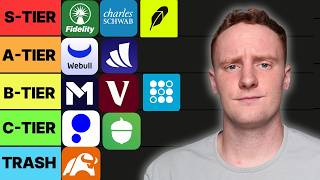

Robinhood: S Tier or Gambling App?
36sControversial ranking of Robinhood as S tier despite criticism of gamification and prediction markets sparks debate.
▶ Play Clip"The title promises a ranking of every stock brokerage, and the video delivers exactly that with detailed S-to-F tier placements and real money testing."
A finance YouTuber tested 12 stock brokerages over a month, ranking them on ease of use, fees, and features from S to F tier. Robinhood and Fidelity get S tier for beginner-friendliness and comprehensive tools, while Moomoo and Acorns rank lower due to clutter or unnecessary fees.
Creator spent 4 hours signing up for every investing app, then tested each with real money over 30 days to rank them on ease of use, hidden fees, and features.
Very beginner-friendly, pioneered zero commissions, fractional shares, instant deposits, and extended-hours trading. Downsides: gamification, options trading made too easy, and prediction markets (gambling).
Old-school broker with modern UI, fractional shares, real research from 20 providers, cash management account with 3.6% APY, and full account types. Only minor con: slightly confusing UI compared to Robinhood.
Beginner-friendly with paper trading mode, fractional shares, extended hours. Best features: paper trading to practice, premium for $3.99/month gives cash management (3.6% APY) and IRA 3.5% match. Downsides: paywalled level 2 data, slow customer support.
Great reputation, acquired TD Ameritrade for thinkorswim, paper trading, cash management with ATM fee reimbursement, fractional shares. Considered the 'Toyota Camry' of brokerages.
No payment for order flow, offers stocks, cryptos, options, bonds, but lacks clear identity. AI Agent called 'trash'. Not recommended over Robinhood.
Chinese company, feels like 'Temu of brokerages'. Good sign-up bonus (8.18% APY for 3 months, up to $1,000 Nvidia stock), but cluttered UI. Only for traders.
Invented index funds, but outdated UI, no fractional shares, slow deposits (5-7 days). Good for buy-and-hold passive investors, but Fidelity or Schwab better.
Best UI in creator's opinion, automatic invest with 1% extra, fractional shares, social features. Integrated with SoFi banking. Downsides: gamification, options made too easy.
For Bank of America customers only, no fractional shares, slow app. Best for credit card rewards tie-in.
Training wheels investing: auto round-ups, invest in curated ETFs. Monthly fee ($3-$12) can be avoided by DIY in other apps. Banking mediocre.
Owned by Morgan Stanley, paper trading, decent options tools, no fractional shares. Decent but outdated compared to newer apps.
Fractional shares, simple UI, good for Chase customers. Complaints: slow UI, money locked on cancelled trades.
Unique 'pie' feature for auto-investing, but considered unnecessary. Other brokerages now offer similar fractional shares and recurring investments.
Robinhood and Fidelity are top-tier for beginners and comprehensive investors respectively, while niche apps like M1 Finance and Acorns serve specific needs but aren't for everyone. Choosing a brokerage depends on whether you prioritize simplicity, features, or ecosystem integration.
What did Robinhood pioneer in 2013?
Zero commissions on stock trades.
1:00
What is the APY on Fidelity's cash management account?
3.6% APY.
3:55
Why is SoFi Invest considered A tier despite gamification?
Best UI, automatic invest with 1% extra, fractional shares, and integration with SoFi banking.
14:01
What is Webull's paper trading mode?
A practice mode where users can make trades with fake money to gain experience without losing real money.
5:58
What is the downside of Moomoo's UI?
It is cluttered and feels like a cheap Chinese product, with a Temu-style badge upon opening.
11:33
What does Merrill Edge require to use?
Being a Bank of America customer.
16:03
What is Acorns' primary feature?
Rounding up purchases and automatically investing spare change into curated ETFs.
17:25
What is the unique feature of M1 Finance?
Building a 'pie' with multiple stocks/ETFs that automatically allocates investments.
22:01
What is the sign-up bonus for Moomoo mentioned?
8.18% APY for 3 months and up to $1,000 of Nvidia stock.
11:24
Robinhood's Zero Commission Revolution
Explains how Robinhood forced all brokerages to eliminate trade commissions by 2019.
1:00Fidelity's Cash Management APY
Highlights Fidelity's 3.6% APY cash management account that competes with high-yield savings.
3:55Webull's Paper Trading for Beginners
Advocates using fake money to learn trading without financial risk.
5:58SoFi's 1% Extra on Auto-Invest
Unique incentive that adds a return for automated investing.
14:01Acorns as Training Wheels
Describes Acorns as a beginner tool that forces investment in good ETFs but comes with a fee.
17:25[00:00] So, I just spent the last 4 hours
[00:01] downloading and making an account with
[00:03] every single investing app that I could
[00:04] find. So, every single day for the next
[00:06] month, I'm going to be putting my own
[00:08] money into these brokerages to find
[00:10] which ones are actually easy to use,
[00:11] which ones are secretly charging you,
[00:13] and which are giving you features that
[00:14] are actually useful. And I'm going to be
[00:16] ranking each of these brokerages on a
[00:18] tier list from S to F. I'll see you guys
[00:20] in 30 days from now. All right, so it's
[00:22] been quite a while since I recorded that
[00:23] first part of the video, and I've gotten
[00:24] a chance to use all of these apps. So,
[00:27] I'm going to go ahead and start out with
[00:28] Robinhood. Robinhood was the first
[00:30] brokerage I ever had. I actually opened
[00:32] it up on my 18th birthday, and pretty
[00:34] much everyone that I knew in college
[00:36] used Robinhood to invest, and like all
[00:38] the all the young people that I know.
[00:40] And that's because it is very, very
[00:41] beginner-friendly. Buying a stock on a
[00:44] brokerage like Fidelity or Schwab
[00:47] compared to Robinhood feels like you're
[00:49] filing your taxes. And despite receiving
[00:51] a lot of hate, things that the younger
[00:54] generation like mine would think come
[00:56] standards with brokerages are only here
[00:58] because of Robinhood. Back in the day,
[01:00] all the brokerages would charge you $5
[01:02] to $10 every single time you bought a
[01:04] stock. But then, in 2013, Robinhood came
[01:08] with zero commissions, meaning you could
[01:09] buy stocks for free, and by 2019, every
[01:12] single brokerage had to follow them.
[01:14] They also made fractional shares
[01:15] popular. If you wanted to buy something
[01:17] like Amazon, you would need the full
[01:19] $250 to buy the share. But, with
[01:23] Robinhood, you can buy just a fraction
[01:25] of it. So, you could even just buy $1.
[01:27] You also get instant deposit, so as soon
[01:29] as you transfer money from your bank
[01:30] account to Robinhood, you can
[01:32] immediately buy stocks with it. With a
[01:34] lot of big brokerages, you still have to
[01:36] wait 3 to 5 business days to be able to
[01:38] buy, which makes it hard if a stock
[01:40] drops or something to be able to
[01:41] capitalize on that. Robinhood also gives
[01:44] you before-and-after-hour trading. So,
[01:46] if some news comes out after hours, you
[01:47] can go ahead and buy or sell a stock. A
[01:50] lot of brokerages still don't give you
[01:52] that. So, I'll go ahead and show you
[01:53] Robinhood. If you open up the app, you
[01:55] can see all the money that you have in
[01:57] it, like total. You can see your
[01:58] different holdings, recurring
[01:59] investments, and then your watchlist is
[02:02] at the bottom. Those are all just the
[02:04] stocks that you're watching. If you want
[02:05] to buy something, just go to the search
[02:06] tab. I'll buy some Apple, hit buy, and
[02:09] then I will buy $100 of it, and then
[02:12] swipe up. And then, just like that, I
[02:15] went ahead and bought Apple, that easy.
[02:17] And then, it'll be with the rest of my
[02:18] stocks on my main page. Now, all that
[02:21] user-friendliness does come with some
[02:23] downsides, though. For the most part, I
[02:25] would argue that investing should be
[02:27] boring. For the most part, you should
[02:28] just buy and hold the S&P 500, and then
[02:31] that's it. But, Robinhood gamifies
[02:34] things, and a lot of beginners don't
[02:35] understand what they're actually doing.
[02:37] The complexity is hid behind the user
[02:39] interface, and they make things like
[02:41] trading options way too easy. There is
[02:43] also Robinhood's reputation, the whole
[02:45] GameStop debacle a couple years back
[02:47] still haunts them a little bit. And my
[02:48] least favorite thing is the prediction
[02:50] markets that they added to Robinhood,
[02:51] which is basically just gambling. You
[02:53] can bet on things like sports game and
[02:55] even the election. But, overall, I don't
[02:57] care what anyone says, Robinhood is
[03:00] still S tier. I believe that a couple
[03:02] years ago was their peak, but I still
[03:04] think they're doing great things, and it
[03:05] is still one of the best brokerages to
[03:07] get started with. All right, next up we
[03:08] have Fidelity. And Fidelity is one of
[03:10] the other best brokerages, but it
[03:11] basically takes the opposite approach to
[03:14] Robinhood. Fidelity's been around since
[03:16] the 1940s. It's a bit more old-school,
[03:18] and they have every account type you'll
[03:19] ever need. But, unlike a lot of the
[03:22] other legacy brokerages, they have done
[03:25] a really good job keeping up as far as
[03:27] UI and features go. If you're more
[03:28] conservative, you can buy things like
[03:30] mutual funds and bonds, which is
[03:32] something that you can't really do on
[03:33] Robinhood. And it also gives you real,
[03:35] legit research from like 20 different
[03:37] providers, which you would usually have
[03:39] to pay for. You can also buy fractional
[03:41] shares with Fidelity. And one really
[03:43] cool thing is that they have a cash
[03:45] management account that can substitute
[03:47] for your bank or your high-yield savings
[03:48] account. You even get debit card and
[03:51] checks if you want. It gives you, I
[03:52] believe, 3.6 APY on your money sitting
[03:55] in there, which competes with the best
[03:56] high-yield savings account, and it's
[03:57] just a great place to keep a cash
[03:59] reserve or an emergency fund. I'll go
[04:01] ahead and show you Fidelity's app. It
[04:02] shows you the account balance up first,
[04:05] and then, if you go down, it'll show you
[04:07] the markets. If you go into your
[04:08] investing tab, you'll have all the
[04:10] different positions that you have. Then
[04:12] you have your watchlist, and then
[04:14] if you go over to discover, it'll show
[04:16] you a bunch of different collections and
[04:18] sectors that you can invest into, and
[04:20] then some research, and then even like
[04:22] some TikTok-style shorts, sort of, and
[04:24] then some more articles. Now, if you
[04:26] want to buy, just hit that transact
[04:28] button, and then you can go ahead and
[04:30] search. Today, I will be buying some
[04:32] Tesla just for fun, and
[04:35] >> [snorts]
[04:35] >> I'll just go ahead and hit that buy
[04:36] button. I will go buy dollars, and I
[04:39] will buy $200 worth of Tesla. You just
[04:42] hit that preview buy Tesla, and then
[04:45] just like that,
[04:46] they'll receive your order, and it'll be
[04:48] with the rest of your positions. Now,
[04:50] I've always heard Fidelity hyped up for
[04:51] years, but this is the first time I've
[04:53] actually tried it, and I will say the UI
[04:54] is a bit clunkier than I would have
[04:56] expected, but it's still miles ahead of
[04:58] Vanguard, or, you know, uh even Schwab.
[05:00] There's really no downsides with
[05:02] Fidelity. I would think the only one is,
[05:04] I guess, it is a little bit more
[05:06] confusing than something like Robinhood,
[05:07] but there's basically nothing to
[05:09] complain about, and this is an easy S
[05:10] tier for me. Also, I went the extra mile
[05:12] to bring you this video. I don't think
[05:13] there's ever been a YouTuber that's made
[05:15] a video like this. All that I ask is
[05:16] that if you're thinking of opening up
[05:18] one of these brokerages, use the links
[05:19] below, because you'll get free stocks,
[05:21] and also it helps support the channel.
[05:23] All right, next up we got Webull. And in
[05:24] my opinion, Webull's like, I guess, the
[05:26] Justin Herbert of brokerages. It's not
[05:29] the absolute best, but it is it is very
[05:31] uncontroversial, and pretty much
[05:33] everyone likes them. It's a relatively
[05:35] beginner-friendly app, but it is built
[05:37] for traders, so all the features are
[05:39] going to be tailored to that. You don't
[05:40] actually need any money to open up an
[05:42] account at all, but you will want to
[05:44] deposit some money, because Webull
[05:46] generally has some really good sign-up
[05:47] bonuses. I got $100 of free stock when I
[05:50] made an account. They have different
[05:51] offers, but I'll link the best one
[05:52] below. As far as features go, you get
[05:54] the extended hours, you can buy
[05:56] fractional shares, but my favorite thing
[05:58] with Webull is that they have a paper
[06:00] trading mode. I was around a lot of
[06:02] finance bros in college that thought
[06:04] they were day traders, and then they
[06:05] would go and lose all their money. And
[06:07] whenever someone tells me that they want
[06:08] to day trade, I always tell them to use
[06:10] a paper account. With paper mode, you're
[06:12] making trades and following the market,
[06:14] but you're using fake money, basically
[06:16] like Monopoly money. So, you're getting
[06:18] the XP of trading, but you're not losing
[06:19] all your money in the process. If you do
[06:22] decide to go with Webull, I'd get the
[06:23] premium. It's only $3.99, but basically
[06:26] everything's cheaper. You get a cash
[06:28] management account that gives you 3.6
[06:30] APY, and a 3.5% master IRA, which is
[06:33] pretty insane. That's like an extra $300
[06:36] if you max that out. So, I'll go ahead
[06:37] and show you Webull. If you go down, you
[06:39] can see all your different positions,
[06:41] your watchlist. Then there's like a tab
[06:42] with all their different accounts, and
[06:44] then like a robo-advisor. But, all you
[06:46] really need is that first tab. If you go
[06:48] to the search button, you can see uh
[06:51] what's going on with the market, some of
[06:53] the movers, some different sectors. But,
[06:55] I'll just go ahead, search Uber, and I
[06:57] will go ahead and buy that. I'll toggle
[06:59] between shares and dollars, and I will
[07:00] just buy $110 of Uber. And then, just
[07:04] like that, the order's submitted. So,
[07:05] yeah, as you can see, super simple app.
[07:07] The only downsides that I've seen is
[07:09] that a lot of the level two data and
[07:12] things that you'll need is behind that
[07:13] paywall, so you will have to pay that
[07:15] $3.99. And also, customer support can be
[07:17] a little bit slow. But, overall, I like
[07:19] Webull, great for traders, clean design,
[07:21] and I'm going to go ahead and throw it
[07:22] in the B tier. All righty, next up we
[07:23] got Charles Schwab. And this is most
[07:26] likely the brokerage that your dad is
[07:28] using right now. It has a great
[07:30] reputation. It's one of the biggest
[07:31] brokerages in the country. They have
[07:33] every account type that you'll ever
[07:34] need, and from what I've seen, the
[07:35] customer service is very good. It's
[07:37] funny, I actually drive by a physical
[07:39] Schwab and then Fidelity location every
[07:41] single day at work. Haven't needed to
[07:43] stop by, but maybe I will one day. You
[07:45] can buy fractional shares with them, and
[07:47] I believe traders actually really like
[07:49] them, too, because a couple years ago
[07:51] they acquired TD Ameritrade, which gave
[07:53] them thinkorswim, which apparently gives
[07:55] you like the best charts and all that
[07:56] for trading. They also have a paper
[07:58] trading account, so you can practice on
[07:59] there if you're a trader. And just like
[08:01] Fidelity, they have a really good cash
[08:02] management account. You can get a debit
[08:04] card, and you can pull money out
[08:07] anywhere in the world, and you're not
[08:08] going to have to pay fees at ATMs. They
[08:11] will reimburse you for that. So, if
[08:12] you're in a different country, it's
[08:13] really good for getting different
[08:14] currencies. All right, so I'll go ahead
[08:15] and show you the app. You have your
[08:17] total value first, and then your
[08:19] dashboard will show you all the
[08:20] different holdings that you have.
[08:22] Down a little bit more is the news going
[08:25] around. I can then go over to watchlist,
[08:27] and that will show me my holdings, and
[08:29] then the markets will show me, again,
[08:30] what is going on with the market, all
[08:32] the breaking news. If I want to buy
[08:33] something, I'll just go over to the
[08:35] trade thing in the middle. I'll go ahead
[08:36] and buy Rivian. First, I'll click buy,
[08:39] and then I will go with a market order,
[08:41] and I will buy two shares of Rivian. And
[08:45] just like that, I'll go ahead and place
[08:46] an order. Bam, we're good. So, as you
[08:48] can see, it's way more overwhelming than
[08:50] something like Robinhood, and a little
[08:51] bit more complex than something like
[08:53] Fidelity, but still pretty good. I feel
[08:54] like Schwab is like a the Toyota Camry
[08:57] of brokerages. So, I'm going to go ahead
[08:59] and throw it in the A tier. All right,
[09:01] next up we have Public. Public is a new
[09:03] player, and I found that online it's
[09:05] kind of hard to find unbiased reviews on
[09:07] them, because they're all sponsored,
[09:09] which is what newer brokerages tend to
[09:11] do. But, when they launched, they tried
[09:13] to be like the social investing, like
[09:15] you could see what other people were
[09:17] invested in. That didn't really catch,
[09:18] so so for a while, they tried to
[09:20] basically just be Robinhood. That didn't
[09:22] work, so now they're trying to be the
[09:23] place where you can buy every single
[09:25] different asset. The biggest thing that
[09:27] seems to be going for them is they don't
[09:29] use payment for order flow for stock
[09:31] trades, meaning they don't get paid to
[09:32] send your orders to certain companies.
[09:34] So, it just makes people feel like
[09:35] they're more on the investor's side.
[09:37] They have everything that you'd want
[09:38] from a modern brokerage, but I just feel
[09:40] like they don't have a clear identity,
[09:41] and there's really no reason to use them
[09:43] over something like Robinhood. But, I'll
[09:44] go ahead and show you the app. So, as
[09:46] you can see, you have your total
[09:47] returns, like pretty much every app
[09:49] shows you. You have your holdings, and
[09:51] then all the different things that you
[09:53] can buy, which I talked about, that's
[09:55] like their main thing. You can see
[09:56] what's going on the market, stocks,
[09:58] cryptos, options, bonds, all that stuff.
[10:00] And then they have Agent, which is like
[10:01] their completely trash AI
[10:04] thing. I feel like every
[10:06] company that's that's falling off right
[10:08] now is trying to introduce AI. From what
[10:09] I've heard, it's pretty horrible. But
[10:10] anyways, to buy a stock, just hit the
[10:12] trade button, go ahead, hit stocks. I
[10:15] will go and search for Ford. You can
[10:18] then toggle to dollars if you want to
[10:19] buy fractional shares. I'll buy $100 of
[10:21] Ford cuz why not? And then just like
[10:23] that, I bought my Ford. So, Public is
[10:26] fine. They just try to do too much to
[10:28] stand out like using AI and then having
[10:30] all those different assets that you can
[10:32] buy. I don't know, they're okay. I've
[10:33] never actually met anyone that uses
[10:35] Public. I don't know. I'm just going to
[10:36] go ahead and throw it in the C tier. I
[10:38] feel like that's fair for them. Okay,
[10:39] next up we have your favorite YouTuber's
[10:41] favorite brokerage, allegedly, and that
[10:43] is Moomoo. Now, I'll do a Gemini
[10:45] sponsorship, a Max Rewards sponsorship,
[10:47] maybe I'll even stoop low enough to do a
[10:49] Rocket Money sponsorship one day, but I
[10:51] will never touch Moomoo. Now, I'm mostly
[10:53] kidding. Moomoo actually does have some
[10:55] good stuff, but
[10:57] to be honest, it feels like Alibaba or
[10:59] Temu was shoved into a brokerage and
[11:02] probably the reason for that is because
[11:03] it's a Chinese company. Now, despite
[11:05] what Caleb Hammer tells you, this is a
[11:07] brokerage for traders and traders only.
[11:09] You do get a lot of cool things like
[11:10] level two data, you get some community
[11:12] chat rooms, powerful trading, pretty
[11:15] much everything that a short-term trader
[11:16] would want. And they also don't take
[11:18] money from payment for order flow. And
[11:19] one good thing that I'll say is they
[11:21] usually have a really, really good
[11:22] sign-up bonus. Right now, they have
[11:24] 8.18% for like 3 months, and then
[11:27] they'll give you up to $1,000 of Nvidia
[11:29] stock. So, maybe it's worth opening up
[11:31] just for that, but I'll show you the
[11:32] app. When I first open it up, it gives
[11:33] me like a Temu style badge, which is
[11:35] kind of annoying. You always get those
[11:37] things. But you can see your watchlist
[11:39] there on more.
[11:40] If you go over to more, you can see like
[11:42] the chat rooms and the news and stuff.
[11:44] I'll go ahead and search up SoFi, and
[11:46] then there's a lot of different
[11:48] information about the company, like I
[11:49] said, like there is some good stuff here
[11:50] if I was a trader, which I'm not. But
[11:53] anyways, I'll just go ahead and do a
[11:55] market order for SoFi. I will buy two
[11:58] and a half shares. Just like that, I
[12:00] bought SoFi. So, pretty easy. Now, I
[12:01] could be wrong about this because I'm
[12:03] not a trader, but I'd rather just use
[12:05] WeBull or I believe Robinhood legend is
[12:07] pretty good, their new trading program.
[12:09] But I'm going to go ahead and throw
[12:10] Moomoo in the D tier. It's just too
[12:12] cluttered and overwhelming. It feels
[12:13] like a cheap Chinese product. All
[12:15] righty, next up we have Unk. We have the
[12:18] We have the grandpa of brokerages, and
[12:19] that is Vanguard. They've been around
[12:21] since the '70s, and they pretty much
[12:23] invented the index fund. Index funds
[12:26] like VTI, VOO, and VT are all actually
[12:28] Vanguard ETFs. And while Vanguard is
[12:31] probably one of the most powerful
[12:33] companies in the world, their brokerage
[12:35] is very, very outdated. Basically, their
[12:37] whole stick is just buying an index fund
[12:39] and then leaving it alone, and that's
[12:41] fine, but they do lack a lot of
[12:44] features. Like you can't buy fractional
[12:45] shares, which means if I wanted to buy
[12:47] something like Berkshire Hathaway, I'd
[12:49] need the full $500. I couldn't buy like
[12:51] half a share or one and a half shares.
[12:53] Definitely not a brokerage that you're
[12:54] going to do any trading on. Everything
[12:56] just feels a little bit slow and
[12:57] delayed. Even when you deposit money
[12:59] into it, it's going to take like 5 to 7
[13:01] days to be able to actually use that
[13:03] money and trade with it. So, let's say
[13:05] the market crashes and you want to
[13:06] capitalize that, it's going to be like a
[13:07] week before you can even get money in
[13:09] there. But I'll go ahead and show you
[13:11] the user interface. I believe it has had
[13:12] a couple facelifts. You have your
[13:14] portfolio, and then there is the
[13:17] research tab. It'll teach you like
[13:19] things about, you know, different I
[13:21] don't know, stock market stuff, ETFs. Uh
[13:24] you can like different different
[13:25] articles, pretty much. If you want to
[13:26] trade, just go to the thing in the
[13:27] middle. I'm going to go ahead and buy
[13:29] some
[13:31] Mary Jane, some Zaza. Um I'm just going
[13:34] to go ahead and buy three shares of it.
[13:36] You guys remember when when all the like
[13:37] the weed stocks were popping off popping
[13:39] off a couple years ago? That was pretty
[13:40] funny. But just like that, orders orders
[13:42] submitted. But yeah, this brokerage is
[13:44] very boring, which might be a good
[13:45] thing, but I don't know. It feels like
[13:47] it feels like Aaron Rodgers right now.
[13:49] Like it used to be legendary a while
[13:51] ago, so it feels bad like disrespecting
[13:53] him, but I don't know. It doesn't have
[13:54] any fractional shares, and
[13:56] I just feel like Fidelity is way better,
[13:58] even Schwab. So, I'm going to go ahead
[14:00] and throw Vanguard in the C tier. All
[14:01] right, next up we have something that is
[14:03] a stark contrast to Vanguard, and that
[14:05] is SoFi Invest. Now, before we get into
[14:07] it, I'll say that I am a bit of a SoFi
[14:09] glazer. I use them for pretty much
[14:11] everything. I think they have the best
[14:12] checking and high-yield savings account
[14:14] on the market. And this might be a wild
[14:16] take, but I actually think SoFi's UI is
[14:18] the best out of any of the brokerages.
[14:20] Some might not trust SoFi. They have
[14:22] been blowing up a little bit recently,
[14:23] like their stock has been very popular,
[14:25] but because they're a publicly traded
[14:27] company, you can look at all their
[14:28] financials, and they look pretty good.
[14:30] And a lot of people don't know this, but
[14:31] they are SIPC insured, which means that
[14:34] your money's safe up to half a million
[14:35] dollars. SoFi has one of the smoothest
[14:37] automatic invest features, and they will
[14:39] give you an extra 1% on everything that
[14:41] you automatically invest, which, you
[14:43] know, adds up. All right, so I'll go
[14:44] ahead and show you SoFi's user
[14:45] interface. I already have some money in
[14:47] here already, mostly Amazon stock
[14:50] because I thought it was a good buy. But
[14:51] anyways, if you scroll down, you can see
[14:53] your watchlist, um and then a couple of
[14:56] the different things that you can do,
[14:58] reoccurring transfers. SoFi also has
[15:00] like the social aspect, so you can see
[15:02] what different people are watching and
[15:04] investing in.
[15:05] If you want to buy, you just click that
[15:07] and then hit the buy and sell, and then
[15:09] that will bring you over to the search.
[15:10] You can see popular stocks, the major
[15:12] markets, and then if you want to search
[15:14] for something, I'll just go VOO, which
[15:15] is what you should all be investing in.
[15:18] Uh you can see news on them, and if you
[15:19] want to buy, you can just hit that buy.
[15:21] I will buy $50, and just like that, you
[15:23] have bought. So, pretty much as easy as
[15:25] Robinhood to buy a stock, whether that's
[15:26] a good or bad thing, but I don't know. I
[15:28] like SoFi. I'm going to use them cuz I
[15:30] really, really like having all my
[15:31] finances in one place, and I trust SoFi.
[15:34] But this isn't going to be the best
[15:35] option for everyone. I probably wouldn't
[15:37] recommend it if you don't already bank
[15:38] with SoFi. And there is a bit of the
[15:40] gamification Robinhood type thing going
[15:43] on, like they make it too easy to trade
[15:45] options, and there's like the confetti
[15:47] when you open up the account, you get a
[15:49] free stock, and there's like an arm that
[15:51] goes down. So, there is a bit of that
[15:53] into it, too. To be honest, this is
[15:55] probably like a B tier brokerage, but I
[15:56] like it, and I use it, and this is my
[15:58] video, so I'm going to go ahead and
[15:59] throw it in A tier. All right, next up
[16:01] we have Merrill Edge. And Merrill Edge
[16:03] is the brokerage that you go with if
[16:04] you're already a Bank of America
[16:05] customer. Like no one really wakes up
[16:07] and says, "Hey, I want to open up a
[16:08] Merrill brokerage today." But that's
[16:10] what it's made for. You get transfers
[16:12] instantly between your Bank of America
[16:14] checking account and the brokerage. It
[16:16] intertwines very well. And also, Bank of
[16:18] America has a rewards program where if
[16:20] you have more money with them, you get
[16:21] better loan rates, and you get higher
[16:23] percentage on your credit cards. I make
[16:25] a lot of videos on credit cards. I know
[16:26] a lot of people have like move over
[16:28] their Roth IRA to Bank of America just
[16:30] so they can get like 5 or 6% cash back.
[16:32] But I would say Merrill's kind of like
[16:34] Vanguard, where it's mostly just the buy
[16:36] and hold ETF. There's no fractional
[16:38] shares. You're not going to be doing any
[16:39] trading on here. And overall, it's just
[16:42] kind of like a little bit of a slow app.
[16:43] I'll show you the app. Full
[16:45] transparency, this is the one that I
[16:46] used by far the least. I had trouble
[16:49] even like transferring money into it.
[16:50] But you have your accounts, your
[16:51] dashboard. As you can see, it pretty
[16:53] much just looks like Bank of America. If
[16:55] you want to trade, you can go over,
[16:56] search something up. I'll get some SCHD,
[16:59] another good ETF if you guys are looking
[17:01] for one. And then you just put in the
[17:02] number of shares, and then you'll be
[17:03] able to buy. So, you know, it's all
[17:05] right, not super fancy, um but not
[17:07] something you're going to go out of the
[17:08] way to open up. I'll just go ahead and
[17:10] throw it in the C tier. All right, next
[17:12] up we have another relatively new
[17:14] player, and that is Acorns. Acorns is
[17:16] pretty much the training wheels of
[17:18] investing. It's what you open up when
[17:19] you have absolutely no idea what you are
[17:21] doing, and you don't even want to think
[17:23] about it. Acorns is pretty much for
[17:25] people that have a hard time investing
[17:27] and saving. It does things like rounds
[17:30] up your change and automatically invest
[17:31] it for you, and then every week will
[17:33] take a certain amount from your bank
[17:35] account, whatever you set. I just had it
[17:36] at $5 a week. I like that it does pick
[17:38] some good ETFs for you. I know that a
[17:41] lot of beginners will go and get a
[17:43] Robinhood account and then just invest
[17:44] in like Archer or like, I don't know,
[17:47] Lucid a couple years ago or some of
[17:48] those marijuana stocks and just lose all
[17:50] their money. So, I like that it does
[17:52] force you to invest in some good ETFs.
[17:55] But that's where the good stops. They
[17:57] make you pay a monthly fee, which is
[17:59] either 3, 6, or 12 dollars, depending on
[18:02] what features you get. And you can
[18:04] pretty much do
[18:05] everything that Acorns does by yourself.
[18:08] All Acorns really invest in is VOO, VTI,
[18:11] some bonds, and then total market ETFs.
[18:13] You could literally copy the same
[18:15] portfolio in Robinhood, SoFi, WeBull,
[18:17] any of the brokers I've talked about.
[18:19] Also, they have like a whole bank thing
[18:21] that I know some people use, but it has
[18:23] a lot of problems. I'll go ahead and
[18:24] show you the app. So, first it'll show
[18:26] you your portfolio, and then like
[18:28] the potential of what it could be in
[18:30] like 40 years. They have the earning
[18:32] where they have like brand deals. They
[18:33] have a learning thing where they have
[18:34] like mini courses and stuff. And then
[18:36] the investing tab,
[18:38] you'll go and see it's just like a
[18:39] couple different ETFs. If you want to
[18:41] choose individual ones, you have to pay
[18:43] extra for that. I'm only paying $3 a
[18:45] month. If I do want to put some extra in
[18:46] investments, I'll just hit transfer in,
[18:48] and then I will load up $100, and then
[18:51] it will automatically invest that for
[18:53] me. Now, I actually think Acorns is
[18:55] really cool. Like I like the concept. I
[18:57] like the app. I think it's good for
[18:58] beginners. Like I had some coworkers
[19:00] talking about it the other day, and they
[19:02] actually really like it, but if I'm
[19:04] being honest, the banking's mid. You can
[19:06] do it yourself in like 5 minutes, but I
[19:08] don't know. I I think I have to throw
[19:10] this in D tier just to be fair. But let
[19:12] me know if you guys like it or you think
[19:13] it belongs in a higher tier. All right,
[19:15] next up we have E*TRADE. It's now owned
[19:17] by Morgan Stanley, and I know people
[19:19] that have been using it for like 10, 20
[19:20] years, and they've had no problem with
[19:22] it. They have paper trading, some decent
[19:23] analogy tools. It's good for someone
[19:25] that wants to trade options, maybe, but
[19:27] doesn't want to go full DJ day trading
[19:29] mode. It does have a decent UI and an
[19:31] okay cash management account, but it
[19:34] doesn't have fractional shares, which
[19:35] means that, you know, if you want to buy
[19:36] Tesla, you're going to have to shell out
[19:38] a whole $400. I'll go ahead and show you
[19:40] guys the app. As you can see, it's like
[19:42] it's okay, maybe a little bit clunky,
[19:44] not really my thing. You have your
[19:46] watchlist. The market tab will show you
[19:48] like what's going on. Got some TV there.
[19:51] Um but if I want to trade, I'll go ahead
[19:53] to the stock, enter in the ticker
[19:55] symbol. I'll go ahead and buy some
[19:56] Lucid. That's Do you guys remember
[19:58] Lucid? I don't even know. They're
[19:59] probably going to go out of business.
[20:00] But I'll just hit buy. I will go three
[20:02] shares, and then preview, and then just
[20:05] like that you have bought it. In my
[20:06] opinion, E*TRADE is like a player that
[20:08] used to be good like 10 years ago, but
[20:10] now is like still pretty decent, but has
[20:13] kind of tapered off. Sort of like I
[20:15] guess Kirk [snorts] Cousins, but I'm
[20:16] going to go ahead and throw E*TRADE in
[20:18] the C tier. All right, next up we have
[20:20] Chase Self-Directed Investing, and it
[20:22] kind of has like the Merrill thing going
[20:23] on where a lot of people already bank
[20:26] with Chase, and they just end up doing
[20:28] their investments with them as well
[20:29] because of convenience. It's good if
[20:31] you're chasing, no pun intended, the
[20:34] Chase Private Client status, but
[20:36] other than that, a lot of people seem to
[20:38] hate it. Now, I actually didn't mind
[20:41] Chase Self-Directed at all. I thought it
[20:42] was fairly simple and good. You can buy
[20:44] fractional shares. Maybe it's because
[20:46] I've had so many credit cards with
[20:48] Chase, I'm just used to the user
[20:49] interface. But I actually didn't mind
[20:50] Chase Investing at all. Now, I did see a
[20:52] lot of people complaining about Chase
[20:54] just overall being a little bit slow in
[20:56] their user interface laggy, and that if
[20:58] you cancel a trade, that money is locked
[21:01] up, and you won't get it till the next
[21:02] day, which is valid, but I don't know.
[21:04] I'll show you the UI. So, at the top you
[21:05] have your portfolio value, your profit
[21:07] and losses, and then you're it'll just
[21:10] show you like your asset allocation.
[21:12] It'll show you your different positions,
[21:14] watch list. And then, if you want to go
[21:16] trade, just hit the trade button. Search
[21:18] up I will invest in some Pepsi today
[21:20] just cuz I feel like it. Buy, market
[21:22] order.
[21:23] Uh, I will switch to dollars, and buy $5
[21:27] of Pepsi. So, as you can see, it is
[21:29] pretty simple. It's not like
[21:30] overwhelming like some of the big ones.
[21:32] So, I don't really know why people hate
[21:33] it as much. Maybe I'm missing something
[21:35] here, but I'm going to throw it in the B
[21:36] tier. All righty, last up we have M1
[21:39] Finance. And this is a hot take, but I
[21:41] actually don't really like M1 Finance. I
[21:43] think the whole pie thing is annoying,
[21:45] and I don't I wouldn't want to say
[21:46] confusing, but just unnecessary. M1 used
[21:49] to have a lot of fans a couple years
[21:51] ago, but I feel like it's kind of dying
[21:52] off. Basically, it's made for the
[21:55] investor that just wants to set
[21:56] something up and then never have to
[21:58] think about it again. I'll show you in
[21:59] the app, but what you basically do is
[22:01] build a pie with a bunch of different
[22:03] stocks and then ETFs, and then when your
[22:06] money goes in automatically, it will be
[22:08] dispersed between those different ones,
[22:09] and then I believe it will buy up the
[22:11] ones that have dipped. Now, a couple
[22:13] years ago, this was kind of new, and a
[22:14] lot of people liked it, but now Fidelity
[22:16] has the basket portfolios, there's
[22:19] Schwab stock slices, and I feel like now
[22:21] there's just a lot of other brokerages
[22:23] with fractional shares, recurring
[22:25] investments, and just better support and
[22:27] then research. Here's the app here. You
[22:28] can see the M1 net worth, all the
[22:30] different sort of things they have. They
[22:32] have a page advertising for loans and
[22:34] then a cash account, but here's the pie
[22:35] thing. Now, mine is mostly spy, and then
[22:38] a couple other ones, but if you want to
[22:39] add something to your pie, you go ahead
[22:42] and click stocks, and then I will search
[22:45] up SoFi again, and I will add that to my
[22:48] portfolio. That is the main one, and I
[22:51] will go ahead and do 5%.
[22:54] Now, I have to make it equal 100, so I'm
[22:57] going to reduce spy from 96 to 91. And
[23:00] then if I go ahead and save that and
[23:02] confirm, and go back to my main pie,
[23:04] SoFi will now have a slice in that.
[23:05] Overall, I think M1 is pretty niche. If
[23:08] you're a kind of person that wants to
[23:09] make a pie and then just auto invest in
[23:11] it, I guess this could be S tier, but I
[23:12] think for the average investor, I'm
[23:14] going to go ahead and throw this into C
[23:15] tier. Like I mentioned, if you use the
[23:17] links below, you'll get free stock, and
[23:18] it also really helps support the
[23:20] channel. I don't think I've ever seen
[23:21] anyone go to this lengths to make a
[23:23] video on brokerages before.
⚡ Saved you 0h 23m reading this? Transcribe any YouTube video for free — no signup needed.