[00:01]
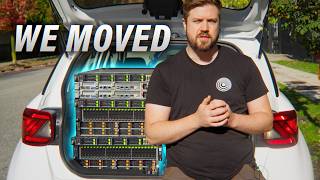
Center and a Canadian Tire on the edge of Vancouver with a trunk full of servers because sometimes it's just better to do it yourself. For almost a decade now, we've built and run our Flowplane video platform on rented cloud
[00:15]
infrastructure. And honestly, it's been great. We've been able to build up a robust and scalable service for both ourselves and other creators without the upfront investment of buying a bunch of expensive hardware or the ongoing cost
[00:31]
and responsibility of maintaining that hardware. Sure, our monthly bill crept up over the years as we added more resources for a growing suite of internal tools used by labs and other various departments, but it's been
[00:45]
manageable. or it was until our host decided that our five-digit monthly bill was gonna go up by about 40% whether we liked it or not. And spoiler alert, we did not. So, what are we going to do about it? Well, the answers in there
[01:01]
about it? Well, the answers in there behind these, which I'm told are uh segways to our sponsor, >> Snapmaker. Their U1 is a multiolor 3D printer and true tool changer. It keeps four colors or materials ready in
[01:15]
separate tool heads for faster, less wasteful multiolor printing. Grab yours wasteful multiolor printing. Grab yours for Black Friday at the link down below.
[01:32]
I'm here to grant you three wishes. For your first, I give you free cash. If you buy this $130 float plane credit, you'll get $60 of it back to spend on LTT store, you can catch up on amazing exclusives on float plane while also
[01:46]
getting some amazing products. That's double amazing. What would you like for >> Affordable RAM. >> I'm not omnipotent. This is Cologic's Van 3, the largest network neutral data center in
[02:01]
network neutral data center in Vancouver. I can show you here and here Vancouver. I can show you here and here and here again but seated. So why a collocation center? You can think of it like a super technically advanced mini
[02:14]
storage facility. We're renting space but they're also providing redundant power, blazing fast networking and multiple layers of security. All things that would be crazy expensive for us to do ourselves. It's $35,000
[02:28]
do ourselves. It's $35,000 just for a generator. This is it. our blank slate. It's bring your own rails, power delivery, routing, switching, servers, backups, etc. All you get are hookups into the facility's power and
[02:42]
networking infrastructure and this sweet, sweet five square ft of floor space. >> AJ, Dan, what are you installing today? >> We're installing networking first cuz without networking, there's not much
[02:56]
without networking, there's not much happening. So, uh, sorry, Mr. the loop, happening. So, uh, sorry, Mr. the loop, but we will evict evict you. So, yes, this one is the first switch. Uh you will have seen this switch before in a
[03:09]
previous video. So, this is the secondary switch. All 100 gig, 32 ports. We're looking at two for obviously redundancy. If you notice right now, they're actually pointing backwards. And there's two reasons for that. One, it's
[03:24]
way easier to route your cable to your servers. And these will actually act as top of the rack switches. And the other reason is that we got models that reason is that we got models that actually pull air from the back and push
[03:37]
air in the front. So if we want to conserve the right air flow with the collocation facility, we need to make sure they're in the right airflow orientation. Hey AJ, weren't those two switches like you know in our building?
[03:51]
>> Yeah, I might have pulled them off pulled them off of uh production. Right now we we have no redundancy at the office. The only issue we have with these is that they have pretty significant limitation with routing.
[04:03]
What we're expecting to do is switch those with uh beefier, more appropriate switches down the road. Uh so stay tuned for that. This is the out of bound or yeah sorry the out ofbound uh switches. So the reason we do that is that if the
[04:19]
switch or the main internet breaks, you want to be able to access your hardware remotely and fix things. So that allows you to do that uh by, you know, having a
[04:31]
VPN to another internet connection that you don't necessarily control or own or through LTE, which we will try to do, but this facility is a big concrete box and this is a big metal box. So will the signal go through? We'll see.
[04:47]
>> And not a VPN in the way that like PIA is a VPN? >> No. Uh so a sight to sight. We use something called Cloudflare zero trust for all our meshing networking. So that will technically land a mesh node so we
[05:01]
>> Why do we call it out of band? We call it out of band because we want to have a network connection that is out of the primary band that we pass all the traffic that is for clients. That way you have an isolated out of band
[05:15]
>> cuz you got bandwidth >> and then we're like over here. >> All right. So, next thing we'll be installing is a multi-blade server. Uh this one is actually something that again you might have seen in another
[05:30]
video. The uh redundant WX server I believe. So it's not redundant anymore. It's in my hand. It's getting reborn here for Flowplane. It's going to host >> For now it's really heavy. So, we're going to remove some of the blades just
[05:44]
to make this easier. And we'll put the blades back in when it's in the rack. >> What we're going to be doing is installing a software called XCPNG,
[05:58]
resources together. >> All four of those blades are going to >> Yeah. And also the two other servers. >> So, it's all kind of quad redundant >> in a sense. But since we're going to be running so much services, we only keep
[06:14]
>> I see. >> So we can run three total capacity and then one for >> kind of like RAID but with compute >> In a way. Yes. >> All right. Here's our fifth node. A 92
[06:30]
core CPU from AMD. Oh, actually it has two. So, actually too many. I don't want to count. Um, but yeah, it has a lot of
[06:44]
count. Um, but yeah, it has a lot of cores and it has 1.5 terbte of RAM. This thing is a beast. And you know what's a beast? This second one. It's exactly the same. Our sixth note here.
[06:56]
>> Oh, look at it. Is worth the car, but it's also going to be running our backups and stuff. So for the out ofbound or OB network, we're
[07:08]
the out ofbound or OB network, we're actually going to install a UniFi UDM Pro that we had lying around. This thing is going to work pretty well for thing is going to work pretty well for us. And uh since it supports WireGuard,
[07:21]
network remotely. >> All right, you've taken our switches, but how are we going to like connect to the office? For now, we're going to use a VPN link, but we're planning something where we will actually have a we call it
[07:37]
where we will actually have a we call it a layer 2. So, a direct fiber link between this data center and the office, >> our own pipe. >> like our own truck things on >> effectively. It's a bit more complex
[07:50]
since we're actually renting a wave. So, we're renting a part of a fiber. Uh, but it's up to 10 gig and we might even, you know, go up to 100 if needed. >> One of the reasons we're using two different colors is because we've got
[08:05]
two redundant power supplies in just about everything. And if one side fails, the other one keeps going. It also lets us move cables and reroute things without having to shut anything off. So, we can reable manage maybe the blue side
[08:18]
and then finish that off and then go do the red side as well. This building has multiple uh power feed which uh allows us to actually power our servers from two feeds. And if one goes down for any reason, the servers will stay up because
[08:34]
they'll keep getting their uh power from at least the blue side or the red side. Pick your team in the comments. This is our out ofbound network. We'll just slap this here. Plug this here. And what this should allow us to do is hopefully
[08:50]
connect to the internet wirelessly in the case that the internet or the transit that we're using goes down. Uh we still want to be able to monitor or do fix remotely. So that allows us to connect through 5G uh with our provider
[09:05]
and then enter and do any changes uh that's necessary to get things back up. This facility actually monitors the power usage of every rack and also the
[09:17]
temperature going in and out. That way uh they can actually live tune their fan uh they can actually live tune their fan circulation uh to account for servers consuming more power and tune them down when there's less consumption. That way
[09:31]
they can save power when there's no big need of cooling. >> As much as it is a facility that just draws a lot of power, if we can save any >> that's cool. >> We're in a data center. We've got
[09:43]
internet service provider now >> for lightest? the office. >> Yes, correct. That's that's the plan at right now. So, that's probably going to save us a lot of money, right?
[09:58]
>> Yeah. We will keep some for redundancy. Lisp will also allow us to have a direct the office. >> There'll be a land connection like >> Yeah. So technically from the office we'll be able to connect to the network
[10:13]
>> No more VPN. >> No more VPN with Dell switches. Something that you need to be careful is the DAC that you plug in and something like Flex Optics DAX. What's cool is that we can use their Flex Optic
[10:27]
programmer to program them to effectively be like, "Hey bro, I am a Dell DAG. Please let me in." And yeah, right now it is doing it. And once
[10:39]
right now it is doing it. And once that's done, we can just lop it in. If I that's done, we can just lop it in. If I can align it. Here we go. a factory reertified drive. This is a Seagate 26 TBTE though. I don't know.
[10:56]
Seagate 26 TBTE though. I don't know. Hopefully it works. We'll find out.
[11:08]
with Vanex and Vanex is the local exchange here for uh internet traffic. So what we did with them for costoptimized connectivity is we went with buy connection meaning that every strand of fiber is actually carrying
[11:22]
strand of fiber is actually carrying both RX and TX or receive and send. Um, both RX and TX or receive and send. Um, so right now this should be able to connect to both switches at the same time. Once I hook everything up, we will
[11:35]
time. Once I hook everything up, we will be able to VGP with every partners that there is on the network and that includes cloud layer which we do a lot of traffic with. Everything is cloud cloud layer protected. That means that
[11:48]
we don't really go out to the internet for that traffic. We will be able to just directly peer with cloud player. So the other end of that fiber is the other end of that fiber is effectively going to the rack of Vanex.
[12:05]
initial setup. We can continue to tidy and optimize and improve over time, but we want to get things going. We have limited time with AJ here. So, you know, certain cable color combinations, tidiness, whatever will improve in the
[12:21]
tidiness, whatever will improve in the future. This here is a MO cable. The really nice thing is that it contains multiple strands of fiber. This can transport eight different signals at the same time on eight different fibers. And
[12:35]
what's cool is that this allows us to break one 100 gig port into 410. Uh that way we keep more of a our capacity going forward. If we're moving all this stuff
[12:47]
off of OVH or at least working with it, I know that we host Kubernetes there. Are we going to put that here too? >> We have about a thousand something >> I love containers. >> We do run a lot of stuff like databases
[13:00]
for labs. All this is going to be get migrated there and uh potentially even we'll have technically more host horsepower and better drives. >> Okay. More workers. That'll be nice. >> And more bandwidth. Actually, all our
[13:13]
racks were at or servers were at 25 gigs and we're upping them to 100. >> Very nice. Very nice. Lots of room for improvement. There's going to be quite a you guys like this video and hopefully we can keep releasing more of these that
[13:28]
you guys like. Uh, thanks for watching. Get subscribed and uh I guess follow the Get subscribed and uh I guess follow the segue uh to to our to our to OUR TO OUR SPONSOR. FOLLOW THE SEGUE TO OUR SPONSOR. YEAH, DAD.
[13:44]
>> He's got to HE'S GOT TO KEEP THE SERVERS WORKING. >> Snap Maker. If you're looking for a multicolor 3D printer, SnapMaker's U1 keeps four colors and materials in separate tool heads and switches between
[13:58]
them in about 5 seconds for faster and more efficient printing. This means more you make and less will end up in the trash bin. Its real tool changer swaps between those four different heads, so
[14:10]
there's no shared nozzles and no time wasting color purges. If you're new to 3D printing, they also have Snapmaker Space, a great hub for you to find things to print so you don't have to stumble around designing everything from
[14:22]
Kickstarter campaign, every order was out over a 100,000 units worldwide. Snapmaker U1 is down from $9.99 to just $6.99 for Black Friday. So, why not save
[14:35]
$300 and grab yours at the link in the video description. If you like this video, go check out this cool playlist of data center tours we do. We're going to have some more coming down the pipe, down the band.