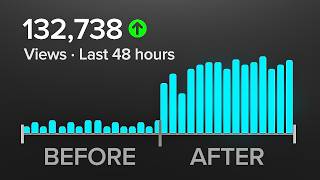

Stop Posting at the Wrong Time!
45sDirectly challenges common advice and promises a specific solution, sparking curiosity.
▶ Play Clip"Delivers a solid, actionable strategy, though the 'simple method' is essentially common sense repackaged."
This video presents a practical method for determining the optimal time to post YouTube videos, tailored to an individual channel's audience. It critiques the built-in YouTube analytics heat map for requiring substantial view data and lacking precision, then introduces a 'copycat strategy' that analyzes the upload times of successful similar channels to identify posting windows.
Most advice on when to post is generic and not based on your specific channel. The video promises a simple method to find the best time for your channel.
Go to YouTube Studio > Analytics > Audience tab, and look for the 'when your viewers are on YouTube' heat map. Darker bars indicate more active viewers.
Most creators can't see this heat map because it requires a lot of recent views. Even when visible, it's not precise or easy to act on.
Find 2-3 channels making similar content to yours that reach the same audience and perform well. These creators have already built the audience you want.
Download the free Chrome extension 'YouTube Upload Time'. It shows the exact date and time a video was uploaded, unlike YouTube's approximate display.
Click on 5-10 of the top performing videos from those channels and write down the upload date and time. Patterns will emerge, such as consistent posting on Thursdays at 6pm.
The logic works for both Shorts and long-form videos. Test posting in the identified window for yourself.
The video concludes that by analyzing the upload times of successful similar channels, you can identify a data-driven posting window that is likely to perform well with your target audience, and you should test this window for your own videos.
What is the first method mentioned for finding the best time to post on YouTube?
Using the 'when your viewers are on YouTube' heat map in YouTube Analytics.
00:30
Why can't most creators see the YouTube Analytics heat map?
Because it requires a lot of recent views on the channel to display.
00:43
What is the 'copycat strategy' for finding the best posting time?
Analyzing the upload times of top-performing videos from similar channels that reach your target audience.
01:08
What Chrome extension is recommended to see the exact upload time of a YouTube video?
YouTube Upload Time.
01:46
How many top-performing videos should you analyze from similar channels to find patterns?
5 to 10 videos.
02:13
Does the copycat strategy work for both Shorts and long-form videos?
Yes, the logic is exactly the same.
02:58
Copycat Strategy
Provides a practical, data-driven alternative to generic advice, leveraging the success of similar channels.
01:08YouTube Upload Time Extension
Introduces a specific tool that solves the precision problem of YouTube's native upload time display.
01:46Pattern Recognition
Emphasizes the importance of collecting enough data points to identify reliable posting patterns.
02:28[00:00] If you want more views on your YouTube videos, you have to start publishing at the right time. The issue is, most advice online is generic and isn't based on your specific channel. So in this video, I'm going to show you a very simple method to figure out when is the best time
[00:15] to post based on your specific channel. Alright, so method one is inside a YouTube studio, but this is not the best method. Later on, I'm going to show you a better way to do this, But if you want a simple way that's built into YouTube, let me show you.
[00:30] All you have to do is go to your analytics, click the audience tab and then look for the heat map called when your viewers are on YouTube. It shows you a heat map of the days and hours your audience is most active.
[00:43] The darker the bar, the more people that are active. Now, the problem is most creators can't actually see this yet. That's because you need a lot of recent views on your channel in order for this to show. And if you haven't gotten that, you'll just see this message that says
[00:56] there's not enough data. But even when you do see it, it's not exactly precise or easy to act on. That's why I want to show you a better method that works for every creator regardless of your size.
[01:08] This is the copycat strategy and it's what I've done to nail in the posting time of our top performing videos. To use this method, you need to find two or three channels that make similar content to yours. They don't have to be massive channels with millions of subscribers. They just
[01:24] These need to be channels that are clearly reaching the same type of audience you're trying to reach, and their videos are performing well. Those creators have already done the hard work of building that audience and you want to use that to your advantage Now go to their channel and sort their videos by most popular You only want to look at their top performing videos the ones that clearly got a lot of
[01:46] traction. But before you click on any of them, go to the Chrome Web Store and download a free extension called YouTube Upload Time. When you click it on any YouTube video, it shows you the exact date and time that video
[02:00] was uploaded. This is way better than what YouTube shows you because they will only tell you the date it was uploaded or how long ago it was uploaded in hours, days, months, or years.
[02:13] But we want to see the exact minute and second that video was uploaded. So click on all of those top performing videos and write down the date and time in a spreadsheet or just on paper and do this across maybe 5 to 10 of their best performing videos and
[02:28] patterns will start appearing. start to see that a lot of their big videos went up on similar days or at similar hours. So if you find a channel that's reaching your target audience and you notice that they're posting let's say every Thursday at 6pm, then that's a great signal that tells you that
[02:44] videos in your specific niche that get posted at that specific time have historically done well with your specific audience. And this method works whether you're posting shorts or long form videos.
[02:58] The logic is exactly the same. channel, sharing your audience, check the upload times on their best performing videos, look for the pattern, then test posting in that window for yourself.
⚡ Saved you 0h 03m reading this? Transcribe any YouTube video for free — no signup needed.