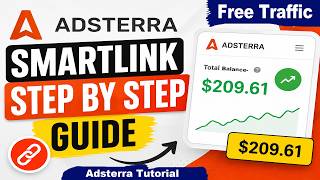

Adsterra Results Revealed!
39sViewers are immediately intrigued by real income screenshots and the promise of a unique method.
▶ Play Clip"Title promises a step-by-step guide, but the video is padded with repetitive instructions and lacks depth."
The video demonstrates a method to monetize traffic using Adsterra's SmartLink feature, combined with free classified ads on auclassifields.com.au and URL shortening via t.ly. The creator shares a step-by-step process to create an Adsterra account, generate a smart link, shorten it, and post it as a free ad to attract clicks and earn revenue.
The creator claims to have achieved interesting results with Adsterra using multiple methods, and will share one method step-by-step.
Video is for educational purposes only; no income guaranteed. Asks viewers to subscribe and like.
Adsterra is described as a best network with 50,000 partners and conversions per year.
Steps to sign up: enter email, login ID (unique), first/last name, password, select messenger type (Telegram, Facebook, WhatsApp, Instagram), enter messenger ID, select country, accept terms, click sign up.
Monetize website, in-app, or social media traffic (Facebook, TikTok). Benefits: high CPM rates, regular payouts, browser-friendly ads, partner care program.
After account creation, go to Smart Links, click 'Add a smart link', select traffic type, click add, wait at least 3 minutes, refresh, then copy the active link.
Paste the smart link into t.ly, click 'Shorten URL', copy the shortened URL.
Go to auclassifields.com.au, create account, click 'Post a free ad', upload image, select category, enter title and description, paste shortened URL, select location, submit.
After submission, listing is pending; wait for approval, then it goes live. When users click the URL, Adsterra may credit the account.
Share smart link on social media (Facebook, Instagram, Twitter, Telegram) or create a website and monetize with Adsterra.
The method involves creating an Adsterra SmartLink, shortening it, and posting it as a free classified ad to attract clicks and earn revenue. Success depends on effort and traffic quality.
What are the benefits of using Adsterra network?
High CPM rates, regular payouts, browser-friendly ads, and a partner care program.
01:42
What steps are involved in creating an Adsterra account?
Enter email, login ID, first/last name, password, select messenger type, enter messenger ID, select country, accept terms, and click sign up.
00:57
How long do you need to wait after creating a smart link before refreshing?
At least 3 minutes.
02:30
What is the purpose of using t.ly in this method?
To shorten the Adsterra smart link for easier sharing.
02:44
What platform is used to post free ads?
auclassifields.com.au
03:00
Adsterra network scale
Highlights the network's credibility with 50,000 partners.
00:43Monetization benefits
Lists key benefits that attract publishers.
01:42Smart link activation wait time
Provides a specific actionable detail for users.
02:30Free classified ads strategy
Introduces a low-cost traffic generation method.
03:00Alternative traffic sources
Expands the method beyond classifieds to social media and websites.
05:02[00:01] you one of the best method that you can use to get some interesting results using Adsterra platform. Guys, here you can see I have got some interesting results with Adsterra network. I have used multiple methods to get this
[00:15] result. I'm going to share with you one of those method. You can watch this full video. I'm going to share with you a step-by-step. You can get amazing results from Adsterra network. Before we start, here is a quick disclaimer. This
[00:29] video is for educational and informational purposes only. I do not guarantee any income and results. Your results may vary based on your effort, skills, experience, consistency, and traffic. Guys, if you are a new on my
[00:43] channel, then please subscribe our channel and like this video. First of all, you can go on Adsterra network. Guys, this is a best network. Here you can see this network have 50,000 partners. Here you can see conversions
[00:57] per year. Guys, first of all, you will have to create account on this network. You can click on this button. It will then take you to this page. You can type your your email address. You can type your login ID. You can type your
[01:10] anything. It should be unique. You can type your first name, last name. You can type your password. You can select your messenger type. Like you can select your Telegram, Facebook, WhatsApp, Instagram. Now you can type your messenger ID. You
[01:27] can select here your country. You can read and accept its terms and conditions. At last, you can click on sign up button. Guys, here you can see you can monetize your website, in app, or social media traffic. Like Facebook,
[01:42] TikTok. Here you can see what you get. You can get high CPM rates, regular payouts, browser-friendly ads, and a partner care program. Once you will create successfully your account, you will then come to this page. You can
[01:57] will then come to this page. You can click on a smart links button. Here you can see you can create a smart link. You can add the link anywhere. Here you can see you can paste it in any social media post or website, Facebook,
[02:14] Instagram, Twitter, Telegram, or you can add the link anywhere. You can simply click on add a smart link button. You can select your traffic type. Now you can click on add button. Now you need to wait at least 3 minutes. After that you
[02:30] wait at least 3 minutes. After that you can refresh the page. a smart link. Here you can see a status. This a smart link is active. You can
[02:44] click here to copy link. Now in next is step what you will have to do is you can go on t.ly platform. You can paste your a smart link. Now you can click on shorten URL button. Yeah, here we go. Here is showing shorten URL. You can
[03:00] click here to copy the shorten URL. Now you can go on this website. Here you can see latest listings. Lots of people are advertising their products and services with this platform. You can use this platform to get loads of viewers. Here
[03:16] you can see latest articles. You can create account on this platform and then you can click on post a free ad button. It will then take you to this page. You can upload your image. You can type your category. You can type your title. You
[03:31] can type your description. Guys, this item is for free. Now you can select your location. At last you can click on submit button. I'm going to fill all of this information. I'm going to upload your image. You can upload your image.
[03:47] You can select your category. You can type your entertainment. You can select any category. Now, you can type your title. You can type your description. Guys, you can type your best title and best
[04:02] description. You can select here this option. Now, you can paste your website URL. You can paste your smart link. You can go on this website. Guys, I have shortened a smart link using this
[04:14] website. Here is showing shortened URL. You can copy this shortened URL. Now, you can paste here. You can scroll down. You can select your location. You can select any of this location. You can select your city. Now, you can
[04:31] scroll down. You can click on submit button. Yeah, here we go. My listing has submitted successfully. Here you can see this listing is in pending. You need to wait for approval. After getting approval, your post will go live on this
[04:46] website. Here you can see your image. Here you can see the title. Here you can see description. And here you can see website URL. When any user will click on this URL, then Adsterra network may credit your account. Guys, this
[05:02] credit your account. Guys, this website's name is auclassifields.com.au. country. You can get lots of users from Australia country. Guys, you can also
[05:15] share your smart link on social media post. Works great with Facebook, post. Works great with Facebook, Instagram, Twitter, Telegram, and more. You can also create website. You can monetize your website with Adsterra
[05:28] network. You can simply click here to add your website. Using this method, you can get some interesting results. I hope this video is helpful for you. Please subscribe our channel and like this video. And also, please share this video
[05:41] with your friends. Thanks for watching. I'll see you guys in next video.




⚡ Saved you 0h 05m reading this? Transcribe any YouTube video for free — no signup needed.