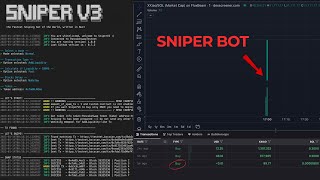

Code a Solana Sniper Bot for Free
46sPromises free, no-coding-required access to a high-demand crypto tool, appealing to beginners and traders.
▶ Play Clip"Title accurately promises a tutorial for tracking new memecoin listings; the video delivers exactly that."
This tutorial demonstrates how to code a Solana sniper bot for free, requiring no prior coding experience. The bot tracks new tokens added to the Raydium pool, filters them for safety, and snipes them quickly. The video focuses on the first step: finding new token contracts using code.
The sniper bot workflow involves: 1) finding new tokens added to Raydium pool or created on Pump.fun as fast as possible, 2) filtering tokens to ensure wallet is not frozen and tokens can be sold, 3) sniping tokens quickly.
Go to the creator's GitHub page, click on 'Solana token tracker', download the zip file, and open it in Visual Studio Code. Ensure Node.js is installed (node -v to check version).
Run 'npm install' in the terminal to install all required dependencies for the repository.
Create a .env file with RPC endpoint and WebSocket URL. Create a free account on Helius, get the API keys, and paste them into the .env file. Save the file.
In the terminal, run 'npx ts-node index.ts' (or similar command) to start the bot. It will display new tokens added to Raydium pool in real-time.
The bot outputs contract addresses and information in the terminal and saves them to a JSON file. Example: a token with signature and base address is shown.
Dex Screener is slow; the bot finds tokens faster. For example, a token found by the bot was not yet visible on Dex Screener but was visible on Solscan and Birdeye.
Tokens from Pump.fun graduate to Raydium when they reach a certain market cap. The bot only detects tokens after they are added to Raydium, not during the Pump.fun phase.
The bot successfully tracks new Raydium pool tokens faster than Dex Screener. Future videos will cover filtering tokens to avoid scams and executing snipes.
What are the three main steps of the Solana sniper bot workflow?
1) Find new tokens added to Raydium pool or created on Pump.fun as fast as possible. 2) Filter tokens to ensure wallet is not frozen and tokens can be sold. 3) Snipe tokens quickly.
00:19
What command is used to install dependencies for the bot?
npm install
02:54
Which service is used to obtain RPC endpoints for the bot?
Helius
03:59
What is the purpose of the .env file in the bot setup?
To store the RPC endpoint and WebSocket URL API keys.
03:07
Why does the bot not detect tokens from Pump.fun before they graduate?
Because the bot monitors Raydium pool additions, and Pump.fun tokens only get added to Raydium after they graduate (reach a certain market cap).
07:46
What is the main advantage of this bot over Dex Screener?
The bot finds new tokens faster than Dex Screener, which is slow.
07:00
Sniper Bot Workflow
Clearly outlines the three-step process for building a sniper bot.
00:03Speed Comparison with Dex Screener
Demonstrates the bot's speed advantage over a popular tool.
07:00Pump.fun Graduation Explanation
Clarifies why some tokens are not detected immediately.
07:46[00:03] going to show you how you can code a Solon sniper bot for free and trust me you don't have to know anything about coding this is the first video of a series so make sure to subscribe the channel and like this video without
[00:19] further Ado let's dive into it to develop our sniper bot we have to take some steps first we have to find new tokens that recently added to radium tokens that recently added to radium pool or recently created on p. Fon as
[00:34] fast as possible because when it comes to Dex screener de screener is quite a slow we have to find token contracts as fast as possible and we use codes to do
[00:46] fast as possible and we use codes to do that uh after finding the contracts we have to filter them because uh we have to make sure our valet is not frozen and we can sell uh those tokens if everything
[01:00] everything uh was okay then we have to snipe those tokens uh quite fast so this is the workflow that we follow and in this video I will show you how you can actually find new tokens using
[01:16] Code okay just go to my GitHub page and click on Solon token tracker I will put the link to this GitHub page in the video description click on code and download the zip file uh we can actually get clone this repository but this is
[01:33] get clone this repository but this is the easiest way to clone that uh let me the easiest way to clone that uh let me put uh this repository on my
[01:46] in Visual Studio code if you haven't installed Visual Studio code please do it this is our code editor uh click on file open Fuller
[02:00] editor uh click on file open Fuller and on desktop click Solon token if you can see the terminal uh click on
[02:15] if you can see the terminal uh click on this option to actually open this option to actually open it okay uh we have to install some it okay uh we have to install some dependencies and to do so we need node
[02:28] uh node.js uh first make sure you have installed uh first make sure you have installed node on your PC or Mac if you don't go node on your PC or Mac if you don't go to nodejs.org and download the LTS
[02:41] version after installing when you type node SLV you should see the version number of number of nodejs okay uh to install all this
[02:54] repository dependencies we have to write mpm install and this will automatically install all dependencies okay now it's time to set
[03:07] dependencies okay now it's time to set up our RPC to actually uh get data from up our RPC to actually uh get data from radium pools uh on the blockchain click radium pools uh on the blockchain click uh you know uh right click and new
[03:20] file uh Dov and we have to put the API keys in Dov and we have to put the API keys in here okay um I have a sample for you
[03:32] here okay um I have a sample for you guys uh you have to put data like this guys uh you have to put data like this for RPC end point uh you will see for RPC end point uh you will see https API keys in here and for web
[03:45] https API keys in here and for web socket this is the site and in here the socket this is the site and in here the API key okay um we have to create an account in helus this is the service that we use to gain access to uh
[03:59] actually rpcs um just go to Helu website I already created a free account so let me log into that click on end points and in
[04:13] log into that click on end points and in here you can see uh RPC information do not share this information with anyone actually I don't use this RPC so that's the reason I'm sharing with you guys uh copy everything in here and I have to
[04:28] mention I'm using the free version if you prefer a faster service you can stick with the paid service the paid version of that uh go to chat
[04:41] version of that uh go to chat GPT paste all the information in GPT paste all the information in here and let's give our example as well here and let's give our example as well this is our
[05:00] write this information in information in the same
[05:16] those datas and we can use it quite easily datas and we can use it quite easily okay uh just go to EnV and paste those uh they're all set make sure to save this file by uh you know pressing
[05:31] this file by uh you know pressing command and S and now as you can see on the read me section uh we actually installed section uh we actually installed nodejs uh we cloned the repository we
[05:46] installed all dependencies we configured the RPC and dependencies we configured the RPC and now we can run uh you know this bot just now we can run uh you know this bot just uh go to terminal again
[06:00] uh go to terminal again click on this and paste npx uh index.ts is actually my main code and index.ts is actually my main code and press
[06:17] tokens that's recently added to radium pool and as soon as a new token added to pool and as soon as a new token added to radium we can see all contract address
[06:29] and in information in here in data section and new solot tokens. Json section and new solot tokens. Json file as you can see it found a new token this is the signature let's go to new Solona
[06:44] Solona tokens we should see this in tokens we should see this in here this is then Q okay this one and in here Base address you can see the contract address now let me go to Dex
[07:00] screener and search for this token as you can see you can't find this token as you can see you can't find this token because uh Dex screener is quite a token because uh Dex screener is quite a slow however if I go to Sol scan and
[07:13] slow however if I go to Sol scan and paste this you can see the token information uh you know when it comes to uh different size like the ex screener bird eye is much faster if I paste the
[07:28] bird eye is much faster if I paste the contract in here here you can see the chart oh uh this is interesting okay now you can see this uh you may ask why uh this token is older than 1 minute uh the reason is this
[07:46] than 1 minute uh the reason is this token graduated from pump. fund website token graduated from pump. fund website in pump. fund when tokens reach to a in pump. fund when tokens reach to a certain market cap uh we call them uh
[07:58] these tokens graduate and when they reach to that certain market cap then their liquidity will add market cap then their liquidity will add to radium so before that we can't see
[08:10] to radium so before that we can't see the token information on our bot because um as I told you the token has not graduated and has not added to radium but as soon as it graduates we can see the contract in here in the future I
[08:25] will show you how you can actually find p. fun tokens as soon as one of them created uh but when it most of these tokens will go to zero and uh you know
[08:38] they can't even graduate but when it comes to some tokens that usually comes to some tokens that usually graduate they usually uh can uh attract graduate they usually uh can uh attract so many people and those uh pools could
[08:50] be a better option to use for example a sniper Bots um let me check the sniper Bots um let me check the signature in here as well
[09:03] okay we have a new token in here let me copy that go copy that go to solid not able to you know find this because it takes time to load this signature
[09:19] it takes time to load this signature this but is super fast this is uh great this but is super fast this is uh great let me go to new Solen token let me go to new Solen token again find this contract
[09:40] is the yvl okay this is the contract yvl okay this is the contract address now let's go to Dex screener again as you can see there is no token it doesn't show that it takes time but
[09:57] if I go to be die you can see this new token this is actually I think from token this is actually I think from pump. fun as well so uh yeah you can see pump. fun as well so uh yeah you can see the
[10:14] times to find the token on Dix screener it really takes
[10:28] you can see the to token oh my God by using Code we were able to find this quite fast but as you can see Dex screener is quite a slow I really hope you found this video helpful this was the first episode of uh the sniper Bots
[10:46] series uh in the next videos I will show you how to filter these tokens to ensure you how to filter these tokens to ensure you wouldn't uh get rocked and then how you can snipe them early cheers viewers hope to see you in my next videos
⚡ Saved you 0h 11m reading this? Transcribe any YouTube video for free — no signup needed.