[00:02]
I'm going to show you how your business can now live inside ChatGPT. You can check, and you can build your own AI agent that talks to customers for you. easier than you think. Plus, there's one
[00:16]
hidden feature most people will totally miss. So, here's what happened on November 10th, 2026, OpenAI launched something called Businesses in ChatGPT. It's in beta right now, and this is a big deal. Why? Because OpenAI says
[00:30]
ChatGPT now has 1.2 billion weekly users. That's billion with a B. That's a lot of people asking ChatGPT what to buy, where to go, and who to trust. stuff. Now, a lot of them just ask ChatGPT, and now businesses get to show
[00:45]
There are three big parts to this update, Business Hub, Business Insights, through all three. The third one is the thing you need to know before you get too excited. I'll get to that in a
[00:58]
second. Okay, let's start with part one, Business Hub. Business Hub is where you claim your business inside ChatGPT. You sign in to ChatGPT on the web, you open search for your company, then you prove it's yours. How do you prove it? You can
[01:13]
business email, a DNS record on your website, or you can connect your Shopify store. OpenAI also uses a company called Persona to check who you are. Once verified badge on your profile, nice and shiny. And here's a small detail. You
[01:28]
you can use the main management features. So, don't skip it. It's like showing your ID at the door. No ID, no party. Now, here's that thing you need to know. A lot of people think you need the ChatGPT business plan for this. You
[01:41]
don't. OpenAI says eligible businesses can claim their profile without an account. Business Hub is a totally separate thing from the chat ChatGPT up. Once you're in, you can add your info, your website, what your business
[01:55]
delivery and return rules, your logo and a cover image. You can
[02:12]
Shopify, you just connect your store. If not, you can use a CSV file past. A clean one, they stop and look. Why does this matter? Because ChatGPT can get some old page on the internet that hasn't been touched in three years. Now,
[02:26]
does not promise you'll show up more. It just helps keep your info, right? Okay, This is the one everyone is going to talk about, but before I show you that, Everything I just showed you is cool, but knowing about a new ChatGPT feature
[02:41]
and actually using it in your business are two very different things. That's where we take ChatGPT updates like this one and turn them into real workflows. info the right way, writing smart instructions for an AI agent, and
[02:55]
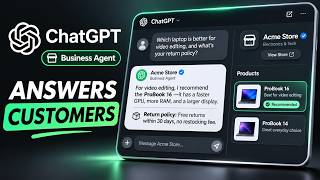
building automations that save you hours every week. It's the best place to scale way. The link is in the comments and description. Part two, business agents. This is the big one. Eligible businesses can now build their own AI agent inside
[03:09]
ChatGPT. Think of it like a helper that knows your business. It talks to your customers for you. Here's how it works. You give the agent your business info, it answer? What should it say about returns? What should it never say? Then
[03:22]
you test it. You ask it real questions, you fix anything it gets wrong, and when it 's ready, you hit publish. And when you test it, be picky. Ask it the stuff suggests products that are really in your catalog. Check that it uses your
[03:35]
real return policy, not a guess. If it gets something wrong, fix it before open a chat with your agent and it's clearly labeled so people know who they're talking to. So picture this. A customer types, I'm stuck between these
[03:48]
and what's your return policy? Your agent can explain the options, it can send them to the right page on your website. That's like having a shop helper who never sleeps, never takes a lunch break, and never says, let me go
[04:02]
can't do. Business agents cannot finish a purchase. They can't make bookings and they can't look up someone's order. All of that still happens on your website or your other tools. So the agent helps people decide. Your website still does
[04:15]
the rest. And there's one more catch. Right now, business agents are only for eligible US e-commerce and online service businesses. So if you're outside profile in supported places, but the agent part may not be open to you yet.
[04:29]
This is early days. Okay, now part three. And this is that hidden feature I insights. Inside Business Hub, you get a 28-day view of what's going on. You can see how often your business gets mentioned. You
[04:42]
to your website and you can see the topics people were asking about when Because it tells you what people actually care about. If lots of people find you through one topic, you know what to make more content about. That's
[04:55]
gold for your content plan. It's also great customer research. You get to see can tell you what to put on your website, what to talk about in your videos, and what your agent needs to be really good at answering. But here's the
[05:07]
Businesses don't see what each person typed and they don't get the chat logs from the agent. It's all grouped together, so you see the big picture, zoom out because there's a bigger story here. Back on September 16th, 2026,
[05:23]
sponsored agents that let some advertisers put AI chats right inside start chat, and you talk to that company's agent. Now with this November update, businesses get the non-ad side too, their own profile, their own agent.
[05:39]
So you can see where this is going. Someone finds a business in ChatGPT, maybe from a normal answer, maybe from an ad. They chat with that business's agent. They ask questions, then they click over to the website and decide
[05:51]
what to do next. But here's one thing to know. Right now, these two systems are not hooked together. OpenAI's help docs say the Business Hub agent and the Ads if you're an advertiser, you have to set up your sponsored agent on its own in
[06:04]
Ads Manager, and sponsored agents are still only open to some advertisers. starting to look less like just a chatbot and more like a place where people find businesses, ask questions, compare stuff, and decide what to buy.
[06:17]
table. So how do you get started? Let me make it super simple. Step one, sign into Chat GPT on the web and open Business Hub from the sidebar. Step two, search for your business and claim it with your business email, phone, domain
[06:31]
check, or Shopify. Step three, finish the persona check and wait to get what you do, your products, your policies, and your product feed if you have one. Step five, if you're eligible, open your draft business agent and give
[06:44]
it clear instructions. Step six, test it, ask it real customer questions, fix what's wrong, then publish. Here's a pro tip for your agents' instructions. Tell Tell it never to make up stock, deals, or delivery dates. Tell it to say when
[06:59]
it doesn't know something and send people to your support page and tell it info it doesn't need. That keeps your agent honest, and honest agents build trust. So who should care about this? If you sell stuff online, this is for you.
[07:12]
for you. Your agent can help people pick the right product, answer your most common questions, and point them to your website. It's like an FAQ page that actually talks back. Inside the AI Profit Boardroom, we show you how to
[07:25]
turn Chat GPT updates like business agents into real systems for your instructions that actually help customers, how to set up AI automations instead of just watching AI news. If you want to go from knowing about this to
[07:41]
step. The link is in the comments and description. And if you want to keep learning for free, join the AI Success Lab. It's a free AI community. You'll get the notes from this video so you don't have to pause and scribble
[07:54]
everything down. You'll get the full step-by-step process for setting up your business in Chat GPT. You'll get simple SOPs you can follow plus over 100 AI use cases just like this one. It's an easy way to keep learning AI and start
[08:06]
putting it to work. The link is in the comments and description.