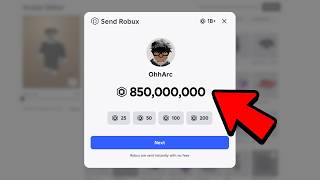
Zero to Thousands of Robux?
45sThe promise of free Robux instantly grabs attention, especially for young Roblox players seeking easy money.
▶ Play ClipThe video claims to reveal a secret method to get free Robux in Roblox, but it is actually a scam that tricks viewers into completing surveys and entering personal information. The presenter provides a series of nonsensical steps that do not result in free Robux, and the final demonstration is fabricated.
The presenter claims to have a method to turn zero Robux into thousands within minutes, promising it's not a scam.
Viewers are asked to subscribe, like, and comment to enter a fake giveaway for free Robux.
Instructions to type 'please donate to me right now' as a code, which results in an invalid code error.
Viewers are told to type 'RBX employee ID 710220' in chat, which turns into hashtags.
Viewers are directed to 'buck.supply' to complete surveys for Robux, but this is a scam to collect personal data.
The presenter shows a fake balance of 75,000 Robux, claiming it came from the method.
The video is a scam that uses fake steps and a survey website to trick viewers into providing personal information. No free Robux are actually given.
"Pure clickbait: the title promises free Robux, but the video is a scam with no real method."
What code does the presenter claim gives free Robux?
The code 'please donate to me right now' is claimed to give free Robux, but it is invalid.
01:07
What fake employee ID is used in the video?
RBX employee ID 710220.
02:39
What website does the presenter direct viewers to for surveys?
buck.supply
04:18
How many Robux does the presenter claim to have after the method?
75,000 Robux.
05:13
False Promise of Free Robux
The video immediately hooks viewers with a claim that is impossible and fraudulent.
00:02Survey Scam Revealed
Directs users to a third-party survey site, a common scam tactic to collect personal data.
04:18Fabricated Proof
The presenter shows a fake Robux balance to convince viewers the method works.
05:13[00:02] players wake up and stare at zero Robux. No cool outfits, no rare items. But what if I told you that I have a method that will turn zero Robux into thousands of Robux within minutes. And no, this isn't one of those boring scamming videos.
[00:16] make sure to stay till the very end of this video. But wait, before we continue with this video, this is your chance to get even more free Robux. I'm giving away thousands of Robux to my subscribers and getting in is super easy
[00:29] and boom, enjoy the free Robux my amazing subscribers. All you have to do to get free Robux is subscribe to the art channel with all notifications on, then like this video, and also comment your Roblox username more than 10 times
[00:41] so I know who to send the Robux to. I'll be picking winners every single video, so everybody will have a chance to get some free Robux in the next video. And also, you must subscribe to the Daisy channel with all notifications turned on
[00:53] for an additional 10,000 Robux. Link will be down in the description below. To begin this Roblox method, you guys want to go over to the redeem Roblox codes. And we're going to type in the code please donate to me right now. Just
[01:07] like that. Once you guys have done that, you guys are going to press the redeem invalid code. But what you guys want to go ahead and do is keep hitting the different error message. And it's going to be this error message right here. So
[01:21] now what you guys want to go ahead and do is go over to your original language, which going to be the English language like it is for me. But now you guys are here. And now we should get an unsupported language screen. Once we
[01:35] the code right here and it's going to be please donate button. And as you guys can see, we're going to get the unexpected error. Please try again later. And all we're going to go ahead and do is go over to
[01:48] our profile. We're going to go over to our bio and all we're going to go ahead and do is delete anything that we have in our bio and we're going to put code in our bio and we're going to put code please donate to me right now, just like
[02:01] [music] Now, we're going to go ahead and back out of there, and all we're going to go ahead and do is go over to the Robux option. Once we're there, we're donate, and it's going to be this game
[02:13] game, we have to go over to the servers, and we have to refresh the servers at least five times. Once we have done that, we're going to go over to the original language. Once we have done that, we're going to go ahead and hit
[02:27] the favorite and notify. Make sure that both of those options are on. Once you go ahead and do is jump inside of the all we're going to go ahead and do is go over to the chat, and we're going to
[02:39] type this in right here, and it's going to be RBX employee ID 710220, that in. Now, as you guys can see, it's going to turn into a bunch of hashtags, your character, just like it's on mine right here. So, now all we're going to
[02:54] go ahead and do is go over to an empty booth right here. And all we're going to go ahead and do is claim it. Once we have done that, we're going to skip the >> We're going to go over to the text option, and we're going to go ahead and
[03:06] clear that out, and we're going to go ahead and put on the exact same piece of code that I just put into the chat. And now, as you guys can see, it's going to look something like this, and all we're going to go ahead and do from here is go
[03:18] over to the chat one last time, and we're going to go ahead and put on that guys can see, it's going to turn into a bunch of hashtags right here. And now, what you guys want to go ahead and do is go over to the bench that's nearest to
[03:32] ahead and take a seat right here, and now your character should look something to go ahead and do is is going to go over to the chat, and we're going to put code please donate to me right now, just like
[03:49] send that in. And now, the code is going to be right on top of your character, and now we're going to officially back out of this game right here. Now that page, all we're going to go ahead and do is scroll all the way down, and we're
[04:02] going to go over to this language right here. Now we should get the unsupported anything else, all I want you guys to do from here is open up a Safari, Google, that you guys are over at Google, you guys want to type in buck.supply, and as
[04:18] website grant you guys the Robux right here, and it's going to be buck.supply. over at my YouTube channel. It's going to say visit buck.supply. So, now let's my username. My username is going to be subscribe arc, and we're going to click
[04:33] next. And now we're going to complete any of the two activities below to claim see, I'm going to open up two of these surveys right here. And as you guys can see, for each survey, it will give us 10,000 Robux. And all I have to do is
[04:46] enter my email address right here, and it'll give me 750 bucks to cash app. And I can literally use this money to get more Robux. And as you guys can see, the next one is going to be $100 to PayPal. And once again, I can use this money for
[05:00] Robux. And now check this out. All I have to do is enter my email address. these surveys really, really quick, and I'll catch you guys in a second. I have So, now all I have to do is literally return back into the Roblox game, and I
[05:13] go. Now that you guys are officially back into the Roblox game, all you guys are going to go ahead and do is click the okay check this out. I have five Robux in the balance, but check this out right now. And boom right there. 75,000
[05:27] account, as you guys can see right there. And it all came from the please we're going to reload the page, and as you guys can see, the Robux are still right there. But yeah, it's been your boy Arc, and I'm signing out. Peace.
⚡ Saved you 0h 05m reading this? Transcribe any YouTube video for free — no signup needed.