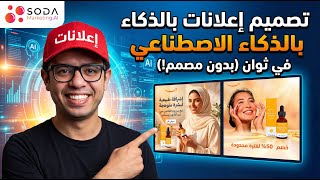

Create Ads in Seconds with AI
42sThe instant transformation from website to ad in under a minute is a jaw-dropping demonstration of AI's power, sparking curiosity and shares.
▶ Play Clip"The title promises AI ad design in seconds, and the video delivers exactly that — a clear, concise demo of the tool's capabilities."
This video is a product demonstration of SodaMarketin.ae, an AI-powered advertising platform that automatically generates branded ads, video ads, and product images in under a minute. The presenter walks through the entire workflow, from importing brand data to generating and resizing ads, emphasizing that no design skills or agencies are required.
Enter your brand's website into SodaMarketin.ae, and the platform automatically imports your brand data, logo, colors, and visual identity.
Choose whether you're selling a product or a service, paste the product page link, and click Import. After import, click Create Ads Set.
Click Generate, and in less than a minute, you get a high-converting ad without designers, skills, or promo requirements.
Use the Resize feature to generate ads in all required sizes and formats for every platform.
Convert any ad to a video ad with one click, or write a specific video idea and let the platform generate it automatically.
Click Edit and type the change you want; it is applied instantly and accurately, with no promo required.
Use Advanced Options to specify ad directions, such as 'Special Offer Ad,' and add custom messages like '50% Discount for a Limited Time.'
Generate product images by selecting 'Photoshots,' choosing a ready-made idea, and clicking Generate.
SodaMarketin.ae saves 10x the time in ad creation and replaces agencies and designers, saving thousands of dollars.
SodaMarketin.ae offers a fully automated, AI-driven solution for creating branded ads, video ads, and product images, eliminating the need for designers and agencies. The platform promises significant time and cost savings for businesses of all sizes.
What does SodaMarketin.ae automatically import when you enter your brand's website?
It imports your brand data, logo, colors, and visual identity.
00:04
How long does it take to generate an ad with SodaMarketin.ae?
Less than a minute.
00:33
What feature allows you to create ads in different sizes for all platforms?
The 'Resize' feature.
00:46
How can you create a video ad with SodaMarketin.ae?
Click 'Convert Video' on any ad, or write a specific video idea and click 'Generate.'
01:00
What is the purpose of the 'Advanced Options' feature?
To specify ad directions, such as 'Special Offer Ad,' and add custom messages like '50% Discount for a Limited Time.'
01:30
How do you generate product images with SodaMarketin.ae?
Click 'Photoshots,' choose 'Quick Option,' select a ready-made idea, and click 'Generate.'
01:57
What is the claimed time savings when using SodaMarketin.ae?
It saves 10 times the time in creating ads.
02:12
Automated Brand Import
This is the core value proposition: the platform eliminates manual setup by auto-importing brand identity.
00:04One-Minute Ad Generation
The speed of ad creation is a key selling point, promising a high-converting ad in under a minute.
00:33Video Ad Conversion
The ability to convert static ads to video ads with one click is a powerful feature for multi-format marketing.
01:00Advanced Customization
The Advanced Options allow for specific ad directions and messages, giving users control over the creative output.
01:30Cost and Time Savings
The claim of replacing agencies and designers highlights the potential for significant cost reduction.
02:12[00:04] in to SodaMarketin.ae. Enter your brand's website, and SodaMarketin.ae will instantly and automatically import your brand data, logo, colors, and visual identity.
[00:18] logo, colors, and visual identity. Now, choose what you're selling: a product or a service? I'll choose a product. Paste the product page link here and click Import. After the product import is complete, click Create Import. After the product import is complete, click Create Ads Set. Now, just click Generate, and
[00:33] that's it! In less than a minute, you'll have an amazing, high-converting ad without designers, without skills, and without any promo required. Need your ad in different sizes? No problem!
[00:46] Click Resize and choose the size you want, and your ads will be ready in all your ads will be ready in all formats for every platform. Need a formats for every platform. Need a high-converting video ad? No problem! Click Convert Video
[01:00] on any ad you like. If you have a specific video idea, write it here, or simply click specific video idea, write it here, or simply click Generate, and SodaMarketin.ae will understand Generate, and SodaMarketin.ae will understand everything and execute it for you. And there you have it: an
[01:15] everything and execute it for you. And there you have it: an amazing, high-converting video ad ready to go! Want to make quick edits to your ad? No promo required! Just click "Edit" and type what promo required! Just click "Edit" and type what you want to change, and it will be applied instantly and with perfect accuracy. Do you
[01:30] want to create ads with specific directions? No problem! Click on "Advanced Options" and then type the direction you want. For example, I'll write " Special Offer Ad" here. Now add any
[01:44] Special Offer Ad" here. Now add any specific message you want to include, such as "50% Discount for a specific message you want to include, such as "50% Discount for a Limited Time." Click "Generate," and your Limited Time." Click "Generate," and your high-converting ad is ready. Do you want to create
[01:57] amazing images for your products? No problem! Click on "Photoshots," choose "Quick Option," select one of the select one of the ready-made ideas designed specifically for your products from here, and then ready-made ideas designed specifically for your products from here, and then click "Generate." And there you have it—an amazing image of your product!
[02:12] click "Generate." And there you have it—an amazing image of your product! Try SodaMarketin EA now and save 10 times the time in creating ads. Create product ads, video ads, and social media posts designed with your brand identity and replace agencies and designers to
[02:29] brand identity and replace agencies and designers to save thousands of dollars every time.




⚡ Saved you 0h 02m reading this? Transcribe any YouTube video for free — no signup needed.