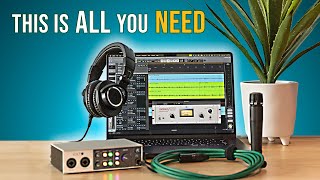

Budget Home Studio Setup: Start Here!
45sDirectly addresses beginner pain point of needing gear, offering a clear, actionable setup guide that promises professional results on a budget.
▶ Play Clip"The title accurately reflects the content: a budget-friendly beginner setup using gear the creator actually owns, with no misleading claims."
This video provides a step-by-step guide to building a budget-friendly beginner home recording setup using gear the creator actually owns and uses. It covers essential components like the computer, audio interface, microphone, headphones, recording software, and accessories, emphasizing practical recommendations for newcomers.
The video aims to help beginners build a great-sounding, budget-friendly home recording setup with gear the creator personally uses.
The computer is the central hub. If you have a Windows or Mac machine from the last 3-5 years, it's likely sufficient. Chromebooks won't work. The creator uses a MacBook Pro M3 but recommends a Mac Mini for budget-friendliness.
The audio interface connects microphones and headphones to the computer. Recommended: Universal Audio Volt 2 with two inputs for future flexibility. It comes with professional-grade plugins and virtual instruments.
A dynamic microphone that is a workhorse for many applications (electric guitar, snare, vocals). Budget-friendly ($99-$109 new, cheaper used). Avoid eBay fakes. Dynamic mics are less sensitive to room noise than condenser mics.
Closed-back headphones ideal for recording to prevent sound leakage into the microphone. They sound accurate, are durable (detachable cables, replaceable ear pads), and can also be used for mixing on a budget.
Luna is a free DAW (digital audio workstation) with full functionality for beginners. It mimics a traditional recording studio workflow and works well for rock, country, pop punk, etc.
Essential accessories include a microphone stand (cheap ones work), a pop filter to reduce plosives, a decent microphone cable (avoid ultra-cheap ones), and instrument-specific items like strings or cables.
With this basic setup and some know-how, you can record songs that fit with professional productions. The creator offers a course using this exact setup to record a full rock song.
By following this gear guide, beginners can assemble a capable home recording studio without overspending. The key is to start with what you have, invest in a quality audio interface and microphone, and use free software to begin making music.
What is the recommended audio interface for a beginner home recording setup?
Universal Audio Volt 2
02:06
Why does the creator recommend a dynamic microphone like the Shure SM57 over a condenser microphone for beginners?
Dynamic microphones are less sensitive to room noise, cheaper, and do not require phantom power.
06:05
What type of headphones are recommended for recording and why?
Closed-back headphones (e.g., Audio-Technica ATH-M50X) because they prevent sound from leaking into the microphone.
08:21
What is the free DAW recommended in the video?
Universal Audio Luna
12:32
What is the purpose of a pop filter?
It stops hard consonant sounds (P, B, D) from creating plosives that hit the microphone.
15:55
Why should beginners avoid buying a microphone cable that is too cheap?
Cheap cables break easily and can introduce noise and radio frequency interference.
16:56
What is the main advantage of having two inputs on an audio interface?
It provides flexibility for future recording needs, such as recording two sources simultaneously.
02:32
How long can the Audio-Technica ATH-M50X headphones last according to the creator?
11-12 years with replaceable ear pads and cables.
09:58
Use Existing Computer
Saves beginners from unnecessary expense; most modern computers are sufficient.
00:39Two-Input Audio Interface
Future-proofing without significant extra cost; enables stereo recording or dual mics.
02:06Shure SM57 Versatility
A professional-grade microphone at a budget price that works for many instruments and vocals.
04:28Closed-Back Headphones for Recording
Essential to avoid sound leakage; also doubles as mixing headphones for budget setups.
07:57Free DAW Luna
Provides full recording functionality without cost, lowering the barrier to entry.
12:32[00:00] If you're wanting to start recording your own songs at home but not sure what gear you need or what you should get, well, you're in the right place because today we're going to build out a great sounding, budget friendly,
[00:12] beginner home recording setup with the exact gear that I would get if I were starting today. And these aren't just random gear recommendations because what we're going to be using is gear that I actually own
[00:24] and do use on a regular basis. So you can be assured that this is a great setup that can deliver great sounding recordings for you at home as well.
[00:39] All right, the first piece of gear we need to talk about is the central hub of everything in our studio, and that is going to be the computer. Now, this is going to be the one piece of gear. I'm not going to have a super strong recommendation other than the computer you have.
[00:53] if you have one, it's probably good enough. If you've bought in the last three, four, five years, you're probably good to go, especially if you're just getting started. Now, with that said, it does need to be a Windows machine or a Mac machine.
[01:06] Chromebooks and things like that, they won't work because they will not run the software and stuff we need to record. So if you have a computer already, there's no need to run out and buy one, especially at the beginning.
[01:18] So definitely give it a try. Now, as far as what I use, I use the Apple MacBook Pro, the M3 chip. It is the base model, the lowest model of those, but it is by no means cheap, and in many ways it is overkill for recording, especially with getting started.
[01:34] Now, as far as what I would get if I didn't have a computer, I would actually go get an Apple Mac Mini. They're really pretty budget-friendly, and they're super powerful, especially with the M chip.
[01:47] So for me personally, I wouldn't care if it's an M1, M2, M3, or M4. It doesn't really matter. And of course, because the Mac Mini is literally just a little box, you're going to need a mouse and a keyboard and a screen.
[01:59] And I would just get something very budget-friendly and cheap off of Amazon or go down to Walmart. And of course, I could always upgrade later on. But for now, I wouldn't need anything fancy at all.
[02:11] The next piece of gear we need to talk about is our audio interface. And this is the little box. We're going to plug our microphones and headphones and all that stuff into. That's going to connect to our computer so we can actually record stuff to our computer
[02:23] and then we can hear stuff back off of our computer. And so the audio interface that I highly recommend is the Universal Audio Vault 2. This is a great interface. It's built like a tank.
[02:36] It works really well and sounds really good. Now, no matter what interface you get, I always recommend getting one with two inputs. I do make one with one input. But I recommend two because the two-input version is not that much more.
[02:50] And as you get more experience and want to try things with recording, you're going to find situations where it's going to be handy to have two inputs. And if it's easy to go ahead and spend a few extra dollars now to get that,
[03:02] then to get only one input now and then have to pay more down the road to get that second input, just go ahead and get it with two inputs at the beginning. Now, this does have a lot of other great features with it, and we're not going to go into all of those right now.
[03:16] I will leave a link in the description to a video where I did a full review of this. So if you want to check that out and get all the details, you can do that there. But the main reason why I recommend this interface over others is because of the software bundle that it comes with.
[03:31] It comes with some amazing plug-ins and things like that. These are things that professional audio engineers use. You've heard them on songs, on the radio, on your streaming services, all that kind of stuff.
[03:44] and you get some of these with this as well. So you're already starting off with pro-level sounding software. Not only that, but it comes with some really nice virtual instruments
[03:56] that allow you to build out full production songs. So now you can do things like drums or bass guitar, things like that, that's sometimes hard for those of us who don't play those instruments.
[04:08] You can have them now when you're recording, and they come with this as well. Now, just for full disclosure, I do have other audio faces that I do use a lot as well. However, the Volt 2 does get used a lot because it is super compact.
[04:24] It's portable. It powers off of my computer through the USB so I don't have to plug it into the wall. And that's super convenient. So those times when I just want something quick and convenient that I know is going to sound good I go for this one All right so the third piece of gear we going to talk about is the microphone And I going to recommend you get a Shure SM57
[04:48] And there are a bunch of reasons for this. First of all, this is just a workhorse of a microphone that works for a lot of things, and you will never outgrow it. In fact, professional recording studios have at least one of these.
[05:03] They usually have three, four, five, or more of these, and they use them all the time. Now, these are great for electric guitar, snare drums. They can definitely be used on acoustic guitar and vocals and things like that.
[05:15] Not only that, but they're budget-friendly. So, for decades and decades, you could buy one of these brand new for $99. Last year or so, they went up to $109.
[05:28] But if you look around, you can still find them for $99 new. Now, there are a lot of brands out there that have their own version of this, and it may be cheaper than this one. However, instead of buying one of those,
[05:41] what I would do is I would get a used shirt S and 57 because these things are built like tanks, and you really cannot go wrong. It's still going to work fine. It's going to sound great.
[05:53] The only caveat I would say on that is don't buy it on eBay because there are lots of fakes on eBay. So find a reputable place or person or whatever and buy one used for $40, $50, $60.
[06:05] if you want to save a few dollars. Now, another reason I recommend a Shure SN57 is because it's what we call a dynamic microphone. Lots of microphones are dynamic microphones,
[06:17] and what that means basically is that it does not require power in order for it to work. Now, a lot of times when we think of recording studios and recording people singing and stuff like that, we think of condenser microphones, and those are microphones that a lot of times look something kind of like this,
[06:32] and this is the Warm Audio WA-47 Junior. and it is a condenser microphone, it does require power in order for it to work. And that power actually just comes from your audio interface.
[06:44] There's a button on there that says phantom or plus 48 or something like that. That's the power button. The Volt 2 will power a condenser microphone. However, I don't recommend starting off with one of these.
[06:56] A few reasons. One, typically they're more expensive than a dynamic microphone. This one is $99 or $109. This one's like $250. So there's definitely more of an investment. Also, the condenser microphones are a lot more sensitive than dynamic microphones typically.
[07:13] So this is going to pick up the air conditioning noise in the room. It's going to pick up the refrigerators found in the next room, the traffic outside, or even just the echo and the reverb of your room will get into recording more with this one.
[07:29] So you're going to be fighting those undesirable sounds while you're trying to record your vocal or acoustic guitar. With a dynamic microphone, they're less sensitive, generally speaking, and so they're going to ignore those things a bit more than a condenser microphone.
[07:43] So, therefore, lots of reasons why I recommend the Shure SM57. You really just can't go wrong. And again, if you want to save a few dollars, get a used one. All right, so the fourth piece of gear we're going to need for our recording setup is headphones.
[07:57] headphones. And these are the ones that I recommend, and they are the Audio-Technica ATH-M50Xs. All right, so what's so great about these headphones? Well, actually, quite a few things.
[08:09] First of all, they're fantastic for recording. They sound really good, and you can trust what you're hearing. There are cheaper versions of this and other cheaper headphones, but a lot of times
[08:21] with those, what you're hearing isn't a very good representation of what you're actually recording. These, you can trust these. Also, these are what we call closed-back headphones, which is what you want for recording.
[08:34] And what that means is we have this solid back right here, and when we're recording, say, our vocals, we have our headphones on so we can hear the music to sing along with, right? And then we have our microphones, which ideally we're not going to be holding.
[08:48] We'll talk about that here just a little bit. But we have our music playing here, and we don't want the music to leak out of our headphones and then get into our microphone when we're recording vocals, right? We want just our vocals to be in our microphone.
[09:02] And with our closed back, that's going to help keep them here. There's another kind of headphones people like for things like mixing and stuff like that. They're called open back headphones. So you're going to see they have a bunch of holes here. And they are designed to actually leak sound out.
[09:16] And that obviously not ideal for recording because it going to leak sound out into our microphone So definitely want closed back headphones for recording also with these headphones you can mix with these headphones What that means is after we
[09:30] recorded all of our instruments and tracks, then mixing is when we set our levels, add all of our effects and stuff like that, add that final polish to our recording. While there may be better options out there for mixing, we're trying to stay on the budget side of things, you can certainly get a
[09:45] good mix with these headphones. I've been using these for a long time. I know them well enough that I can actually get a good mix with these. I also recommend these because they should last you a very long time. My last pair was like 11 or 12 years, right?
[09:58] And that's because of the way these are designed. When you get these, you get several different cables for your headphones, short, long. I have the cordy one here. And that's because you can actually detach the headphones from the cable.
[10:12] And that means if your cable ever goes bad, you don't have to buy new headphones just to replace the cable. You just get a new cable. Also, these headphones, they fold up nice and easy just like that, and it kind of helps protect them and makes them nice and easy to take with you.
[10:26] So I throw these in my backpack for work and use them every single day at work, and then I bring them home and I use them for music stuff too. Also, you can get extra parts for these if for some reason you ever need to.
[10:38] My last headphones, because they were like 11, 12 years old, at one point I did need to replace the ear pads here just because this black stuff started to wear off, which is normal, but, you know, $30 or whatever it was,
[10:51] and I got new ear pads and just put them on, and they were as good as new again. So you can really make these last you a very long time. Now, at this point, sometimes people ask, well, what about speakers?
[11:04] Well, we're not really going to get into speakers because, one, we're trying to stay on the budget side of things, and speakers can get pretty expensive. Also, two, speakers aren't real great in a room without acoustic treatment
[11:19] because they put sound out into the room, and that's bouncing everywhere when you're trying to mix or when you're recording and stuff like that, and it can be problematic. I have acoustic treatment in here, and still there's definitely some problems
[11:34] even with using speakers in my room because this is not professionally set up or anything like that by any means, but it is better than just bare walls. Now, if you do want to get some speakers, that's perfectly fine.
[11:46] If you've got the money and all that, go ahead and get yourself some speakers. And one good thing about speakers, and I like using mine for it, is if I'm recording guitar or bass or working on drum parts with virtual instruments and stuff like that, then I can hear that coming out of my speakers.
[12:01] And it is fun and it is inspiring to hear loud speakers in the room and stuff like that. So that is one good use for them. But just know that if you don't have a really well acoustically treated room, your speakers aren't going to be very accurate and be somewhat problematic.
[12:18] So using your headphones for recording and for mixing and things like that takes your room out of the equation, and it's a whole lot cheaper as well. All right, so the fifth piece of gear we need for our recording setup is the recording software.
[12:32] You'll hear this called a DAW or a DAW or a digital audio workstation a lot of times. but basically this is software that lives in a computer and this is our recording studio it's
[12:44] where we're going to record our tracks to we'll see our waveforms we'll have all of our faders we can edit stuff we can add effects we can adjust levels all those things we think of like in a recording studio that's where this lives and the recording software or DAW that I recommend
[13:00] Then is Universal Audio's Luna. And I really like Luna. I've been using it exclusively for the last year. And I've used lots of other recording softwares or DAWs along the way,
[13:13] including the Professional Standard Pro Tools. Now, there are several reasons why I recommend Luna. One of them being that there is a free version. There is a paid version as well.
[13:26] But the free version is actually exactly the same as far as all the functionality as the paid version. Except the paid version has a bunch of extra plug-ins. So basically you're pinned for the plug-in.
[13:38] And it has a couple little features that people getting started with the recording don't care about. So the free one does everything you need. Also, I really like the way Luna works. If you think of like the traditional recording studio you have in your mind
[13:53] with the large console and the big speakers and all that kind of stuff, right? Luna is as close to that feeling and that idea as you can get on your computer It not exactly the same obviously but it that kind of mindset that kind of feeling on your computer A lot of other dogs don do that Also I really feel like
[14:14] Luna is built to work with the kind of music that I like to record. So I'm doing rock, country, pop punk, whatever, some pop stuff, singer-songwriter stuff, things where we typically
[14:27] think of like real instruments or a band situation and again very like traditional recording kind of thing luna works great for that and that's exactly what i do so definitely give it a try check out
[14:40] that free version all right for the sixth bit of gear we need for our recording setup is just all the little accessories and things that people tend to forget about because we're focused on microphones and interfaces and recording software and plugins and all that cool stuff and sometimes
[14:56] we kind of just forget about this stuff. So I'm going to group all this together. And the first thing of this accessories group we're going to need is a microphone stand. So I actually just got this one the other day. And this is the fanciest, most expensive microphone stand I've
[15:12] ever had. This is like, I think 80 bucks or something like that. I've been using cheap onstage stands for many years now. I got a bag, I think of like 10 way back in the day for like a hundred bucks something like that it is not that cheap but like 20 years ago it was and just over
[15:28] the years they've kind of just screw stripped out something breaks something fails and I just lose one here and lose one there and I've gotten down to just a couple left and so time to buy some new microphone stands so I bought a little bit nicer one but you can definitely get away with cheap
[15:44] stands I have for many years I've even recorded drum sets and A-list session players with them The next accessory we're going to want to get is a pop filter, and I've had this one for a very long time.
[15:57] You can see it even has a little hole right there. And what a pop filter does is when we're singing vocals, it goes between us and the microphone. And what this does is this stops that sound from the P's and the B's and D's and stuff like that,
[16:14] those hard sounds where air gets pushed and it hits the front of the microphone, and maybe you've heard that before with like that right this stops that and so definitely want to
[16:26] have one of these all right so the next accessory we're going to need is a microphone cable of course this is what we're going to use to connect a microphone to our audio interface when we're recording things like vocals acoustic guitars and stuff like that right now you can go out there and spend well over a hundred dollars on a short microphone cable if
[16:44] you want to that is completely unnecessary but you do want to get yourself a decent cable so 10 15 feet something like that and you know 20 bucks will get you a good microphone cable that's going to last you a while
[16:58] don't go get the $5 stuff the connections will break you'll end up with noise and radio frequency interference and all that kind of stuff and just be incredibly frustrated just get yourself a halfway decent one don't go
[17:11] crazy and you're good to go. Now the last little bit of accessories, just anything you need for the instruments that you play or that you're going to be recording. So I play guitar, so picks, strings, and the things that go along with that, guitar cables, if you play keyboards, you might need a
[17:26] MIDI cable or a USB cable, and just any of those little incidentals that you probably already have, but just make sure you have plenty on hand so that when you're recording, if a guitar string breaks,
[17:38] You can replace your strings if needed. You don't have to just stop everything until you can go buy a pack of strings. Just make sure you keep that stuff on hand. Of course, as you start recording and getting more experience, you will likely pick up more gear.
[17:51] Things that sound different, maybe things you think sound better, or just maybe even just make your life easier. But with this basic recording rig we have right here and a little bit of know-how, you can record songs that fit right in the playlist with your favorite bands.
[18:08] In fact, I have a course that you can check out where I use this exact setup to record a full production rock song with drums and bass and guitars and keys and vocals, and I show you exactly how I do it step by step.
[18:23] So definitely check out the description down below for more information about that course, and you can check out that review video of the Volt 2 right here and that video showing you how to get started with recording songs in Luna right here.
⚡ Saved you 0h 18m reading this? Transcribe any YouTube video for free — no signup needed.