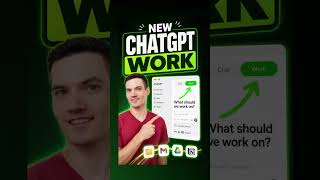

5 Hidden ChatGPT Features You Didn't Know
45sThe list format with hidden features creates curiosity and a quick payoff for viewers.
▶ Play Clip"The title promises five features and delivers exactly that, though the content is brief and lacks depth."
The video showcases five new ChatGPT features that enhance productivity and workflow integration. It highlights the ability to import contacts from other AI tools, work directly with PC files, create presentations, connect to services like Gmail for email summaries, schedule recurring tasks, and organize desktop files.
Go to the website and download the ChatGPT app. It imports contacts from other AI tools to avoid starting from scratch.
The app can work directly with files on your PC, enabling tasks like creating presentations from those files.
Use plugins to connect services like Gmail. Ask ChatGPT to summarize important emails from the last week.
Ask ChatGPT to send the same summary every Monday morning. Use the scheduled feature to view recurring tasks.
Ask ChatGPT to organize a messy desktop. After approval, files are neatly organized.
The video demonstrates practical ways to leverage ChatGPT for automation and productivity, from email management to file organization.
How can you import contacts into ChatGPT?
By downloading the app and importing contacts from other AI tools.
What can ChatGPT do with files on your PC?
It can work directly with files and create presentations from them.
00:15
How do you connect Gmail to ChatGPT?
Use plugins and select Gmail as a service.
00:30
How can you schedule a recurring task in ChatGPT?
Ask ChatGPT to send a summary every Monday morning and use the scheduled feature.
00:46
Import Contacts
Shows how to migrate from other AI tools seamlessly.
File Integration
Demonstrates direct file interaction, a key productivity boost.
00:15Service Plugins
Illustrates how to connect external services for automated summaries.
00:30Scheduled Tasks
Highlights automation of recurring workflows.
00:46[00:00] Five new things ChatGPT can do that you probably didn't know about and why I switched to ChatGPT work. Number one, go to this website and download the chatbt app. It imports your contacts from other AI tools so you don't have to start from scratch. The
[00:15] app can work directly with the files on your PC. Number two, click the new work toggle, Tell ChatGPT to create a presentation using those files and it'll build one for you. Number three,
[00:30] click plugins, then choose a service like Gmail. Once it's connected, ask ChatGPT summarize my most important emails from the last week and you'll get a summary of what matters most. You can also connect lots of other services. Number four, ask ChatGPT to send you that same summary
[00:46] every Monday morning. Then click scheduled to see your new recurring task. Number five, I'll ask ChatGPT to organize my messy desktop. After I approve it, everything is neatly organized.



⚡ Saved you 0h 01m reading this? Transcribe any YouTube video for free — no signup needed.