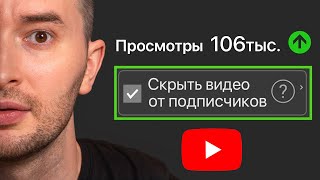

8 YouTube Settings That Kill Your Channel
45sThe promise of revealing hidden settings that 'kill' channels taps into creators' fear of failure and desire for growth, making it highly clickable.
▶ Play Clip"Delivers on the promise of eight settings, but some points are common knowledge and the sponsor pitch adds fluff."
This video, presented by a creator with over 2,000 published videos, identifies eight YouTube settings that can silently hinder channel growth, particularly for new channels aiming for their first thousand subscribers. The host provides practical advice on configuring channel settings, avoiding common pitfalls, and leveraging features like advanced features and subtitles to improve reach and engagement.
The video claims that eight settings, if incorrectly configured, can waste months of work and prevent channels from reaching their first thousand subscribers.
In YouTube Studio settings, under the Channel tab, select your country of residence. Don't fear choosing Russia if you're from there; YouTube won't block you. This helps signal you're a real person, not a bot.
Add keywords including variations of your name and channel name to help people find your channel in search. Also add terms like 'YouTube production' or 'producer' to improve searchability.
Incorrectly marking videos as for adult audiences can drastically reduce views. YouTube has strict policies, especially regarding content with children; ensure you set the correct age category.
Even if marked 'not for kids', featuring a child without an adult present can lead to restrictions or blocking. Always show yourself with your child to comply with community rules.
Unchecking this box when publishing a video can help test new content with new viewers without showing it to your existing subscribers, potentially boosting recommendations to new audiences.
Linking long videos and Shorts is crucial. Shorts should lead viewers to long-form content via clickable links, increasing session time and signaling to YouTube that your content is engaging.
Use endings and hints to encourage viewers to watch more of your videos, increasing total watch time, which is a key signal for YouTube's algorithm.
Confirm your phone number to enable advanced features, which can lift restrictions on video length and increase trust, leading to more views. The host shares a personal example of growth after enabling them.
Copyright claims can reduce reach. If you own the rights, file an appeal with the license; if not, remove the track. Ignoring claims can hurt your video's performance.
Enable automatic subtitles or manually add them to improve accessibility and reach. About 5-10% of viewers use subtitles, and missing them can cause viewers to skip your video.
Using the delayed publication feature is fine, but making a video 'unlisted' and later making it public can result in low reach because YouTube treats it as a stale video without initial promotion.
Properly configuring YouTube settings and avoiding common mistakes can significantly boost channel growth. The host emphasizes that attention to these details, along with consistent content strategy, ensures rapid channel development.
What is the first setting to check in YouTube Studio for channel optimization?
Set your country of residence in the Channel tab.
00:28
Why is it important to add keywords to your channel?
To help people find your channel in search, especially variations of your name and channel name.
00:53
What happens if you incorrectly mark your video as for adult audiences?
It can drastically reduce views and potentially lead to restrictions.
01:35
How can you test a new video with new viewers without showing it to your subscribers?
Uncheck the 'Publish to Subscriptions feed' box when publishing.
02:58
What is the primary purpose of Shorts according to the video?
To lead viewers to long-form content via clickable links.
04:07
What is the key signal for YouTube that you create interesting content?
The total time a viewer spends on your channel.
05:24
What is required to enable advanced features on YouTube?
Confirm your phone number.
06:21
What should you do if you receive a copyright claim on a track you own?
File an appeal with the license.
07:26
What percentage of viewers regularly use subtitles?
About 5-10%.
09:02
Why is making a video unlisted and later public a bad idea?
YouTube treats it as a stale video without initial promotion, resulting in low reach.
09:41
Country setting signals authenticity
Setting your country correctly helps YouTube recognize you as a real person, not a bot.
00:28Unchecking subscription feed for testing
This setting allows creators to test new content with new audiences without alienating subscribers.
02:58Advanced features boost growth
Enabling advanced features via phone verification can significantly increase views and trust.
06:21Subtitles increase reach
Adding subtitles can capture the 5-10% of viewers who rely on them, improving watch time.
09:02Delayed publication pitfalls
Using unlisted then public can kill reach because YouTube sees it as stale content.
09:41[00:01] literally waste months of work because of a couple of incorrectly checked boxes in their creative studio. They are confident that they did everything right, but statistics say eight settings that are quietly
[00:14] killing your channel and preventing you from getting that first coveted thousand subscribers. I'm team and I have released over 2,000 expert videos on YouTube. And that's why I have something to need to do is set up and optimize the channel itself. Got it? It's
[00:28] not about a specific video. We go to the creative studio and immediately select this column on the left in the settings. Open it and select the channel tab. In this tab, we must select the country of residence. Don't be afraid to put Russia
[00:40] if you are from Russia. YouTube won't block you for this , as many people worry. manipulate your channel, the more signals you give YouTube that you're not a bot, but a real person. Therefore, I recommend choosing this right away.
[00:53] and earn additional income through YouTube's affiliate program, I recommend leaving this tab alone for now and selecting a country only once you where you'll be enabling monetization, and then selecting it from there. Well, for example,
[01:06] write Georgia, so now I do n’t choose anything. As for keywords so that your channel can be found by these keywords. It is especially important to write different variations of your first name, last name, or channel name here. This way, if someone
[01:20] YouTube search and wants to find your channel, they will be able to find it under any circumstances. write your channel name incorrectly. I also recommend what you do, like YouTube, production, producer,
[01:35] that will also help you organize your searches for these queries. The second setting experience I have already encountered more than five people who accidentally chose this setting incorrectly. And we are talking about choosing the wrong age category of
[01:49] viewer. That is, they made a check mark and indicated that the video was intended for intended for an adult audience. What could this mean in practice? But such videos, at the very least, get practically no views. At worst, it
[02:02] especially if the video accidentally contains money or naked adult body parts. YouTube has a very strict policy regarding children, so it is very difficult to comply with the rules when producing such content. And when you select the wrong checkbox, be prepared
[02:16] that you will definitely break something. I would name a bug that is very similar to this one, but does not concern the settings. This is the use of children in the frame, especially without the participation of an adult. Even if you 've marked your video as not for kids, but
[02:29] commenting on something off-camera, rest assured that the video is adults, because it features a small child. And here, too, you will restrictions and even complete blocking due to the creation of such content. The way out of this
[02:44] Tube community rules, be sure to show yourself with your child if you want them to the frame in any way and not fall under these restrictions. And the next setting, which in the wrong hands will kill your channel, but in the right hands, will help
[02:58] restore even a dead channel. Now I'm going to tell you about a life hack that to mention on camera. Or maybe they don’t even know it themselves. If you already have a are about to release a video that is not suitable for your audience, but
[03:12] understand that views will be few, because YouTube will show it to your existing won't go anywhere, but you have a chance to test how your new project will work for new viewers without showing it to your subscribers. To do this, we simply
[03:27] uncheck the box when publishing the video, this one , publish in the . This simple setting will make your new video more likely to be recommended to new viewers. Your subscribers will, of course,
[03:40] recommendations page, but in smaller numbers. This checkbox is the answer to the and all my new videos have stopped getting publishing a new series of videos." If you have any questions about how
[03:54] understood them, check out one of my recent episodes on the channel. I promise that you will understand how algorithms work and be able to influence them. And determine how quickly your channel can grow, or, on the contrary,
[04:07] stagnate. And I want to talk about the importance of linking videos together. This doesn't just mean long videos that can be linked together in endings or tooltips, but also short content. Remember that the Shors
[04:19] are a comprehensive story to introduce you, yes, to learn about you. And their only task is to translate into long-form content. So, be sure to use this clickable link and embed a video on the topic so that people can go to Shorts
[04:33] , click on this link, and see your long episode, the topic of which Shorts touched on. I also talked in previous issues about why a series of views is important. Yes, the longer a viewer's viewing session on your
[04:45] YouTube will start to drastically bump you up in recommendations. What does it mean? It is very important for YouTube that viewers spend as much time as possible watching videos. And if he accidentally showed your video there a certain number of times in
[04:58] the recommendations and the viewer discovered you, then he decided to watch another of your videos and, God willing, another one, then for YouTube this is a powerful sign that he showed this is a powerful sign that he showed
[05:11] viewer stayed watching three times longer. This means that you have, well, mega-interesting . It calculates the total time a viewer spends on your channel. And for him, this is the most important signal that you are creating interesting content. So,
[05:24] create such obvious reasons with open loops of interest, yes, why you you probably noticed how these hints regularly pop up in my head and how I explain that you need to watch something based on the end credits.
[05:38] talked about the nuances that exist for small channels, why it’s impossible for them to become big. This is very important. This way, channels grow systematically and quickly, and not rule also applies to shorts. If they watched you for a little less than a minute, but
[05:53] then a viewer moved on and started watching you for 3,710 minutes, for YouTube this is the same interesting. Therefore, make shorts that lead to long rollers. Also, the description of your video. Let the viewer have a choice of what else he wants to
[06:07] watch if he missed these clues and endings. After watching, he here are some titles that he is also interested in; he wants to watch them the channel, if he doesn’t scroll past you at all. Therefore, links are also effective.
[06:21] independent of the author, but will definitely help you grow your channel many times faster. I'm talking about enabling advanced features now. Unfortunately, you can't enable them manually, but you can enable additional features. If you
[06:34] be sure to click the checkbox and confirm your phone number. You will be able to upload videos with no length restrictions and you can enable advanced features, get ready. It is from this
[06:47] I just recently recorded a video about why YouTube is killing new channels. And this was the key problem, because of which all channels did not grow at the start. And I to verify the author as a living person. YouTube trusts these channels
[07:01] giving them more views. For example, in the regular publications, my channel had just over 80 subscribers. But by that time I had already released 12 videos, which had
[07:13] gained practically nothing. But on day 101, when I was given advanced features, everything started to grow dramatically. Coincidence? Don't think. And lo and behold, after next 28 days, more than 700 people subscribed to my channel. I've covered more
[07:26] enable them, and what they affect in this video. setting that authors don't pay attention to is copyright. If , it means we have violated something. And don't pay attention to what is
[07:41] written there, it doesn't affect anything. at a minimum it will affect the coverage. Yes, there are no your video will be recommended less, but we still 2,000 videos, and of those videos that had copyright infringement, well, none
[07:56] of them got many views. Well, whether it’s a coincidence or not is up to you to decide, but I think that this also has an impact. Try to file violation, at least not because of monetization, but in order to remove
[08:09] appeal is easy to file. If you used a track that you own the rights to, simply copy the license and paste it into this appeal field. Click send and that's it. Write the name of your channel.
[08:21] used copyrighted music and you don't have the rights, just delete that track in the settings where you submit your appeal. This can be done even with the help of this function. best solution for promoting your video. For as long as I've been working with
[08:36] become convinced that algorithms are a sore subject. It seems like you're doing everything right, but there are stop being afraid of algorithms and start getting views systematically, I came up with a cool, budget-friendly format. This is group support in
[08:50] channel development based on a monthly subscription. It costs the same as one of my paid consultations, but I work with you for the entire month. To learn more, write to me using the contact information in the description, and I'll tell you why this method
[09:02] consultations. The next setting that will increase your impressions and views is the presence of subtitles. Be sure to at least check the box to use automatic subtitles, or better yet, check manually and add
[09:15] punctuation marks and correct any spelling errors. To see Creator Studio and see how many people are watching you with subtitles. You 'd be surprised, well, about 5 dash 10% do this regularly, and that's exactly the
[09:28] if you don't enable this checkbox. But don't forget that every viewer, because of this missed parameter, not only doesn't watch you, but also ruins your statistics watching somewhere public, but there are no subtitles. They'll
[09:41] skip you and, perhaps, never return to your video. And the last cut your reach concerns the publication itself. It's much easier when you've publish button, and the video is out. Everything, nothing threatens your coverage. But you can't even 100%
[09:55] guess what will happen if you postpone the publication and decide to release the delayed publication function for this. When you click it, choose a convenient time released at the appointed time. However, some authors prefer not to
[10:10] postpone publication, but to temporarily make it accessible via a link. And that's it, accessed via the link. But they don't even realize that YouTube perceives it as a published unit that doesn't gain reach. If you later
[10:23] open such a stale video , you will notice that the reach and video you uploaded. and put it on hold for publication. done this many times and noticed that the videos we
[10:37] shared publicly via a link didn't see a huge increase in views and impressions. settings and avoid other mistakes (which you can learn about from these videos), rest assured that your channel will always
[10:49] assured that your channel will always grow rapidly. Bye everyone.
⚡ Saved you 0h 10m reading this? Transcribe any YouTube video for free — no signup needed.