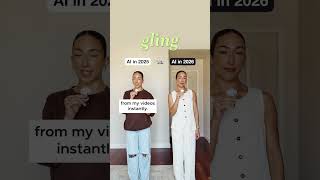

AI Tools That Actually Save Me Time
30sThe rapid-fire list of concrete AI productivity tools makes viewers want to save and try them immediately.
▶ Play Clip"Title suggests a 2025 vs 2026 comparison, but the video is just a roundup of current AI tools — misleading."
In this short video, a content creator shares five AI tools they use to streamline their social media workflow. From generating content ideas and scripting to video editing and post-production, the video offers a quick overview of how AI can reduce the workload for creators.
The creator uses Stanly to study viral reels and generate content ideas that fit their niche.
WhisperFlow is used for scripting videos, replying to team messages, and capturing ideas via voice-to-text.
Claude helps train the team on brand voice, reply to emails, and automate tasks to save time.
Gling AI cuts out awkward pauses instantly and handles the entire first rough cut so the creator can focus on final edits.
Tenplify adds trending closed captions to reels and helps create carousels and edit photos.
The video emphasizes that AI tools can handle repetitive tasks, allowing creators to focus on final editing and overall strategy.
What is Stanly used for?
To study viral reels and turn them into content ideas that fit the creator's niche.
00:01
How does WhisperFlow help content creation?
It provides voice-to-text for scripting videos, replying to team, and capturing ideas.
00:15
What tasks does Claude automate?
Training the team on brand voice, replying to emails, and automating tasks.
00:30
What editing task does Gling AI handle?
It cuts out awkward pauses and handles the entire first rough cut.
00:30
What does Tenplify do?
It adds trending closed captions, creates carousels, and edits photos.
00:42
AI-powered content ideation
Shows how AI can replace manual brainstorming for social media.
00:01Voice-to-text for efficiency
Highlights a practical use of AI for faster content scripting.
00:15AI team automation
Demonstrates using AI for email and brand-voice training, not just editing.
00:30Post-production shortcuts
Illustrates how AI tools handle captions and graphics to save time.
00:42[00:01] and I'm not sure what to post to Instagram. I use Stanly to study viral reels and turn them into content ideas that actually fit my niche and [music] voice-to-text when I just don't feel like typing everything out. I use
[00:15] WhisperFlow to script videos, reply to my team, and capture my ideas in real brainstorming, scripting, and organizing ideas for my business. I use Claude to train my team on my brand voice, reply to emails for me, and automate tasks to
[00:30] save me time. I use Gling AI to cut out awkward pauses from my videos instantly. [music] I use Gling AI to handle the entire first rough cut for me, so I could focus on refining the final edit. I use Tenplify to add trending closed
[00:42] captions to my reels because manually doing that is the worst. I use Tenplify content from instantly [music] adding creating gorgeous carousels, editing photos, and so much more. Follow if you
[00:56] without feeling like you need to work 24/7 just to keep up.
⚡ Saved you 0h 01m reading this? Transcribe any YouTube video for free — no signup needed.