
AI Summary
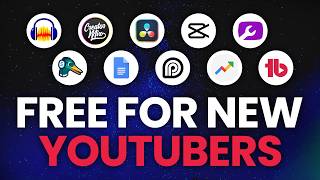
This video presents a curated list of free tools for YouTube creators, covering video editing, music, captioning, audio processing, thumbnails, SEO, link management, live streaming, AI scripting, and trend research. The presenter emphasizes that these tools are free and aims to help creators avoid upfront costs.
Chapters
The video starts with the premise that being a content creator can be free, and the tools mentioned will not cost any money.
DaVinci Resolve is a free video editor that can handle color grading and other editing needs, but requires a modern computer.
CapCut is another free editing tool that allows for creative effects like putting text behind the subject, and it has a mobile app.
The presenter mentions a creator who teaches editing through his content, implying that learning can be free by watching tutorials.
CreatorMix.com offers free music for creators, and they have a copyright ID system that can be used to dispute claims easily.
Opus Clip can automatically create short videos with captions from longer content, free for videos under two minutes.
Audacity is a free audio editor that allows you to add equalizers and process your voice.
There are tools that give three free thumbnails per month, with templates to help design them.
TubeBuddy offers SEO features targeting YouTube search, helping creators optimize their videos for discovery.
A free link-in-bio tool allows creators to put multiple links in their bio, interlinking social media accounts.
StreamYard is a free tool for live streaming, allowing you to invite guests and record streams in the background.
There are AI tools that help with scripting, with a free limit of three scripts per month.
trends.google.com helps creators stay on top of trends globally and within their niche, allowing them to hop on trends as they happen.
The presenter encourages viewers to click the link in the description for more tools and resources.
The video provides a practical list of free tools for YouTube creators, covering essential aspects of content creation from editing to SEO. It emphasizes that creators can start without financial investment, leveraging free resources to grow their channels.
Mentioned in this Video
Study Flashcards (7)
What is the name of the free video editor mentioned that requires a modern computer?
easy
Click to reveal answer
What is the name of the free video editor mentioned that requires a modern computer?
DaVinci Resolve
00:30
Which tool can automatically create short videos with captions from longer content, free for videos under two minutes?
medium
Click to reveal answer
Which tool can automatically create short videos with captions from longer content, free for videos under two minutes?
Opus Clip
02:23
What is the free audio editor mentioned that allows you to add an equalizer?
easy
Click to reveal answer
What is the free audio editor mentioned that allows you to add an equalizer?
Audacity
02:53
Which tool offers SEO features specifically targeting YouTube search?
medium
Click to reveal answer
Which tool offers SEO features specifically targeting YouTube search?
TubeBuddy
03:39
What is the free live streaming tool that allows you to invite guests and records streams in the background?
medium
Click to reveal answer
What is the free live streaming tool that allows you to invite guests and records streams in the background?
StreamYard
04:46
What is the free limit for AI scripts per month mentioned in the video?
medium
Click to reveal answer
What is the free limit for AI scripts per month mentioned in the video?
Three scripts per month
05:25
Which website is recommended for staying on top of trends globally and within your niche?
easy
Click to reveal answer
Which website is recommended for staying on top of trends globally and within your niche?
trends.google.com
05:41
💡 Key Takeaways
Free Content Creation
Sets the premise that creators can start without spending money, which is a key insight for beginners.
CreatorMix Music
Provides a free music resource with a copyright ID system, addressing a common pain point for creators.
01:54Opus Clip Repurposing
Highlights a tool that automates short-form content creation, saving time and effort.
02:23TubeBuddy SEO
Emphasizes the importance of SEO for YouTube discovery, a crucial principle for growth.
03:39Google Trends for Timing
Shows how to use data to create timely content, a strategic insight for creators.
05:41Full Transcript
[00:00] comes with a price tag attached to it, is my version of giving that idea one of these, to be a content creator that will not cost you any money.
[00:17] (upbeat music) is something to edit your videos with. that pretty much everybody's using.
[00:30] is called DaVinci Resolve. It can help you color your videos, pretty much anything you need to do,
[00:43] However, unless you have a modern computer, on your computer. if it is something that you decide to use,
[00:57] that makes content about DaVinci Resolve, that we have on our list is called CapCut. that you can use so that you can do all kinds of crazy stuff
[01:11] so you can put text behind you And one more awesome thing about CapCut is they have an app. they still have you covered for free.
[01:25] so if you wanna see what it can do, I'll put a link to that down in the description as well. once you learn how to use the software,
[01:38] He teaches content creators how to edit just from watching his content and applying what he says. (gentle music)
[01:54] we like to make music, because of that we made a free music resource you can visit the website at creatormix.com,
[02:09] We even have it uploaded while you're live streaming or something like that, because YouTube's copyright ID system is a dumpster fire
[02:23] to use the music in the footer so that in the event you can easily dispute it without fear. you can upload them to Opus Clips captioning tool for free.
[02:39] for free as long as they're under two minutes long. that's under two minutes Opus Clip is gonna take care of the rest from there
[02:53] And now you got a short video with captions on it for free. It's called Audacity. you can add an equalizer to your voice
[03:07] So for example, this is my voice without any processing. Since you also have to make thumbnails for your videos, which will give you three free thumbnails per month.
[03:24] Both options have templates that you can use or you're just struggling with your thumbnails by using their templates.
[03:39] where they specifically target YouTube search, when people are actively looking for them on YouTube that has SEO or search engine optimization features.
[03:54] Now look, with this, but it's free. TubeBuddy also has a ton of helpful tools
[04:06] It's kind of one of those priority tools you know how when you go to somebody's channel page on YouTube or you go to their bio over on TikTok
[04:20] and when you go to that link, Well, I'm gonna tell you where you can get one for free It just happens to have a lot of great free tools
[04:34] With our social bio tool, and you can put as many links as you want, all for free. This is a great way to interlink your social media accounts.
[04:46] or you're interested in live streaming or giving it a shot, there's a really easy to use tool called StreamYard It allows you to invite guests on
[04:58] They even record your streams in the background, and then you can upload 'em into Opus Clip for example the repurposing part of Opus Clip is not a free plan,
[05:13] I'm not sure if you noticed or not, but my continuity in this video is all over the place. you can use your Google account
[05:25] But if you want some help and you want to have AI in the way that you want, But it comes with a free limit of three scripts per month.
[05:41] If you wanna stay on top of trends globally and within your niche, then you can use trends.google.com from the information that they give you there.
[05:55] that people might be looking for the type of content If you scroll down the page, once the topic's in there, so that you can hop on a trend as it's actually happening.
[06:08] And depending on your content type, could be a game changer for you and your content. and other YouTube tools as well.
[06:22] So, go ahead and click on that now I'll see you over there.