
AI Summary
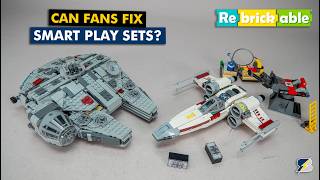
This video reviews two community-created modifications for LEGO SmartPlay sets, the Millennium Falcon and the X-Wing. The creator highlights specific improvements made to each set, discusses the trade-offs, and encourages the LEGO community to explore further custom builds.
Chapters
The video introduces SmartPlay sets, noting mixed initial reactions from AFOLs. The creator mentions that the 3D sensing feature is not used in any launch sets.
LEGO fans either complain or improve sets. The video will showcase two improvements: the SmartPlay Millennium Falcon and the X-Wing.
The Falcon mod requires no extra parts and aims to improve the look without compromising play features. The designer has many alternate builds on Rebrickable.
The mod reduces the build's bulk, slims down the mandible side panels, repositions stickered tiles for accuracy, and replaces a distracting red connector with a dark-bleach gray one.
The laser cannon sound tile is moved to allow triggering two functions with a single knob. Some functions remain redundant, but the engine glow interruption can be fixed by adjusting a pin and a red 1x1 tube.
The large red-accented gap behind the cockpit is closed, now seating two minifigures. All interior features remain accessible and playable.
The modification is praised for no structural compromises, clear visual improvements, and enhanced functionality. Instructions are clean and worth the price.
The X-Wing mod requires removing the wings, turret, and ladder. One part from the cart is needed, plus a few spare parts. Instructions are free.
The cockpit is moved back, and without the smart brick, the R2 head remains but not the body. The smart brick still detects the X-Wing tag from a distance.
The result is a sleeker X-Wing without the red trigger button and gap, but the smart brick is less accessible and R2 is no longer a full figure.
The creator hopes for more custom builds using SmartPlay features and more generic tags. Encourages LEGO to expand the SmartPlay ecosystem beyond licensed content.
Both modifications offer significant improvements over the stock sets, balancing aesthetics and functionality. The creator encourages the community to explore further custom builds and hopes LEGO expands the SmartPlay ecosystem.
Mentioned in this Video
Tutorial Checklist
Study Flashcards (5)
What is the main goal of the Falcon modification by Werger Brixen?
easy
Click to reveal answer
What is the main goal of the Falcon modification by Werger Brixen?
To improve the look without compromising play features, and no extra parts are required.
01:07
What is the most noticeable change in the Falcon mod?
easy
Click to reveal answer
What is the most noticeable change in the Falcon mod?
The lower profile, making the build look much less bulky.
01:27
How can the engine glow interruption be fixed in the Falcon mod?
medium
Click to reveal answer
How can the engine glow interruption be fixed in the Falcon mod?
By adjusting the pin and the red 1x1 tube, allowing both effects to work simultaneously.
02:22
What parts need to be removed for the X-Wing mod?
medium
Click to reveal answer
What parts need to be removed for the X-Wing mod?
The wings, turret, and ladder.
03:17
What is a trade-off of the X-Wing mod?
medium
Click to reveal answer
What is a trade-off of the X-Wing mod?
The smart brick is less accessible and R2 is no longer a full figure.
04:01
💡 Key Takeaways
Falcon mod requires no extra parts
Shows that significant improvements can be made without additional pieces, making it accessible to all builders.
01:07Fixing engine glow interruption
Provides a specific, actionable fix for a common issue, demonstrating practical problem-solving.
02:22Smart brick detects tag from distance
Reveals an interesting technical detail about the SmartPlay system's sensing capabilities.
03:42Call for more generic tags
Highlights a limitation of the current SmartPlay ecosystem and suggests a direction for future expansion.
04:17Full Transcript
[00:00] Hi everyone this is Balazs from RacingBrick and in today's Rebrickable video we will take a look at some SmartPlay sets. Yes, the first reactions to SmartPlay were mixed at best, some AFOLs don't really like
[00:12] the system, but I've seen keys genuinely enjoying the sets. Personally, I think there are some major unused features that could have made these much more desirable. Yes, I'm talking about the famous 3D sensing and positioning feature, I had confirmation
[00:26] from the team that it's not used in any of the launch sets. I will dedicate a separate video to SmartPlay experiments soon, but for now let's focus on something else, community fixes. While LEGO fans, since as they don't like out of the box, they usually do two things,
[00:41] complain online, or improve them, and since this is LEGO, we all know which one is more interesting. Today I will show two of these improvements, we have the SmartPlay Millennium Falcon and the X-Wing.
[00:53] These are the stock versions, I have a second Falcon to show the modified versions side by side, but for the X-wing I have to rebuild it, so no direct comparison there. Let's start with the Falcon. The modification is by Werger Brixen Rebricable. There are
[01:07] tons of alternate builds on the profile, mostly Star Wars related, but there are some extreme ones like turning an otter into a pirate ship Here is the product page of the Falcon mod No extra parts are required according to the designer the goal was to improve the look without compromising play features You can check the full list via the link below but let take a look at the changes
[01:27] At first glance there might not seem to be many differences, but actually a lot has been reworked. The most noticeable change is the lower profile, the build looks much less bulky. The side panels of the mandibles were also slimmed down so they don't stick out as much.
[01:42] The stickered round tiles for the maintenance access base were repositioned to more accurate locations and the same goes for the rear engine vents. The red connector at the back originally helped locate the function controller, but it was quite distracting visually.
[01:55] Now the setup is rearranged and the dark-bleach gray connector is visible instead. The function itself was also improved. The laser cannon sound tile was moved here so you can now trigger two functions with a single knob, depending on which smart brick slot you use.
[02:09] Some functions are still a bit redundant though, for example the shooting position also plays engine sounds and the engine mode produces similar noises alongside the blue glow. Realistically you probably wouldn't use two smart bricks here anyway.
[02:22] If you do, the engine glow gets interrupted while firing, but this can be fixed easily by adjusting the pin and the red 1x1 tube, allowing both effects to work simultaneously. The biggest visual improvement is closing the large red accented gap behind the cockpit which now also seats 2 minifigures The remaining smart tiles stay in their original positions and all interior features remain fully accessible and playable I really like this modification
[02:48] no structural compromises, clear visual improvements and enhanced functionality. The instructions are clean and easy to follow, definitely worth the price. Now let's move on to the X-wing, this modification is by Sawyer Bricktime. The designer also
[03:02] has some nice alternate builds, including multiple Hail Mary Starship variants. Here's the improved X-Wing, and the instructions are actually free, all links are in the description and pinned comment by the way. For the mod you have to remove the wings since they remain unchanged, but you will need to
[03:17] disassemble the turret and also the ladder, the ladder isn't mentioned in the description. One part is required from the cart, this one here. The description mentions using some spare parts listing 3 pieces, but in my experience
[03:30] a few more small extras were needed. I couldn't find my dark-bleach gray version of this tile, so I used the black one instead from my spares. The build itself is fine, a few steps aren't the most intuitive, but it's easy enough to
[03:42] follow. The interior gets a major overhaul which was quite surprising. The cockpit is moved further back, and without the smart brick this is what you see. R2 head remains but not the body To install the smart brick you need to remove this rear section swap in the brick and reattach the head Interestingly the brick still detects the
[04:01] X-Wing tag from that distance, I noticed the same during my earlier experiments. The result is a sleeker X-Wing without the large red trigger button and the gap behind the cockpit, but as always it's a trade-off, the smart brick is less accessible and R2 is no longer a full figure,
[04:17] so it really depends on your preference. These were the 2 modified SmartPlay builds I wanted to show today. This feels like just the first step, I would love to see more custom builds using SmartPlay features or even fully original creations. For that we would definitely
[04:32] need more tags, especially generic ones. Hopefully LEGO expands the SmartPlay ecosystem soon, and not just with licensed content. Let me know folks what you think, are these improvements better than the originals? Let's talk about it in the comments section.
[04:45] If you enjoyed this video then please give it a thumbs up and don't forget to subscribe with notifications as more exciting LEGO videos are coming soon! See you next time, bye bye!