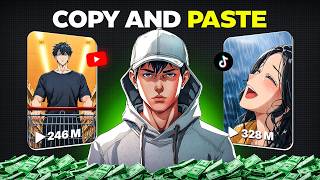

Viral Channel Exposed: 130K Subs in 49 Videos
45sReveals a shocking growth hack that promises quick monetization, sparking curiosity and aspiration.
▶ Play Clip"Title accurately describes the process of copying videos from a Chinese app and re-uploading on YouTube."
This video reveals a step-by-step workflow for creating viral AI-narrated storytelling videos by sourcing content from the Chinese app Xiaohongshu, translating and rewriting scripts with ChatGPT, generating AI voiceovers, and editing in CapCut. The method is designed to help creators replicate the success of channels that gained over 130,000 subscribers with only 49 uploads.
A channel gained over 130,000 subscribers with only 49 uploads by posting viral AI storytelling videos.
Xiaohongshu (Chinese app) is the primary source for high-quality AI animated storytelling videos.
Download the APK from APK Pure if not available in your region.
Search using Chinese keywords and follow 10-15 creators to get a feed of fresh AI videos daily.
Copy the share link and use a Xiaohongshu video downloader website to save the video.
Upload the video to a free AI transcription tool that supports Chinese audio. For videos over 6 minutes, split into sections for better accuracy.
Use ChatGPT to rewrite the transcript into natural English, keeping the story engaging and avoiding robotic translation.
Use tools like 11 Labs, MiniMax, or any AI text-to-speech software to generate narration from the script.
Sync the downloaded video with the AI voiceover, adjust playback speed, and hide subtitles by duplicating the clip, applying blur, and masking.
Use ChatGPT to generate thumbnail ideas, SEO-friendly titles, description, and hashtags for better click-through rates.
By consistently following this workflow—sourcing from Xiaohongshu, rewriting scripts, generating AI voiceovers, and optimizing packaging—creators can produce high-quality AI storytelling videos that have strong potential for viral growth on YouTube.
What is the name of the Chinese app used as a source for AI storytelling videos?
Xiaohongshu
00:14
How many creators should you follow on Xiaohongshu to get a fresh feed of AI videos?
10 to 15 creators
00:53
What should you do if the video is longer than 6 minutes before transcribing?
Split it into smaller sections for better accuracy.
01:18
What is the recommended approach for translating the transcript in ChatGPT?
Ask ChatGPT to rewrite it into natural English, not a direct translation.
01:31
Name two AI text-to-speech tools mentioned for generating voiceover.
11 Labs and MiniMax
02:01
How do you hide subtitles in CapCut according to the video?
Duplicate the original clip, place it as an overlay, apply a blur effect, and mask only the subtitle area.
02:41
What is the final step before uploading the video?
Package the video with thumbnail, title, description, and hashtags generated by ChatGPT.
03:22
Viral Channel Growth
Demonstrates the potential of this method with a real example of rapid subscriber growth.
00:01Xiaohongshu as Source
Reveals an unconventional content source that many creators may not know about.
00:14Rewriting for Natural English
Emphasizes the importance of avoiding robotic translations for audience engagement.
01:31Subtitle Hiding Technique
Provides a specific editing trick to remove subtitles while keeping video quality.
02:41Packaging for Clicks
Highlights that content alone isn't enough; proper packaging drives views.
03:22[00:01] videos getting millions of views and wondering how people create them, then this video is for you. Just take a look at this channel. It gained over 130,000 subscribers with only 49 uploads. Videos like these are going incredibly viral on
[00:14] YouTube right now. And this channel is fully monetized. So, in this video, I'll So, let's get started. The first thing you need is a source for highquality AI platforms for [music] that is Xiao Hong Shu, one of China's biggest content
[00:28] available in many regions, you'll need to download the APK from APK Pure. Once you've installed the app, open the explained. If you don't find enough results, you can also search using
[00:41] relevant Chinese keywords to discover even more content. You'll find hundreds of animated storytelling videos uploaded by different creators. Whenever you come across a creator who consistently posts highquality AI explained videos, don't
[00:53] just download one video, follow that creator. Repeat this process until you've followed at least 10 to 15 creators. This way, every time you open the app, your feed will already be filled with fresh AI explained videos,
[01:05] single day. Once you find a video you want to use as inspiration, copy its share link and download it using any Shiao Hong Shu video downloader website. step is extracting its transcript. [music]
[01:18] Upload the video to any free AI transcription tool that supports Chinese audio. Within a few minutes, it'll generate the complete transcript. If [music] six minutes, I recommend splitting it into smaller sections
[01:31] before generating the transcript because that usually gives much better accuracy. Once it's finished, simply copy the entire transcript. Now, open Chat GPT Instead of asking for a direct translation, ask ChatGpt to rewrite it
[01:47] into natural English while keeping the story engaging, easy to understand, and clean script that sounds like it was originally written in English instead [music] of a robotic word for word translation. Read through it once and
[02:01] your script is ready, it's time to generate the voice over. You can use tools like 11 Labs, Miniaax, or any AI texttospech software you prefer. Simply paste your [music] script, choose a natural sounding voice, generate the
[02:15] narration, and download the final audio. Now, import [music] both the downloaded video and your AI voice over into Cap Cut or any editing software you're comfortable using. Your main goal is to sync the visuals with the narration. If
[02:28] certain scenes move too quickly or too slowly, simply adjust the playback speed until everything matches [music] naturally.
[02:41] subtitles, and you can easily hide them by duplicating the original clip, placing it as an overlay, applying a blur effect, and masking only the subtitle area so the rest of the video stays sharp. Once everything is synced,
[02:54] your video is almost finished. No one could have imagined that this rain would continue for an entire year. [music] After 20 straight days of brutal, scorching heat, the sky finally broke open. Outside the supermarket, people
[03:08] celebrated as if they had been set free. Some laughed while others ran directly into the rain, enjoying the cool water after [music] weeks of unbearable temperatures. I walked out of the supermarket carrying a bag of pork and
[03:22] frowned as I looked at the rain getting heavier by the minute. The final step is packaging your video properly because that's what gets people to click. Paste your final script into chat GPT and ask it to generate multiple thumbnail ideas
[03:35] based on the story. Pick the concept you like the most and recreate it using screenshots from the video or AI generated images. Next, ask chat GPT to generate several clickworthy SEO friendly English titles and choose
[03:50] [music] the strongest one. Finally, ask it to write an optimized YouTube [music] and hashtags. At this point, translated script, a realistic AI
[04:02] voiceover, a fully edited video, a high-converting thumbnail, an SEO optimized title, and a searchable description. That's the complete [music] workflow. If you follow these steps consistently and focus on improving your
[04:14] with every upload, you'll be able to create highquality AI explained videos best chance to grow. If you like this video, subscribe to AI Vision for more
[04:26] upcoming banger [music] content. Until then, bye-bye.
⚡ Saved you 0h 04m reading this? Transcribe any YouTube video for free — no signup needed.