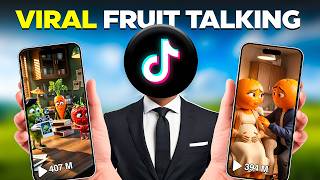

2.3M Followers with AI Fruit Videos?
35sShocking follower count and viral trend hook viewers instantly, promising a free method to replicate success.
▶ Play Clip"The title accurately promises a free method to create viral talking fruit drama videos, and the video delivers exactly that."
This video provides a step-by-step guide to creating viral AI story videos, specifically 'talking fruit drama' videos, using free tools. The workflow covers idea generation, script and visual creation, and animation, enabling anyone to produce engaging content for platforms like TikTok and Instagram.
AI story videos are going viral on TikTok and Instagram, with some creators gaining millions of followers from zero in weeks. The key is telling interesting stories with consistent characters, stunning visuals, and suspense.
The process is divided into three stages: finding a video idea, generating the script and visuals, and turning everything into an animated video.
Use Google's 'Explore GPT' section and search for 'Ultimate Fruit Content Creator'. Type 'start' to generate 10 viral video ideas for the niche.
Copy the chosen idea, paste it back into the chat, and let GPT generate a complete script with character dialogues. Then type 'continue' to get character prompts for consistent characters.
Use Google Flow with image generation enabled, aspect ratio 9:16, and 'Nano Banana Pro' model. Copy character prompts from GPT to generate full-body character images.
Type 'continue' in GPT to get image prompts for each scene. Copy prompts, paste into Flow, and add character images as references for consistency.
Type 'continue' in GPT to get animation prompts with dialogue. In Flow, select 'image to video', paste the prompt, and generate animated clips with movement and voice.
Import clips into CapCut, arrange in order, add fade transitions, auto captions with animation, background music at -20 dB, then export.
By following this free workflow using GPT, Google Flow, and CapCut, anyone can create engaging AI story videos that have the potential to go viral on social media.
What are the three stages of creating AI story videos according to the video?
Finding a video idea, generating the script and visuals, and turning everything into an animated video.
00:37
Which GPT is used to generate viral video ideas for fruit drama videos?
Ultimate Fruit Content Creator.
00:50
What aspect ratio should be used for character images in Google Flow?
9:16.
01:30
How do you ensure character consistency across scenes?
Add the character images as reference images when generating scene images in Google Flow.
02:02
What tool is used to animate the images and include dialogue?
Google Flow's 'image to video' feature with animation prompts from GPT.
02:35
What volume level is recommended for background music in CapCut?
Around -20 dB.
03:34
Viral AI Story Videos Trend
Highlights the massive growth potential: a TikTok page gained 2.3 million followers with just a few uploads.
00:01Three-Stage Workflow
Provides a clear, repeatable framework for creating AI story videos.
00:37Consistent Character Creation
Using character prompts and reference images ensures visual consistency, a key factor for viewer engagement.
01:30Animation with Dialogue
Eliminates the need for separate voiceover by embedding dialogue directly into animation prompts.
02:35[00:01] or Instagram reels, you've probably seen these AI story videos everywhere. Just take a look at this Tik Tok page. It gained 2.3 million followers with just some uploads. Videos like these are going incredibly viral on Instagram and
[00:13] Tik Tok right now. Some creators are getting millions of views, and many of them started from zero just a few weeks ago. The reason these videos perform so well is simple. They're not random AI clips. [music] They tell interesting
[00:25] stories with consistent characters, stunning visuals, and enough suspense to keep people watching until the end. And the best part, you can create these videos completely free. In this video, I'll show you the exact workflow [music]
[00:37] I use step by step, so you can start making these viral AI story videos yourself. [music] The entire process is divided into three simple stages. Finding a video idea, generating the script and visuals, and [music] finally
[00:50] turning everything into an animated video. So, let's get started. The first thing you need is a video idea. Open Google and search explore GPT. Go to the GPT section and search [music] for Ultimate Fruit Content Creator. Open it,
[01:04] type start, and press enter. It will instantly generate 10 viral video ideas designed for this niche. Pick the one you like the most, copy it, paste it back into the chat, and let it generate a complete script. The script will
[01:17] include every character in all of their dialogue. Once your script is ready, dialogue. Once your script is ready, simply type continue. Chad GPT will now every character in your story. We'll use these prompts to create consistent
[01:30] characters throughout the video. Now head over to Google Flow. Enable image head over to Google Flow. Enable image generation. Set the aspect ratio to 9 to 16 and choose the Nano Banana Pro. Copy the first character prompt from chat
[01:42] GPT. Paste it into Flow and generate the image. It should create a full body which is exactly what we need. Repeat the same process for every remaining character.
[02:02] back to chat GPT and type continue again. This time it will generate image prompts for every scene in your story. Copy the first scene prompt, paste it characters are mentioned [music] in that scene. Add those character images as
[02:16] reference images before generating. This keeps your characters looking consistent [music] throughout the entire video. Repeat the process until every scene Repeat the process until every scene image is finished.
[02:35] >> Now it's time to animate those images. Return to chat GPT one last time and type continue again. It will generate animation prompts for every scene. These prompts already include the dialogue for that scene, so you don't need a separate
[02:49] AI voice generator. Go back to Google Flow, select your first scene image, and select image to [music] video. Paste the animation prompt. Apply the same video click [music] generate. In a few moments, you'll have a fully animated
[03:03] video with movement and voice already included. Repeat this process for every remaining scene [music] until all your clips are ready.
[03:19] animated clip into Cap Cut and arrange them in the correct order. Add fade out transition to each clip. Use the auto captions feature to generate subtitles. Increase the size slightly and add a simple caption animation. Next, import
[03:34] your background music and reduce the volume to around minus20 so it doesn't overpower the voice. Finally, once everything's finished, export the [music] video. Here's the final results. I can't wait to meet our little one.
[03:47] [laughter] >> I know. It's the most exciting day. >> I know. It's the most exciting day. >> I can't wait to meet our little miracle.
[04:01] results. >> What is it? Is it bad? >> What is it? Is it bad? >> Oh, no.
[04:18] Everything is fine. The baby is healthy. >> That's the complete workflow. If you found this helpful, subscribe to AI Vision for more informative and AI [music] content like this. Thanks for watching and I'll see you in the next
⚡ Saved you 0h 04m reading this? Transcribe any YouTube video for free — no signup needed.