
Create a Full Instagram Carousel in Under a Minute with AI
45sDemonstrates a quick, practical AI workflow for social media content, appealing to creators looking for efficiency.
▶ Play Clip"The title promises a fast AI carousel workflow and the video delivers exactly that — short, practical, and to the point."
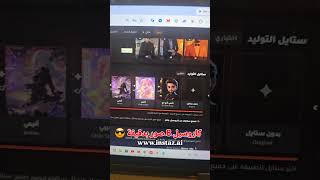
The video demonstrates how to create a complete Instagram carousel — 8 images including a personal photo — in under a minute using an AI-powered tool (instas.ai). The creator walks through the workflow: upload photos, select a generation style, describe the topic, and the AI provides both the topic and content strategy before generating all images. The result can be downloaded to a phone with one tap and uploaded to Instagram with another.
The tool creates a full 8-image Instagram carousel, including the user's own photo, in about half a minute.
Upload photos, choose a generation style, and enter the topic. The AI then supplies the topic and the content strategy automatically.
All generated images are delivered in one batch; a single tap downloads them to the phone, and another tap uploads them to Instagram.
The same task takes about 17 minutes when done manually on the creator's channel, but the AI tool completes it in under a minute.
AI tools can reduce Instagram content creation from roughly 17 minutes to under a minute, making carousel production nearly effortless.
How many images does the AI-generated Instagram carousel contain?
8 images, including the user's own photo.
What are the three steps in the AI carousel workflow?
Upload photos, choose the generation style, and enter the topic.
00:12
What does the AI provide after the user enters the topic?
The topic and the content strategy.
00:12
How long does the manual version of this task take on the creator's channel?
About 17 minutes.
00:36
How long does the AI tool take to complete the carousel?
Under a minute.
00:36
AI carousel in half a minute
Shows a concrete, measurable speed gain for a common content-creation task.
AI handles topic and strategy
The tool doesn't just generate images — it also produces the creative direction, removing a major planning bottleneck.
00:1217 minutes vs. 1 minute
A clear before-and-after comparison that quantifies the value of the AI workflow.
00:36[00:00] اشوف الصور محلاها عمل لي كاروسيل انستجرام كامل بنص دقية كاروسيل انستجرام كامل 8 صور وفيهم صورتي وبيجننوا عن طريق anestes.ai انا شو عملت انا دخلت
[00:12] رفعت له صور الي اخترت ستايل التوليد كتبت له شو الموضوع البدي اياه اعطاني الموضوع ولت الاستراتيجية اعطاني الاستراتيجية خلصنا اعمل توليد للصور
[00:24] توليد كل الصور اعطاني اياهم كبسة بنزلوا عندي على موبايلي كبسة برفعهم على الانستجرام هذا الحكي نفسه على تشجيبتي فعليا بياخد يمكن
[00:36] 17 دقايق بس اذا انت مستعجل انت بتروح على instas.ai وبتعمله حرفيا خلال من دقيقة



⚡ Saved you time reading this? Transcribe any YouTube video for free — no signup needed.