
OPcache Mistake Costs 20% Performance
54sThe shocking claim of a 20% performance loss immediately grabs attention and promises a quick fix for a common misconfiguration.
▶ Play Clip"Delivers practical advice on OPCache configuration, though the title is slightly sensationalized."
This video explains the critical importance of properly configuring OPCache in PHP, highlighting how incorrect settings can lead to significant performance degradation. It details the key configuration parameters and how to diagnose issues using PHP info output.
A customer lost 20% in performance because OPCache was configured to 'small', causing PHP to recompile scripts on every request, which is expensive.
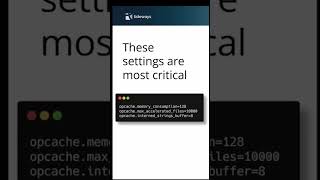
Three settings are critical: memory consumption, maximum accelerated files, and internal strings buffer.
Use PHP info output of Zend OPCache to check values like free memory, internal strings free memory, and the cache keys to max keys ratio to determine if limits are reached.
Proper OPCache configuration is essential for PHP performance; ignoring it can lead to significant slowdowns. Regularly monitor OPCache metrics to ensure optimal settings.
What performance loss did a customer experience due to incorrect OPCache configuration?
20% performance loss.
00:03
What are the three critical OPCache settings?
Memory consumption, maximum accelerated files, and internal strings buffer.
00:19
How can you determine if OPCache limits are reached?
Check PHP info output for free memory, internal strings free memory, and cache keys to max keys ratio.
00:35
Real-world performance impact
Concrete example of 20% performance loss due to misconfiguration.
00:03Key OPCache parameters
Identifies the three settings that must be tuned for optimal performance.
00:19[00:03] This customer did and they lost 20% in performance because of it. When Upcash is configured to small, PHP is recompiling scripts and every request over and over again. And this is obviously expensive. The PHP in settings
[00:19] obviously expensive. The PHP in settings for UPC have three settings that are critical to get this right. Memory consumption, maximum accelerated files and internal strings buffer. You can look at the PHP info output of Zent up cash
[00:35] at the PHP info output of Zent up cash for the values of free memory internal strings free memory and the cash keys to max keys ratio to find out if the limits max keys ratio to find out if the limits are reached in application.
[00:57] more configuration settings blog onways.com am
⚡ Saved you 0h 01m reading this? Transcribe any YouTube video for free — no signup needed.