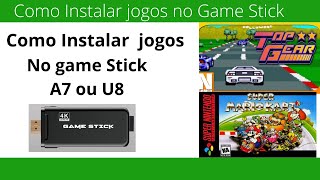

10,000 Retro Games for Under R$150?
42sThe promise of thousands of games for a low price sparks curiosity and potential controversy about value.
▶ Play Clip"The title accurately promises a cheap retro console with 10,000 games, and the video delivers exactly that with a hands-on demo."
This video is a hands-on review of the Game Stick A7, a budget retro gaming console purchased from Shopee for under R$150. The presenter demonstrates the unboxing, setup, and gameplay, highlighting its support for multiple emulators and a library of over 10,000 pre-loaded games.
The Game Stick A7 runs emulators for GBA, Game Boy Color, Mega Drive, Super Nintendo, and more, but does not include PlayStation 1. It comes with over 10,000 games pre-loaded.
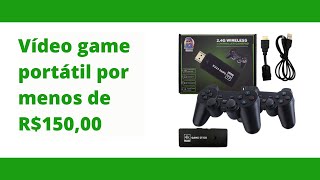
The package includes two wireless controllers that require AAA batteries, an HDMI cable, a USB power cable, and a 32GB memory card containing the games.
The console connects to a TV via HDMI and is powered via USB. Setup involves plugging in both cables and selecting the correct HDMI input on the TV.
The interface allows browsing by console or featured games. The presenter demonstrates playing Street Fighter and Donkey Kong, noting that two players can play simultaneously.
Each console category contains around 1,541 games, totaling over 10,000 games across all systems. The device is praised as a great value for retro gaming enthusiasts.
The Game Stick A7 is a cost-effective solution for playing classic retro games on a modern TV, offering a vast library and easy setup for under R$150. It is recommended for casual gamers and nostalgia seekers.
Which emulators does the Game Stick A7 support?
GBA, Game Boy Color, Mega Drive, Super Nintendo, and more, but not PlayStation 1.
00:02
How many games are pre-loaded on the Game Stick A7?
Over 10,000 games.
00:17
What type of batteries do the controllers require?
AAA batteries.
00:59
How does the Game Stick A7 connect to a TV?
Via HDMI cable and is powered via USB.
01:12
How many games are available per console category?
Approximately 1,541 games per console.
05:00
Affordable Retro Gaming
Highlights the value proposition of a sub-R$150 device with a massive game library.
00:02Simple Setup Process
Demonstrates that the device is plug-and-play, making it accessible to non-technical users.
01:12Game Library Size
Provides concrete numbers (1,541 games per console) that quantify the device's value.
05:00[00:02] video game for under 200 reais? Super Nintendo, Mega Drive, GBA, those Game Boy Colors, etc. Well, I present bought. This device here runs the GBA (the black and white one, the
[00:17] first GBA), Game Boy Advance, GBA Color, Mega Drive, Super Nintendo, and other video game emulators. This one does n't include the PlayStation 1, but it comes with quite a lot. I've
[00:31] already used it; it has over 10,000 games. This is the box you'll buy. So, if you see one of these boxes with these pictures, that's the device I have in my hand. What comes with it? It comes with two
[00:44] I'll change the screen, I'll pause so everyone. So, what comes with it? Okay, I've already opened it. The controllers are in this little bag here, very nice. This controller uses
[00:59] batteries, right? Only AAA batteries. I already bought them and put them in to test it out later. It's pretty cool, it's worth buying. I'll close it up properly later. It's actually buying. I'll close it up properly later. It's actually
[01:12] easy to close, it's actually struggling, look, so the video game is actually this device here, look how cool, it connects to the TV via HDMI cable, the games are on a 32GB card, there are more than
[01:27] 10,000 games here, right? Here's the power input, because it needs power, so you're going to plug it into the TV, let's see where the power path is, look. So you go to the place here, right? This little input here, right?
[01:41] here, right? This little input here, right? And this USB one, you'll use HDMI and USB to make it easier, some TVs have rear inputs, so it will probably be difficult to handle. So it comes with an
[01:58] And plug it into the TV, so you want to make it much easier, let's do it in practice now, device with USB, let's go, we're going to the place here at the input, my TV has USB and HDMI inputs, right? So we're going to plug in the HDMI, right?
[02:14] So we're going to plug in the HDMI, right? Very easy, we plug it in, and it will need power, right? So here, HDMI, right? In the HDMI inputs, this is HDMI 2, right? If you need to know when configuring this HDMI, it won't run on the M2, it will run
[02:27] this HDMI, it won't run on the M2, it will run here to power it with USB. So we're going to plug in the USB here, so we plugged in both HDMI and USB, it's television, not turn on the TV here, we're going to turn off the
[02:44] television, it's already on HDMI 2, here's the remote to turn it on, we're going to click here to turn it on, it's already charging. Look how cool, right? Let's see some games, there's this annoying music, but look how
[02:59] cool, here, more than 10,000 games here, you can choose some classics like Street Fighter, let's see how the games are, let's click here, it will load and you'll see how cool it is to play Street
[03:13] Fighter with the wireless controller, right? You can play with two people. play with two people. Look how cool, awesome, a Super Nintendo, I'm going to pause here to start,
[03:27] so we're here, look, a game there, just for Nintendo. Look how cool, I'm just going to then I'll show you how to change the game, it's normal, you can play here in the store, it's normal, you can play here in the store, I'm a little bad here, right?
[03:51] game. So this button goes back to the home screen. These are the featured games here, okay? There are several games here, but if you want to choose by media, you the full spinners that I like the most. So, Super Nintendo Donkey Kong, look how
[04:08] cool, right? There are several interesting games, it's RPG. Let's try Kong so you can see this classic, right? I used to play it a lot. There are several games for you to play lot. There are several games for you to play for less than R$200. So it's really worth
[04:22] it. Two controllers and a TV adapter. So you play the retro games, right? So here, let's go, press play, one can play with two people too. So let's go, look there, comment on the
[04:38] channel, subscribe if you have one of these too. So, how cool, look here, great! Look, classic!
[05:00] play, anyway, there are several games, I hope you like them. There are only this Super Nintendo 2310, right? So each media here has 1,541 games. Look, it's swiping to the side, there are many games that you
[05:16] have here, very old games, right? So there are games from various, various retro games, right? So 10,000 games, that's it. It has a memory card that comes with it, and it already has games built-in. It's really worth it! So subscribe to the channel and comment what you
[05:31] So subscribe to the channel and comment what you thought.
⚡ Saved you 0h 05m reading this? Transcribe any YouTube video for free — no signup needed.