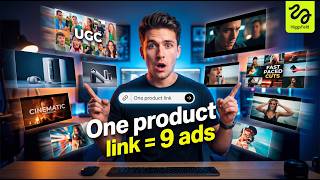

From Link to Pro Ads in Minutes
36sShocking cost contrast ($15k to free) and instant transformation hook viewers.
▶ Play Clip"The title accurately describes the tool's capability to generate multiple ads from one link and includes a tutorial."
Higgsfield Marketing Studio, powered by Seedance 2.0, allows users to generate multiple high-quality ad creatives from a single product link or image. The tool handles scripting, scenes, editing, and audio, producing professional-looking ads in minutes without the need for a production team.
With just a product link or image, users can create ads that previously cost $15,000 to $45,000 to produce. The platform handles scripts, scenes, editing, multiple ad styles, UGC videos, product demos, and cinematic ads with consistent characters and realistic motion.
Click the link in the description to access the Higgsfield website. Inside, tools like Marketing Studio, URL to Video, and Seedance 2.0 are available. Focus on Marketing Studio for ad creation.
Click 'Add Product' to paste a product link or upload an image. The tool automatically pulls in product details.
Choose an avatar from pre-made options or create a custom one. Select an ad format from UGC, tutorials, unboxing, hyper motion, TV spots, and more.
Describe how you want the ad to look, or simply hit generate to create a complete ad using AI without manual scripting.
The generated ad looks polished with clean visuals, natural pacing, and AI-generated music that fits perfectly.
Selecting 'product review' format and increasing duration to 15 seconds produces a natural-looking UGC ad with realistic speech and product interaction.
The wild card format allows AI to be more creative and experimental, producing dynamic and polished ads without any manual tweaking.
Higgsfield Marketing Studio enables users to create multiple high-quality ad creatives from a single product link in minutes, eliminating the need for a production team or complex setup.
What is the estimated cost range for producing ads traditionally, as mentioned in the video?
$15,000 to $45,000
00:24
What is the name of the AI engine powering Higgsfield Marketing Studio?
Seedance 2.0
00:38
What are the steps to create an ad in Higgsfield Marketing Studio?
1. Click link to access website. 2. Click Marketing Studio. 3. Add product link or image. 4. Select avatar. 5. Choose ad format. 6. Hit generate.
01:48
What ad formats are available in Higgsfield Marketing Studio?
UGC, tutorials, product reviews, unboxing, hyper motion, TV spots, wild card, and more.
02:19
Can users create custom avatars in Higgsfield Marketing Studio?
Yes, users can create custom avatars from scratch.
03:03
What happens when you hit generate without describing the ad?
The AI creates a complete ad automatically without manual scripting or setup.
03:33
How does the product review ad generated by the tool compare to real UGC?
It looks natural and believable, with realistic speech, product interaction, and expressions, as if filmed by a real creator.
05:09
What is the 'wild card' format?
A format where AI gets more creative and experimental with the output, producing dynamic and polished ads without manual tweaking.
05:52
Cost Reduction
Highlights the dramatic cost savings from traditional ad production ($15k-$45k) to AI-generated ads.
00:24Step-by-Step Tutorial
Provides a clear, actionable guide for users to replicate the process.
01:48AI-Generated Music
Demonstrates that AI can generate background music that fits the visuals perfectly.
04:12Realistic UGC
Shows that AI-generated product reviews can be indistinguishable from real user-generated content.
05:09Creative Wild Card
Illustrates the AI's ability to produce creative, dynamic ads without human input.
06:32[00:02] with just a product link, or even a simple image, you can create ads like simple image, you can create ads like this.
[00:24] ready to run. And the crazy part is, these are the kind of ads that used to cost anywhere from $15,000 to $45,000 to produce. Agencies, creators,
[00:38] full production teams. Now, it all happens in one place. This is Higgsfield Marketing Studio, powered by Seedance 2.0.
[00:50] You give it one product, and it handles everything. Scripts, scenes, editing, everything. Scripts, scenes, editing, multiple ad styles, UGC videos, product demos, cinematic ads, all with consistent characters, realistic motion,
[01:05] and fully generated video and audio. No team, no back-and-forth, no delays. And the craziest part? You can go from product to a full set of ad creatives in
[01:17] minutes. I mean, seriously, take a look at this.
[01:33] just one product link. Different angles, different hooks, ready to test immediately. This is the kind of output you'd normally pay thousands for. So, in this video, I'm going to show you exactly how this works, step by step,
[01:48] this yourself. Let's get into it. So, click the link in the description, and it'll take you straight to the Higgsfield website. Once you're inside, you'll see tools like Marketing Studio, URL to Video, Seedance
[02:04] 2.0, and more. For this, we're going to focus on Marketing Studio. So, go ahead and click on that, and this This is basically your main workspace, where we're going to create the ads.
[02:19] formats that you can generate for your product. UGC, tutorials, product reviews, cinematic ads, everything's here. Now, let's jump into the main interface. First, click on Add Product. This is
[02:34] where you can either paste your product link, or manually upload an image, if For this example, I'm going to use this product to create the ad. I'm going to copy this product link, head back over to Higgsfield, and paste it right here.
[02:49] Once I do that, it'll automatically start pulling in the product details. So, I'll go ahead and select it. Next, we've got the avatar section. This is where you choose who's going to present your ad. If I click on avatars,
[03:03] you'll see a bunch of options to choose from. And what's really cool is you can even create your own custom avatar from scratch. For this example, I'm just going to pick this one. Next, let's move into the formats. Right here, you'll
[03:17] find all the different ad styles you can generate. UGC, tutorials, unboxing, hyper motion, TV spots, and more. So, for this example, I'm going to select TV spot. Now, here's what's really powerful. You can actually
[03:33] describe exactly how you want your ad to look, and it will generate it based on your input. But, what's even crazier is you can skip all of that. Just hit the generate button, and it will create a complete ad for you using AI.
[03:48] No manual scripting, no setup, which saves a ton of time. So, I'm going to hit generate, and let's see how this turns out.
[04:12] >> And boom, this actually came out really clean. The visuals look polished, the pacing feels natural, and everything flows like a real ad. Look at the shots, the transitions, even the way the product is presented. It feels like
[04:26] something professionally produced. And what's even crazier, the music is also generated by AI, and it actually fits perfectly with the visuals. The matches.
[04:41] Honestly, this feels like a ad straight out of a production team, not something generated in a few clicks. All right, so let's try another ad drop-down, and this is going to give me nine other ad formats. For this, let's
[04:55] try product review. And this time, I'm going to increase the duration to 15 seconds, then hit generate. I've been using the Philips Sonicare 4100 lately. The sonic clean feels gentle, but lifts plarch fast.
[05:09] The pressure sensor nudges me to lighten up, and the settings make it easy to up, and the settings make it easy to pick my intensity. ad was generated in just a few clicks, and it actually feels like a real person
[05:25] talking about the product. The way the person speaks, uses the product, and reacts to it, looks natural and believable. Even the expressions and timing feel real. The flow of the video is exactly like the kind of UGC ads you
[05:39] see on TikTok or Instagram. Nothing feels forced or robotic. Honestly, if you didn't know this was AI, you would think this was filmed by a real creator. And that's what makes this so powerful. Now, let's try one more
[05:52] concept. This time, I'm going to switch things up, and choose the wild card This is where the AI gets a bit more creative and experimental with the output. For the aspect ratio, I'm going to leave
[06:06] it on automatic, and let the AI handle everything. No manual tweaking, no everything. No manual tweaking, no setup. And now, let's hit generate. setup. And now, let's hit generate. >> [music]
[06:32] style is completely different from before. It feels more creative, more dynamic, almost like a professional editor put this together. The cuts, the pacing, the overall vibe, it actually stands out. And the background music
[06:46] hits perfectly with the visuals. Everything feels intentional, not random. Even without anyone talking, the video still communicates the product really well. Honestly, this feels like a polished ad you could run right away.
[06:59] And the fact that this came from just one input, that's actually insane. And yeah, that's Higgsfield Marketing Studio. From a single product link to multiple high-quality ad creatives in just minutes. No team, no editing, no
[07:14] complicated setup. Just input your product, and let the AI handle the rest. yourself, click the link in the description below, and start creating description below, and start creating your own ads.


⚡ Saved you 0h 07m reading this? Transcribe any YouTube video for free — no signup needed.