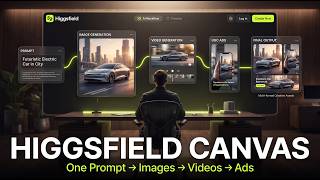

End the AI Workflow Chaos!
43sHighlights a common pain point (switching between tools) and introduces a solution, hooking creators frustrated with fragmented workflows.
▶ Play Clip"The title accurately promises a workflow from prompt to images to videos to ads, and the video delivers exactly that."
Higgsfield Canvas is a visual AI workspace that integrates prompts, images, videos, and models into a single infinite canvas, eliminating the need to switch between multiple tools. This video demonstrates how to build complete AI workflows for content creation, including cinematic videos and ad creatives, all within one connected environment.
Current AI content creation often requires switching between different apps for generation, animation, and upscaling, leading to disconnected workflows.
Higgsfield Canvas is a visual AI workspace that connects prompts, images, videos, and models on one infinite canvas, allowing users to build complete workflows visually.
Higgsfield is a complete AI image and video creation platform with tools for cinematic videos, AI UGC ads, image generation, multi-shot storytelling, and more.
Canvas offers templates with connected nodes, such as image nodes connected to prompt boxes, which can be linked to other parts of the workflow like video generation.
Users can create a new Canvas and start with a simple workflow: prompt node → image node → video node. Additional nodes can be added via right-click.
A detailed prompt for a cinematic scene of a lion walking through a dark jungle at night with glowing eyes, light rays, realistic fur, and dramatic atmosphere.
Users can upload reference images, increase batch size (up to 4 images), and choose from multiple AI image models like GPT Image 2 or automatic mode.
SeeDance 2.0 is selected as the video model. A motion prompt is added to animate the image, resulting in a cinematic video with smooth camera movement and realistic fur motion.
Canvas can generate ad creatives automatically from a simple prompt and product page link, producing a static ad and then animating it into a video ad.
Users can generate different ad versions (e.g., UGC style) within the same canvas by modifying the motion prompt, without starting over.
Canvas supports real-time collaboration with live chat and calls, public or private sharing, making it suitable for solo creators and teams.
Higgsfield Canvas transforms AI content creation by providing a unified visual workspace where all elements of a workflow remain connected, making the process more organized and efficient. This approach represents the future direction of AI creation tools.
What is Higgsfield Canvas?
A visual AI workspace that connects prompts, images, videos, and models on one infinite canvas.
00:17
What are the three default nodes in a new Canvas workflow?
Prompt node, image node, and video node.
01:44
Which AI image model is used by default in the demonstration?
GPT Image 2.
02:54
Which AI video model is used in the demonstration?
SeeDance 2.0.
03:32
How many images can be generated at once in Canvas?
Up to four images.
02:41
What is the purpose of the 'automatic mode' in image generation?
It automatically picks the best AI image model depending on what you're creating.
03:07
How can you create ad variations in Canvas without starting over?
By clicking on the output node, going back into video generation, and typing a new motion prompt.
05:52
What collaboration features does Canvas offer?
Real-time collaboration with live chat and calls, public or private sharing.
06:58
Unified Workspace Concept
Introduces the core innovation of Canvas: a single visual workspace that replaces multiple disconnected tools.
00:17Automated Ad Creation
Demonstrates how Canvas can generate a complete ad from just a product link and prompt, showcasing its efficiency.
04:28Future of AI Creation
States that visual, connected workflows are the direction AI creation is moving toward.
06:45[00:02] complete mess. You generate something in one app, animate it somewhere else, upscale it in another tool. And after a while, everything feels disconnected. But Higgsfield just launched something really interesting called Higgsfield
[00:17] Canvas. It's basically a visual AI workspace where you can connect prompts, workspace where you can connect prompts, images, videos, and models together on one infinite canvas. So, instead of switching between tools all day, you
[00:30] build one complete workflow visually. In this video, I'll show you how Higgsfield Canvas works, how the node system works, and why this could completely change AI content creation. Let's get into it. First, head over to Higgsfield and
[00:45] create your account. Once you log in, you'll notice that Higgsfield is much more than just a single AI model. It's basically a complete AI image and video creation platform with tools for cinematic videos, AI UGC ads, image
[00:59] generation, multi-shot storytelling, and more. But in this video, we're focusing on Canvas. So, head over to the Canvas section, and These are different Canvas templates you can start with right away. If we open
[01:15] one of them, you'll notice there are a few connected tabs. The first one is the image node connected to a prompt box. So, basically, the prompt generates the connected into other parts of the workflow. Like video generation. Now,
[01:30] with Canvas, you can create ads, social media content, videos, and complete AI workflows all in one place. So, let's build one ourselves. I'm going to head back and click on all Canvas. Then from here, I'll click
[01:44] create new Canvas. Right away, you'll see a simple starter workflow. First comes the prompt node, then the image node, and then the video node. Basically, the same workflow I I you earlier. Now, if I click anywhere
[01:57] and right-click, it opens up all these different tools and nodes you can add. You'll see things like prompts, image generators, video generators, voiceovers, and more. For this example, I'm going to start
[02:10] prompt I'm going to use. A cinematic scene of a powerful lion walking slowly through a dark jungle at night. Glowing eyes, light rays passing through the trees, realistic fur movement, dramatic atmosphere, cinematic
[02:25] lighting, ultra-realistic detailed environment, shallow depth of field, cinematic composition, 4K film look. Next, I'm going to click on this button and select image generation. Once I do that, a new node appears on the canvas.
[02:41] From here, you can upload a reference image, increase the batch size to generate multiple images at once, and customize the settings however you want. You can actually generate up to four images at the same time. But for this
[02:54] example, I'm just going to leave everything at the default settings. Right now, it's using GPT Image 2. And if you click here, you'll see all the different AI image models available inside Canvas. There's also an automatic
[03:07] mode, which automatically picks the best model depending on what you're creating. But for this example, I'm going to stick with GPT Image 2. Now, all I have to do with GPT Image 2. Now, all I have to do is hit run. And after a few seconds,
[03:20] the image is ready. And honestly, this looks really good. So, next, I'm going to click this button again and select video generator.
[03:32] As you can see, SeeDance 2.0 is already selected, which is honestly one of the best AI video models right now. You can also switch between different video models from here, depending on the style you want. But for this example, I'm
[03:45] going to stay with SeeDance 2.0. Now, I just need a short motion prompt. So, I'm going to type, "The lion slowly walks forward while the camera smoothly pushes in. Cinematic lighting, realistic fur movement, dramatic atmosphere,
[04:00] natural motion, ultra-realistic, cinematic film style." Now, let's hit generate and see what Canvas creates for us. And there it is. The final result actually looks insanely cinematic. You can see the lion moving naturally, the
[04:15] fur motion looks realistic, the camera movement feels smooth, and the overall scene has that high-end cinematic look. And the crazy part is that this entire workflow was built visually inside one Canvas.
[04:28] From the prompt to the image to the final animated video, everything stayed connected in a single pipeline. Now, let me show you something even crazier. Instead of building everything manually, you can actually give Canvas a simple
[04:41] start generating ad creatives automatically. So, for this example, I already created a quick workflow. On the left side, I added a simple prompt asking Canvas to create an Instagram static ad for this
[04:55] product. And I also pasted the product page link directly into the prompt. That's literally it. Then, Canvas used GPT Image 2 to generate the static ad automatically. And honestly, this came out way better than I expected. The
[05:11] layout looks clean, the product placement feels professional, the typography looks polished, and overall, it genuinely feels like a real branded But now comes the really interesting part. I connected the generated image
[05:24] directly into a video generation node. So, instead of rebuilding everything from scratch, Canvas takes the existing ad creative and turns it into a fully animated video ad. For this, I used Cedents 2.0. Then,
[05:38] I added a short motion prompt asking it to create smooth cinematic movement and animate the product naturally. And after generating, this was the final result. And what's even crazier is that if you want another
[05:52] version of the ad, for example, a UGC style ad, you can generate that, too, inside the exact same canvas. All you have to do is click on the output node, go back into video generation, and type something simple
[06:06] like, "Create a cinematic UGC ad for this shoe." And canvas will generate a completely new ad variation directly inside the workflow. So, instead of starting over every time, you can keep
[06:19] building on top of the same pipeline. And honestly, this is where Higgsfield canvas starts feeling really powerful, because this entire workflow happened inside one connected workspace, from the product link to the static image, to the
[06:33] animated commercial, to additional ad variations. Everything stayed connected visually inside one canvas. And this is why canvas feels very different from normal AI tools.
[06:45] It's not just an AI generator, it's a complete creative workspace, where you can build full pipelines for ads, storytelling, content creation, product marketing, and basically any visual workflow you can think of. You can also
[06:58] collaborate with your team in real time, use live chat and calls directly inside the workspace, share projects publicly, or keep everything private for team collaboration. So, whether you're a solo creator, marketer, designer, filmmaker,
[07:13] or part of a larger creative team. Canvas makes the entire AI workflow feel way more organized, visual, and connected. And honestly, this feels like the direction AI creation is moving toward. Everything visual, everything
[07:28] connected, everything happening in one place. So, yeah, that was Higgsfield canvas. If you want to try it yourself, check out you want to try it yourself, check out the link in the description below.

⚡ Saved you 0h 07m reading this? Transcribe any YouTube video for free — no signup needed.