
AI Summary
In this video, the creator walks viewers through the complete Twitch Affiliate onboarding process, from meeting eligibility requirements to completing tax forms and setting up payment methods. The guide highlights the importance of accurate personal information and the platform's content exclusivity rule.
Chapters
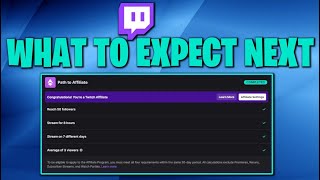
Reaching Twitch Affiliate requires 50 followers, 8 hours streamed in 30 days, 7 unique days streamed in 30 days, and an average of 3 viewers.
The onboarding starts from the Creator Dashboard, accessible via the user icon, or via Insights > Achievements > Path to Affiliate.
Two-Factor Authentication must be enabled on the Twitch account before starting onboarding, as a security measure.
The first step is 'Payout Registration,' which requires personal details like name, email, company (optional), and permanent address for tax processing.
The creator emphasizes that tax information must match exactly to avoid delays in payout approval.
There is a Twitch Affiliate Agreement that must be agreed to, with a key clause on 'live content exclusivity.'
The live content exclusivity clause prohibits multi-streaming or posting stream content to other platforms for at least 24 hours after it goes live on Twitch.
Next, you need to complete a tax interview, which asks for your tax classification (e.g., individual) and whether you are a US person, followed by electronic signature consent.
The service tax interview is often skipped if your royalty tax info is complete, pulling data from the first form.
You must select a payout method, but you need to accrue at least $100 in revenue before being eligible for a payout.
The creator chose 'Hold my payments' since he expects to be below the $100 threshold for a while, but notes options like direct deposit, wire, PayPal, or check.
After onboarding, features like subscriptions become available instantly, and the process is completed.
Mentioned in this Video
Tutorial Checklist
💡 Key Takeaways
Affiliate eligibility criteria
Clearly outlines the four hard requirements any streamer must meet, a core reference for aspiring affiliates.
00:28Matching tax info exactly
Emphasizes that inconsistencies in tax details can delay payout approval, a practical tip to avoid common pitfalls.
02:08Details of content exclusivity rule
Highlights a critical but often overlooked clause in the agreement that can lead to removal from the program.
03:29Strategic payout method choice
Suggests 'hold my payments' as a sensible option for those not near the $100 threshold, showing practical decision-making.
06:07Immediate access to new features
Confirms that features like subscriptions unlock instantly upon completing onboarding, which is motivating for new affiliates.
07:17Full Transcript
[00:00] What is going on everybody? Noble here with you guys today. In today's video we're going to be checking out the onboarding process for the Twitch Affiliate program. Now a lot of the information that we're fixing to talk about is actually
[00:12] going to be private information for myself as well as for you. But I think that just showing you what the process is actually like before you actually get to the affiliate program is something that you guys should know and that way you can kind of know what to expect. So in order to get to affiliate you
[00:28] You actually have to have these four things first. You need to reach 50 followers, you need to stream for at least 8 hours in the past 30 days, you need to at least stream on 7 different days in the past 30 days, and you need to
[00:41] reach an average of 3 viewers. So as you guys can see, I've already got all that. Once you complete all these, you'll get this at the top of your dashboard. So from your home screen, you're going to click on your icon on the top right, and then
[00:54] you're going to click on Creator Dashboard. creator dashboard that's where all this will show up but if you also need someone else to find it you go to insights then achievements and that'll show you path to affiliate which is what we're
[01:08] trying to work on right now so it's completed this and it says congrats you're eligible for affiliate status begin your affiliate onboarding so we're going to click on get started and again all of this stuff is very personal information so i'm not going to show you everything i'm just going to
[01:22] talk about why everything is there so first thing that you need to do we've actually made a video for this already, I'll leave a link in the description. You need to have two-factor authentication already enabled on your Twitch account. I've already done that, we've made a video, go
[01:35] check that out if you haven't done that yet. And then once you're done with that, you can go to Affiliate Onboarding. Click on this, and the first thing that you need to do is your payout registration. Begin your payout registration. We're going to click on this,
[01:49] and then again, this is the personal information that you guys will need to put in. It says, Twitch is a subsidiary of Amazon and we use some Amazon tools to help you get paid including the forms on this page Please fill them out and use the following guidelines You guys can check all that stuff out I already done it myself This form must match your
[02:08] tax information correctly or exactly and any inconsistencies may cause your delays for your payout registration approval. Don't worry you'll still be able to edit things on your page later if your information changes. So again I'm
[02:22] going to go ahead and fill this out you guys would fill this out and this is for your tax purposes we need to know your name your email and confirm your email and then your company name if optional they also are going to need your
[02:35] permanent address the city that you live in and all that other personal information again this is for tax purposes you need to fill this out so I'm going to go ahead and fill this out myself and then we'll move on to the next page alright so once you've filled out all that information we also have a
[02:49] a Twitch affiliate agreement, a bunch of legal mumbo-jumbo here, but I really do suggest that you guys read the Twitch affiliate agreement. I'm going to go ahead and click on this and highlight one specific part for you guys.
[03:01] Alright, so the main thing that I wanted you guys to know is that if you apply for the Twitch affiliate program, you do need to pay attention to this. This is very important, and if you don't abide by this, you will not be allowed to be in the Twitch affiliate program.
[03:14] The live content exclusivity right here. But basically what this means is if you're in the Twitch affiliate program and you're choosing to stream to Twitch, any content that you stream for the first 24 hours that that content is on your channel, you cannot put that anywhere.
[03:29] That means you cannot multi-stream. That means you cannot post your stream anywhere else, including to YouTube or any other places that you could live stream to for at least 24 hours, whenever that goes up. I just want to make that abundantly clear to you guys because there's a lot of people that don't know this and they get kicked out of the affiliate program not understanding why that is.
[03:49] So if you guys agree with that, all you have to do is press agree. Now step three or four is tax interviews Submit your tax information and we going to go ahead and fill this out So let go ahead and click on this real quick and this is going to have a lot of personal information like i said mine is completely blocked out just make sure that all of your information is accurate and
[04:07] up to date make sure it is all true because this is what they're going to use again for tax purposes as well as to send out your payments once you reach the threshold for you to be able to be paid out and then you can go ahead and press open royalty tax interview form all right so once this
[04:23] We opened a tax information interview about you. What is your tax classification? For me, in this case, this is going to be an individual. I don't have a business for this. So, it's going to be individual.
[04:36] For your U.S. tax purposes, are you a U.S. person? Yes, of course. Now, once you click yes, you're going to get all this personal information. You're going to make sure that it is 100% accurate. You've also got this area here that says I consent to provide the electronic signature
[04:51] for the information provided for the IRF or the W-9 form. So once you're done with that, you're going to go ahead and put your full name in here and then hit save and preview. Alright, so once you're done with that, you guys can see the first one has been completed
[05:05] and now you have to do the second one. It's not started yet, so we're going to go ahead and click begin service tax interview for the second time. And actually this one was really easy because I think it pulls from the first one. So it says your tax information is complete.
[05:17] No additional information is required for the service tax interview. You've already provided your tax information in the royalty tax. So you can go ahead and press done. And you guys can see here that both of these are now completed. So we can hit continue and move on to the fourth step.
[05:31] Now this is going to be your payout method. It says here, here you can choose how you want to be paid. You must accrue at least $100 in revenue before you're eligible for a payout. Click set payout method. And again, most of your stuff here is going to be personal information.
[05:46] I've got all of mine blocked out, but again, I'm not going to be a company. I'm an individual. And then all of the rest of your stuff here, you should fill out on your own. Make sure it accurate Make sure it up to date Once you done with all that you can press next And then we going to choose what it is you want you can choose the direct deposit you can choose wire transfer check paypal or hold my payments i actually going to choose hold my
[06:07] payments but i am also going to be paid out by paypal now it's going to be a while before i actually hit a hundred dollars that i make on my twitch channel because again i just now got the affiliate thing i'm not going to have a whole lot of subscribers if i'm being realistic i'm not going
[06:22] get a whole bunch of subscribers immediately so it's probably going to be a while before I hit that $100 payout. So I'm going to choose hold my payments. It says your payments will not be released until a valid payment method is selected. Once again we can also go ahead and set up whatever
[06:36] it is that you want whether it's your bank, wire transfer, PayPal. But right now I know I'm not going to make $100 on Twitch for a very long time so I'm just going to leave it on hold my payments and then click on next. Now all that's done now it's kicked me back to the stream key and preferences.
[06:50] We do have an affiliate here, so I think that should be good. It says onboarding. Onboarding's already done. Payment methods. So it looks like we should be good. Subscription names.
[07:02] Let's see. Counselors. Yeah, so we now have subscriptions available to us. We'll probably have emails that I can go ahead and make. One instant email upload. Find out how to. Okay, so there's a lot more stuff that we actually have access to now that we are in the affiliate program.
[07:17] It happened almost instantly. instantly. Once again, just make sure that all of your information is up to date and is accurate. Once you're done with that, you'll be able to be part of the opinion program. Once again, make sure that you're not going to be streaming anywhere else except for Twitch for at least the
[07:32] first 24 hours of your stream, and you guys should be good. I'm not sure if this actually helped you guys out because I was not able to show you exactly what you need to put in each spot,
[07:44] But I do think that it's important for you guys to know what to expect whenever you're working your way up to a video So hopefully this helps you guys out If it did please let me know in the comments down below and as always please consider liking sharing and subscribing
[07:56] And I'll see you guys on the next video