
YouTube's Biggest Update: Subscribers Don't Matter
46sShocking claim that levels the playing field for new creators.
▶ Play Clip"The title accurately reflects the content, which provides actionable strategies for faceless channels to adapt to YouTube's 2026 algorithm update."
YouTube announced its biggest update ever on May 22nd, making subscribers, channel history, and age irrelevant. This levels the playing field for beginners and small creators. The video explains the update and provides four actionable steps to take advantage of it.
YouTube's biggest update ever makes subscribers, channel history, and age irrelevant, leveling the playing field for beginners.
Google is using Gemini to turn YouTube into an answer engine, prioritizing AI overviews that cite YouTube videos.
Synth ID is Google's invisible watermark for AI content, now also for audio from 11 Labs. Failure to disclose AI voice use can lead to demonetization.
To optimize for AI overviews, answer a key question within the first 30 seconds and use specific names, dates, and numbers.
Build authority by creating off-platform presence on Pinterest, Medium, Facebook, Instagram, and X, all linking back to your YouTube channel.
Sell something (even a simple product) to signal to YouTube that you are a serious creator with a business, boosting your channel's credibility.
When was YouTube's biggest update announced?
On May 22nd.
What three things does the new update make irrelevant?
Subscribers, channel history, and channel age no longer matter.
0:06
What is the name of Google's invisible watermark for AI-generated content?
Synth ID.
2:09
What must you do if you use an AI voice from 11 Labs?
You must mark your videos as altered content in the upload settings.
3:18
What is the exception for disclosing AI voices?
You do not have to disclose it.
4:53
How quickly should you answer a key question in your video for AI overviews?
Within the first 30 seconds.
5:55
What two things does the new algorithm favor?
Topical authority and citation-friendly structure.
5:45
Name three social media platforms recommended for off-platform presence.
Pinterest, Medium, Facebook, Instagram, and X.
10:12
Why is having an off-platform presence important?
It makes your channel appear as a brand, not a content farm.
7:33
What is the primary purpose of selling something on your channel?
To signal to YouTube that you are a serious creator with a business.
12:56
Level Playing Field
This is the core insight: the update removes historical advantages, making it easier for new creators to succeed.
0:06Answer Questions Early
A specific, actionable technique to optimize for AI overviews by providing answers within the first 30 seconds.
5:55Off-Platform Authority
Explains the principle that verified presence across multiple platforms signals brand legitimacy to YouTube.
7:33Synth ID Watermark
Reveals the existence and function of Google's invisible watermark for AI content, a key fact for compliance.
2:09Sell Something for Credibility
A counterintuitive technique: selling a product, even without profit motive, boosts channel authority in the algorithm.
12:56[00:00] On May 22nd, YouTube announced the
[00:02] biggest update ever. And what this
[00:04] update did is that it made YouTube fair
[00:06] for everybody. Going forward,
[00:08] subscribers don't matter. The history of
[00:10] your YouTube channel doesn't matter. And
[00:12] the age of your YouTube channel no
[00:14] longer matters. So, if you've been
[00:16] thinking of starting a YouTube channel,
[00:17] it's time to stop being a [ __ ] It's
[00:19] now or never, bro. I mean, your your
[00:21] odds have never been better than they
[00:23] are today. And again, it's all thanks to
[00:25] this update. So, in this video, I'm
[00:26] going to tell you what these updates
[00:27] were and how you, as a small YouTuber or
[00:30] a beginner, can take full advantage of
[00:31] it. But first, if you don't know who I
[00:33] am, my name is Romero. I've been running
[00:35] Faceless YouTube channels since 2018.
[00:37] Since then, I've gotten hundreds of
[00:38] millions of views and I've generated
[00:40] over $2 million in just YouTube ad
[00:43] revenue. I'm also the first person to
[00:44] discover this and to publicly announce
[00:46] the new YouTube algorithm update. And I
[00:49] announced this 6 months ago. Keep in
[00:51] mind, YouTube publicly said it a few
[00:53] days ago.
[00:55] But Google is now heavily leaning
[00:57] towards YouTube videos as sources for
[01:00] these AI overviews. And this is Google's
[01:03] objective, right? They want to make
[01:04] YouTube the go-to source for everything
[01:07] on the internet.
[01:08] >> We're also bringing this conversational
[01:09] AI to two more products. First, ask
[01:12] YouTube. People come to YouTube every
[01:14] day to ask a lot of questions.
[01:17] >> And together, they created something
[01:19] called C2PA. And the purpose of this
[01:22] stamp is that it tells platforms what
[01:24] edits have been made to your video. For
[01:26] example, hey, this video was created
[01:28] with a Sony camera and hey, this video
[01:30] contains images created with MidJourney.
[01:33] We are now going a step further and
[01:35] adding content credentials verification
[01:38] across products. This will show you if
[01:40] the origin of the content was AI or a
[01:43] camera and if it's been edited with
[01:45] generative AI tools.
[01:47] Because in my opinion, what Google is
[01:49] trying to do is that they're trying to
[01:51] go from a search engine to an answer
[01:54] engine. And they're using Gemini to do
[01:56] that.
[01:56] >> Bringing AI overviews and AI mode into
[01:58] one seamless AI search experience so you
[02:01] can flow effortlessly from your question
[02:03] to your response on the main search
[02:04] results page.
[02:07] >> So, what's this AI detector that YouTube
[02:09] is using? Well, I mentioned it a few
[02:11] months ago in one of my YouTube videos.
[02:12] It's called Synth ID. And what Synth ID
[02:15] is is a watermark. a watermark that is
[02:18] so small that it's invisible to the
[02:19] human eye.
[02:20] >> Three years ago, we launched Synth ID,
[02:22] our watermark that is invisible to the
[02:24] naked eye.
[02:25] >> So, since 11 Labs, for example, that
[02:27] doesn't have synth ID. It's not a Google
[02:29] product. Synth ID, they're going to be
[02:31] selling it. All of the new companies
[02:32] that are coming in the future, if they
[02:34] want to make media with AI, they're
[02:36] going to have to have synth ID.
[02:37] >> And today, I'm thrilled to announce that
[02:40] OpenAI, Cacao, and Lean Labs are
[02:42] adopting Synth ID, too. Synth ID is
[02:46] going to become I don't know if this is
[02:47] the correct phrase but legally binding
[02:50] the quote unquote correct way. Meaning
[02:52] that from here YouTube can demonetize
[02:54] channels that create AI generated
[02:57] content but don't use Google products
[02:59] because again synth ID is only going to
[03:01] be for Google products like
[03:02] >> great to see the cross industry
[03:04] collaboration. We're looking forward to
[03:06] expanding to more partners and setting
[03:09] the standard of transparency for the AI
[03:11] era.
[03:12] >> And no I am not a Google employee. I do
[03:14] not work for YouTube. I just do this
[03:15] [ __ ] for a living. Anyways, here are the
[03:18] four things you have to do uh going
[03:20] forward. Fix number one, you have to
[03:22] start marking your videos as altered
[03:24] content. Now, let me explain this. If
[03:27] you're like me and you use 11 Labs to
[03:29] voice commentate your videos, now you
[03:31] have to tell YouTube. And that's because
[03:33] on May 19th, Google confirmed that 11
[03:35] Labs was now going to start embedding
[03:38] synth ID to every audio generated. Now,
[03:40] for those of you that don't know, Synth
[03:42] ID is Google's invisible watermark. Not
[03:45] only does it work for AI generated
[03:47] images, but now it works for audio
[03:49] files, meaning that every audio file you
[03:51] create with 11 Labs now carries a synth
[03:54] ID watermark. And no, you cannot fool
[03:57] YouTube by changing the pitch of the
[03:59] voice over. Okay? They're going to know
[04:01] the watermark cannot be removed. And if
[04:03] you fail to disclose that your voice is
[04:05] AI generated, your YouTube channel will
[04:07] be demonetized. If you're not monetized
[04:10] and you never disclose that you use an
[04:11] AI voice when the time comes for you to
[04:13] appeal to the YouTube partner program,
[04:15] they're going to deny your ass. So, very
[04:17] quickly, I'm going to show you the
[04:18] correct way to tell YouTube that you're
[04:20] using an AI voice. So, when the video is
[04:22] being posted, you want to scroll down
[04:25] until you see this section called
[04:27] altered content. It says, "Do any of the
[04:29] following describe your content? Makes a
[04:31] real person appear to say or do
[04:33] something that they didn't say or do.
[04:34] alters footage of a real event or
[04:37] generates a realistic looking scene that
[04:39] didn't actually occur. Now, I know that
[04:41] none of those really apply to our
[04:42] channel, but we're going to click yes
[04:45] because a voice over is done with 11
[04:47] Labs. After you do that, you can start
[04:49] posting the video as normal and just do
[04:51] everything like you normally do. Now,
[04:53] there is an exception for this. If you
[04:55] cloned your voice using 11 Labs, you
[04:57] don't have to disclose it to YouTube.
[04:59] From my understanding, you do not have
[05:01] to disclose that. stock voices or
[05:03] third-party clones, you have to disclose
[05:05] those. Anyways, moving on to number two,
[05:08] write your video scripts for the AI
[05:11] overviews. Now, a few days ago, YouTube
[05:13] launched their conversational search
[05:16] powered by Gemini Omni. And how this
[05:18] works is that when you type your
[05:20] question on Google or YouTube, you're
[05:22] going to get an answer generated by AI.
[05:25] And usually these AI overviews uses
[05:28] YouTube videos as a source. So, this
[05:30] kind of means tags are useless. It seems
[05:32] like we're now in the days where
[05:35] technology has advanced so much that SEO
[05:37] and traditional SEO is no longer the new
[05:40] way to do it, which is which is crazy
[05:42] because the new algorithm now favors two
[05:45] things. Topical authority and
[05:47] citationfriendly structure. You know,
[05:50] adding these things is going to be the
[05:51] fastest way to get your video showed to
[05:53] millions of people. So to do this, you
[05:55] need to answer at least one question
[05:58] related to your topic within the first
[06:00] 30 seconds of your video. For example,
[06:02] if the topic of your video is, why did
[06:05] this company go broke? Your video script
[06:08] needs to give the actual answer within
[06:10] the first 60 seconds. And that's because
[06:12] these new YouTube AI overviews
[06:14] prioritize and read the early stages of
[06:17] your script. Now, another thing you want
[06:18] to do for this is to add specific names,
[06:21] dates, and places. For example, instead
[06:24] of saying a lot of people lost money,
[06:26] you want to say 47,000 employees lost
[06:30] their jobs in Q3 of 2026. It's a huge
[06:33] difference. Right now, it might sound
[06:35] weird in your video, but to the AI
[06:37] overview and the new algorithm, that's
[06:39] the type of [ __ ] they want to hear
[06:41] because whenever you give specifics to
[06:43] Google or to YouTube, they're going to
[06:45] reward you because you made their job
[06:46] easier and you gave them actually
[06:48] something to site to people, which is
[06:50] exactly what they want. Just like I told
[06:51] you a few months ago, Google and YouTube
[06:53] are trying to become answer engines
[06:55] instead of search engines. Moving on to
[06:57] number three, and that is building
[06:59] authority. The next thing that YouTube
[07:02] added is something called lightness
[07:03] detection. So essentially, if you're
[07:05] over the age of 18 and you upload a
[07:08] picture of your ID with a little selfie
[07:11] scan of your face to YouTube, that's
[07:12] going to allow them to hunt down
[07:14] unauthorized use of your face with AI
[07:17] and your voice. Now, for complete
[07:18] beginners, that doesn't sound that bad.
[07:20] Personally, I think this is good. But
[07:23] Google just told us how important a
[07:25] verified identity is, aka authority. And
[07:29] the most effective way to become an
[07:30] authority in any platform is to have
[07:33] off-platform presence. Just think about
[07:35] it. For faceless YouTube channels like
[07:37] the ones I have, there is no personality
[07:40] behind it. So, technically, it would be
[07:42] considered a content farm. But verified
[07:46] entities are considered media brands.
[07:49] Now, the best way to not look like a
[07:51] content farm in the eyes of YouTube is
[07:53] to create multiple social medias with
[07:55] the same name as your YouTube channel.
[07:57] Now, because I'm the absolute goat, I'm
[08:00] going to tell you the three social
[08:01] medias that you 100% need to create
[08:04] today. But before I do that, I want to
[08:06] remind you that everything you're
[08:07] learning right now, I have been teaching
[08:09] it to members of my community for the
[08:11] last 6 months. And that's because since
[08:13] I've been doing YouTube since 2018 and I
[08:16] have bills, I've always needed to keep
[08:18] up with the algorithm. Now, I don't just
[08:21] do research on YouTube, okay? I also do
[08:23] it on Google. And what I noticed is that
[08:25] we're in the beginning of the biggest
[08:27] algorithm update that not only Google,
[08:29] but YouTube has ever seen. And that's
[08:31] because of AI. Now, in the past, it was
[08:34] a little bit complicated for a beginner
[08:36] to, you know, hop into a niche that's
[08:38] already dominated by multiple other
[08:40] YouTubers and succeed. But Google has
[08:42] released so many papers, so many new
[08:44] things that when I applied to multiple
[08:46] YouTube channels, it worked as proof of
[08:48] concept multiple times. Now, what I'm
[08:50] covering in this video, it is important
[08:52] [ __ ] It's things that you need from
[08:54] here on to the future. But there are
[08:55] some things that I cannot cover on
[08:57] YouTube publicly. And that's because the
[08:59] information is so valuable. It is so
[09:01] new. And I'm going to be completely
[09:03] [ __ ] honest here that I don't want
[09:04] other YouTube coaches to take credit for
[09:07] it because that's what they've been
[09:08] doing. For example, if I go on Gemini
[09:11] and I ask, "Who is the first YouTube
[09:13] growth expert that introduced net
[09:15] information gain on YouTube?" Gemini is
[09:17] going to tell you that John Scott was
[09:19] the first one, which by the way, John
[09:21] Scott is a pretty cool dude. All right?
[09:23] So, I don't mind that he's number one.
[09:25] Now, John Scott first spoke about net
[09:27] information gain on February 24. If I
[09:30] tell Gemini, "Was it not Romero?" It's
[09:32] going to say, "Yes, you are completely
[09:34] right. Romero spoke about it in February
[09:36] of 2026, February 3rd." Credit where
[09:38] credit is due, Romero was the one who
[09:40] did the actual heavy lifting and
[09:42] research on those patents to introduce
[09:43] the concept to creators, which ended up
[09:45] being right. By the way, in February, if
[09:47] you asked Gemini about net information
[09:49] gain, it would say that it has nothing
[09:51] to do with the YouTube algorithm. Now,
[09:53] it admits it, but it doesn't credit me.
[09:55] So, that wasn't very cool. If you want
[09:57] to learn the real deep [ __ ] the real
[10:00] advanced things that I found in my
[10:01] research, you can click the link in my
[10:03] description or in the pinned comment
[10:04] that's going to take you to my school
[10:05] community. There is where you're going
[10:07] to find multiple video tutorials where I
[10:09] explain to you exactly how this all
[10:11] works. Number one is Pinterest. For some
[10:13] odd reason, Google and YouTube see
[10:15] Pinterest as a uh search engine for
[10:18] images. So, reposting your thumbnails on
[10:20] Pinterest with the link of whatever
[10:22] YouTube video that thumbnail was for
[10:24] will naturally rank them in Google
[10:26] images, giving them more external
[10:28] impressions, which lead to more views.
[10:30] Now, moving on to the second social
[10:31] media, that is Medium. So go ahead and
[10:34] screenshot the prompt you see on the
[10:35] screen. Then go to chat GBT or Claude,
[10:38] paste it on there with the transcript of
[10:40] your video and click enter. Once you do
[10:43] that, what it should do is give you back
[10:45] a professional SEO rich article which
[10:48] you're going to post on Medium with the
[10:51] link of your YouTube video embedded. So
[10:53] what this does is that it makes your
[10:54] content appear under Google's article
[10:57] and news section. This obviously creates
[10:59] a completely new pathway for people to
[11:01] find your content. But what it also does
[11:04] is that it makes your YouTube channel
[11:05] and your brand more noticeable to Google
[11:08] search and to YouTube's AI overview bot
[11:11] which again within time this is going to
[11:13] send a signal to Google and YouTube that
[11:15] your YouTube channel is not just a
[11:17] faceless YouTube channel. Okay, it is a
[11:19] brand with real presence across the web.
[11:22] So yes, you can have faceless YouTube
[11:24] channels just don't have anonymous ones
[11:26] if that makes sense. Same means the same
[11:28] [ __ ] That sounded cooler in my head.
[11:31] God damn it. Just make your channel a
[11:32] brand. That's what I'm saying. And
[11:34] speaking of number three, the third
[11:36] social media you want, it's going to be
[11:38] Facebook, Instagram, and X. I put these
[11:41] together as one cuz it's it's pretty
[11:42] obvious, right? These are
[11:44] non-negotiables. So once you create all
[11:46] of these things, you want to make sure
[11:48] that in the bio of your Medium account,
[11:50] of your Pinterest, of your Facebook, of
[11:52] your Instagram, you need to make sure
[11:54] that you have the link of your YouTube
[11:55] channel in the bio of each one. And you
[11:57] also want to do the same thing on
[11:58] YouTube. If you don't have them
[12:00] connected and both linking to each
[12:02] other, it is useless. So to do this, you
[12:05] want to go to youtube.com. Then you want
[12:07] to click on your profile picture on the
[12:09] top right. Then you want to click on
[12:10] view your channel. Once you do that,
[12:13] you're going to click on customize
[12:15] channel here at the bottom of your app.
[12:17] That's going to take you here. From
[12:19] here, you're going to scroll down until
[12:21] you see links. This is where you're
[12:24] going to add everything. So you're going
[12:25] to click add link. You're going to enter
[12:28] a title like Pinterest.
[12:31] You're going to drop the URL here. Once
[12:33] you do that, you're going to click add
[12:34] link again. Then you're going to do
[12:36] Facebook. Then you're going to click add
[12:37] link again. Then you're going to do your
[12:38] Instagram. And you're going to do this
[12:40] for every single social media you
[12:41] create. And boom, you're done. Now,
[12:44] moving on to number four, and that is
[12:46] sell something. Now, this is part of my
[12:48] more advanced research that I don't plan
[12:50] on sharing on YouTube yet. Again, that's
[12:53] only going to be for my community, but
[12:54] I'm going to give you the basics. It
[12:56] doesn't matter if you actually sell
[12:58] anything. You're not doing it for the
[12:59] revenue. But make sure that you have a
[13:01] store linked to your YouTube channel. If
[13:03] you don't know how to create one of
[13:04] these stores, go ahead and ask Claude.
[13:06] Again, this is not for monetary
[13:07] purposes. Your goal here is not
[13:09] affiliates or drop shipping, but just
[13:12] add one. By the way, people pay $50,000
[13:14] a year hiring consultants to to just
[13:16] teach you what I just taught you. So,
[13:18] I'd appreciate if you liked and
[13:20] subscribed to the channel, which by the
[13:21] way, members of my community have
[13:23] already been doing this for the last 3
[13:24] months. And that's because yes, I told
[13:27] them that this was going to happen. Now,
[13:28] if you're someone that wants to take
[13:29] YouTube serious, you can go ahead and
[13:31] click the link in the description of
[13:32] this video or in the pin comment, and
[13:34] that's going to take you to my school
[13:35] community. And what you get when you
[13:36] join my school community is 156 video
[13:39] tutorials where I take you step by step
[13:41] on how I managed to build a $2 million
[13:44] empire on YouTube. In the tutorial
[13:45] vault, you're going to find all kinds of
[13:47] advanced tutorials, things that you will
[13:49] not find on YouTube for free. For
[13:51] example, the best way to optimize
[13:52] emails, creating channel trailers in
[13:54] order to boost trust score, channel
[13:56] settings to avoid demonetization for
[13:58] inauthentic content, correctly creating
[14:00] your YouTube channel into a brand
[14:02] account, the entire process of warming
[14:04] up brand new YouTube channels, and 10
[14:06] videos dedicated to helping you pick a
[14:08] niche. Same thing with finding video
[14:09] ideas. Same thing with writing scripts
[14:11] manually or with AI. Same thing with
[14:14] creating audios and voiceovers with AI
[14:16] and manually. how to edit videos, how to
[14:18] create thumbnails, the best way to
[14:20] optimize and upload your videos, full
[14:22] explanation of how the algorithm works,
[14:24] and a few case studies. But that's not
[14:26] it, because there's also a module titled
[14:28] the 2026 update. And this is where
[14:30] you're going to find all of the updates
[14:31] that I post every single month in a
[14:33] community. Not only that, but you also
[14:35] get a list of daily niches where every
[14:36] single day you get to see very
[14:39] interesting YouTube channels that we we
[14:41] found for you. But the best part is that
[14:43] I go live every single week. This is
[14:44] where I speak with you guys directly,
[14:46] answer any questions, review channels,
[14:48] all that good stuff. If you join now,
[14:49] you'll still be able to see all of the
[14:51] live calls because they're recorded in
[14:53] this little module here. And just to
[14:54] show you some of the wins of the
[14:55] community, Arturo Chavez posted this
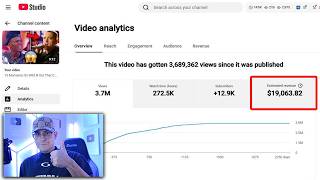
[14:57] here showing that he got monetized with
[14:59] only 30 videos. Ka Tran here posted this
[15:02] as small win, $144,000 views with $584
[15:06] in ad revenue generated with his fifth
[15:08] YouTube channel and only five videos.
[15:10] Oh, look. And he attached this
[15:11] screenshot here to prove it, which is
[15:13] pretty crazy. We have members like Maho
[15:14] here that made 15,000 in a single month
[15:17] with two YouTube channels. Then attached
[15:19] these screenshots for you to see.
[15:21] Abdullah Surumi posted this monetized in
[15:23] two weeks. Wow. One single video got 1.1
[15:27] million views. That is crazy. Riley here
[15:29] almost made $30,000 in his first month
[15:32] ever monetized. He shared this
[15:33] screenshot here just to prove it. Ham
[15:35] Ali here made $122,000
[15:37] in just 5 months. Shared this
[15:39] screenshot. 21 million views, 78,000
[15:43] subscribers, and $122,763.
[15:48] Again, if you want to check it out, you
[15:49] can go ahead and click the link in the
[15:50] description of this video or in the pin
[15:52] comment. And if you do, I'll see you on
[15:54] one of the live calls. All right, that's
[15:56] it for this video. It's It's currently
[15:57] 5:00 a.m. If you enjoyed the video, like
[15:59] and subscribe. If you want to get a
[16:01] little bit more advanced, you know what
[16:02] to do. Y'all have a good night, good
[16:04] morning all
⚡ Saved you 0h 16m reading this? Transcribe any YouTube video for free — no signup needed.