
BNB Crash: How to Save Your Airdrop
44sUrgent financial advice during a market crash, tapping into fear and the need for immediate action.
▶ Play Clip"Title promises a solution and delivers a clear, actionable guide, though it lacks depth and context."
This video provides a step-by-step guide on how to recover BNB that is locked in the Venus protocol after participating in the Airdrop Festival web3 campaign. The process involves repaying a USDT loan taken as collateral to release the BNB, then withdrawing the BNB from Venus.
Users who participated in the Airdrop Festival and put BNB as collateral are facing losses as BNB price drops. They must repay the USDT loan to recover their BNB, otherwise the platform will sell the BNB to cover the loan.
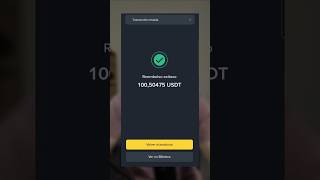
To recover BNB, users need to go to the campaign's loans section on the Venus website, find the 'amortize' option, and repay the borrowed USDT amount (e.g., 100.50475). After repaying, the loan is cleared, and the BNB collateral is released.
After repaying, refresh the tab to confirm no loans remain and the BNB guarantee (e.g., 0.22 BNB worth $134) is still there. Then select BNB, set the maximum insurance amount, and click 'withdraw' to return the BNB from Venus to your normal BNB balance.
Click 'withdraw' to complete the process. Note that you need some BNB in your account to pay for transaction fees.
By following these steps, users can successfully reclaim their BNB locked in Venus from the Airdrop Festival web3 campaign, avoiding liquidation and securing their assets.
What happens if BNB continues to fall and the loan is not repaid?
The platform will sell the BNB to pay off the loan.
00:14
What is the first step to recover BNB locked in Venus?
Go to the campaign's loans section on the Venus website.
00:14
What option do you use to repay the USDT loan?
The 'amortize' option.
00:26
What should you do after repaying the loan to confirm it's cleared?
Refresh the tab to see no loans remain and the BNB guarantee is still there.
00:54
Why do you need some BNB in your account when withdrawing?
To pay for transaction fees.
01:22
Risk of Liquidation
Explains the critical risk of not repaying the loan: the platform will sell the BNB collateral.
00:14Amortization Process
Provides the exact steps to repay the loan using the 'amortize' function.
00:26Verification Step
Emphasizes the importance of refreshing to confirm the loan is cleared and collateral is intact.
00:54[00:01] who did the Vinance airdrop and put collateral into BNB to continue doing missions. All those like BNB are dropping a lot, now they have to withdraw it by returning the USDT they lent and they will be able to recover their
[00:14] BNB. If they don't do that and BNB continues to fall, the platform will sell that BNB to pay off the loan. So, you keep the USDT, but it will consume the BNB you had before. If they do
[00:26] do is the following. They go to the campaign, the loans section on their website 3, they go to the part that says amortize and they put 100.50475 or the amount that it says down there borrowed, they click approve and they will see
[00:40] turn green, as if they no longer owe anything, they have to click amortize. which says transaction sent. They confirm all the amortization until it says to change to 0 USDT and there we see that we already have the repayment of those 100 USD that we lent.
[00:54] Now we would no longer have a debt. To see it clearly, you have to refresh that tab and we'll see that we still don't have any loans, but we do have the $134 guarantee, which is the 0.22 BNB we had. Now
[01:09] We're going to select BNB. We're going to set a maximum insurance amount, which is all we set. We select "withdraw" and we see that we will return the BNB, which is BNB
[01:22] in Venus, and we will have our normal BNB. We click withdraw and then things, it's because they need to have some BNB in the account to pay for the BNB in the account to pay for the transactions.




⚡ Saved you 0h 01m reading this? Transcribe any YouTube video for free — no signup needed.