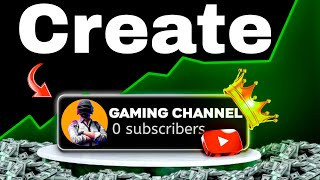

The Mistake Killing New Gaming Channels
43sDirectly calls out a common mistake that wastes years, creating urgency and relatability for aspiring creators.
▶ Play Clip"The title promises growth but delivers basic setup steps with a heavy push to subscribe; it's average advice with some filler."
This video provides a step-by-step guide on creating and growing a gaming YouTube channel in 2025. The creator outlines four key points: setting up the channel correctly, choosing a consistent content niche, editing videos for quality, and adding voiceovers to boost views and sponsorship opportunities.
The creator warns that many people unknowingly make a mistake that can waste two to three years, leading to regret.
When creating a channel, decide on a name that is easily searchable and a niche (e.g., gaming) that helps reach the right audience.
Use a Gmail account to create the channel, select 'Customize' or 'Continue', and then edit the channel name via 'Review Channel'.
Click 'Customize Channel' to add banner, description, and other details. Paste a pre-written description for efficiency.
Go to Advanced Settings, set the channel as 'Not for Kids', and enable features by verifying your mobile number.
YouTube offers three verification options: video verification, valid ID verification, and channel history. The creator recommends channel history, which takes 15-20 days to enable.
Write a channel name, description, and add important keywords in 'Basic Info'. You can temporarily include big creator names for initial days.
Stick to one content type (funny or professional/serious gaming) to help YouTube understand your audience and promote videos effectively.
Editing is essential for virality, including thumbnails, intros for long videos, and effects for shorts. Quality matters for all formats.
New channels often ignore voiceovers, but adding them significantly improves views and increases sponsorship chances compared to non-voiceover channels.
To succeed with a gaming channel in 2025, focus on proper setup, consistent content, quality editing, and voiceovers to stand out and attract both viewers and sponsors.
What is the first step when creating a YouTube channel?
Decide on a channel name and niche that is searchable and targets the right audience.
00:41
What are the three verification options for enabling advanced features on YouTube?
Video verification, valid ID verification, and channel history.
02:56
How long does channel history verification take?
15 to 20 days.
03:11
What are the two types of gaming content mentioned?
Funny and professional/serious gaming.
04:24
What is the benefit of adding voiceovers to videos?
It increases views and boosts sponsorship chances compared to non-voiceover channels.
05:59
Channel Name and Niche
Emphasizes the foundational step of choosing a searchable name and niche to reach the right audience.
00:41Verification Options
Provides a practical tip to use channel history verification instead of more complex methods.
02:56Content Consistency
Highlights the importance of sticking to one content type for YouTube's algorithm to work effectively.
04:09Voiceover Impact
Reveals a key differentiator for new channels that can significantly affect views and monetization.
05:32[00:02] and knowingly or unknowingly you are also making the same mistake which you should not do at all, in such a situation you will not even know how you will waste your two to three years and in the end you will also say the same thing that I made a mistake sir and the
[00:15] fourth point out of these is going to be very important because it will make you not a gamer but a real gamer so do n't skip the video at all let's start from the first n't skip the video at all let's start from the first point it
[00:29] boring then adjust it a little now see there will be many of you who have already created a channel and there will be some people who want to create a channel but knowingly or unknowingly everyone makes some mistake so come let's
[00:41] know how to create a channel in the right way so whenever we create a channel then first of all we have to decide the name and niche of the channel the name should be such that when searched it easily comes up in the search feed and the niche should help in which our video We
[00:56] help in which our video We can reach the right audience, which will be our niche. Gaming. can reach the right audience, which will be our niche. Gaming. Now, to create a channel, we must have created a
[01:11] gmail-email, select it. As soon as you select it, you will see two options here: Customize and Continue. Continue and proceed further. This way, your channel will be created, but when you click on Review Channel,
[01:24] you will have to edit its name etc. from here.
[01:38] keep it as YouTube 3 Party once, so I will
[02:01] click on Profile again. Now click on View Channel from here. As soon as you click, your channel will open like this. Now, from here, click on Customize Channel. You can do banner description and many other
[02:14] processes from here. Currently, I will paste the description that I have already written here. Once this is done, you will get a setting option on the bottom side, tap on it, click on Channel from here, and from here,
[02:28] go to Advanced Settings and first make it Not for Kids. Select it and then come to the Feature and Eligibility option, you will
[02:41] enabled, you can do it easily with your mobile number, ok, when your mobile number is verified, you will get a message like this here, now you have to enable the advanced feature, so for this YouTube has given 3 options - video
[02:56] verification, in which you will have to make a video of your face, valid ID verification and channel history, so I would suggest that you do it from the channel history only, so tap on the simply access feature, select the third option and click done, it will be
[03:11] enabled within 15 to 20 days, now if you tap on default here, you will tap on default here, you will write the name of your channel in small and capital letters, after that write some sentences related to the channel and content
[03:26] etc. here and here you will get the option of basic info where you can enter important keywords related to the channel like channel name, content You can also use keywords related to it and the name of your own big creator,
[03:41] but only for the initial days, later you can remove it. So the channel has been successfully created and on this channel I am going to do a short challenge in the next video and will give away its content in the last, so don't forget to subscribe. Now let's move
[03:54] so don't forget to subscribe. Now let's move towards the second point, which is,
[04:09] 10k and 12k views, all the other videos were stuck in the same way, the reason is that whoever understands, he is uploading it and moreover, thousands of gaming channels are coming out every day, so it is very important to understand the content,
[04:24] so see, if there is a gaming channel, then there will be two types of content for it, first funny and second professional and serious gaming, so if you have created a new channel and you have uploaded a funny video on it, then you have to try that
[04:39] every upcoming video of yours will be of funny type and I have a separate section for how to edit funny videos. I am going to bring a video from and second professional and serious gaming, in this you will have to do serious gaming with good game play like you must have seen e-sports
[04:52] etc. same like that and if you do this then youtube2 will start working on your video properly and the video will also reach the right audience and now the question arises that will the video go viral by doing this much then the answer is absolutely
[05:06] video go viral by doing this much then the answer is absolutely not for that you will have to do editing now whether the video is long or short it does not matter the fundamental of editing applies to everyone in which you have thumbnail if it is a long video then intro and if it is short then
[05:19] editing effect etc and quality for which I have already made a couple of videos you can go and watch them but wait now after doing all this do not miss the fourth point so wait now after doing all this do not miss the fourth point so
[05:32] scrolling youtubes etc. whether it is shorts or long but in all of them forget the views on the videos of new channels even a fly was refusing to sit but at the same time there were some new channels whose videos had decent views the reason for which is that
[05:46] What other channels were avoiding was voice over and if you start doing voice over on your videos then it will definitely affect the views of your videos and the audience will also say the same thing, there is not just one benefit of doing voice over, there are
[05:59] many benefits, you must have heard the name of sponsorship, so the chances of sponsorship increase a lot as compared to non voice over channels, so if you do not do voice over on your videos then start doing it from now and on this channel you will keep getting
[06:13] so if you want you can subscribe to this channel and to make a good thumbnail you should watch this video of mine, I will be there.
⚡ Saved you 0h 06m reading this? Transcribe any YouTube video for free — no signup needed.