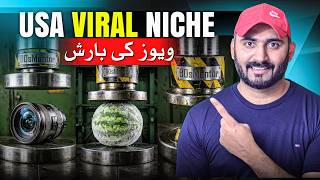

Millions of Views on Hydraulic Press Videos!
45sHigh-earning viral channels with millions of views hook viewers with the promise of easy money.
▶ Play Clip"Delivers a practical, free method for creating viral videos, though the title's promise of 'viral' is somewhat oversold as results vary."
The video is a step-by-step tutorial on creating viral hydraulic press-style videos for YouTube automation, using free AI tools like Google Gemini and Google Flow. The creator demonstrates how to generate prompts, create realistic images, animate them into videos, and edit them together using CapCut, all without needing a physical hydraulic press.
The video starts by showcasing popular hydraulic press channels with millions of views, highlighting the potential for revenue and audience engagement, particularly from US viewers.
The creator provides a master prompt (available in the video description) that allows users to generate multiple object video ideas. Users can specify the number of objects (e.g., 15) and the prompt will list unique objects like 'red hot molten glass'.
Copy the master prompt and paste it into Google Gemini (free tool). Press enter, and Gemini will generate a list of objects with serial numbers. Users then input each serial number to get a specific prompt for that object.
In the prompt, users can add their channel name for branding. The example uses '90s mentor' to be displayed on the video.
Use Google Flow (free credits available) to generate images. Select 9:16 aspect ratio for shorts/reels, choose the number of images (e.g., 4), paste the prompt, and generate. Pick the best image for video creation.
In Flow, select the image, choose video generation, keep 9:16, select model 'view 3.1 light' (10 credits) or fast (20 credits), and click start. The video will be generated with sound effects.
If Flow credits run out, download the image and use Meta AI (free) to create videos. Upload the image, paste the motion prompt from Gemini, and click animate. Note: Meta AI videos lack sound effects.
After generating videos for all objects, open CapCut (free version), import the videos, and merge them into a single video. Export with a name like 'Hydraulic Press'.
The creator encourages viewers to like, comment, share, and subscribe to the channel '90s mentor' for more YouTube automation tutorials.
The video provides a complete, free workflow for creating viral hydraulic press-style videos using AI tools, from prompt generation to final editing, enabling viewers to start their own YouTube automation channels.
Master Prompt for Automation
Provides a reusable prompt that simplifies generating multiple video ideas, a key technique for scaling content.
01:14Free AI Tools for Content Creation
Demonstrates a cost-effective workflow using Google Flow and Meta AI, making video creation accessible.
03:47Sound Effects as a Differentiator
Highlights that Flow's automatic sound effects add production value, a crucial factor for viewer engagement.
07:34Editing Workflow with CapCut
Shows a simple merging process to create longer videos from multiple clips, essential for channel growth.
09:39[00:00] یو ایس اے کی وائرل نیچ ڈونڈ رہے ہیں جس کے اوپر ملینز میں ویوز آئیں تو آپ دلکل ٹھیک ویڈیو کے اوپر پہنچیں یہاں دوستو یہاں پہ یہ دیکھیں میں آپ کو کچھ چینلز دکھاتا ہوں یہاں پہ دیکھیں آپ کے سامنے یہ نظر آرہے ہیں
[00:12] ہائیڈرولک پریس کی یہ چینلز ہوتے ہیں اسیم آر ویڈیوز کے اندر آتے ہیں یہ دیکھیں فائی سکسی سکس میلین ویوز 323 ملین ویوز یعنی کہ ملین کے اندر ویوز آ رہے ہیں اور اس پر کے چینل اچھا خاصا ریونیو
[00:24] بھی جنرل کر رہے ہوتے ہیں یہاں پر دیکھیں بہت ہی سانی اس طرح کی ویڈیوز بنانا یہاں پر دیکھیں ایک اور چینل میں آپ کو دکھاتا ہوں یہاں پر دیکھیں 62 ملین ویوز یہاں پر دیکھیں 53 ملین 49 ملین ویوز اب دیکھیں آپ لوگوں کے پاس ہائیڈرولک پریس
[00:37] مشین تو نہیں ہے تو کیا ہوا آپ لوگوں پر ایک پاس ای آئی موجود ہے جو کہ آپ کو اس طرح کی مفت کے اندر ویڈیوز بنا گئے یہاں پہ دیکھیں میلینز کے اندر اس طرح کی ویڈیوز کے اوپر ویوز آتے ہیں موسٹلی یو ایس کی آڈینس ہوتی ہیں
[00:49] ان کے پاکستان کے لوگ بھی اس طرح کی ویڈیوز کو کافی زیادہ پسند کرتے ہیں یہ تو ہوگئے یوٹیوب آٹومیشن کے لیے جو لوگوں نے فیس بک آٹومیشن کرنی اگر ان کے فری اسبح ک٨ پر بھی اس طرح کی ویڈیوز کے اندر میلینز کے اندر ویوز آرہیں گے
[01:01] آپ دیکھیں آپ کے سامنے یہ نظرا ولکوں کے اندر میلینز کے اندر ویوز آرہیں گے دوستو اگر آپ بھی کئوریص میں اسطرح کی ویڈیوز بنانا سیکھنے کیلئے تاکہ آپ لوگ بھی یوٹیوب آرٹومیشن کر سکے یو ایس اے کی وائرل نیش نیشو پر کام کر سکے
[01:14] تو میں آج آپ کو سٹیپ بائی سٹیپ اس طرح کے ویڈیوز مفت کے اندر بنانا شکاہوں گا یہاں دوستہ اس طرح کے ویڈیوز بنانے کے لیے سمپل آپ کو ایک ماسٹر پرامٹ کی ضرورت پڑتی ہے جو کہ آپ لوگوں کی آسانی کے لیے میں نے آریڈی بنا دی ہے
[01:26] آپ لوگوں کو یہ والے پرامٹ کا لنک اس ویڈیو کی ڈسکرپشن میں مل جائے گا اگر آپ یوٹیوب کے اوپر دیکھ رہے ہیں اگر آپ فری سپوک یا ٹک ٹاک کے اوپر یہ ویڈیو دیکھ رہے ہیں تو آپ کو جانا ہوگا یوٹیوب کے اوپر 90 منٹ ہو چینل سرچ کیجئے
[01:40] یہ والی ویڈیو آپ کو وہاں پر نظر آئے گی اس کی رسکسن میں آپ کو لنک مل جائے گا آپ نے سمپل کیا کرنا ہے کہ آپ نے جتنے بھی آبجیکٹ کی ویڈیوز بنانی ہوگی یہاں پر اٹھ کے نمبر لکھیں پرگرام میں 20 لکھیں یہاں پر لکھیں میں 15 لکھ جاتا ہوں
[01:52] کہ مجھے پندرہ یونیک objects کی اس طرح کی ویڈیوز بنانی ہے تو آپ نے اس prompt کو اوپر سے لے کر end تک copy کر لینا ٹھیک ہے جی یہاں تک یہ دیکھیں right click کر کے copy کر لیجے گا
[02:04] جب آپ copy کر لیں تو google کا جو اپنا tool ہے جمنی یہاں تک دیکھیں google jenai آپ نے simple اس کے اندر آ جانا ہے اور اس prompt کو پیس کر کے enter press کر دینا
[02:17] جب آپ enter press کریں گے یہ کام اپنا start کر دے گا یہ دیکھیں object one سے لے کر یہاں دیکھیں 15 object بولا ہے پندرہ object کی اس میں یہاں پہ دیکھیں آپ کو name دے دیں for example یہاں پہ دیکھیں
[02:30] red hot molten glass اس کے بعد honeycomb اس کے بعد vintage alarm giant jawbreaker object realistic video videos engagement
[02:49] वो किस पर करना है वो भी मैं आपको आगे चलके बताता हूँ यहाँ पर यह देखिए पहला ऑब्जेक्ट है red hot molten glass fire यहाँ पर देखिए आपने इसका serial number note करना 1 लिखा हुआ है आपने यहाँ पर जिन्मी के अंदर आके यहाँ पर 1 को enter करना है
[03:04] और यहाँ पर देखिए submit के बटन के ऊपर क्लिक कर देना है पहले ऑब्जेक्ट की आप लोग के लिए प्रॉम्ट बनाएगा जैसे मैंने यहाँ पर मेशिन की यहाँ पर इसमें कुछा कि आप अपने चैनल का नेम भी उसके उपर इस तस्वीर के उपर इस वीडियो के अंदर डालना चाहते हैं तो वो लिख दीजिये
[03:17] मैं यहाँ पर लिख देता हूँ 90s mentor मेरा channel name उसके ऊपर branding के अंदर आना चाहिए ठीक है आप जो भी अपने channel का नाम लिखेंगे आपने लिखते हैं आप उसके मताबग आप लोगों के लिए यहाँ पर यह देखें इनिज का prompt यह देखें prompt image यहाँ पर आप लोगों के लिए
[03:47] लेंगे तो Google का एक अपना tool है जिसका नाम है slow ठीक है Google slow आपको Google Apps के लिए मिल जाएगा आपने यहाँ पर आना है यहाँ पर आपको मुफ्त के credits मिलते हैं अगर आपके पास credits खतम हो जाए तो next free का tool कौन सा use करना है वो भी आगे
[04:02] आगे चलके आपको बताता हूँ, आपने यहाँ पर new project के ऊपर click करना है, जैसे आप new project के ऊपर click करेंगे, कुछ setting आप लोगों ने करनी है, यहाँ पर सबसे पहले आपने image को select करना है, 9 by 16 की image रखनी है,
[04:17] जो के हमारी YouTube automation के लिए, short channel के लिए होगी, रियल्स के लिए होगी, फेस्बुक के लिए और टिक टॉक की वीडियो के लिए होगी. ठीक होगी नहीं? यहाँ पर आप अपनी मरदिस्ते एक से लेके चार तक जितने भी आप इमेजेज जनरेट करवाना चाहते हैं. फाइजर में मैं चार इमेजेज
[04:31] जनरेट करवाना चाहता हूँ कोई क्रैजिट नहीं लगेगा अमिज जनरेट करने का राइट क्लिक करके पेस करेंगे प्रॉम्ट को और एंटर पेस कर देंगे देखते हैं कि क्या results आते हैं और यहाँ पर जो सबसे बेहतरीन image होगी
[04:43] उसको हम select करेंगे और उसकी आगे चलके video बनाएंगे यहाँ पर यह देखें मेरे पास 4 realistic images आ चुकी हैं अब आप पर depend करता है कि आपको कौन सी image पिसंद आती है for example मैं यहाँ पर देखें
[04:56] एक एक करके open करता हूँ यहाँ पर देखे यह भी बेश्टरीन से तरीके में नजर आ रही है यह वाली सबसे अच्छी नजर आ रही है अब हमने इसकी वीडियो बनानी है वीडियो बनाने के लिए simple आपने आ जाने है वापस जमने के उपर और यहाँ पर देखे
[05:26] simple copy flow image select video यहाँ पर कुछ setting करना होगी simple आपने नेमें बनाना के ऊपर click करना है अब आपने video के ऊपर click करना है
[05:40] frames को ही रहने दीजिगा 9 by 16 और आपने यहाँ पर 1 यहाँ के एक आपकी video generate हो और आपने यहाँ पर model select करना है view 3.1 light ठीक है fast वाला करेंगे तो 20 credit होती है
[05:53] लाइट वाला करेंगे तो 10 credit use होते हैं आपने इसको use करने के बाद start के button के ऊपर click करना है अब आपको कौन सी image यहाँ पर पसंद आईए यह वाली यह वाली यह वाली मैं पर यह वाली सबसे अच्छी है ठीक है
[06:05] इसके ऊपर branding name बेचा नजर आ रहा है और आपने यहाँ पर simple आके right click करके अपने prompt को paste करना है और enter press करना है जैसे आप enter press करेंगे यहाँ पर देखे image generation start हो देगा
[06:17] ठीक है जितनी वेर में flow के ऊपर image generate होती है अब मैं कुछ लोगों को जिनके पास credits नहीं होते हैं, खतम हो जाते हैं, वो फ्रीने और platform के ऊपर कैसे generate कर सकेंगे, वो भी दिखाता हूँ.
[06:29] उसके लिए हमें यहाँ से एक image को download करना होगा. For example, यह वाली image यह इसके ऊपर right click करके, download के buttons ऊपर click करके, यहाँ पर देखें original image 1K वाली इसको download कर लेते हैं
[06:41] जैसे मैंने इसको download किया आपने next platform जो के meta AI या Google का अपना free का platform उसके अंदर आ जाना है और यहाँ पर create video के उपर click करना है plus के बटन के उपर click करने के बाद आपने यहाँ से यहाँ वाली image को upload करना है
[06:57] जैसे आप upload करें अपने prompt को आपने paste करने में है ठीक है कौन सा prompt जो के आपने यहाँ पर motion prompt लिये Gemini से करने के बाद आपने animate के बटन के उपर click करना है यहाँ पर देखें यह animation start हो गई यहाँ पर
[07:09] ठीक है अब देखेंगे के realistic video कौन बनाता है यहाँ पर यह देखे आपके सामने इसको मैं प्ले करके दिखाता हूँ आपको यहाँ देखे यहाँ पर देखे बेतरीन से अन्दास में यह देखे आपके सामने यह वीडियो बन चुकी है
[07:25] It's amazing, next level. Sound effects. If you go to the back button, click this to download, click the original size and click the download.
[07:39] This video is downloading. It's made a video for us, but the problem is that it doesn't add any sound effect for you. You will need to add sound effect yourself.
[07:52] यह देखें, flow की सबसे best है और यहाँ पर देखें, इसकी थोड़ी सी खास नहीं है यहाँ पर, देखें, मैंने एक और भी इसकी तरह वीडियो बनाई है यहाँ पर इसको download करेंगे फिर सही पता चलेगा simple sound effects
[08:16] यह मैंने एक और वीडियो बनाई थी इसको भी मैं play करके दिखाता हूँ आपको यह meta AI से बनी है अच्छी है लेकिन इसमें बात यह है कि sound effects नहीं होते ठीक है इसके साथ जो मैंने बनाई है इसके लावा जो flow से बनाई है वो उसके जरा वोर से देखिए
[08:29] ये देखे प्रॉपर ये देखे sound effects के साथ आपके सामने एक वीडियो आती है ये देखे 90th minute और इसके उपर लिखा हुआ है प्रॉपर तरीके से अभी आप लोगों ने रुकना नहीं है आपको further steps भी बताता हूँ अगर आप वीडियो के इस विषय तक पहुंच चुके तो आपको वीडियो एंगेजिंग और अच्छी लग रहेंगे होगी
[08:45] इस तरह के वीडियोस बनाने में काफी मेहनत लगती है तो आप लोगों की अप्रिशेशन चाहिए अप्रिशेशन आप कैसे कर सकते हैं इस वीडियो को लाइक करके और नीचे positive comment करके इससे मुझे appreciation मिलेगी और आप लोगों के लिए इस तरह अच्छे अच्छी वीडियो लेकर आँगा
[08:57] ताके आप लोग YouTube automation start कर सके अब यहाँ पर देखें मैंने एक वीडियो बनाई गया है बैके पर जाता हूँ, मैंने आपको अपनी गैलॉर्जी भी दिखाता हूँ यहाँ पर देखिये आईस वाली भी बनाई है इसके अलावा यह देखिये दूसरी भी बनाई है
[09:11] यह देखिये कबीच ज्यादा गोल्ड बारी भी बनाई है तो इस तरह दो तीन वीडियो यहाँ पर डाउनलोड करता हूँ आप लोगों ने क्या करना है इस तरह वान बाई वान करके इस फॉर्म से जितने भी ऑब्जेक्ट दी होंगे आपने उसकी वीडियो से नेट करवाने के बाद
[09:25] आप लोगों ने उनको merge करना होगा जो के जब आप इस channel के ऊपर आते हैं न ये देखे crazy वाले ये वाले channel के ऊपर आते हैं ये 9 minute 10 minute की video बनी है ये किसी एक object को यहाँ पर crush नहीं करते multiple objects को crush करते हैं
[09:39] उसके बाद आप लोगों ने क्या करना है अब आप लोगोंने simple क्या करना है, cap cut को open कर लेना है, इसका free वाला version, ठीक है, import के button के ऊपर click करके आपने जो भी इस तरह की videos बनाई होंगी, आपने उसको यहाँ पर import कर लेना है, ठीक है, 1, 2, 3, मैंने 3 videos को यहाँ पर, यह देखें, पहली video, यह वाली video, यहाँ पर यह देख
[10:10] वीडियो ठीक है hydraulic press और आपने इसको export कर लेना है और यहाँ पर यहाँ पर देखिए इसके final results भी आप लोगों के सामने आ गए यहाँ पर देखिए max level की videos बन रही है simple से prompt को देने के बाद
[10:24] AIC मदद से वो भी free के अंदर so friends what you are waiting for यूट्यूब आइटोमेशन का चैनल रन करना है
[10:39] नाट ओनली यूट्यूब आइटोमेशन आप फेस्बुक और टिक टॉक पर भी सीम काम कर सकते हैं हाई ओप फ्रेंज वीडियो वेलियो वलगी होगी सुस्को समका ज़रूर दिजिये शेयर कीजिए अपनी दोस्तों के साथ और सैनल 90th minute ओर को जुरू सब्सक्राइब कीजिए
[10:51] थेंक यू



⚡ Saved you 0h 10m reading this? Transcribe any YouTube video for free — no signup needed.