
AI Recreates Lord of the Rings Trailer!
42sShows a stunning AI-generated animation that looks professional, sparking curiosity and awe.
▶ Play Clip"Delivers on the promise of free anime-style image generation using ChatGPT, though the Lord of the Rings trailer hook is misleading."
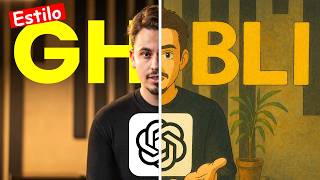
This tutorial demonstrates how to create Studio Ghibli-style anime images for free using ChatGPT. The creator shows a step-by-step process of uploading personal photos and using a simple prompt to transform them into anime-style artwork, with results appearing in under three minutes.
The video opens with a demonstration of AI-generated anime-style content, setting the stage for the tutorial.
Social media platforms are flooded with professional-looking anime images that are actually AI-generated, not drawn by artists.
The creator aims to teach viewers how to create similar AI-generated anime images in their own style, using free tools.
The tutorial exclusively uses ChatGPT (free or paid version) to generate anime-style images.
Viewers need to log in or register for a ChatGPT account. The creator demonstrates logging in with email and password.
In ChatGPT, click the three dots to find the 'Create Image' option. Upload a photo from your library.
The creator uploads a photo of himself with his son and uses the prompt 'Draw this image in Studio Ghibli style.'
The image generation takes 2-3 minutes, sometimes as fast as 30 seconds.
The creator attaches another image and repeats the same prompt, showing consistent results.
A photo from Italy is uploaded with the same prompt. The result is shown, though the creator notes it made him look bald.
The creator reveals that the Lord of the Rings music video shown at the start was made using ChatGPT and other AI tools.
If the video reaches 10,000 likes, the next video will teach how to create any animated video in Japanese anime style.
ChatGPT can generate Studio Ghibli-style anime images from personal photos for free, with results in minutes. The creator hints at more advanced AI animation tutorials if engagement goals are met.
What tool does the tutorial use to create Studio Ghibli-style images?
ChatGPT (free or paid version).
00:56
What prompt is used to transform a photo into Studio Ghibli style?
'Draw this image in Studio Ghibli style.'
01:37
How long does it typically take for ChatGPT to generate an image?
2-3 minutes, sometimes as fast as 30 seconds.
01:52
What is the first step to create an image in ChatGPT?
Click the three dots and select 'Create Image'.
01:25
AI-generated images are everywhere
Highlights the prevalence of AI art on social media, setting context for the tutorial.
00:29Simple prompt works
Demonstrates that a single, straightforward prompt can produce consistent anime-style results.
01:37Lord of the Rings video creation
Reveals that complex AI animations can be created using ChatGPT and other AI tools.
03:05[00:02] young man using artificial intelligence to recreate the Lord of the Rings trailer from home. You're about to see his creation on your You're about to see his creation on your screen
[00:16] [Music] [Applause]
[00:29] go on your Instagram, TikTok, Facebook, X, any of them, you'll see a lot of images that look professional. They look like anime images drawn by artists, but none of them were. They were all made using
[00:42] artificial intelligence. If you clicked on this video, you probably want to know how I create these kinds of images, but in my own way, Daniel. free? I'm warning you now that it exists. Today's video will teach you that, but to
[00:56] video until the end. First of all, in today's tutorial I'm only going to use a can replicate this. The first thing you're going to do is come here to the I doing now? If you don't have a GPT chat account, you will need to
[01:12] register. Since I already have an account, I'll just enter my email and password, and that's it . Oh, while I'm here recording in the early hours of the morning, sales are practically going through. OK. Continue. I arrived here in the GPT chat. Whether you have the paid or
[01:25] free version, it doesn't matter. He does this here for free. There you have the option here in the three dots, right in the corner, to create an image. To create an image, you will first load a file from your library. So I came here to the
[01:37] file, for example. I'm going to select a photo of me with my son. To add. photo of me with my son. To add. Draw this image in Studio Giby style. It will take him a little while to draw the picture, okay? It takes 2 to 3
[01:52] minutes at most. Sometimes he draws in 30 seconds or less. and you'll see the finished result. Wait a minute, editor, because I'm still recording the result here. The GPT chat image is ready here.
[02:06] And I took the opportunity to attach another image here and ask him to do the same thing. He's going to draw that image the same way, and I'm going to cut it out again 'll see the finished result. The image is now complete here. The result is
[02:19] like the way they positioned their mouths, , anyway. Come here, third option, create image. Let's attach another random image here, folks. Collections. Let's see here.
[02:35] Hmm, pickart. I'll add this image here from when I was in Italy. And I'll send the same prompt. Draw an image in the Studio Gib style. I never really know if it's Studio Gib or Studio Gibi, but I don't care. The
[02:52] image will be ready anyway. As soon as I snap my fingers, you'll see the final result. The image is ready, look. This is the original image. The only thing I didn't like is that it made me kind of bald.
[03:05] But I'm not going to complain because I really was a little bald in watched this video must be wondering: "But Daniel, how did that guy manage to create the Lord of the Rings music video using only
[03:19] artificial intelligence?" Basically, I used the chat department and some artificial intelligence, and I can recreate any animation with it. If you want to share this video as soon as it hits 10,000 likes. The next video
[03:32] that will be released will teach you how to make any animated video you want in the Japanese anime style. Thank you for your attention.


⚡ Saved you 0h 03m reading this? Transcribe any YouTube video for free — no signup needed.