
My Keyword Mistake Cost Me Views
45sRelatable failure story hooks viewers who struggle with low views.
▶ Play Clip"Title accurately promises keyword strategies; video delivers exactly that with clear, actionable steps."
This video provides a step-by-step guide to finding keywords for YouTube videos, sharing seven actionable strategies that helped the creator's channel reach 250,000 views per month. The focus is on identifying untapped, high-traffic keywords to improve video visibility and ranking.
The creator explains how keyword research is crucial for YouTube success, sharing that his channel gets 250,000 views per month due to effective keyword strategies.
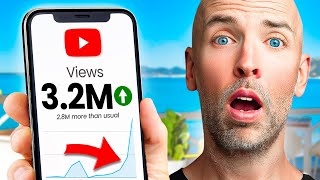
The creator initially picked keywords without research, like 'advanced seo', which had low search volume, leading to poor video performance.
Find keywords by analyzing competitors' most popular videos. Focus on channels similar in size, sort by most popular, and note keywords used in titles and descriptions.
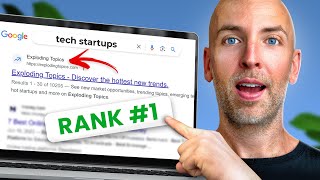
Use the free tool 'Exploding Topics' to discover trending keywords that are less competitive. Sort by categories and time frames to find relevant topics.
Target keywords that show video results in Google search. This allows ranking in both YouTube and Google, providing extra views. The channel gets about 6,000 views per month from Google.
Tools like TubeBuddy and VidIQ show keyword search volume, competition, and an overall score. They also provide related keywords. The creator personally uses VidIQ.
YouTube Analytics reveals the exact keywords people use to find your videos. Adding missing keywords to title, tags, and description can improve ranking.
Long tail keywords are specific and less competitive. View page source of competitor videos, search for 'keywords' in the HTML, and note long tail terms. Alternatively, use TubeBuddy or VidIQ.
KParser scrapes YouTube's suggested search results, providing thousands of keyword ideas from a single topic. It's a free tool for finding long tail keywords.
Playlists can rank in search results. Use SEO-friendly titles and descriptions with target keywords to increase watch time and visibility.
By implementing these seven keyword research strategies, you can significantly improve your YouTube video's search ranking and attract more views. The key is to focus on untapped, trending, and long tail keywords while leveraging analytics and competitor insights.
What is the first strategy for finding YouTube keywords?
Copy your competitors' best keywords by analyzing their most popular videos.
02:00
Which free tool is recommended for finding trending keywords?
Exploding Topics.
03:30
What are 'video result keywords'?
Keywords that show video results in Google search, allowing ranking in both YouTube and Google.
05:00
Name two YouTube SEO Chrome extensions mentioned.
TubeBuddy and VidIQ.
06:30
How can you find keywords from your own YouTube analytics?
Go to YouTube Studio > Analytics > Reach > Viewers to see exact keywords people use to find your videos.
08:00
How do you view a video's tags using page source?
Right-click on the page, select View Page Source, then search for 'keywords' (Ctrl+F) to find the tags.
09:30
What is KParser used for?
It scrapes YouTube's suggested search results to provide thousands of keyword ideas.
11:00
What is the bonus strategy for keyword optimization?
Optimize playlist titles and descriptions with target keywords to help playlists rank in search.
12:00
Early Keyword Mistake
Shows the consequence of ignoring keyword research: a video optimized for 'advanced seo' got few views due to low search volume.
00:45Competitor Keyword Copying
Provides a practical, low-effort method to find proven keywords by analyzing competitors' popular videos.
02:00Video Result Keywords
Highlights an often-overlooked opportunity to rank in both YouTube and Google, yielding extra views.
05:00YouTube Analytics Goldmine
Reveals that YouTube Analytics shows exact search terms used to find your videos, enabling optimization for already-ranking keywords.
08:00Playlist SEO
Emphasizes that playlists can rank in search, a commonly missed opportunity for increasing watch time.
12:00[00:00] today i'm going to show you exactly how to find keywords for your youtube videos step by step in fact the keyword research tips that i'm about to share with you is one of the main reasons that my channel gets 250 000 views per month so if you want actionable strategies that you can use to find untapped keywords you'll love this video keep watching when i started my youtube channel a couple years ago i put zero thought
[00:26] into keyword research whenever i wanted to create a new video i pretty much pick a keyword out of thin air and optimize it around that keyword and it's one of the main reasons that my videos struggle to get views hi mom no i'm still not getting any views for example i optimized one of my early videos around the keyword advanced seo well as it turned out very few people search for advanced seo on youtube and because
[00:52] i picked the wrong keyword my video didn't get many views flash forward to today and i spend a lot of time finding keywords for my youtube videos and it's paid off because i optimize my youtube videos around terms that people actually search for on youtube my channel gets hundreds of thousands of views every month even when i don't publish anything new with that it's time for me to show you the exact strategies that i use starting
[01:18] with strategy number one copy your competitors best keywords when it comes to video keyword research you don't need to start from scratch in fact you can find amazing keywords from other channels in your niche here's how to do it first head over to one of your competitors channels you want to avoid channels that have way more subscribers than you do instead focus on channels that are about your size or a little bit bigger then click on
[01:44] that channel's videos tab and sort by most popular this will show you their videos that got the most views finally head over to one of their popular videos and look at the keywords that they use in their title and description and just like that you have a handful of proven keywords that you can optimize your videos around and now it's time for our second strategy find trending keywords using exploding topics if your channel is brand new
[02:10] or if you just want to find keywords that are easy to rank for you want to target trending keywords why is this important unlike older established keywords trending keywords are brand new which means they're not super competitive yet and because these keywords are blowing up you can get in early and ride the wave as that topic becomes mainstream the question is how do you find trending topics that other people don't know about yet a free tool
[02:37] called exploding topics this free tool scrapes the web for topics that more and more people are searching for and it bubbles up terms that are blowing up the best part you can sort the topics by different categories and time frames that way you could find a keyword that's perfect for your channel for example let's say that your channel is in the health and fitness space well you can choose categories like fitness health and food and see
[03:03] topics that are blowing up which leads us to strategy number three video result keywords yes wrecking your video number one in youtube search is great but ranking your video in youtube and google that's even better in fact my channel gets about 6 000 views per month directly from google not bad my secret video result keywords you see google doesn't have videos in the search results for every single keyword that people search for instead google only shows
[03:29] video results for certain keywords these keywords are called video result keywords here's an example of a video result keyword video result keywords tend to be on topics like sports tutorials cute things or pretty much any topic where a video result makes sense so before deciding on a keyword for your youtube video search for that keyword in google if you don't see a video in the results it means that google has decided that it's not a video
[03:55] result keyword but when you see one or more youtube videos in the search results you've uncovered a video result keyword which is great and when you optimize your video around that video result keyword you have a chance to rank your video in google which can lead to lots of extra views and now it's time for strategy number four use youtube seo chrome extensions coming up with a list of potential keywords is a great first step but
[04:21] how do you know which keywords to actually go after well that's where youtube seo chrome extensions like tubebuddy and vid iq come in handy i've personally tested vidiq and tubebuddy and i can say that they both have their pros and cons but in general i don't think that one is that much better than the other so i'd go with whatever tool works best for you i personally use vidiq so i'll show you how to find keywords
[04:47] for your youtube videos using that extension all you need to do is search for one of your potential keywords in youtube and you'll see that keyword search volume and competition you even get an overall score that takes the number of searches and competition into account and the higher that score is the better i also recommend checking out the top related keywords section of this report it's a great way to find related keywords that would be tough
[05:13] to find any other way with that out of the way let's dive right into strategy number five your own youtube analytics youtube analytics is a keyword research goldmine that's because youtube analytics shows you the exact keywords that people use to find your videos to find this report in your youtube studio go to analytics reach viewers in most cases you'll find keywords that you're already optimizing for if so that's a good sign that your video seo efforts
[05:39] are paying off but every once in a while you'll run across a keyword that you're not optimizing for so why is this important well youtube is already ranking you in the search results for that keyword and you didn't even optimize for it according to youtube if you add that missing keyword to your title tags and description you can rank even higher in youtube for that keyword and now it's time for our second to last strategy strategy
[06:05] number six find long tail keywords in your competitors tags as you probably know long tail keywords are keywords that are super specific for example a normal keyword is something like keto diet and a long tail version of that term will be something like best keto diet dessert recipes even though long tail keywords don't get a ton of searches they're also not that competitive which makes them easy to rank for and as it turns out a lot
[06:31] of these long tail keywords are hiding in plain sight in fact other videos in your niche are probably already using awesome long tail keywords in their tags unfortunately youtube doesn't show you the tags that other videos use on the watch page so you'll need to dig into the page's html to see them to do that right click on the page and click view page source which will show you that page's html code now don't be intimidated
[06:58] by all this code you don't need to be a developer to use this technique all you need to do is search the page ctrl f on windows and command f on mac then type in keywords all the terms that show up after keywords are that videos tags and you want to pay special close attention to any long tail keywords that show up like this one now if you don't want to keep looking at long lines of
[07:24] html you can just see a video's keywords right on the page with tubebuddy or vid iq with that let's get into our final strategy k parser now you might have noticed that when you search for something on youtube youtube suggests certain keywords for you and as you probably know this is a great way to find long tail keywords for your youtube videos the only problem is youtube only shows you about 8 to 10 suggestions per keyword
[07:50] what if there was a way to find even more of these suggested keywords automatically well there is a free keyword tool called k parser to use it just enter a topic idea into the tool and they'll get to work scraping youtube's suggested results for example for this search i just did i got thousands of keyword ideas pretty cool so before we end this video i've got a quick bonus strategy for you which is to optimize your
[08:16] playlist titles this is a great way to use all the keywords that you just found now i probably don't need to tell you that playlists are great for increasing your channel's watch time that's because playlists automatically play one video right after another unfortunately most people don't optimize their playlists for seo in fact this is a mistake that i made back in the day when i first started making playlists i'd give them whatever name popped into my
[08:42] head which ended up being a huge mistake that's because playlists can actually rank in the search results which is why today i give my playlists seo friendly titles like how to get higher google rankings i also write descriptions for each playlist that includes my target keyword which has helped my playlist rank for keywords that people search for on youtube there you have it seven ways to find keywords for youtube videos if you like this video make
[09:08] sure to subscribe to my youtube channel right now just click on the subscribe button below this video also if you want exclusive seo and traffic techniques that i only share with subscribers head over to backlinko.com and hop on the newsletter it's free now i want to turn it over to you which strategy from today's video do you want to try first are you going to find trendy keywords and exploding topics or look for long tail keywords
[09:34] in your competitors tags either way let me know by leaving a comment below right now [Music] you
⚡ Saved you 0h 09m reading this? Transcribe any YouTube video for free — no signup needed.