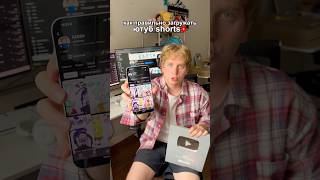

Uploading Shorts Wrong? Fix It Now!
43sDirectly addresses a common pain point and promises a solution, making viewers want to watch to avoid missing out.
▶ Play Clip"The title promises a guide for 2026, but the content is generic advice that applies to any year, making it somewhat oversold."
This video provides a step-by-step guide on how to correctly upload YouTube Shorts to maximize their visibility and reach. The creator emphasizes that many uploaders fail not because of the content itself, but due to incorrect uploading practices, and offers ten practical tips to improve Shorts performance.
The video suggests that poor performance of YouTube Shorts is often due to incorrect uploading, not the video content itself. It recommends downloading the video and uploading it via the plus sign, selecting the file, rather than uploading directly from a computer.
Adding a preview or cover image at the bottom of the video can increase the chances of getting views. Many YouTubers use high-quality covers to attract clicks.
Prepare the cover image beforehand, set it at the end of the video for a millisecond, and when selecting the frame for the cover, slide the slider to the very end and choose that frame.
Use popular topics and add an emoji to make the video stand out. A catchy title is crucial for attracting viewers.
The description for Shorts plays a small role but can still help the video's performance. Tags are often useless but can help determine where the video is recommended at the beginning.
Don't post the video right away; set it to restricted access first and then schedule the time. Also, avoid being included on YouTube Kids. These steps can help with recommendations and encourage rewatching.
The video concludes by encouraging viewers to start loading Shorts correctly right away and offers three free tutorials on monetization via a link in the profile.
What is the recommended method for uploading YouTube Shorts?
Download the video and upload it via the plus sign, selecting the file, rather than uploading directly from your computer.
00:02
How can you increase the chances of getting views on a Short?
Add a preview or cover image at the bottom of the video.
00:14
What is the technique for selecting a cover frame?
Set the cover at the end of the video for a millisecond, then slide the slider to the very end and select that frame.
00:29
What elements make a title catchy for Shorts?
Use popular topics and add an emoji to make the video stand out.
00:43
What is the role of tags in Shorts?
Tags are often useless but can help determine where the video is recommended at the beginning.
00:55
What is the recommended scheduling practice for Shorts?
Set the video to restricted access first, then schedule the time to post it.
01:07
Uploading Method is Key
Highlights that the upload process itself, not just content, affects Shorts performance.
00:02Preview Increases Views
A simple visual addition can significantly boost visibility.
00:14Cover Selection Trick
A specific, actionable tip for choosing an effective cover frame.
00:29Catchy Titles with Emojis
Emphasizes the importance of titles and emojis in standing out.
00:43Scheduling for Success
Scheduling and restricted access can improve recommendations and rewatching.
01:07[00:02] might not be your videos, but rather that you're uploading them incorrectly. YouTube doesn't recommend them. So in this video I will show you how to download YouTube shorts correctly. First, download the video not through your computer, but
[00:14] click the plus sign, select the video you need and click next. Third, you It will then appear at the bottom of the video, increasing your chances of getting you can put a preview. Many YouTubers use high-quality covers
[00:29] follows. Prepare the cover in advance, set it at the end for a millisecond, and when you're choosing a frame for the cover, turn the slider all the way to the end and select that Make an interesting and catchy title. Use popular topics
[00:43] add an emoji to make your video stand out from the crowd. Sixth. Write a description for shorts. It plays a small role, but it can still help your videos. Seventh. Tags in shorts are often useless, but they
[00:55] can also help you determine where to recommend your videos at the beginning. Eighth. being included on YouTube Kids. Ninth, don't post the video right away. Set it to restricted access first and only then schedule the time. Tenth.
[01:07] in recommendations and can make your viewers rewatch your shorts can start loading your shorts correctly right now. And if you want set up monetization, grab three free tutorials from the link in my
[01:21] free tutorials from the link in my profile.
⚡ Saved you 0h 01m reading this? Transcribe any YouTube video for free — no signup needed.