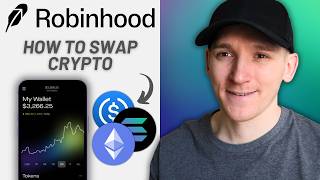

How to Swap Crypto in Robinhood Wallet
41sClear, step-by-step tutorial that appeals to beginners looking to swap crypto.
▶ Play Clip"Delivers exactly what the title promises: a clear, practical guide to swapping crypto in Robinhood Wallet."
This video is a step-by-step guide on how to swap and bridge cryptocurrencies within the Robinhood Wallet app. It covers the necessity of holding the correct gas coin for each blockchain, demonstrates the swap process using Arbitrum as an example, and explains key concepts like network fees and slippage.
The swap feature in Robinhood Wallet supports multiple blockchains, allowing users to swap tokens and bridge them between chains within the app.
Each blockchain requires a specific gas coin to pay transaction fees. For example, Ethereum and Base use ETH, Solana uses SOL, and BNB Chain uses BNB. Without the correct gas coin, transactions cannot be completed.
To swap on a chain, you must deposit the appropriate gas coin into your wallet on that chain. This often involves withdrawing from a centralized exchange or bridging from another chain.
The video demonstrates bridging ETH from Arbitrum to Robinhood chain by using the swap feature and selecting the destination chain, effectively sending value across networks.
Slippage is the difference between the quoted price and the actual execution price due to time delays. For major coins like ETH and USDC, a max slippage of 0.5-1% is recommended. For low-liquidity meme coins, higher slippage may be necessary.
If the actual price moves beyond the set max slippage, the trade will be rejected. For example, if you set 1% slippage and the trade would execute at 3% worse, it will not go through.
The video provides a clear, practical walkthrough for swapping and bridging crypto in Robinhood Wallet, emphasizing the importance of gas coins and slippage settings to ensure successful transactions.
What is the gas coin for Ethereum and Base chains?
ETH
00:54
What happens if you don't have the gas coin in your wallet?
You won't be able to transact at all, even if you have other tokens.
01:09
What is slippage?
The difference between the price quote and the actual execution price due to time delays.
04:07
What max slippage is recommended for major coins like ETH and USDC?
0.5% to 1%
04:19
If you set max slippage to 1% and the trade would execute at 3% worse, what happens?
The trade will be rejected.
04:47
Gas Coin Requirement
Explains a fundamental concept that confuses many new users: each chain requires a specific gas coin.
00:41Slippage Explained
Provides a clear definition of slippage and its practical impact on trades.
04:07Slippage Tolerance
Shows how to set slippage limits to avoid unfavorable trades, a key risk management technique.
04:47[00:01] wallet set up yet, I've got a video guide on that. I'll link it in the description below. But you can see I've got a balance of tokens in my wallet. On the left-hand side here, we need to press swap. This takes us through to the
[00:13] many different blockchains, and you can swap tokens on all of these different chains. You can even swap and bridge tokens between chains within Robinhood Ethereum, and you want to bridge them
[00:26] within this swap feature. So, if you're using Robinhood chain, that's fine. But the only thing to remember is that whichever chain that you're using, you that chain. If you want to swap or bridge, you need to pay a transaction
[00:41] fee known as gas. And each chain has a different gas coin that you pay transaction fees with. On Robinhood chain, you pay for the transaction fee in Ethereum. So, you need some ETH in your wallet on the Robinhood chain in
[00:54] order to use it to swap tokens or to bridge. If you're using Solana, you need the SOL token. Ethereum uses ETH for gas, so does base. BNB chain uses BNB that you're using, you're going to need some of the gas coin in your wallet to
[01:09] don't have the gas coin in your wallet, you won't be able to transact at all. And even if you have other tokens in your wallet, you still won't be able to pay the gas fee, so you won't be able to swap. So, you just need to deposit some
[01:22] of the gas coin into your wallet on the chain that you're using. So, let's say Well, we need to deposit ETH on the Robinhood chain. How do you do that? Go really support the Robinhood chain right now, so you may need to bridge some
[01:35] tokens over. Let's take another example like Arbitrum. Well, Arbitrum uses ETH balance here. So, what I'm actually going to do is deposit some ETH on the can use that blockchain to swap tokens. So, what I'm going to do is press uh
[01:50] Then, which uh coin do I want to receive? I want to receive Ethereum cuz that's the gas coin. So, I'm going to this one. This is my deposit address. I'm going to go over to my centralized exchange. You can see that in my
[02:04] portfolio, I've got some ETH. So, I'm going to withdraw that. to?" I'm going to choose Ethereum. That's the gas coin that I use to pay I'm going to withdraw that over the Arbitrum one chain as you can see. Now,
[02:17] my centralized exchange doesn't support Robinhood chain. Most of don't. If exchange app, you might be able to buy ETH on there and withdraw it over to your Robinhood wallet. If not, then you're going to have to take some ETH
[02:30] then bridge it over in the Robinhood wallet app. In any case, pay the transaction fee in the gas coin. I'm going to withdraw over Arbitrum one. I'm going to paste in my address and send the Ethereum out. That goes to
[02:44] Robinhood wallet. Then I can use that chain, bridge the ETH over to Robinhood know that's a bit complicated, but basically, if you want to use a blockchain, you have to pay gas fees on that chain for every transaction. Send
[02:57] using, and that's it. So, on the left-hand side, press swap. I'm going to use Arbitrum as an example. You can use any of these chains. I'm going to swap into, let's say, USD Coin. So, what it tells me here is I'm
[03:11] swapping on Arbitrum. I'm swapping from ETH on the left-hand side at the top. Let's change this. You can see I've only got a balance of ETH here, so that to pay gas fees in ETH and also use the
[03:23] So, I can choose anything there, and I'm going to swap it into USDC on Arbitrum. So, if you want to bridge between chains, go over to this side, press Let's say that I want to send ETH from Arbitrum to Robinhood. I can do that.
[03:39] See, I'm swapping across networks. I'm bridging. So, I'm sending the value of chain. That's how I'm bridging over to Robinhood chain. If you want to do that, uh I'm just going to swap a token, though. It's the same thing. so USD
[03:53] Uh let's choose an amount. So, I'm swapping 25% of my ETH. So, I'm selling ETH. I'm buying USDC. You can see the transaction fees and everything Now, notice that the network fee is 2 cents, no problem here. Slippage.
[04:07] Slippage is the difference between the price quote that you're getting here and then the price that it actually trades at on chain. There's a time difference amount of difference between what you think you're going to get and what
[04:19] On the right-hand side, you can see the edit button. Max slippage. I would say for bigger coins like Ethereum, USDC, and things like that, you know, 0.5% Uh let's just do it at 1%. It's absolutely fine. Now, if you're swapping
[04:34] meme coins or some crazy coin up with a lot lower liquidity, the max slippage what you allow. So, if for example, you get a quote and then the trade can go through at let's say a 3% worse trade, then the trade will
[04:47] reject cuz you're telling the system here only allow 1% slippage, not 3%. So, if it's 3%, 2%, you know, 1.1%, it will reject the trade. If it's 0.9%, it will go through for you at that trade uh price. So, if you're happy with this and
[05:02] everything and the fees, down at the bottom, just swipe up. That will swap fee and you'll swap the coins, whatever you have here.
⚡ Saved you 0h 05m reading this? Transcribe any YouTube video for free — no signup needed.